Are Outlets With Usb Ports Wired Differently Inside
Outlets with USB ports are not wired entirely differently from standard outlets. They use the same 120V or 240V AC power supply but include a built-in USB charging module that converts AC power to the 5V DC your devices need. Understanding how these outlets work inside can help you make safer, smarter choices for your home or office.
Key Takeaways
- USB outlets use standard wiring: They share the same electrical circuit as regular outlets but add a small internal converter.
- The USB module handles the conversion: AC power from the wall becomes the DC power your phones and tablets need.
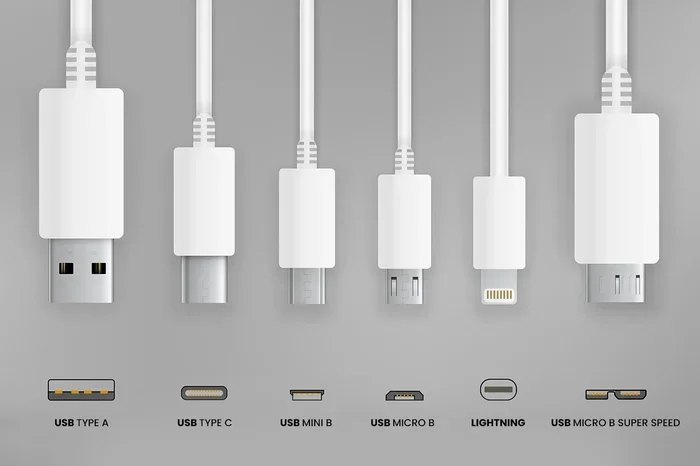
- USB-A and USB-C are the two main types: Each delivers different speeds and power levels.
- Safety features are built in: Most USB outlets include surge protection and overcurrent safeguards.
- Installation is similar to a regular outlet: A licensed electrician can swap them in with minimal effort.
- They save space and reduce clutter: No need for bulky wall adapters or power strips.
- Not all USB outlets are equal: Wattage and amperage vary, so check specs before buying.
[FEATURED_IMAGE_PLACEHOLDER]
📑 Table of Contents
- Are Outlets With USB Ports Wired Differently Inside?
- How USB Outlets Work Inside
- Standard Outlet Wiring vs. USB Outlet Wiring
- Types of USB Ports You Will Find in These Outlets
- Safety Features Inside USB Outlets
- How to Install a USB Wall Outlet
- Common Mistakes People Make With USB Outlets
- Expert Insights on USB Outlet Wiring
- Are USB Outlets Worth It?
- Conclusion
Are Outlets With USB Ports Wired Differently Inside?
You have probably seen those wall outlets with USB ports built right into them. They look sleek. They save space. And they seem almost too convenient. But a question keeps popping up: are outlets with USB ports wired differently inside? The short answer is no. The long answer is much more interesting.
Inside an outlet with a USB port, you will find familiar wiring. The AC power lines that carry electricity from your breaker box work the same way they always have. What makes these outlets special is a small circuit board tucked inside. This board takes the high-voltage alternating current and converts it into the low-voltage direct current that your phone, tablet, or smartwatch needs. So the main wiring is the same, but there is extra hardware doing the heavy lifting.
Understanding how USB wall outlets work can help you make better decisions. It can also keep you safe. Whether you are upgrading your kitchen, home office, or bedroom, knowing what goes on behind the wall plate matters. Let us break it all down.
How USB Outlets Work Inside
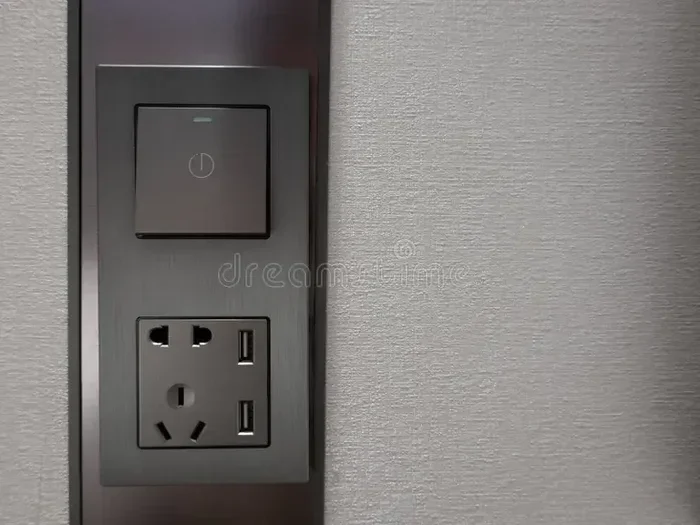
At first glance, a USB power outlet looks just like a regular duplex outlet. It has two or three plug slots and maybe a ground pin. But flip it over or peek inside, and you will notice something extra. There is a small printed circuit board, or PCB, sitting right there in the middle.
The Role of the Internal Converter
This little board is the heart of the outlet. It contains what is called a switching power supply. Its job is to take the 120V or 240V AC power coming from your home’s wiring and step it down to 5V DC. Some newer models can even output 9V or 20V for fast-charging USB-C devices.
Here is how it works in simple terms:
- AC power enters through the hot and neutral wires from your wall.
- The converter steps down the voltage to a safe, low level.
- The USB port delivers the correct current to your device.
- A feedback circuit monitors the draw and adjusts output as needed.
Think of it like a water pressure reducer on a garden hose. Your home’s wiring delivers water at high pressure. The converter is the little valve that brings it down to a safe, usable level for your delicate devices.
Does the USB Module Affect the Outlet’s Main Function?
No. The USB charging module operates independently from the standard plug sockets. You can plug in a lamp on one receptacle while charging your phone on the USB port. Both draw power from the same circuit, but they do not interfere with each other. This is one of the biggest advantages of USB outlets.
Standard Outlet Wiring vs. USB Outlet Wiring
Now let us get into the real comparison. When an electrician installs a USB wall outlet, the wiring process is nearly identical to installing a regular outlet. The hot wire, neutral wire, and ground wire all connect the same way.
What Stays the Same
Both outlet types use the same basic electrical circuit. They connect to the same household wiring. They follow the same National Electrical Code guidelines. The wire gauges, circuit breakers, and grounding methods are identical. If you have ever had a standard outlet replaced, the process for a USB outlet is almost the same.
What Is Different
The differences are small but important. Here is what changes inside a USB outlet:
- A small circuit board is added between the AC input and the USB output.
- Additional wiring connects the circuit board to the USB port terminals.
- The USB port itself is mounted into the outlet faceplate rather than being a separate device.
- Some models include extra components for surge protection or voltage regulation.
That is really it. The core electrical work does not change. You are simply adding a smart converter into the mix. The internal wiring of outlets with USB ports follows the same path as any other outlet, with a small detour through the converter board.
Quick Comparison Table
| Feature | Standard Outlet | USB Outlet |
|---|---|---|
| Wiring method | Hot, neutral, ground | Hot, neutral, ground + USB module |
| Voltage output | 120V AC | 120V AC + 5V DC (USB) |
| Installation complexity | Standard | Standard (slightly more components) |
| Space needed | Single gang | Single or double gang |
| Cost | $3-$10 | $15-$40 |
| Requires special wiring | No | No |
As you can see, the wiring difference is minimal. The real variation comes down to the internal electronics and the quality of the USB charging module.
Types of USB Ports You Will Find in These Outlets
Not all USB outlets are created equal. The type of port matters a lot for how fast and how safely your devices charge. Let us look at the most common options.
USB-A Ports
The classic rectangular USB-A port is still very common in wall outlets. It delivers up to 2.4 amps at 5V, which is fine for most phones and small tablets. USB-A ports are reliable and widely compatible with older devices. However, they are slower than newer options.
USB-C Ports
USB-C is the future of charging. These oval-shaped ports support faster charging speeds and higher power delivery. Many modern USB outlets now include one or two USB-C ports. Some can deliver up to 60W or even 100W with USB Power Delivery technology. This is enough to charge laptops and even some monitors.
USB-C vs. USB-A: Which Is Better?
USB-C wins in almost every category. It charges faster. It is reversible, so you never flip it wrong. It supports higher wattages. But USB-A still has a place, especially if you have older devices that only work with that connector. The best USB outlets offer both types so you can charge everything in one spot.
Safety Features Inside USB Outlets
Safety is not something you want to cut corners on. The good news is that most quality USB charging outlets come with built-in protections. These features work behind the scenes to keep your devices and your home safe.
Overcurrent Protection
If your device draws too much current, the outlet’s internal circuitry shuts down the USB port. This prevents overheating and potential fire hazards. Overcurrent protection is standard in most modern USB outlets.
Surge Protection
Some USB outlets include surge suppression. This guards against power spikes from lightning strikes or grid fluctuations. While not a substitute for a whole-house surge protector, it adds an extra layer of defense for your plugged-in devices.
Temperature Monitoring
Higher-end models include thermal sensors. If the outlet gets too hot, it automatically reduces power or shuts off entirely. This is especially important for USB outlets in enclosed spaces like cabinets or behind furniture.
Short Circuit Protection
If a wire inside the outlet shorts out, the circuit breaker trips or the internal fuse blows. This is the same basic protection found in standard outlets, just applied to the USB module as well.
When shopping for a USB power outlet, look for certifications like UL listing or ETL certification. These tell you the product has been independently tested for safety. Never buy an uncertified outlet, no matter how good the price looks.
How to Install a USB Wall Outlet
One of the best things about USB outlets is that they install just like a regular outlet. You do not need special wiring or a completely different setup. Here is what the process looks like.
What You Will Need
- A USB outlet rated for your circuit’s amperage
- A screwdriver (Phillips and flathead)
- A voltage tester
- A wire stripper
- A licensed electrician (recommended)
Step-by-Step Installation
- Turn off the power at the breaker box. Always verify with a voltage tester before touching any wires.
- Remove the old outlet by unscrewing the faceplate and pulling the unit out of the electrical box.
- Disconnect the wires from the old outlet. Note which wire goes where (hot, neutral, ground).
- Connect the new USB outlet using the same wire configuration. The USB model will have the same terminals for the AC wires plus additional terminals for the USB module.
- Secure the outlet in the electrical box and attach the faceplate.
- Turn the power back on and test both the plug sockets and the USB ports.
Pro tip: If you are not comfortable working with electrical wiring, hire a professional. It is not worth the risk. A licensed electrician can have this done in under 30 minutes for most standard installations.
Can You Replace a Standard Outlet With a USB Outlet?
Yes. In most cases, you can swap a regular outlet for a USB outlet without any additional wiring. The electrical box and circuit are already set up for you. Just make sure the circuit can handle the combined load of both the plug sockets and the USB ports. Most household circuits are rated for 15 or 20 amps, which is more than enough for typical USB charging.
Common Mistakes People Make With USB Outlets
Even though USB outlets are straightforward, people still make avoidable mistakes. Here are the ones to watch out for.
Buying the Cheapest Option
Ultra-cheap USB outlets often cut corners on safety. They may use low-quality components that overheat or fail prematurely. Invest in a reputable brand with proper certifications. Your safety is worth more than saving a few dollars.
Overloading the Circuit
Just because an outlet has USB ports does not mean you can plug in every device in your house. If you have a USB outlet in the kitchen, do not also run the microwave, toaster, and coffee maker on the same circuit. Spread your high-draw appliances across different circuits to avoid tripping breakers.
Ignoring Wattage Ratings
Every USB outlet has a maximum wattage or amperage rating. If you plug in a device that exceeds that limit, the outlet may shut down or, in worst cases, get damaged. Check the specs before you buy and make sure they match your charging needs.
Forgetting About Placement
Where you install a USB outlet matters. Avoid placing them in damp areas unless they are rated for wet locations. Do not hide them behind heavy furniture where heat cannot escape. Good placement ensures longevity and safety.
Expert Insights on USB Outlet Wiring
Electrical engineers and licensed electricians agree that USB outlets are a safe and practical upgrade for most homes. The internal wiring follows the same principles as any standard outlet. The added USB module is a self-contained unit that operates independently.
One thing professionals emphasize is the importance of proper grounding. Just like a regular outlet, a USB outlet must be grounded correctly. This protects against electrical shock and ensures stable power delivery. If your home has older wiring with ungrounded outlets, have an electrician upgrade the circuit before installing USB outlets.
Another expert tip: look for USB outlets with smart charging technology. These outlets detect what device is plugged in and automatically deliver the optimal charging speed. This not only charges your devices faster but also protects them from overcharging.
Some homeowners worry that the USB module will add heat to the outlet. In most cases, this is not a problem. Modern USB outlets are designed with heat dissipation in mind. They use thermal materials and ventilation channels to keep temperatures safe. If you ever notice an outlet getting unusually warm, unplug devices and have it inspected by a professional.
Are USB Outlets Worth It?
After learning about the wiring, safety features, and installation process, the big question remains: are USB outlets worth it? For most homeowners, the answer is yes.
They offer a clean, streamlined look. They eliminate the need for bulky wall chargers and power strips. They charge your devices safely and efficiently. And the installation is simple enough that many homeowners handle it themselves. USB outlets combine convenience with modern technology in a way that standard outlets simply cannot match.
The main downside is cost. A USB outlet costs more than a standard one. But when you factor in the savings from not buying separate chargers and adapters, the investment pays for itself over time. Plus, USB outlets can increase your home’s value by making it feel more modern and functional.
Think of it this way. A standard outlet gives you power. A USB outlet gives you power and convenience in one package. For busy households with multiple devices, that makes a real difference every single day.
Conclusion
Are outlets with USB ports wired differently inside? The answer is clear: the core wiring is the same, but there is an added USB charging module that does the conversion work. You get the reliability of standard outlet wiring with the added benefit of built-in USB charging. It is a simple upgrade that brings real value to any home.
Whether you are renovating a single room or upgrading your entire house, USB wall outlets are a smart choice. They are safe, easy to install, and incredibly convenient. Just make sure you buy a quality product with proper certifications, and have it installed correctly. Your devices and your family will thank you.
Take a look at your home right now. How many chargers are plugged into regular outlets? How many adapters are cluttering your power strips? Now imagine replacing just a few of those outlets with USB power outlets. The difference in convenience would be immediate and noticeable. It is one small change that makes a big impact.
Start with your bedroom or home office. Those are the rooms where you charge devices the most. Once you experience the ease of a built-in USB outlet, you will wonder why you did not make the switch sooner. The future of home charging is already here, and it fits right into your wall.
Frequently Asked Questions
Do USB outlets require special wiring in the home?
No. USB outlets use the same wiring as standard outlets. The hot, neutral, and ground wires connect the same way. The only difference is the addition of a small internal circuit board that converts AC power to DC for USB devices.
Can I install a USB outlet myself?
If you have basic electrical knowledge, you can replace a standard outlet with a USB outlet yourself. However, if you are unsure about any part of the process, it is always best to hire a licensed electrician. Working with electrical wiring carries inherent risks.
Do USB outlets charge devices slower than wall adapters?
Not necessarily. Many USB outlets now support fast charging standards like USB Power Delivery. Some even match or exceed the charging speed of quality wall adapters. The key is to check the amperage and wattage ratings before purchasing.
Are USB outlets safe to leave plugged in all the time?
Yes. Quality USB outlets are designed to be left plugged in continuously. They include safety features like overcurrent protection, thermal regulation, and short circuit prevention. Always choose a certified product from a reputable manufacturer.
What is the difference between USB-A and USB-C outlets?
USB-A is the traditional rectangular port found on older devices. It charges at slower speeds, typically up to 2.4 amps. USB-C is the newer oval-shaped port that supports faster charging, higher wattages, and reversible plug orientation. Many modern USB outlets include both port types.
Can a USB outlet power a laptop?
Yes, but only if the outlet supports high-wattage USB-C Power Delivery. Standard USB-A ports deliver about 12 watts, which is not enough for most laptops. USB-C outlets rated at 60W or 100W can comfortably charge laptops and even some monitors.
=== META TITLE ===
Are Outlets With USB Ports Wired Differently Inside?
=== URL SLUG ===
are-outlets-with-usb-ports-wired-differently-inside
=== SEO TITLE ===
Are Outlets With USB Ports Wired Differently Inside?
=== INTERNAL LINKS USED ===
Related reading: 5 components found on the motherboard to understand how internal circuit boards work. Also learn 10 ways computers are used in medicine to see how USB charging technology supports healthcare devices.