Can A Broken Laptop Screen Be Fixed Without Buying A New One
A broken laptop screen can often be fixed without replacing the entire device. Whether you have a cracked LCD panel, dead pixels, or a flickering display, several repair options exist that save you hundreds of dollars. This guide covers every method from DIY fixes to professional repairs so you can decide the best path forward.
Your laptop screen just cracked. Maybe you dropped it. Maybe a pet knocked it off the desk. Either way, panic sets in fast. The first thought that hits most people is the same: Can a broken laptop screen be fixed without spending a fortune on a brand-new machine?
The short answer is yes. In most cases, a broken laptop screen can be repaired or replaced without buying a whole new laptop. You might be surprised by how affordable and straightforward the process can be. This guide walks you through every option, from quick DIY fixes to professional repairs.
We will cover the types of damage you might face, how much repairs cost, whether you can do it yourself, and when it makes sense to just replace the whole thing. By the end, you will know exactly what to do next.
Key Takeaways
- Screen replacement is the most common fix: A new display panel solves most cracked or broken laptop screen problems.
- DIY repair is possible on a budget: You can replace the screen yourself with basic tools and a compatible replacement panel.
- Professional repair costs vary: Expect to pay between $100 and $300 depending on your laptop model and damage type.
- Not all damage needs a new screen: Software glitches, loose cables, and backlight issues often have simple fixes.
- Warranty may cover the cost: Check your laptop warranty before spending money on repairs.
- Prevention works: Using a screen protector and proper care reduces the risk of future damage significantly.
📑 Table of Contents
- Understanding Broken Laptop Screens
- Common Types of Laptop Screen Damage
- How Much Does It Cost to Fix a Broken Laptop Screen?
- Can You Fix It Yourself? DIY Laptop Repair Tips
- When to Replace vs. When to Repair
- How to Prevent Future Screen Damage
- When to Seek Professional Help
- Check Your Warranty First
- Conclusion
Understanding Broken Laptop Screens
Before you jump into fixes, it helps to understand what actually happened. A broken laptop screen can mean many different things. The damage type determines the best repair method and cost. Let us break down the basics so you know exactly what you are dealing with.
Laptop screens use either LCD or LED technology to display images. Both rely on thin panels that can crack, discolor, or stop working entirely. The good news is that these panels are replaceable parts. You do not need to toss your entire laptop just because the display is damaged.
What Causes Laptop Screen Damage?
Several common events lead to a cracked laptop screen:
- Dropping the laptop: This is the number one cause. Even a short fall onto a hard surface can crack the display.
- Closing the lid with pressure: A pen, pencil, or debris on the keyboard can press against the screen and create cracks.
- Heavy objects on the laptop: Placing something weighty on a closed laptop can bend and break the panel.
- Manufacturing defects: Rarely, screens fail due to factory issues rather than user damage.
- Hinge damage: A broken hinge can put stress on the display cable and screen over time.
How to Tell If Your Screen Is Broken
Not every display problem means the screen is physically damaged. Here are signs that point to a broken laptop screen:
- Visible cracks or spiderweb patterns on the display.
- Black spots or lines across the screen.
- The screen goes completely black but the laptop is still running.
- Flickering or dimming that does not stop.
- Colors appearing washed out or distorted.
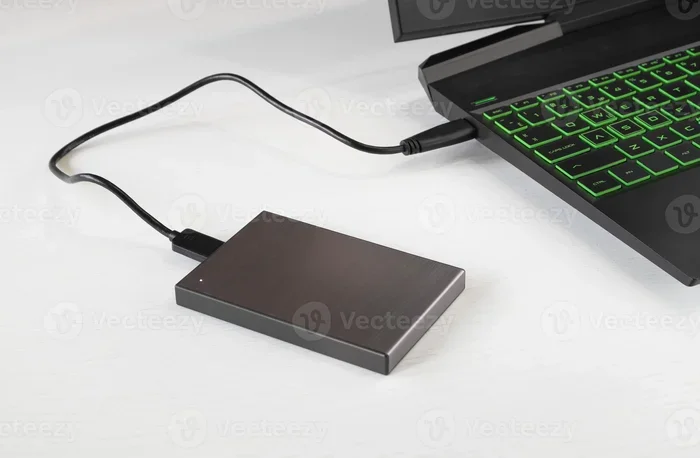
If you notice any of these, connect your laptop to an external monitor. If the external display works fine, the problem is almost certainly the laptop screen itself, not the internal hardware.
Common Types of Laptop Screen Damage
Not all screen damage looks the same. Understanding the specific type of damage helps you choose the right repair approach. Here are the most common issues people face with a broken laptop screen.
Cracked or Shattered Screen
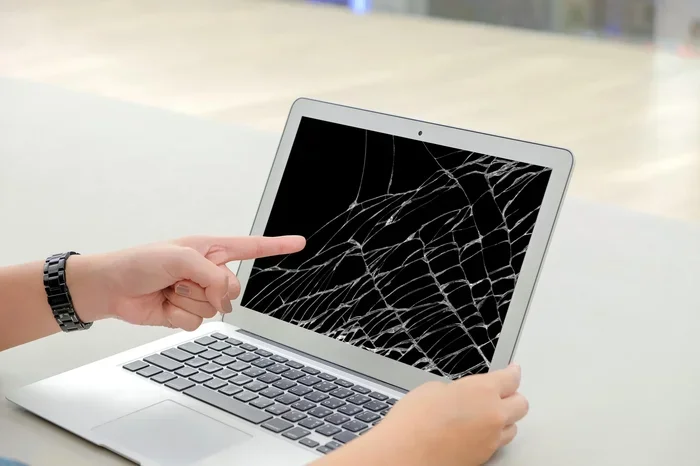
This is the most obvious type of damage. The display panel has visible cracks or is completely shattered. A cracked screen usually happens from impact — drops, pressure, or hits. The laptop may still work fine internally, but you cannot see anything properly on the display.
Fixing a cracked screen almost always means replacing the laptop screen. There is no reliable way to repair a shattered panel. The good news is that replacement panels are widely available and relatively affordable.
Dead Pixels
Dead pixels are small dots on the screen that stay black no matter what you display. They happen when individual pixels on the LED display stop receiving power. A few dead pixels might not bother you much, but clusters can make the screen hard to use.
Software tools can sometimes fix stuck pixels, but dead pixels usually require a full screen replacement. The good news is that a few scattered dead pixels might not warrant an immediate repair.
Flickering or Dim Screen
If your screen flickers or stays very dim, the problem might not be the panel itself. It could be a failing backlight, a loose display cable, or even a graphics card issue. These problems are often much cheaper to fix than a full screen replacement.
Try adjusting the brightness first. If that does not help, connect an external monitor. If the external display works without flickering, the issue is likely with the laptop’s backlight or internal cable rather than the LCD panel.
Lines or Patches on the Screen
Horizontal or vertical lines across the screen can signal a damaged display panel or a loose connection. Sometimes these lines appear after a drop. Other times they develop slowly over weeks.
Lines that stay constant usually mean the panel itself is damaged. Lines that come and go might point to a cable or connector problem. Both issues are fixable without buying a new laptop.
How Much Does It Cost to Fix a Broken Laptop Screen?
Cost is the big question everyone asks. Nobody wants to spend more on repairs than the laptop is worth. Let us look at the real numbers for laptop repair costs so you can make an informed decision.
Factors That Affect Repair Cost
Several things determine how much you will pay to fix a broken laptop screen:
- Laptop brand and model: Premium brands like Apple and Dell often have pricier replacement panels.
- Screen size: Larger screens cost more to replace than smaller ones.
- Panel type: Touchscreens and high-resolution displays cost more than standard panels.
- Damage severity: A simple crack costs less than a shattered panel with additional internal damage.
- Repair method: Professional repair costs more than a DIY fix, but it comes with a warranty.
Average Repair Costs by Laptop Type
Here is a general idea of what you might expect to pay:
- Budget laptops: $80 to $150 for a replacement screen.
- Mid-range laptops: $100 to $200 for screen replacement.
- Premium laptops: $150 to $350 depending on the model and panel type.
- MacBooks: $200 to $400 through Apple or authorized repair centers.
Compare these costs to buying a new laptop. Most people can fix a cracked laptop screen for a fraction of the price of a replacement device.
DIY vs. Professional Repair: Cost Comparison
Doing it yourself saves on labor costs. A replacement panel for a standard 15.6-inch laptop typically costs $50 to $120 online. Professional repair adds labor charges, which can bring the total to $150 to $300.
However, DIY repair carries risk. If you damage the panel further during installation, you could end up spending more in the long run. Weigh your comfort level with tech work before deciding.
Can You Fix It Yourself? DIY Laptop Repair Tips
If you are handy and willing to learn, replacing a laptop screen yourself is very doable. Thousands of people do it every week. Let us walk through what you need to know for a successful DIY laptop repair.
What You Will Need
Before you start, gather these tools and materials:
- A compatible replacement screen (match your laptop model exactly).
- A small Phillips-head screwdriver set.
- A plastic prying tool or spudger.
- A soft, clean workspace with good lighting.
- A microfiber cloth to handle the new panel safely.
You can find replacement screens on Amazon, eBay, or specialty repair sites. Just search for your exact laptop model number followed by “display panel.”
Step-by-Step Screen Replacement
Here is a simplified overview of the process:
- Power off the laptop and unplug all cables.
- Remove the bezel around the screen using the plastic prying tool. Be gentle to avoid breaking the frame.
- Unscrew the old panel from the metal brackets inside the laptop.
- Disconnect the display cable carefully. It is usually a thin, flat ribbon cable.
- Remove the old screen and set it aside safely.
- Connect the new panel’s cable and secure it with the screws.
- Replace the bezel and test the new screen before fully reassembling.
YouTube has excellent video tutorials for almost every laptop model. Watch the video for your specific device before you start. This simple step saves a lot of headaches.
Quick Tips for a Smooth Repair
- Take photos at every step so you remember how things go back together.
- Keep all screws in a small container or magnetic mat.
- Handle the new panel by the edges only — fingerprints and oil damage the display.
- Do not force any part. If something does not fit, stop and check your approach.
- Test the new screen with the bezel off before you put everything back together.
When to Replace vs. When to Repair
Sometimes a broken laptop screen is just one part of a bigger problem. Knowing when to repair and when to replace the whole laptop saves you time and money.
Repair the Screen When…
- The rest of the laptop works perfectly — keyboard, battery, storage, everything is fine.
- The repair cost is less than half the price of a new laptop.
- The laptop is less than three years old and still meets your needs.
- You have important data or software on the device that would be hard to transfer.
- The damage is limited to the screen only — no other parts are affected.
Replace the Laptop When…
- The laptop is over five years old and struggling with performance.
- Multiple components are failing — screen, battery, keyboard, and more.
- The repair cost exceeds the value of the laptop.
- You need newer features like a better processor or more RAM.
- The laptop is no longer supported by the manufacturer for updates.
As a general rule, if your laptop costs more than $500 originally and the screen repair is under $200, fixing it makes sense. If the laptop is old and slow, a new device might be the better investment.
How to Prevent Future Screen Damage
Once you fix your broken laptop screen, you want to make sure it never happens again. Prevention is simple and costs very little.
Use a Screen Protector
A thin laptop screen protector adds a layer of defense against cracks and scratches. They are cheap — usually under $15 — and easy to apply. They will not prevent a major impact, but they reduce the risk of surface damage significantly.
Handle Your Laptop Carefully
Simple habits go a long way:
- Never close the lid with pens or pencils on the keyboard.
- Do not place heavy objects on a closed laptop.
- Carry your laptop in a padded bag or sleeve.
- Keep the laptop on a stable surface — not the edge of a table.
- Avoid using the laptop on your lap while walking around.
Keep Your Software Updated
Sometimes a flickering or dim screen is not physical damage at all. It can be a software or driver issue. Keeping your operating system and graphics drivers updated helps prevent display problems that look like hardware damage.
If your screen starts acting weird, run a quick diagnostic before assuming the worst. Update your drivers, check your display settings, and connect an external monitor. You might save yourself an unnecessary repair.
When to Seek Professional Help
DIY repair works great for many people. But sometimes you need a professional. Here are clear signs that you should take your laptop to a repair shop:
- The screen is completely shattered and you are not comfortable doing the repair yourself.
- Your laptop is still under warranty — opening it yourself may void the coverage.
- You have tried basic troubleshooting and the screen still does not work.
- The damage involves the hinge or display cable, which requires more advanced repair skills.
- You notice liquid damage or burn marks on the screen.
Authorized repair centers and local tech shops can diagnose the problem quickly. Many offer free estimates. Always ask for a cost breakdown before approving any repair work.
Check Your Warranty First
Before you spend a single dollar, check your laptop warranty. Many manufacturers cover accidental damage for the first year or two. Some extended warranties also include screen repair coverage.
AppleCare, Dell Premium Support, and similar programs often cover screen replacement at little or no cost. Even if your warranty has expired, check the terms — some programs offer discounted repairs for out-of-warranty devices.
Contact the manufacturer’s support team with your model number and a description of the damage. They can tell you quickly whether the repair is covered. This one phone call could save you hundreds of dollars.
Conclusion
Can a broken laptop screen be fixed? Absolutely. The vast majority of cracked, flickering, or damaged laptop screens can be repaired without buying a new device. Whether you choose a DIY screen replacement or visit a professional repair shop, the cost is almost always much lower than a new laptop.
Start by assessing the damage. Identify the type of problem — a crack, dead pixels, flickering, or lines. Then decide whether to repair or replace based on the age and value of your laptop. Check your warranty before spending any money. And if you are comfortable with basic tech work, a DIY repair is a great way to save money and learn a useful skill.
A broken laptop screen does not mean the end of your device. With the right approach, you can get your laptop working perfectly again for a fraction of the cost of a replacement. Take action today and give your laptop a second life.
Frequently Asked Questions
How long does it take to fix a broken laptop screen?
A professional repair usually takes one to two hours. A DIY replacement can take anywhere from 30 minutes to an hour if you have done it before. First-timers should set aside a couple of hours and follow a video tutorial carefully.
Is it cheaper to repair or replace a laptop?
Repairing a broken screen is almost always cheaper than buying a new laptop. Screen replacements typically cost $80 to $300, while a new laptop can cost $500 or more. Repairing makes sense unless the laptop is very old and has other problems.
Can I use my laptop with a cracked screen?
Yes, you can use a laptop with a cracked screen if the display still works. Connect an external monitor for a better experience. However, cracked screens can worsen over time, so it is best to repair or replace the panel soon.
Do I need special tools to replace a laptop screen?
No special tools are needed. A basic Phillips-head screwdriver and a plastic prying tool are enough for most laptops. You will also need a compatible replacement screen, which you can order online for a reasonable price.
Will a broken laptop screen affect the rest of the computer?
Usually, no. A broken screen is a display-only problem. The laptop’s processor, storage, and memory are all unaffected. You can still use the laptop by connecting it to an external monitor while you arrange the repair.
How do I find the right replacement screen for my laptop?
Search online for your exact laptop model number followed by “replacement screen” or “display panel.” Make sure the resolution, size, and connector type match your original panel. Most sellers list compatible models clearly in the product description.