Are There Different HDMI Standards You Should Know
Yes, there are different HDMI standards, and knowing them matters for your setup. HDMI has evolved through several versions, each offering better bandwidth, resolution, and features. This guide breaks down every major HDMI standard so you can pick the right cable and port for your needs.
If you have ever stood in front of a shelf of cables at a store, you know how confusing HDMI options can be. Different labels, different numbers, and different prices all promise the best picture. But not all HDMI standards are created equal, and buying the wrong one means missing out on features you paid for.
The good news is that understanding HDMI is simpler than it looks. Each version builds on the last, adding support for higher resolutions, faster refresh rates, and better audio. In this article, we will walk through every major HDMI standard you should know about in plain, simple language. No jargon, no confusion, just clear facts that help you make the best decision for your setup.
Key Takeaways
- Multiple HDMI versions exist: HDMI 1.4, HDMI 2.0, and HDMI 2.1 are the main standards you will encounter today.
- HDMI 2.1 is the latest and greatest: It supports 4K at 120Hz, 8K resolution, and much higher bandwidth than older versions.
- Cable types matter just as much: Standard, High Speed, Premium High Speed, and Ultra High Speed cables each serve different needs.
- Check your devices first: Buying the wrong HDMI cable can limit your display quality and audio performance.
- HDMI ports on your motherboard determine compatibility: The right port ensures you get the full benefits of newer standards.
- HDMI is used in many fields: From gaming to medical imaging and healthcare technology, HDMI standards affect how clearly you see every detail.
📑 Table of Contents
What Are HDMI Standards?
HDMI stands for High-Definition Multimedia Interface. It is the most common way to connect devices like TVs, monitors, laptops, and game consoles. A single cable carries both video and audio signals, which makes it incredibly convenient. Over the years, the HDMI specifications have been updated to support better picture quality and faster data transfer.
Think of each HDMI version as a new chapter in the story of digital connections. The early versions handled standard definition just fine. But as screens got bigger and sharper, the standards had to keep up. Today, we have versions that can handle stunning 8K resolution and blazing fast refresh rates.
Why HDMI Standards Matter
Knowing which HDMI standard your devices support helps you get the best experience. If you buy a 4K TV but only use an older HDMI cable, you might not see the full picture quality. The same goes for gaming. A modern console can output amazing visuals, but the wrong HDMI cable type can hold it back.
Here is why this matters for everyday users:
- Better picture quality: Newer standards support higher resolutions like 4K and 8K.
- Smoother motion: Updated HDMI bandwidth allows for higher refresh rates, which is great for gaming.
- Improved audio: Newer versions support advanced audio formats like Dolby Atmos and eARC.
- Future-proofing: Using the right HDMI cable type means your setup stays relevant longer.
The Different HDMI Versions Explained
The HDMI standard has gone through several major updates since it was first introduced. Each version brought improvements in speed, resolution, and features. Let us break them down one by one so you can see exactly what changed and why it matters.
HDMI 1.0 Through 1.4
The original HDMI 1.0 launched in 2003. It supported resolutions up to 1080p and was a big step forward from older analog connections. Over the next few years, small updates like HDMI 1.1, 1.2, and 1.3 refined the standard. Then came HDMI 1.4, which added some important features.
HDMI 1.4 introduced support for 3D content and 4K resolution at 30Hz. It also brought the Ethernet channel, which allowed devices to share an internet connection through the HDMI cable. While these features feel dated now, HDMI 1.4 was a big deal at the time. Many older devices still use this standard today.
HDMI 2.0 and HDMI 2.0a
HDMI 2.0 arrived in 2013 and was a major leap forward. It bumped up the HDMI bandwidth to 18 Gbps, which opened the door to 4K resolution at 60Hz. This was a game changer for both home theater fans and gamers. HDMI 2.0a and 2.0b were minor updates that mainly added support for High Dynamic Range (HDR) content.
If you own a 4K TV or monitor, there is a good chance it supports HDMI 2.0. This standard is still very common and handles most everyday tasks with ease. Streaming 4K content from Netflix or playing games at 4K 60Hz works perfectly with HDMI 2.0.
HDMI 2.1: The Latest Standard
HDMI 2.1 is the newest and most powerful version available today. It was released in 2017 and brought massive improvements. The HDMI bandwidth jumped to 48 Gbps, which is more than double what HDMI 2.0 offered. This huge increase in speed unlocks some incredible capabilities.
Here is what HDMI 2.1 brings to the table:
- 4K at 120Hz: Ultra smooth motion for fast-paced gaming and sports.
- 8K at 60Hz: Support for the next generation of ultra-high-resolution displays.
- Dynamic HDR: Improved HDR support that adjusts frame by frame for better contrast.
- Variable Refresh Rate (VRR): Reduces screen tearing and stuttering during gaming.
- Quick Frame Transport (QFT): Reduces input lag for a more responsive experience.
- eARC support: Enhanced Audio Return Channel for the best surround sound quality.
If you are a serious gamer or a home theater enthusiast, HDMI 2.1 is the standard you want. It is the foundation of next-generation consoles like the PlayStation 5 and Xbox Series X.
HDMI Cable Types and Connectors
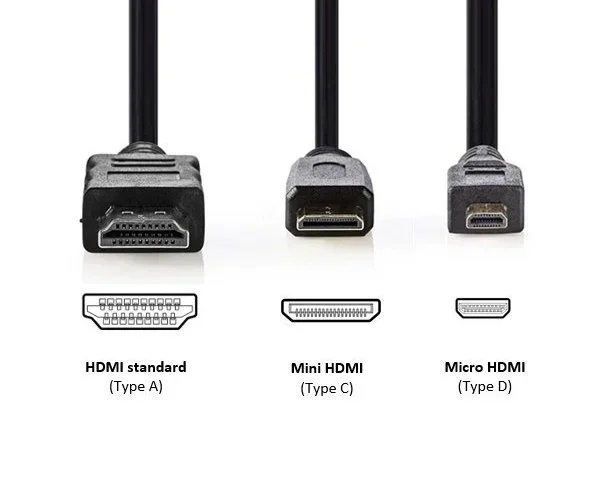
Along with the versions, HDMI cables also come in different categories. These cable types are designed to match the capabilities of each HDMI standard. Using the wrong cable can prevent you from getting the full performance of your devices.
Standard HDMI Cable
The Standard HDMI Cable is the most basic type. It supports resolutions up to 1080p and is suitable for older devices. If you have an older TV or a basic monitor, this cable will get the job done. However, it will not support 4K or the advanced features found in newer HDMI versions.
High Speed HDMI Cable
High Speed HDMI cables support resolutions up to 4K at 30Hz. They are a solid choice for most home theater setups. If you watch 4K content from a streaming device or Blu-ray player, a High Speed cable will deliver great quality. These cables are widely available and affordable.
Premium High Speed HDMI Cable
The Premium High Speed HDMI Cable is certified for HDMI 2.0 features. It supports 4K at 60Hz and includes bandwidth for HDR content. If you have a 4K TV and want to enjoy HDR movies and games, this is the cable you need. Look for the Premium HDMI Certification logo on the packaging to make sure you are getting a genuine product.
Ultra High Speed HDMI Cable
Ultra High Speed HDMI cables are designed for HDMI 2.1 and beyond. They support the full 48 Gbps of bandwidth, which means they can handle 4K at 120Hz, 8K at 60Hz, and all the advanced features like VRR and Dynamic HDR. If you have a gaming console or a high-end TV, this is the cable to buy. These cables are backward compatible too, so they work with older devices as well.
HDMI 2.0 vs HDMI 2.1: Key Differences
Understanding the difference between HDMI 2.0 and HDMI 2.1 is one of the most important things when choosing your setup. Both standards are widely used, but they serve different needs and offer very different performance levels.
Bandwidth Comparison
The biggest difference is bandwidth. HDMI 2.0 maxes out at 18 Gbps, while HDMI 2.1 jumps to 48 Gbps. That extra bandwidth is what allows HDMI 2.1 to support higher resolutions and refresh rates. If you want the smoothest gaming experience or the sharpest picture quality, HDMI 2.1 is the clear winner.
Feature Comparison
Beyond bandwidth, there are several other key differences between these two standards:
| Feature | HDMI 2.0 | HDMI 2.1 |
|---|---|---|
| Max Bandwidth | 18 Gbps | 48 Gbps |
| Max Resolution | 4K at 60Hz | 8K at 60Hz / 4K at 120Hz |
| HDR Support | Static HDR | Dynamic HDR |
| VRR | No | Yes |
| eARC | ARC only | eARC with full audio support |
| Quick Frame Transport | No | Yes |
| Backward Compatible | Yes | Yes |
As you can see, HDMI 2.1 offers a lot more. But that does not mean HDMI 2.0 is obsolete. For most casual viewers and everyday streaming, HDMI 2.0 still works great. It is only when you push into high refresh rate gaming or 8K content that HDMI 2.1 becomes essential.
How to Choose the Right HDMI Standard
Choosing the right HDMI standard depends on what you plan to do. A casual movie watcher has different needs than a competitive gamer or a content creator. Here are some simple tips to help you decide.
First, check what your devices support. Look at the specs for your TV, monitor, laptop, or game console. If your TV only has HDMI 2.0 ports, there is no benefit to buying an Ultra High Speed cable. You will get the same performance with a Premium High Speed cable.
Second, think about your resolution and refresh rate needs. If you watch 4K content at 60Hz or lower, HDMI 2.0 is plenty. But if you play games at 4K 120Hz or want to future-proof your setup for 8K, HDMI 2.1 is the way to go.
Third, consider your budget. Ultra High Speed HDMI cables cost more than older cable types. If you do not need the advanced features of HDMI 2.1, there is no need to spend extra. A Premium High Speed cable will serve you well for most situations.
Finally, always buy certified cables. Look for the HDMI Licensing LLC certification on the packaging. This ensures the cable meets the official HDMI specifications and will deliver the performance it promises. Cheap uncertified cables can cause signal drops, audio issues, and poor image quality.
Common HDMI Mistakes and How to Avoid Them
Even with all this knowledge, people still make mistakes when choosing HDMI cables and standards. Here are the most common ones and how to avoid them.
Buying the most expensive cable you do not need: If your devices only support HDMI 2.0, an Ultra High Speed cable will not give you any extra benefit. Match your cable to your devices.
Ignoring cable length: Longer HDMI cables can lose signal quality. If you need a cable longer than 10 feet, consider an active HDMI cable or a fiber optic option. These maintain signal strength over longer distances.
Not checking port compatibility: The HDMI port on your motherboard or device must support the standard you want to use. A device with an HDMI 2.0 port cannot output HDMI 2.1 features no matter what cable you use.
Assuming all 4K cables are the same: There is a big difference between a cable that supports 4K at 30Hz and one that supports 4K at 60Hz or 120Hz. Always check the specifications before buying.
Forgetting about audio: HDMI carries both video and audio. If you want the best sound quality, make sure your cable supports eARC or ARC. This is especially important for soundbars and home theater systems.
Using old cables with new devices: If you just bought a new PS5 or Xbox Series X, make sure your HDMI cable can handle the output. Older cables may work but will limit your experience.
Conclusion
The world of HDMI standards can seem complicated, but it does not have to be. Each version of HDMI brings something new to the table, from better resolution to faster refresh rates and improved audio. The key is to match your cable and port to your devices and your needs.
If you are a casual viewer, HDMI 2.0 with a Premium High Speed cable will serve you well. If you are a gamer or a home theater enthusiast, HDMI 2.1 with an Ultra High Speed cable is the way to go. And no matter what you choose, always buy certified cables from reputable brands.
Understanding HDMI standards empowers you to make smart buying decisions. You will get better picture quality, smoother motion, and richer sound every time. So the next time you set up a new device or upgrade your display, you will know exactly which HDMI standard and cable to choose. Your setup will thank you for it.
Frequently Asked Questions
What is the latest HDMI standard available today?
HDMI 2.1 is the latest standard as of now. It supports 4K at 120Hz, 8K at 60Hz, and offers a massive 48 Gbps of bandwidth. It also includes features like Dynamic HDR, VRR, and eARC for the best gaming and viewing experience.
Do I need an Ultra High Speed HDMI cable for 4K?
Not necessarily. If you watch 4K content at 60Hz or lower, a Premium High Speed HDMI cable is enough. You only need an Ultra High Speed cable if you want 4K at 120Hz, 8K resolution, or other HDMI 2.1 features like VRR.
Are all HDMI cables the same?
No, HDMI cables are not all the same. They come in different categories designed for different HDMI versions. Using the wrong cable can limit your display quality and prevent you from accessing features like HDR or high refresh rates.
Can I use an HDMI 2.1 cable with an HDMI 2.0 device?
Yes, HDMI 2.1 cables are backward compatible. They will work with older devices, but the performance will be limited to what the device supports. You will not get HDMI 2.1 features unless both the cable and the device support them.
What is the difference between HDMI ARC and eARC?
HDMI ARC (Audio Return Channel) lets your TV send audio back to a soundbar or receiver. HDMI eARC (Enhanced Audio Return Channel) is an updated version that supports richer audio formats like Dolby Atmos and uncompressed surround sound. eARC is only available with HDMI 2.1.
How long can an HDMI cable be before signal quality drops?
Standard HDMI cables work well up to about 10 to 15 feet. Beyond that, signal quality can degrade. For longer runs, consider active HDMI cables or fiber optic options, which maintain strong signal quality over much greater distances.
=== CONCLUSION ===
Now you know that HDMI standards are not all the same, and you understand the key differences between them. From HDMI 1.4 to HDMI 2.1, each version brings improvements that matter for picture quality, speed, and audio. Choosing the right HDMI standard and cable for your setup is simpler than you think.
Take a moment to check your devices, assess your needs, and pick the right cable. A small upgrade can make a huge difference in your viewing and gaming experience. Whether you are streaming movies, playing the latest games, or setting up a home theater, the right HDMI connection makes everything better.