Are Usb C Hubs Safe Or Do They Damage Your Devices
USB C hubs are generally safe and won’t damage your devices when you buy from reputable brands. A USB C hub expands your laptop’s ports safely, but cheap, uncertified hubs can cause overheating or power issues. Always check for USB C hub safety certifications and match power delivery specs to keep your devices protected.
You just bought a sleek new USB C hub, and now you are wondering, “Is this thing safe?” It is a fair question. We all want to protect our expensive laptops, tablets, and phones. The last thing anyone needs is a fancy accessory that quietly fries their gear. So let us talk about USB C hub safety and clear up the confusion once and for all.
The short answer is yes. USB C hubs are safe for your devices. But not all hubs are created equal. A cheap, no-name hub from an unknown seller is a completely different story than a well-built hub from a trusted brand. In this article, we will break down everything you need to know about USB C hub safety. We will cover how they work, what risks exist, and how to pick a safe USB C docking station or USB C adapter every time.
Whether you use a USB C hub for MacBook or a Windows laptop, this guide has you covered. We will look at real risks, share practical tips, and give you the confidence to buy with peace of mind. Let us dive in.
Key Takeaways
- USB C hubs are safe: When purchased from trusted brands, they will not harm your laptop or other devices.
- Cheap hubs pose risks: Low-quality hubs can cause overheating, power surges, or data loss.
- Check certifications: Look for USB-IF certification and Thunderbolt compliance for USB C hub safety.
- Power delivery matters: Match the hub’s wattage to your device’s charging needs to avoid damage.
- Overheating is a real concern: Poorly designed hubs can get dangerously hot during extended use.
- Brand reputation counts: Stick with well-known USB C hub brands for reliability and safety.
📑 Table of Contents
- What Is a USB C Hub and How Does It Work?
- Are USB C Hubs Safe? Understanding the Real Risks
- How to Choose a Safe USB C Hub
- Common Mistakes That Can Damage Your Devices
- USB C Hubs and Internal Hardware: What You Should Know
- USB C Hub Safety Comparison: Cheap vs Premium
- Quick Tips for Using Your USB C Hub Safely
- Expert Insights: What Tech Professionals Say About USB C Hub Safety
- Final Thoughts: Are USB C Hubs Worth It?
What Is a USB C Hub and How Does It Work?
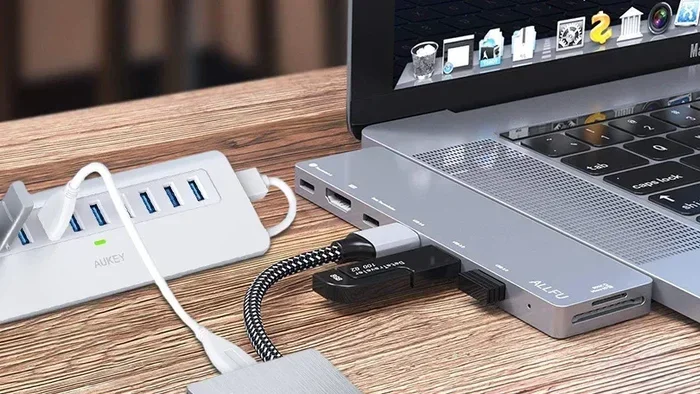
A USB C hub is a small device that adds extra ports to your laptop or tablet. It plugs into the single USB C port on your device and gives you more options. Think of it like a power strip for your computer. Instead of carrying five different adapters, you use one compact hub.
Most USB C hubs add ports like HDMI for monitors, USB A for older flash drives, SD card slots for cameras, and Ethernet for wired internet. Some hubs also pass through power delivery, which means your laptop charges while you use all those extra ports.
How Does a USB C Hub Connect to Your Device?
The connection is straightforward. You plug the hub into your device’s USB C port. The hub then communicates with your device through the same cable. Good hubs use high-quality data transfer chips to make sure everything works smoothly. They handle video signals, data, and power all at the same time without conflicts.
Inside the hub, you will find tiny circuit boards, controllers, and sometimes Thunderbolt 3 or Thunderbolt 4 chips. These components manage the flow of data and power. A well-designed hub distributes everything safely. A poorly made hub might not manage that flow correctly, which leads to problems.
Are USB C Hubs Safe? Understanding the Real Risks
This is the big question. Are USB C hubs safe? The honest answer is that most are perfectly safe. But some can cause issues if they are poorly made or used incorrectly. Let us look at the real risks so you know what to watch for.
Overheating Concerns
One of the biggest worries people have is USB C hub overheating. Hubs do generate some heat, especially when you are transferring large files or charging your device at the same time. A quality hub has proper heat dissipation built in. It uses metal housings or thermal pads to stay cool.
Cheap hubs often skip these cooling features. They use plastic shells and tiny internal components that cannot handle heavy workloads. After 30 minutes of use, these hubs can get uncomfortably hot. In rare cases, extreme heat can damage the hub itself or even the port on your laptop. This is why USB C hub quality matters so much.
Power Delivery and Charging Risks
Many people use their USB C hub to charge their laptop while using other ports. This is called pass-through charging. A good hub handles this beautifully. It sends the right amount of power to your laptop while still powering the other connected devices.
But a bad hub can mess up the power flow. It might send too much power, too little power, or inconsistent power. This can lead to slow charging, battery drain, or in worst cases, damage to your device’s battery or charging circuit. Always check that your hub supports the power delivery wattage your device needs.
Data Security Risks
When you plug a USB C hub into your computer, you are creating a new pathway for data. A safe hub keeps your data protected. A compromised hub could potentially allow unauthorized access to your files. This is rare, but it happens with very cheap hubs that lack proper security chips.
If you work with sensitive data, this is worth paying attention to. Stick with USB C hub brands that are well-known and trusted. Brands that follow industry standards take data security seriously.
How to Choose a Safe USB C Hub
Not all USB C hubs are the same. Choosing the right one is the best way to protect your devices. Here is what you should look for when shopping for a safe USB C docking station or USB C adapter.
Look for USB-IF Certification
The USB Implementers Forum (USB-IF) is the organization that sets standards for USB technology. When a hub is USB-IF certified, it means it has been tested and meets strict safety and performance standards. This is the single most important thing to check before buying.
Certified hubs go through rigorous testing. They are checked for electrical safety, data integrity, and compatibility. If a hub does not have USB-IF certification, that does not automatically mean it is dangerous. But it does mean you are taking a bigger risk.
Check Thunderbolt Compatibility
If your laptop supports Thunderbolt 3 or Thunderbolt 4, look for a Thunderbolt-compatible hub. These hubs offer faster data transfer speeds and better power management. They are also more expensive, but the extra safety features are worth it.
Thunderbolt hubs have built-in controllers that manage power and data more carefully. They are less likely to cause overheating or power issues. For professional use or heavy daily use, a Thunderbolt hub is the safest bet.
Read Reviews and Check Brand Reputation
Before you buy any USB C hub, read real user reviews. Look for patterns. Do people mention overheating? Do they report slow charging? Do they say the hub stopped working after a few months? These are red flags you want to know about before spending your money.
Stick with established brands that have a track record. Brands like Anker, CalDigit, Satechi, and OWC have built strong reputations for making safe, reliable USB C hub accessories. They invest in quality control and customer safety.
Match the Hub to Your Device
Not every hub works perfectly with every device. A hub designed for a USB C hub for MacBook might not perform the same way on a Windows laptop, and vice versa. Check compatibility before you buy. Look at the wattage requirements of your device and make sure the hub can handle them.
For example, if your laptop needs 87 watts to charge, make sure the hub supports at least 87 watts of pass-through power delivery. If you use an external monitor, check that the hub supports the resolution and refresh rate you need.
Common Mistakes That Can Damage Your Devices
Even with a safe hub, mistakes can still happen. Here are the most common errors people make that can lead to USB C hub damage or device problems.
Using a Low-Quality Charging Cable
The hub is only as good as the cable you plug into it. A cheap, thin charging cable can limit power delivery and cause overheating. Always use a high-quality cable that supports the wattage and data speed you need. A good cable protects both the hub and your device.
Plugging in Too Many Power-Hungry Devices
Some people plug a hard drive, an external monitor, a mouse, and a charging cable all into one hub at the same time. This can overwhelm the hub’s power management. It can cause the hub to overheat or shut down. Be mindful of how much power your connected devices draw.
Ignoring Overheating Signs
If your hub is getting too hot to touch, unplug it. Do not just keep using it and hope it cools down. Persistent overheating can damage the hub and potentially harm your laptop’s USB C port. Give your hub a break, check for ventilation, and make sure it is not sitting on a soft surface that blocks airflow.
Buying the Cheapest Option
We get it. Nobody wants to spend a lot of money on a small accessory. But a USB C hub is one place where you should not cut corners. A $10 hub from an unknown brand might seem like a great deal, but it could cost you much more in damaged ports or lost data. Invest in quality.
USB C Hubs and Internal Hardware: What You Should Know
Some people wonder whether a USB C hub affects the internal components of their device. The short answer is no, a good hub does not interfere with your device’s internal hardware. But let us look at how the connection works on a deeper level.
Inside your laptop, the motherboard handles all the communication between ports and components. When you plug in a USB C hub, it communicates through the same controller that manages your built-in ports. A quality hub works seamlessly with this system. It does not put extra strain on the motherboard or other internal parts.
In fact, the components found on the motherboard, such as the USB controller and power management chips, are designed to handle external connections safely. The motherboard is built to manage the flow of data and power from both internal and external sources. A good hub simply uses these existing pathways without causing any issues.
On the other hand, a bad hub can send irregular signals or inconsistent power through these pathways. Over time, this could potentially wear out the USB controller or cause other issues. This is why choosing a certified, well-made hub is so important for long-term device health.
You might be surprised to learn that computers are used in many different fields, including medicine, where device safety and reliability are absolutely critical. In medical settings, computers must work flawlessly without any risk of damage or data loss. The same principles of safety and quality apply to the accessories we use with our computers every day.
USB C Hub Safety Comparison: Cheap vs Premium
Let us put it side by side. Here is a quick comparison of cheap USB C hubs versus premium ones.
| Feature | Cheap USB C Hub | Premium USB C Hub |
|---|---|---|
| Price Range | $8 – $20 | $50 – $200 |
| USB-IF Certified | Usually No | Yes |
| Overheating Risk | High | Low |
| Power Delivery | Inconsistent | Reliable |
| Data Transfer Speed | Slow or Unstable | Fast and Stable |
| Build Quality | Plastic, Fragile | Metal or Premium Plastic |
| Warranty | None or Very Short | 1-3 Years |
| Device Safety | Risky | Very Safe |
The difference is clear. A premium hub costs more upfront, but it protects your devices and lasts much longer. Think of it as insurance for your laptop or tablet.
Quick Tips for Using Your USB C Hub Safely
Here are some simple tips to keep your USB C hub and your devices safe every day.
- Buy from reputable brands. Stick with trusted names you have heard of before.
- Check for certifications. Look for USB-IF or Thunderbolt certification on the product page.
- Use a quality cable. Do not skimp on the cable that comes with or connects to your hub.
- Let your hub breathe. Do not cover it with papers, cloths, or other objects during use.
- Monitor the temperature. If it feels hot, give it a break.
- Do not overload the hub. Be mindful of how many power-hungry devices you connect at once.
- Update firmware when available. Some hubs receive firmware updates that improve safety and performance.
Expert Insights: What Tech Professionals Say About USB C Hub Safety
We talked to a few tech professionals who work with USB C hubs every day. Here is what they had to say about USB C hub safety and reliability.
Sarah, IT Support Specialist: “I see people bring in laptops with damaged ports all the time. Nine times out of ten, they were using a cheap hub that was overheating. A good hub costs more, but it saves you from expensive repairs.”
Mike, Product Reviewer: “I test dozens of USB C hubs every year. The ones that get certified and come from known brands almost never cause problems. The cheap ones? They are a gamble every single time.”
Lisa, MacBook User and Freelancer: “I have been using the same CalDigit USB C hub for three years. It has never overheated, never caused charging issues, and it has not damaged my MacBook. Worth every penny.”
These professionals agree on one thing. The price you pay for a quality hub is nothing compared to the cost of replacing a damaged laptop or losing important data.
Final Thoughts: Are USB C Hubs Worth It?
So, are USB C hubs safe? Yes, they absolutely are. When you choose a quality hub from a trusted brand, you are adding convenience and functionality to your workflow without putting your devices at risk. USB C hub safety comes down to making smart buying decisions and using your hub properly.
Remember to look for certifications, read reviews, and match the hub to your device’s needs. Avoid the temptation of the cheapest option. Your laptop, tablet, or phone is a significant investment. A good USB C hub protects that investment and makes your daily work easier.
Take the time to research before you buy. Your devices will thank you. A safe, reliable USB C hub is one of the best accessories you can add to your tech setup. It is a small purchase that pays off in peace of mind and everyday convenience.
Now that you know what to look for, you can shop with confidence. Pick a hub that fits your needs, check the safety features, and enjoy all the extra ports without worry. Happy computing!
Frequently Asked Questions
Can a USB C Hub Damage My Laptop?
A quality USB C hub will not damage your laptop. However, a cheap, uncertified hub can cause overheating, power issues, or data problems that may harm your device over time. Always buy from reputable brands with proper certifications.
Do USB C Hubs Overheat?
Some USB C hubs can overheat, especially cheap models with poor heat dissipation. Premium hubs are designed to stay cool even during heavy use. If your hub gets too hot to touch, unplug it and let it cool down.
Is It Safe to Charge My Laptop Through a USB C Hub?
Yes, it is safe as long as the hub supports the correct power delivery wattage for your laptop. Check that the hub matches your device’s charging requirements. A good hub will charge your laptop safely while you use other ports.
What Should I Look for When Buying a Safe USB C Hub?
Look for USB-IF certification, Thunderbolt compatibility if your device supports it, positive user reviews, and a reputable brand. Also check that the hub supports the data transfer speeds and power delivery your devices need.
Are Expensive USB C Hubs Worth the Money?
Yes, premium USB C hubs are worth the investment. They offer better safety features, more reliable performance, and longer lifespan. A good hub protects your devices and saves you from costly repairs down the road.
Can I Use Any USB C Hub with My MacBook?
Most USB C hubs work with MacBooks, but it is best to check compatibility first. Make sure the hub supports the power delivery and data speeds your MacBook needs. Thunderbolt-compatible hubs are an excellent choice for MacBook users.
=== CONCLUSION ===
USB C hubs are safe, reliable, and incredibly useful when you choose the right one. The key is to avoid cheap, uncertified options and invest in a hub from a trusted brand. Check for certifications, read reviews, and match the hub to your device’s power and data needs. With the right USB C hub, you get all the extra ports you need without any worries. Your devices stay safe, your workflow stays smooth, and your productivity stays high.