Are USB Keys Safe How to Keep Your Data Safe and Protected
USB keys are convenient but come with real security risks like malware, data theft, and physical damage. This guide shows you exactly how to keep your files safe with encryption, password protection, and smart habits. Follow our simple tips to use your USB flash drive without worry.
USB keys have become one of the most popular ways to carry files around. These small devices fit in your pocket and hold everything from photos to work documents. But a question many people ask is simple: are USB keys safe?
The short answer is that they can be safe, but they also carry real risks. Malware can hide on a flash drive. Someone could steal your device and access your files. And physical damage can wipe out your data in seconds. The good news is that you can take easy steps to protect yourself.
In this guide, we will walk you through everything you need to know about USB flash drive security. You will learn about the dangers, the best protection tools, and simple habits that keep your data safe. Whether you use a USB key for work, school, or personal files, this article has you covered.
Key Takeaways
- USB keys can carry malware: Malicious software can spread from infected drives to your computer easily.
- Encryption is your best defense: Encrypted USB drives protect your sensitive data even if the device is lost.
- Physical damage is a real threat: Drops, water, and heat can destroy your portable storage device.
- Password protection adds a layer of safety: Always use a strong password or PIN on your flash drive.
- Smart habits matter most: Simple practices like scanning drives and keeping backups prevent most problems.
- Not all USB keys are equal: Choose trusted brands with built-in security features for better protection.
📑 Table of Contents
What Is a USB Key and Why Do People Use It?
A USB key is a small portable storage device. You plug it into a computer’s USB port to save or transfer files. People love them because they are tiny, fast, and easy to use. You can carry hundreds of gigabytes of data in your hand.
USB keys connect directly to your computer’s motherboard through the USB port. The motherboard handles the data transfer between your device and the flash drive. Because of this direct connection, any threat on the USB key can reach your system quickly.
Here are some common reasons people use USB keys:
- Moving files between work and home computers
- Backing up important documents and photos
- Installing software or operating systems
- Sharing large files with colleagues or friends
- Storing portable apps that run directly from the drive
Despite their convenience, USB keys are not without risks. Understanding these risks is the first step toward staying safe.
Are USB Keys Safe From Malware and Viruses?
The biggest danger with USB keys is malware. A malicious program can hide on your flash drive without you knowing. When you plug the drive into your computer, the malware can activate and spread to your system.
How Malware Spreads Through USB Drives
Malware spreads through USB drives in several ways. One common method is called an autorun infection. When you plug in an infected drive, your computer may automatically run a hidden program. This program can install itself on your system before you even open a single file.
Another way is through simple file sharing. If you plug your USB key into an infected computer, that computer can drop malware onto your drive. The next time you use that drive on a clean computer, the infection spreads.
Some advanced threats even target the USB hardware itself. These are sometimes called USB killer devices. They send a power surge through the USB port to damage your computer’s internal components.
Common Types of USB Malware
Not all USB threats are the same. Here are the most common types you should know about:
- Viruses: These attach to files on your drive and spread when you open them.
- Trojans: These pretend to be normal files but secretly steal your data.
- Ransomware: This locks your files and demands payment to unlock them.
- Worms: These spread automatically across networks without user action.
- Keyloggers: These record your keystrokes to steal passwords and personal information.
The good news is that you can prevent most of these threats with the right tools and habits. More on that in the sections below.
How to Keep Your Data Safe on a USB Key
Protecting your data on a USB key does not have to be complicated. A few simple steps can make a huge difference. Let us look at the most effective ways to keep your portable storage safe.
Use Encryption
Data encryption is the single best thing you can do for USB security. Encryption scrambles your files so that no one can read them without a password. Even if someone steals your drive, they cannot access your data.
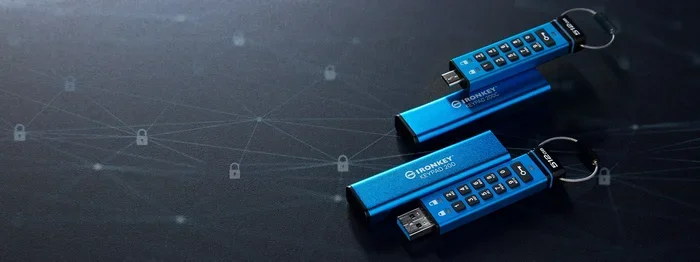
Many modern USB drives come with built-in hardware encryption. These encrypted USB drives have the encryption chip built right into the device. You do not need to install any extra software. Just set a password, and your files are protected.
If your drive does not have built-in encryption, you can use software solutions. Programs like VeraCrypt or BitLocker can encrypt any USB drive. They work well and are easy to set up.
Set a Strong Password
Even with encryption, a weak password can undo all your hard work. Choose a password that is long and complex. Use a mix of letters, numbers, and special characters.
Never use easy-to-guess passwords like “1234” or “password.” If you have trouble remembering passwords, consider using a password manager. These tools store your passwords safely and help you create strong ones.
Enable Write Protection
Write protection stops files from being written to or changed on your USB drive. This is a great way to prevent malware from copying itself onto your device. Many USB drives have a physical switch for write protection.
When the switch is in the locked position, your drive becomes read-only. You can still view and copy files off the drive. But nothing new can be added or changed. This is especially useful when you need to check files on a potentially infected computer.
Keep Your USB Key Clean
Regularly scan your USB drive with antivirus software. Before you open any files from the drive, run a quick scan. Most antivirus programs let you right-click a drive and scan it instantly.
Also, format your USB drive occasionally. Formatting erases everything and can remove hidden malware. Just remember that formatting deletes all your files. Always keep backups of important data before you format.
Physical Threats to USB Keys
Malware is not the only danger. USB keys are small and fragile. They face physical threats every day that can destroy your data.
Damage From Drops and Handling
USB flash drives are tiny, which makes them easy to lose or drop. A single fall onto a hard floor can break the internal connector. When this happens, your drive may stop working completely.
To protect your drive from physical damage, use a protective case. A simple keychain case or a zippered pouch can prevent drops and scratches. Never leave your USB key loose in a bag or pocket where it can get stepped on or crushed.
Water and Heat Damage
Water and heat are enemies of electronic devices. If your USB drive gets wet, dry it thoroughly before plugging it in. Even a small amount of moisture can cause a short circuit.
Heat is just as dangerous. Leaving your drive in a hot car or in direct sunlight can warp the internal components. Keep your USB key in a cool, dry place when you are not using it.
Data Loss From Accidental Deletion
We have all done it. You accidentally delete a file from your USB drive. Panic sets in. The good news is that deleted files are often recoverable. Data recovery software can help you get your files back.
However, the best approach is prevention. Always keep a backup of your most important files. Store copies in at least two different places. This could be a cloud service and your computer’s hard drive, for example.
Choosing a Safe USB Key
Not all USB drives are created equal. Some offer better security features than others. When shopping for a new drive, look for these important features.
Built-In Security Features
The safest USB drives come with built-in security. Look for drives that offer:
- Hardware encryption: The encryption is built into the drive chip, not software.
- Fingerprint authentication: Some drives let you unlock them with your fingerprint.
- Password protection: A built-in PIN or password prevents unauthorized access.
- Rugged design: Shock-resistant and waterproof builds protect against physical damage.
Trusted Brands to Consider
Stick with well-known brands when buying a USB drive. Trusted manufacturers invest more in quality control and security. Some popular and reliable brands include SanDisk, Samsung, Kingston, and Corsair.
Avoid buying cheap, unknown-brand drives from suspicious sellers. These drives may use low-quality memory chips that fail quickly. Worse, some cheap drives have been found to have pre-installed malware.
Capacity vs. Security Trade-Off
Bigger is not always better. A 256GB drive might seem great, but it also means more data at risk if the drive is compromised. Consider your actual needs before you buy. A smaller encrypted drive is safer than a large one with no protection.
Common Mistakes That Put Your USB Data at Risk
Many people make simple mistakes that put their data in danger. Here are the most common ones to avoid.
Using Unknown USB Drives
Never plug in a USB drive you found or received from someone you do not trust. It could be loaded with malware. This is one of the oldest tricks in the book for cybercriminals. If you find a USB drive, hand it in to your IT department or throw it away safely.
Leaving Your Drive Unattended
A USB key is small and easy to misplace. Leaving it on a public desk or in a shared computer is a huge risk. If someone finds your drive, they could access your files or plug it into an infected computer that then contaminates your drive.
Ignoring Software Updates
Your computer’s operating system and antivirus software need regular updates. These updates patch security holes that malware can exploit. Ignoring updates leaves your system vulnerable, even if your USB drive itself is secure.
Not Having a Backup
Even the best USB drive can fail. Hardware can break, drives can get lost, and accidents happen. Without a backup, you could lose everything. Make it a habit to back up your USB files to your computer or a cloud service regularly.
Expert Tips for Maximum USB Security
Want to take your USB security to the next level? Here are some expert tips that professionals use.
Use a dedicated USB drive for sensitive files. Do not mix personal files with work files on the same drive. This limits the damage if one drive is compromised.
Scan every drive before use. Make it a habit to scan any USB key with your antivirus software before opening a single file. This takes just a few seconds and can save you from a major headache.
Disable autorun on your computer. Most modern operating systems disable autorun by default. If yours has not, turn it off. This prevents malware from automatically running when you plug in a USB drive.
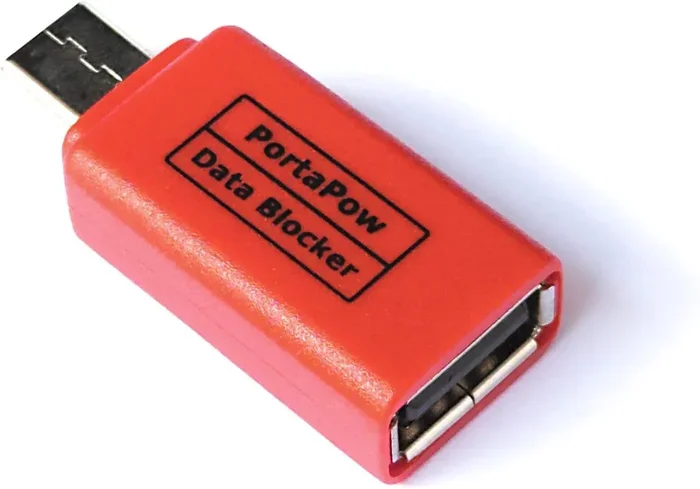
Use a USB port blocker. If you are concerned about unauthorized USB access, a physical port blocker is a great solution. It prevents anyone from plugging in a USB device without your permission.
Educate yourself on the latest threats. Cybersecurity threats evolve constantly. Stay informed about new types of USB malware and protection methods. Reading trusted tech blogs and security websites can help you stay ahead of risks.
In workplaces, USB security policies are essential. Many companies restrict USB usage to prevent data breaches. If you work in a healthcare or medical setting, these policies are especially important because sensitive patient data may be involved.
Final Thoughts on USB Key Safety
So, are USB keys safe? The honest answer is that they are as safe as you make them. A USB key is a powerful tool for data transfer and portable storage. But like any tool, it comes with risks that you need to manage.
The dangers of malware, physical damage, and data theft are real. But they are also preventable. With encryption, strong passwords, regular scans, and smart habits, you can use your USB flash drive with confidence.
Take a few minutes today to check your current USB security setup. Are your drives encrypted? Do you have backups? Do you scan new drives before use? Small changes now can save you from big problems later.
Stay safe, stay smart, and never underestimate the importance of protecting your data. Your USB key holds more than just files. It holds your memories, your work, and your peace of mind.
Frequently Asked Questions
Can a USB key give my computer a virus?
Yes, absolutely. An infected USB drive can transfer malware to your computer the moment you plug it in. This is one of the most common ways viruses spread. Always scan a USB key with antivirus software before opening any files from it.
What is the safest USB drive to buy?
The safest USB drives have built-in hardware encryption and password protection. Look for trusted brands like SanDisk, Samsung, or Kingston that offer encrypted USB models. Avoid cheap, unknown brands that may contain pre-installed malware or use low-quality components.
How do I encrypt my USB flash drive?
You can encrypt your drive using built-in tools like BitLocker on Windows or FileVault on Mac. Third-party tools like VeraCrypt also work well. Some USB drives come with encryption already built in, which is the easiest option for most users.
What should I do if I lose my USB key?
If your drive is encrypted, your data is protected even if someone finds it. If it is not encrypted, assume your files are accessible to others. Change any passwords or sensitive data that were stored on the drive. Report the loss if it contained work or personal information.
Can USB drives be physically damaged?
Yes, USB drives are fragile and can be damaged by drops, water, heat, and static electricity. Always use a protective case and keep your drive in a safe, dry place. Back up your data regularly to prevent permanent loss from physical damage.
Is it safe to use a USB drive on a public computer?
Using a USB drive on a public computer is risky. Public computers may have malware that can infect your drive. If you must use one, scan your drive afterward and avoid saving sensitive files to it. Better yet, avoid using USB drives on public computers altogether.