Can A Better Hdmi Cable Improve Your Gaming Experience
A better HDMI cable can genuinely improve your gaming experience by boosting resolution, refresh rate, and reducing input lag. Not all HDMI cables are created equal, and choosing the right one for your gaming console or PC setup can make a real difference in how your games look and feel.
You just bought a shiny new gaming console or upgraded your PC setup. You plug everything in, fire up your favorite game, and something feels off. The colors look flat. The motion feels choppy. You wonder if your HDMI cable gaming setup is holding you back.
Here is the thing most gamers overlook. The cable connecting your device to your screen can make or break your experience. A better HDMI cable is not just a marketing gimmick. It can unlock features that your expensive TV or monitor is fully capable of delivering.
In this guide, we will break down exactly how HDMI cables affect gaming. We will cover bandwidth, refresh rates, input lag, and everything else you need to know. By the end, you will know whether upgrading your cable is worth your money.
Key Takeaways
- HDMI cable quality matters: A better HDMI cable supports higher bandwidth, enabling smoother 4K gaming and better frame rates.
- HDMI 2.1 is the game-changer: It delivers 120Hz at 4K, VRR, and ALLM for next-gen gaming consoles and PCs.
- Your current setup matters: Upgrading your HDMI cable only helps if your TV, monitor, or console supports the higher specs.
- Longer cables can cause signal loss: Keep cable length reasonable for the best signal transmission.
- Price does not always equal quality: Many affordable HDMI cables perform just as well as expensive premium ones.
- HDR and gaming go hand in hand: The right cable unlocks richer colors and better contrast in supported games.
📑 Table of Contents
- Understanding HDMI Cables and Gaming
- How HDMI Cables Affect Gaming Performance
- HDMI 2.0 vs HDMI 2.1: What Gamers Need to Know
- When Should You Upgrade Your HDMI Cable?
- Common Mistakes Gamers Make with HDMI Cables
- Expert Tips for Choosing the Best HDMI Cable for Gaming
- Does Cable Length Affect Gaming Performance?
- The Role of HDMI Cables in Next-Gen Gaming
- Final Thoughts
Understanding HDMI Cables and Gaming
HDMI stands for High-Definition Multimedia Interface. It is the standard cable that connects your gaming device to your display. Whether you use a PlayStation 5, Xbox Series X, or a gaming PC, there is a good chance you rely on an HDMI cable for your display output.
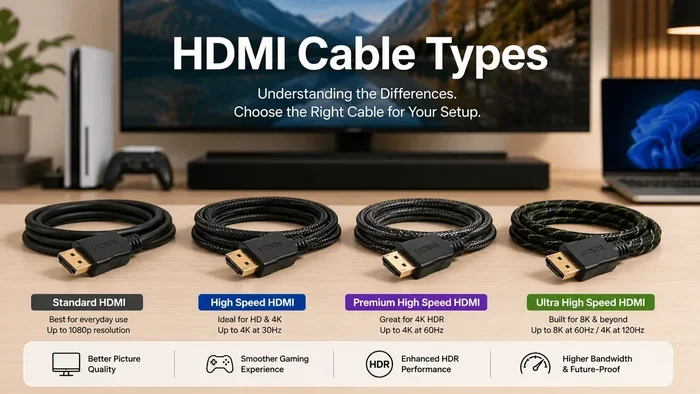
But not all HDMI cables are the same. Different versions support different features. Some cables can handle 4K at 60Hz. Others can push 4K at 120Hz or even 8K. The version and quality of your cable directly impact your gaming performance.
Think of it like a highway. A wider highway allows more cars to travel at once. A higher-bandwidth HDMI cable allows more data to flow from your console to your screen. More data means better image quality, smoother motion, and richer colors.
What Does Bandwidth Mean for Gaming?
Bandwidth is the amount of data a cable can transfer per second. Higher bandwidth means more information reaches your display quickly. This translates into several gaming benefits:
- Higher resolution: 4K and even 8K support become possible.
- Higher refresh rates: 120Hz or 144Hz gaming becomes smooth.
- HDR support: You get better contrast, deeper blacks, and more vivid colors.
- Less input lag: Your actions on the controller respond faster on screen.
When you use a low-quality or outdated cable, you cap your display at lower settings. Your expensive 4K gaming monitor might only run at 1080p because of a cheap cable. That is a huge waste of hardware.
How HDMI Versions Evolved
HDMI technology has improved over the years. Each new version brought better signal transmission and support for higher resolutions. Here is a quick look at the main versions gamers care about:
- HDMI 1.4: Supports 4K at 30Hz. Fine for movies, not ideal for gaming.
- HDMI 2.0: Supports 4K at 60Hz. A solid choice for most current-gen gaming.
- HDMI 2.0b: Adds HDR support. Great for games that use High Dynamic Range.
- HDMI 2.1: The current king. Supports 4K at 120Hz, 8K at 60Hz, VRR, and more.
If you want the best ultra HD gaming experience, HDMI 2.1 is the way to go. But remember, both your console and your display need to support it for the full benefits.
How HDMI Cables Affect Gaming Performance
You might wonder, “Can a cable really change how my games play?” The answer is yes. Your HDMI cable quality affects several aspects of your gaming experience that you can actually feel and see.
Resolution and Display Quality
The resolution your game runs at depends partly on your cable. A standard HDMI cable might limit you to 1080p. A high-quality HDMI cable rated for 4K lets you enjoy crisp, detailed visuals. This matters a lot in games where you need to spot enemies in the distance or appreciate beautiful environments.
For example, games like “Horizon Forbidden West” or “Cyberpunk 2077” look stunning at 4K. But if your cable cannot handle the bandwidth, you will never see them at their best.
Refresh Rate and Smoothness
Refresh rate is how many times your screen updates per second. A 60Hz display refreshes 60 times per second. A 120Hz display refreshes 120 times. The difference is huge in fast-paced games.
With a better HDMI cable, you can push your display to higher refresh rates. This means smoother motion, less blur during fast movements, and a more responsive feel. Racing games, shooters, and fighting games especially benefit from higher refresh rates.
Input Lag and Responsiveness
Input lag is the delay between pressing a button and seeing the action on screen. Gamers hate input lag because it makes games feel sluggish and unresponsive.
A good HDMI cable minimizes this delay. It ensures your controller inputs reach your display as quickly as possible. For competitive gamers, every millisecond counts. A better HDMI cable for gaming can give you a slight but meaningful edge.
HDR and Color Accuracy
HDR stands for High Dynamic Range. It expands the range of colors and brightness levels your display can show. Games with HDR support look more realistic and immersive.
But HDR only works if your cable supports it. Older HDMI cables may not carry the HDR signal properly. A gaming HDMI cable that supports HDR ensures you see the full color range your TV or monitor is capable of producing.
HDMI 2.0 vs HDMI 2.1: What Gamers Need to Know
This is where most gamers get confused. HDMI 2.0 and HDMI 2.1 are both popular, but they serve very different needs. Let us break down the key differences.
HDMI 2.0: The Reliable Workhorse
HDMI 2.0 has been around since 2013. It remains a solid choice for many gamers. Here is what it offers:
- 4K resolution at 60Hz
- Basic HDR support
- 18 Gbps bandwidth
- Works with most current-gen consoles
If you play games at 4K and 60Hz, HDMI 2.0 is more than enough. Many gamers are perfectly happy with it. You do not need to spend extra money unless you want to push beyond these limits.
HDMI 2.1: The Future of Gaming
HDMI 2.1 is the latest standard, and it is built for serious gamers. Here is what makes it special:
- 4K at 120Hz or even 8K at 60Hz
- Up to 48 Gbps bandwidth
- Variable Refresh Rate (VRR) support
- Auto Low Latency Mode (ALLM)
- Quick Frame Transport (QFT)
- Enhanced Audio Return Channel (eARC)
VRR is a big deal. It syncs your display refresh rate with your console or PC frame rate. This eliminates screen tearing and reduces stuttering. If you play fast-paced games, VRR makes a noticeable difference.
ALLM automatically switches your TV to low-lag mode when you start a game. No need to dig through settings menus. It just works.
Which One Should You Choose?
The answer depends on your setup. If you have a PS5 or Xbox Series X and a 4K 120Hz TV, go with HDMI 2.1. If you have a 1080p or 4K 60Hz setup, HDMI 2.0 will serve you well.
Here is a quick comparison to help you decide:
| Feature | HDMI 2.0 | HDMI 2.1 |
|---|---|---|
| Max Resolution | 4K | 8K |
| Max Refresh Rate at 4K | 60Hz | 120Hz |
| Bandwidth | 18 Gbps | 48 Gbps |
| VRR Support | No | Yes |
| ALLM Support | Limited | Yes |
| Best For | Casual gaming, 4K 60Hz | Next-gen gaming, 4K 120Hz |
As you can see, HDMI 2.1 is the clear winner for serious gaming performance. But it only matters if your devices support it.
When Should You Upgrade Your HDMI Cable?
Not everyone needs a new HDMI cable. In fact, upgrading without a reason can be a waste of money. Here are clear signs that you should consider getting a better HDMI cable:
You Bought a New Console or GPU
New consoles like the PS5 and Xbox Series X support 4K at 120Hz. If you are still using an old HDMI 1.4 cable, you are leaving performance on the table. Upgrade to an HDMI 2.1 cable to unlock the full potential of your new hardware.
You Upgraded Your TV or Monitor
If you recently bought a 4K 120Hz gaming monitor or TV, your old cable might not support those specs. Check the refresh rate and resolution of your new display. Then match your cable to those capabilities.
You Notice Screen Tearing or Stuttering
Screen tearing happens when your console and display are out of sync. If you see horizontal lines across your screen during fast-action games, your cable might not support VRR. An HDMI 2.1 cable with VRR support can fix this issue.
You Want HDR but It Is Not Working
If your games look dull even though your TV supports HDR, your cable might be the problem. Older cables often cannot carry the HDR signal correctly. A certified high-speed HDMI cable will resolve this.
Your Cable Is Damaged or Too Long
Over time, HDMI cables can degrade. Frayed ends, bent pins, and exposed wiring all hurt signal transmission. Also, very long cables (over 15 feet) can lose signal strength. If your cable is damaged or too long, it is time for a replacement.
You Want Future-Proofing
Even if your current setup works fine, an HDMI 2.1 cable prepares you for future upgrades. As more games and devices adopt higher standards, having a future-proof cable saves you from another upgrade soon.
Quick Tips Before You Buy
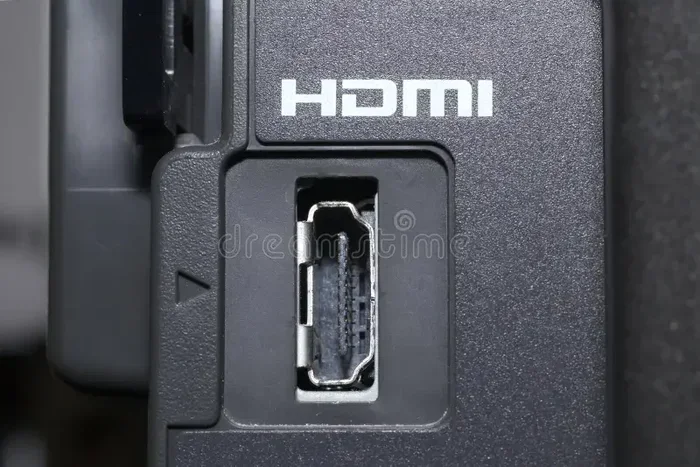
- Check your devices for their HDMI port version.
- Look for “Ultra High Speed HDMI” on the cable label.
- Do not pay extra for “gaming-specific” branding unless it adds real features.
- Buy from reputable brands to avoid counterfeit cables.
- Keep your cable length under 6 feet for the best signal quality.
Common Mistakes Gamers Make with HDMI Cables
Many gamers make avoidable mistakes when it comes to their HDMI setup. Here are the most common ones and how to fix them.
Assuming All HDMI Cables Are the Same
This is the biggest mistake. Not all cables are equal. A cheap, unverified cable might not support the bandwidth you need. Always check the cable rating and certification before buying.
Overpaying for Premium Branding
Some brands charge a premium for cables that perform no better than affordable alternatives. You do not need to spend $100 on an HDMI cable. Many well-reviewed cables under $20 deliver excellent gaming performance.
Ignoring Cable Length
Longer cables can weaken the signal, especially at higher resolutions. If you need a long cable, look for one with built-in signal boosting or opt for an active HDMI cable.
Using the Wrong Port on Your TV
Some TVs have multiple HDMI ports, but not all support the same features. Check your TV manual to find which ports support 4K 120Hz or HDR. Plugging your gaming HDMI cable into the wrong port limits your experience.
Neglecting Firmware Updates
Sometimes the issue is not the cable at all. Your console or TV might need a firmware update to support new features. Always update your devices before blaming the cable.
Buying Counterfeit Cables
The market is full of fake HDMI cables that claim to be HDMI 2.1 but are not. Buy from authorized sellers and look for the official Ultra High Speed HDMI certification mark.
Expert Tips for Choosing the Best HDMI Cable for Gaming
Choosing the right cable does not have to be confusing. Follow these expert tips to find the best HDMI cable for your gaming setup.
Look for the Ultra High Speed HDMI Certification
The HDMI Forum certifies cables that meet specific standards. Look for the “Ultra High Speed HDMI” label. This guarantees the cable supports HDMI 2.1 features including 4K 120Hz, HDR, and VRR.
Match Your Cable to Your Display
If you have a 4K 60Hz TV, an HDMI 2.0 cable is sufficient. If you have a 4K 120Hz TV, you need HDMI 2.1. Do not pay for features your display cannot use.
Consider Your Gaming Setup
Think about what you play and on what device. Competitive gamers who play shooters benefit most from low-latency cables. Casual gamers who enjoy story-driven games might prioritize 4K resolution and HDR over refresh rate.
Read Reviews Before Buying
Look for reviews from trusted tech sites and real users. A well-reviewed budget cable often outperforms an overpriced premium one. Focus on real-world performance, not marketing claims.
Keep Your Setup Clean
Cable management matters more than most gamers think. Avoid tangled cables and keep them away from power cords. This reduces interference and ensures the best signal transmission for your gaming setup.
Test Your Setup After Upgrading
After getting a new cable, test it thoroughly. Check your resolution, refresh rate, and HDR settings. Make sure everything displays correctly before settling in.
Does Cable Length Affect Gaming Performance?
Yes, it can. Longer HDMI cables are more prone to signal loss. This is especially true at higher resolutions and refresh rates. A 3-foot cable will almost always perform better than a 20-foot cable of the same quality.
If you need a longer cable, look for one with active signal boosting. These cables use built-in electronics to maintain a strong signal over longer distances. They cost a bit more but are worth it for ultra HD gaming setups where the display is far from the console.
For most gaming desks, a 6-foot cable is the sweet spot. It gives you flexibility without sacrificing signal quality.
The Role of HDMI Cables in Next-Gen Gaming
Next-gen gaming is all about pushing boundaries. Games are getting more detailed, frame rates are climbing, and displays are becoming more advanced. Your HDMI cable needs to keep up.
HDMI 2.1 cables are designed for this era. They handle the massive data requirements of 4K 120Hz gaming, ray tracing, and HDR. Without a compatible cable, you cannot take full advantage of your next-gen console or GPU.
As game developers continue to push the limits of what is possible, the importance of a good HDMI cable gaming connection will only grow. Investing in the right cable now means your setup is ready for whatever comes next.
Final Thoughts
So, can a better HDMI cable improve your gaming? Absolutely. The right cable unlocks higher resolutions, smoother frame rates, better colors, and lower input lag. It is one of the simplest and most affordable upgrades you can make to your gaming setup.
But remember, a better cable only helps if your devices support the features it offers. Check your console, TV, or monitor capabilities before spending money. And do not fall for overpriced cables that promise more than they deliver.
For most gamers, an HDMI 2.1 Ultra High Speed cable is the best investment. It future-proofs your setup and ensures you are ready for the latest in gaming technology. Whether you are a casual player or a competitive gamer, the right HDMI cable makes a real difference.
Take a look at your current setup today. Check your cable version, your display specs, and your gaming habits. You might be surprised at how much better your games can look and feel with the right HDMI cable in place.
Your games deserve better. Your setup deserves better. And with the right knowledge, you can make it happen without breaking the bank.
Frequently Asked Questions
Does HDMI cable quality really affect gaming?
Yes, it does. A better HDMI cable supports higher bandwidth, which means better resolution, smoother refresh rates, and HDR support. If your current cable cannot handle the data your console or PC outputs, you will miss out on features your display is capable of delivering.
What is the best HDMI cable for 4K gaming?
An Ultra High Speed HDMI cable (HDMI 2.1) is the best choice for 4K gaming. It supports 4K at 120Hz, VRR, ALLM, and HDR. Look for the official Ultra High Speed HDMI certification mark on the packaging to ensure you are getting a genuine cable.
Can a bad HDMI cable cause input lag?
A damaged or low-quality HDMI cable can introduce input lag and signal delays. While the cable itself does not add significant lag in most cases, a poor connection or incompatible cable can prevent your display from running in its lowest-latency mode, which increases input lag.
Do I need HDMI 2.1 if I have a PS5?
It depends on your TV. If you have a 4K 120Hz TV, an HDMI 2.1 cable lets you take full advantage of the PS5’s capabilities, including 120Hz gaming and VRR. If you have a 4K 60Hz TV, an HDMI 2.0 cable will work just fine for now.
Are expensive HDMI cables worth it?
Most of the time, expensive HDMI cables are not worth the premium. Many affordable cables perform just as well as high-end ones. Focus on certifications and specifications rather than price tags. An Ultra High Speed HDMI cable under $20 will serve most gamers perfectly.
Can HDMI cable length affect gaming performance?
Yes, longer cables can lose signal strength, especially at higher resolutions. For the best gaming performance, keep your HDMI cable under 6 feet. If you need a longer cable, choose one with active signal boosting to maintain a strong connection.