Can A Hdmi Port Be Repaired Easily Without Buying New
Yes, a HDMI port can often be repaired without buying a new device. Whether the port is loose, bent, or not working at all, several fix options exist for every budget. You can try simple home solutions like cleaning or using epoxy, or visit a professional for soldering and micro-soldering. The cost of repair is usually much lower than replacing the entire device. This guide walks you through every option so you can make the best decision for your situation.
Have you ever plugged in your HDMI cable only to get a blank screen or no signal at all? It is frustrating, especially when you are trying to watch a movie or game with friends. The first thing many people think is, “I need to buy a new TV or laptop.” But here is the good news. A HDMI port can often be repaired without spending hundreds of dollars on a brand new device. Whether the issue is a loose connection, a bent pin, or total signal loss, there are solutions available. This article breaks down every option so you can fix your HDMI port with confidence and save money in the process.
We will cover everything from simple home fixes to professional repair options. You will learn how to identify what went wrong, what each repair method costs, and when it makes more sense to replace instead of fix. By the end, you will have a clear roadmap to get your HDMI connection working again. No fluff, no guesswork, just practical advice you can use right away.
The good thing about HDMI port repair is that most problems are simpler than they look. A little knowledge goes a long way. So let us dive in and explore how you can bring your HDMI port back to life.
Key Takeaways
- HDMI port repair is possible: Most HDMI port issues can be fixed without replacing the whole device.
- Home fixes work for minor problems: Cleaning, tightening, and using epoxy can solve loose or dirty port issues.
- Professional repair costs less than buying new: Micro-soldering and port replacement are affordable alternatives.
- Prevention saves money: Proper cable handling and regular cleaning extend the life of your HDMI port.
- Know when to replace: Some damage is too severe for repair, and that is okay.
- DIY has limits: Attempting complex fixes without skill can cause more harm than good.
📑 Table of Contents
Understanding HDMI Port Problems
Before you can fix anything, you need to understand what is actually wrong. HDMI port problems come in different shapes and sizes. Some are minor and easy to fix. Others need professional attention. Let us look at the most common signs and causes of HDMI port damage.
Common Signs of a Faulty HDMI Port
How do you know your HDMI port is actually broken? Here are the most common symptoms people notice:
- No signal at all: Your screen stays black even when the cable is plugged in. This is the most obvious sign that something is wrong with your HDMI port.
- Intermittent signal: The picture comes and goes. You have to wiggle the cable to get it to work. This usually points to a loose HDMI port.
- Flickering or static: The screen shows noise or random flashes. This can mean a bent pin inside the port is disrupting the HDMI signal.
- Wrong resolution or color: The image looks off or blurry. Sometimes a damaged port cannot send the full HDMI output properly.
- Port feels loose: The cable does not fit snugly anymore. It slides in and out easily. This is a very common issue with HDMI port repair cases.
What Causes HDMI Port Damage
Understanding the root cause helps you choose the right fix. Here are the top reasons a HDMI port stops working:
- Physical wear and tear: Plugging and unplugging cables hundreds of times weakens the port over time. The pins inside can bend or break.
- Dust and debris buildup: Tiny particles collect inside the port and block the connection. This is one of the most overlooked causes of HDMI port not working issues.
- Bent or broken pins: A single bent pin can ruin the entire HDMI connection. This happens when cables are forced in at an angle.
- Soldering issues: Over time, the solder joints that hold the port to the circuit board can crack. This is common in older devices.
- Power surges: Electrical spikes can fry the internal components of a HDMI port. This is less common but very damaging.
- Cheap or faulty cables: Low-quality cables can put too much pressure on the port or send irregular signals that cause long-term damage.
Quick Tip: Before assuming the worst, try a different HDMI cable first. Sometimes the problem is the cable, not the port. This simple step saves a lot of unnecessary troubleshooting.
Can a HDMI Port Actually Be Repaired
The short answer is yes. Most HDMI port problems can be fixed. The real question is how much effort and money the repair requires. Let us look at when a repair makes sense and when it does not.
When Repair Is Possible
Many common HDMI port issues are very fixable. Here are situations where repair is almost always worth it:
- Loose port: If the port wiggles but is not physically broken, tightening or re-soldering the connection usually solves the problem.
- Dust or debris blockage: A simple cleaning can restore full function. This is the easiest and cheapest HDMI port repair of all.
- Bent pins: A skilled technician can straighten or replace individual pins without replacing the entire port.
- Cracked solder joints: Re-soldering the port to the circuit board is a standard fix that most repair shops handle daily.
- Corrosion on contacts: Chemical cleaning can remove oxidation and restore a good HDMI connection.
If you are dealing with any of these issues, there is a strong chance your HDMI port can be brought back to working order. The key is catching the problem early before it gets worse.
When You Need a Full Replacement
Not every situation allows for a simple fix. Here are cases where a full HDMI port replacement or even a new device might be the better choice:
- Severe physical damage: If the port is cracked or snapped off the circuit board, replacement may be the only option.
- Multiple failed repairs: If you have already tried fixing the port and it keeps failing, the board underneath may be too damaged.
- Outdated device: If your device is several years old and the repair cost approaches the price of a new one, replacement often makes more financial sense.
- Water or fire damage: These types of damage can affect the entire board, not just the port. In such cases, replacing the HDMI port alone will not help.
Expert Insight: A professional technician can assess the damage in minutes. Many repair shops offer free diagnostics. Always get a professional opinion before committing to a replacement. You might be surprised how affordable a fix can be.
How to Fix a Loose HDMI Port at Home
Some HDMI port repairs are simple enough to do yourself at home. You do not need to be a tech expert. With the right tools and a little patience, you can solve many common problems. Here are the most effective DIY methods.
Cleaning the HDMI Port
Dust and lint are the enemies of a healthy HDMI port. Over time, debris builds up inside the port and blocks the connection. Cleaning is often the first step in HDMI port troubleshooting.
Here is how to clean your HDMI port safely:
- Power off the device: Always unplug the device before you start. Safety first.
- Use compressed air: Short bursts of air can blow out loose dust and particles from inside the port.
- Use a toothpick or soft brush: Gently scrape away any stubborn debris around the pins. Be very gentle. You do not want to bend anything.
- Try a cotton swab with isopropyl alcohol: Dampen a cotton swab lightly and clean the inside of the port. Let it dry completely before plugging anything in.
- Inspect with a flashlight: Look inside the port to check for bent pins or remaining debris.
Cleaning alone fixes a surprising number of HDMI connection problems. It costs almost nothing and takes just a few minutes.
Using Epoxy or Glue for Loose Connections
If your HDMI port feels loose but is not broken, a small amount of epoxy can tighten things up. This is a popular HDMI port fixed method for home users.
Here is how to do it:
- Apply a tiny amount of two-part epoxy around the base of the port where it meets the device body.
- Do not get any epoxy inside the port itself. Keep it on the outside only.
- Let it cure for the full time recommended on the product label.
- Once cured, plug in the cable and test the connection.
Common Mistakes: Using too much epoxy is the number one mistake people make. A little goes a long way. Also, never use super glue. It is too brittle and can crack under the weight of a plugged-in cable.
Professional HDMI Port Repair Options
When home fixes do not work, it is time to call in the experts. Professional repair shops have the tools and skills to handle more complex HDMI port repair jobs. Here is what you can expect.
Soldering and Micro-Soldering
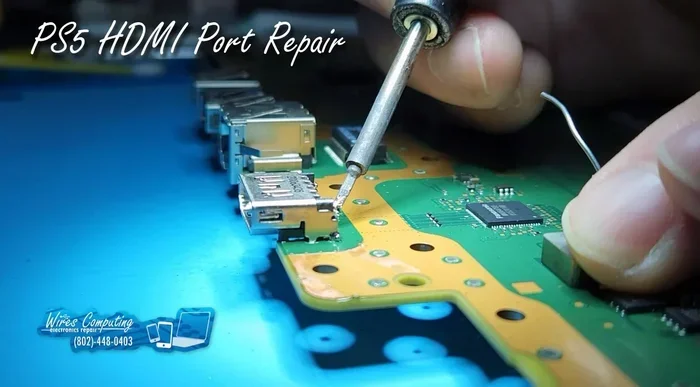
Soldering is the most common professional method for HDMI port repair. A technician uses a fine-tipped soldering iron to reattach the port to the circuit board. For very small devices like smartphones or tablets, micro-soldering is used.
Micro-soldering involves working under a microscope with extremely fine tools. The technician can:
- Re-solder cracked joints on the circuit board
- Replace individual pins inside the port
- Repair damaged traces that connect the port to the main board
- Replace the entire port assembly if needed
Micro-soldering is a specialized skill. Not every repair shop offers it. Look for shops that specifically mention micro-soldering or board-level repair when you search for HDMI port repair near me.
Cost of Professional HDMI Port Repair
One of the biggest concerns people have is the HDMI port cost for professional repair. The good news is that it is usually much cheaper than buying a new device. Here is a general breakdown:
- Simple cleaning or tightening: $20 to $50
- Re-soldering the port: $50 to $100
- Micro-soldering repair: $75 to $150
- Full port replacement: $100 to $200
These costs vary based on the device, the repair shop, and your location. Always ask for a diagnostic fee upfront. Many shops waive the diagnostic cost if you proceed with the repair.
HDMI Port Repair vs Buying New
This is the big decision. Should you repair the HDMI port or just buy a new device? The answer depends on several factors. Let us break it down so you can make the smartest choice.
Cost Comparison
Here is a side-by-side look at repair versus replacement costs:
| Option | Average Cost | Time Required | Risk Level |
|---|---|---|---|
| DIY Home Fix | $5 to $20 | 30 minutes to 2 hours | Low to Medium |
| Professional Repair | $50 to $200 | 1 to 5 days | Low |
| Buy New Device | $200 to $2000+ | Immediate (if in stock) | None |
As you can see, repairing a HDMI port is almost always the more affordable option. Even the most expensive professional repair costs a fraction of a new device.
When to Choose Repair
Repair makes the most sense when:
- The device is relatively new and in good condition otherwise
- The repair cost is less than 40% of the price of a new device
- The device has features you rely on and love
- The HDMI port damage is the only problem
- You want to reduce electronic waste
When to Replace the Device
Replacement is the better choice when:
- The device is very old and has other failing components
- The repair cost exceeds 50% of the new device price
- The damage affects the main circuit board beyond just the port
- You were planning to upgrade anyway
- The device is no longer supported with software updates
Quick Tip: Before deciding, make a list of all the issues your device has. If the HDMI port is the only problem, repair is almost always the right call. If multiple things are broken, it might be time for an upgrade.
Preventing HDMI Port Problems in the Future
The best HDMI port repair is the one you never need. Taking care of your ports now can save you a lot of trouble later. Here are proven ways to keep your HDMI connection strong and reliable.
Best Practices for HDMI Cable Handling
How you plug in and pull out your cables matters more than you might think:
- Always pull from the plug, not the cable: Yanking the cable wears out the port. Grip the connector and pull straight out.
- Do not force the cable in: If it does not fit easily, check for debris or a bent pin. Forcing it can break the pins inside.
- Use high-quality cables: Cheap cables often have poor shielding and weak connectors. Invest in well-made HDMI cables that fit snugly.
- Avoid bending the cable sharply at the port: A sharp bend puts stress on the port and can loosen the connection over time.
- Use cable management clips: These keep cables secure and reduce tension on the port.
Quick Tips for Port Longevity
Follow these simple habits and your HDMI port will last much longer:
- Clean ports regularly: Use compressed air every few months to remove dust buildup.
- Do not leave cables plugged in when not in use: If a device sits unused for a long time, unplug the cable to reduce pressure on the port.
- Use port covers or caps: Some devices come with protective covers. Use them whenever possible.
- Avoid placing heavy objects on cables: Weight on a plugged-in cable puts direct pressure on the port.
- Check for loose fit early: If the cable starts feeling loose, address it immediately. Early intervention prevents full HDMI port damage.
Final Thoughts on HDMI Port Repair
A HDMI port does not have to mean the end of your device. Whether you choose a simple home fix or take it to a professional, there are real solutions available. The key is identifying the problem correctly and choosing the right approach for your situation and budget.
Most HDMI port issues are fixable. Cleaning, tightening, re-soldering, and replacement are all proven methods that work. The cost of repair is almost always lower than buying something new, and it keeps perfectly good devices out of landfills.
Start with the simplest fix. Clean the port. Try a different cable. If those do not work, move on to epoxy or professional help. With the right approach, you can get your HDMI connection back up and running in no time. Do not throw away a working device just because one port is broken. Fix it, and keep enjoying your setup.
Frequently Asked Questions
How much does it cost to repair an HDMI port?
The cost of HDMI port repair depends on the device and the type of damage. Simple cleaning or tightening costs between $20 and $50. Re-soldering or micro-soldering typically runs $50 to $150. Full port replacement can range from $100 to $200. These costs are usually much lower than buying a new device.
Can I fix a loose HDMI port myself?
Yes, you can fix a loose HDMI port at home in many cases. Start by cleaning the port with compressed air and isopropyl alcohol. If the port feels loose because of a weak solder joint, you can apply a small amount of two-part epoxy around the base. For more serious looseness, a re-soldering job may be needed, which is best left to a professional.
What causes an HDMI port to stop working?
The most common causes are dust and debris buildup, bent or broken pins, loose solder joints, and physical wear from frequent plugging and unplugging. Power surges and using low-quality cables can also damage a HDMI port over time. Identifying the cause helps you choose the right fix.
Is it worth repairing an HDMI port on a TV?
In most cases, yes. Repairing the HDMI port on a TV is usually much cheaper than buying a new one. A professional repair typically costs between $50 and $200, while a new TV can cost hundreds or thousands of dollars. However, if the TV is very old and has other issues, replacement might make more sense.
Can a bent HDMI pin be fixed?
Yes, a bent HDMI pin can often be straightened or replaced by a professional technician. Micro-soldering experts can fix individual pins without replacing the entire port. If you are not comfortable doing this yourself, take the device to a repair shop that offers board-level or micro-soldering services.
How long does HDMI port repair take?
Simple fixes like cleaning or tightening take just 30 minutes to an hour. Re-soldering or micro-soldering usually takes a few hours. Full port replacement may take one to two days, depending on parts availability. Most repair shops can give you a timeline during the diagnostic assessment.