Can A USB Be Used As An Aux Input For Audio Devices
Yes, you can use a USB as an aux input for audio devices in many cases, but it depends on your device and setup. USB carries digital audio signals, while aux uses analog connections. With the right adapter or built-in support, you can enjoy high-quality sound from USB drives, phones, and computers through aux ports. Understanding the differences helps you choose the best connection for your needs.
Key Takeaways
- USB and aux are different connection types: USB sends digital audio, while aux sends analog audio signals.
- You can use USB as aux with adapters: USB to aux cables and USB DACs make this connection possible in many setups.
- Not all devices support USB audio: Always check your device specs before assuming USB will work as an aux input.
- Audio quality can improve with USB: USB connections often provide cleaner sound compared to standard aux cables.
- Common mistakes cause poor performance: Using the wrong cable or outdated drivers can ruin your audio experience.
- USB audio is plug and play on most modern devices: You often do not need extra software to get sound working.
- Car stereos, computers, and smartphones support USB audio: These are the most common devices where USB replaces aux.
📑 Table of Contents
- What Is A USB Connection And How Does It Work?
- What Is An Aux Input And How Does It Work?
- Can You Use USB As An Aux Input For Audio Devices?
- Devices That Support USB Audio Input
- USB To Aux Adapters And Sound Cards
- Common Mistakes When Using USB As Aux
- Expert Tips For Getting The Best Audio Quality With USB
- Key Takeaways
- Conclusion
What Is A USB Connection And How Does It Work?
USB stands for Universal Serial Bus. It is one of the most common connection types in the world today. You use USB to connect phones, drives, keyboards, and many other gadgets. But can a USB be used as an aux input for audio? The short answer is yes, in many cases.
USB was first created in the mid-1990s. Its main job was to simplify how devices connect to computers. Before USB, you needed many different cables for different devices. USB changed all of that. It became a one-size-fits-all solution for data transfer and power delivery.
USB cables carry both data and power. This makes them very versatile. You can charge your phone and transfer files at the same time. But audio is a different story. USB sends digital audio signals. This is different from what an aux cable carries. Aux cables send analog audio signals. Understanding this difference is key to knowing when USB can replace aux.
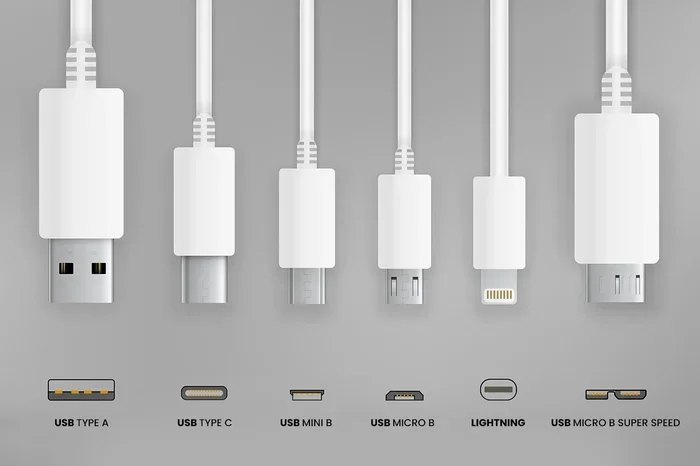
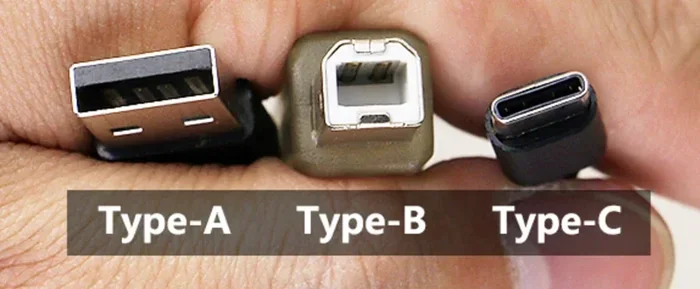
There are several types of USB connectors. USB-A is the flat rectangular plug you see on computers. USB-B is often used for printers. USB-C is the small reversible plug found on modern phones and laptops. Each type can carry audio, but the setup may differ. The type of USB port on your device matters a lot when trying to use USB as aux.
USB audio has come a long way over the years. Early USB audio was often low quality. Today, USB audio can rival or even beat traditional aux connections. Many audio devices now use USB as their primary input. This shift happened because digital audio carries less noise than analog audio. Less noise means cleaner, better sound.
What Is An Aux Input And How Does It Work?
An aux input, short for auxiliary input, is a simple analog audio connection. You have probably seen the 3.5mm headphone jack on many devices. That is the most common type of aux connection. It has been around for decades and is still widely used today.
Aux cables carry analog audio signals. This means the sound is sent as a continuous electrical wave. Your device converts digital audio into this analog signal before sending it through the cable. The receiving device then converts it back to sound. This process works well but can introduce noise and interference.
The aux connection is simple. You plug one end into your device and the other into the receiving device. There is no software or drivers needed. It is truly plug and play. This simplicity is why aux remains popular. People of all ages and tech levels can use it without any hassle.
Aux connections are found on car stereos, speakers, headphones, and mixers. They are universal in the sense that most audio devices have an aux port. But aux cables have limits. They can only carry stereo audio. They also have a limited range. Longer aux cables can lose signal quality.
USB audio works differently. It sends digital data directly from the source to the receiving device. The receiving device has a digital-to-analog converter, or DAC, that turns the data into sound. This process can be much cleaner than analog aux connections. It is one reason why many audiophiles prefer USB for audio.
Can You Use USB As An Aux Input For Audio Devices?
This is the big question. The answer depends on your device and what you are trying to do. In simple terms, USB can work as an aux input, but the setup is not always direct. Let us break it down.
When you plug a USB cable into a device, the device needs to recognize it as an audio source. Not all devices are set up to do this. Some devices only see USB as a data or charging connection. Others can accept USB audio input right away. Modern computers and smartphones usually support USB audio. Older car stereos may not.
USB audio class is a standard that makes USB audio work across devices. When a device follows this standard, it is plug and play. You do not need to install special drivers or software. This is great news for everyday users. You just plug in the USB cable and the sound works.
However, there is a catch. USB audio is digital. Aux input is analog. You need a way to convert the digital signal to analog. This is where adapters and external DACs come in. A USB to aux adapter handles this conversion for you. It takes the digital audio from the USB port and turns it into an analog signal that an aux port can read.
How USB Audio Works In Practice
Let us look at a real-world example. You have a USB flash drive with music files. You want to play this music through a speaker that only has an aux input. You cannot plug the USB drive directly into the aux port. The aux port does not understand digital data. You need a USB to aux adapter or a USB DAC.
A USB DAC is a small device that connects to your USB port. It converts digital audio to analog audio with high quality. Many USB DACs sound better than the built-in audio chips in laptops and phones. This is why music producers and audiophiles often use them.
Another example is using a USB phone with a car stereo. If your car stereo has a USB port, it may support USB audio directly. In this case, you plug your phone into the car stereo with a USB cable. The stereo reads the digital audio files and plays them. No aux cable is needed. This is a common setup in modern vehicles.
Some people wonder if they can use a USB cable to connect two devices for audio. For example, connecting a phone directly to a speaker with a USB cable. This only works if the speaker has a USB audio input port. Most speakers do not. They only have aux inputs. In these cases, you need an adapter.
USB To Aux Adapters: What You Need To Know
USB to aux adapters are the most common solution for using USB as aux. These small devices plug into a USB port on one end and have an aux output on the other end. They handle the digital-to-analog conversion for you.
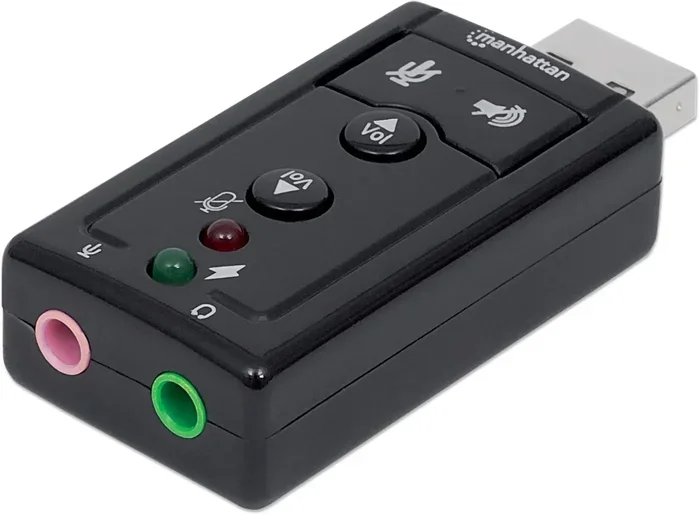
There are two main types of USB to aux adapters. The first is a simple cable with a USB plug on one end and a 3.5mm aux plug on the other. The second is a small box or dongle that contains a built-in DAC. The second type usually offers better sound quality.
When buying a USB to aux adapter, look for one with a decent DAC. Cheap adapters may produce low-quality sound or introduce noise. Spending a little extra on a good adapter makes a big difference. You want clear, noise-free audio.
These adapters work with many devices. They work with laptops, desktop computers, tablets, and some smartphones. They are especially useful for older car stereos that do not have USB audio support. You plug the adapter into a USB port in the car and then connect your aux cable to the adapter.
Devices That Support USB Audio Input
Not all audio devices support USB audio input. Let us look at the most common devices and how they handle USB audio.
Computers And Laptops
Most modern computers support USB audio. Windows, Mac, and Linux all recognize USB audio devices. You can plug in a USB DAC or a USB microphone and start using it right away. Computers are powerful tools for audio work. They handle music production, editing, and playback with ease. In fact, computers are used in many fields beyond entertainment. They help doctors in hospitals with patient records and imaging. If you want to learn more about how computers are used in different fields, check out our article on 10 Ways Computers Are Used In Medicine.
On a computer, USB audio is almost always plug and play. You do not need to install drivers in most cases. The computer recognizes the USB audio device and sets it as the default audio output or input. This makes it very easy to use USB as an aux input on a computer.
Car Stereos
Car stereos vary widely in their USB audio support. Newer car stereos often have USB ports that support both data transfer and audio playback. If your car stereo supports USB audio, you can plug in a USB drive or phone and play music directly.
Older car stereos may have USB ports that only charge devices or transfer files. They do not support USB audio input. In these cases, you still need an aux cable or a USB to aux adapter. Check your car stereo manual to see what USB features it supports.
Many people use USB in their cars because it is more reliable than aux. USB connections are less prone to interference. You do not get that annoying buzzing sound that sometimes comes with aux cables. This is a big advantage of using USB over aux in vehicles.
Smartphones And Tablets
Smartphones and tablets can use USB audio in different ways. Many Android phones support USB audio through a USB-C or micro-USB connection. You can plug in a USB DAC or a USB microphone for better audio quality.
iPhones are a bit different. Apple uses Lightning or USB-C ports. iPhones do not always support USB audio input directly. You may need a special adapter made for iOS devices. These adapters can be a bit pricey, but they work well when you need them.
Tablets follow the same patterns as phones. Android tablets generally support USB audio well. iPads support USB audio through the Camera Connection Kit or USB-C adapters. Always check your device specifications before buying a USB audio accessory.
External Speakers And Audio Systems
Some external speakers have USB inputs. These speakers have built-in DACs. They convert USB digital audio to analog sound on their own. This is a great setup because you get high-quality audio without needing extra adapters.
Most powered speakers, however, only have aux inputs. For these speakers, you need a USB to aux adapter. The adapter connects to your audio source via USB and outputs analog sound through the aux cable to the speaker.
USB To Aux Adapters And Sound Cards
USB to aux adapters and USB sound cards are two popular ways to use USB as aux. They serve similar purposes but work a bit differently. Let us compare them.
| Feature | USB To Aux Adapter | USB Sound Card |
|---|---|---|
| Primary Function | Converts USB digital audio to aux analog output | Adds audio input and output capabilities to a device |
| Sound Quality | Varies widely by price | Generally better, especially in mid-range models |
| Ease Of Use | Plug and play on most devices | Plug and play, but may need driver setup |
| Price Range | $5 to $50 | $10 to $100+ |
| Best For | Simple audio output from USB devices | Recording, gaming, and professional audio |
| Portability | Very portable, small size | Less portable, often larger |
A USB sound card is a more complete audio solution. It adds both audio input and output options to your device. Many USB sound cards come with microphone jacks, headphone jacks, and line-in ports. They are great for podcasting, gaming, and music production.
A simple USB to aux adapter is more limited. It only converts USB audio to aux output. It does not add input capabilities. But for basic audio playback, it works great and costs much less.
Quick Tips For Choosing The Right Adapter
- Check compatibility: Make sure the adapter works with your device type (USB-A, USB-C, micro-USB).
- Look for a built-in DAC: Adapters with DACs offer better sound quality than simple cables.
- Read reviews: Cheap adapters can introduce noise. Read user reviews before buying.
- Consider cable length: Longer cables may lose signal quality. Keep cables short for best results.
- Test before committing: If possible, test the adapter with your device before buying it long-term.
Common Mistakes When Using USB As Aux
Using USB as an aux input can be tricky if you do not know the common pitfalls. Here are mistakes many people make and how to avoid them.
Assuming all USB ports support audio. Not every USB port on a device handles audio. Some ports are only for data transfer or charging. Check your device manual or look for audio symbols near the USB port.
Using a low-quality adapter. Cheap USB to aux adapters often produce poor sound. They may introduce buzzing, static, or low volume. Invest in a decent adapter from a reputable brand. Your ears will thank you.
Ignoring driver updates. On computers, outdated audio drivers can cause USB audio to malfunction. Keep your audio drivers up to date. Most operating systems update drivers automatically, but sometimes you need to do it manually.
Using too long a cable. Long USB cables can cause signal loss. Long aux cables can also lose quality. Keep your cables as short as possible for the best audio performance. A 3 to 6 foot cable is usually the sweet spot.
Not testing the setup properly. After connecting everything, always test the audio before relying on it. Play a familiar song and listen for any issues. Check for static, distortion, or low volume. Fix problems before you need the setup for an important moment.
Forgetting about power requirements. Some USB audio devices need more power than others. If you are using a USB hub, make sure it provides enough power. A powered USB hub is often better for audio devices than a bus-powered one.
Expert Tips For Getting The Best Audio Quality With USB
Want to get the most out of your USB audio setup? Here are some expert tips that make a real difference.
Use a dedicated USB DAC. A USB DAC is the best way to get high-quality audio from a USB connection. It handles the digital-to-analog conversion with better precision than most built-in chips. Even a budget DAC sounds better than no DAC at all.
Keep your audio files high quality. USB audio can deliver lossless sound, but only if your files support it. Use FLAC or WAV files instead of compressed MP3s when possible. The difference is noticeable on good audio equipment.
Avoid USB extensions when possible. Every connection point can introduce signal loss. Plug your USB audio device directly into the source port. If you must use an extension, use a high-quality, short one.
Ground your devices properly. Ground loops can cause humming or buzzing in your audio. Use grounded USB cables and make sure all your audio devices are on the same power outlet or surge protector.
Update firmware on USB audio devices. Many USB DACs and sound cards receive firmware updates. These updates can improve compatibility and sound quality. Check the manufacturer website for the latest firmware.
Experiment with audio settings. On computers, you can adjust sample rates and bit depths for USB audio. Higher settings generally mean better quality but require more processing power. Start with 44.1 kHz and 16-bit, then try higher settings if your device supports them.
Use USB audio for critical listening. If you are listening to music for enjoyment or doing professional audio work, USB is often the better choice. The digital connection is cleaner and more reliable than analog aux. Reserve aux for quick, casual connections where convenience matters most.
Key Takeaways
- USB can be used as an aux input: With the right adapter or built-in support, USB works as an alternative to traditional aux connections.
- USB carries digital audio, aux carries analog: Adapters or DACs are needed to bridge this gap in most setups.
- Modern devices generally support USB audio: Computers, newer car stereos, and many smartphones handle USB audio natively.
- USB to aux adapters are affordable and easy to use: They make USB audio accessible to anyone with a simple plug and play setup.
- USB audio quality is often better than aux: Digital connections are less prone to interference and noise than analog cables.
- Avoid common mistakes: Use quality adapters, keep cables short, and update drivers for the best results.
- USB audio is the future of audio connectivity: As more devices adopt USB-C and USB audio standards, aux ports may become less common.
Conclusion
The question of whether you can use a USB as an aux input has a clear answer. Yes, you can in most cases. With the right adapter, DAC, or built-in support, USB audio works as a great alternative to traditional aux connections. The setup is straightforward and the audio quality is often better.
USB as aux input is a practical solution for many situations. Whether you are connecting a USB drive to a car stereo, using a DAC with your laptop, or plugging a microphone into your computer, USB audio delivers reliable and clean sound. The days of worrying about tangled aux cables and buzzing interference are fading.
Remember the key points. Check your device compatibility before buying adapters. Invest in a quality USB to aux adapter or DAC for the best results. Avoid common mistakes like using cheap cables or ignoring driver updates. With these tips, you will get great audio every time.
USB audio technology continues to improve. Newer devices support higher quality digital audio through USB connections. As USB-C becomes the standard, audio connectivity will only get better. Embrace the change and enjoy the benefits of USB audio in your everyday life.
So the next time someone asks you if a USB can be used as aux, you will know the answer. Share what you have learned with friends and family. Help them get better audio from their devices. Good luck with your USB audio setup, and enjoy the improved sound quality!
Frequently Asked Questions
Can I plug a USB drive directly into an aux port?
No, you cannot plug a USB drive directly into an aux port. An aux port expects an analog audio signal, while a USB drive sends digital data. You need a USB to aux adapter or a USB DAC to convert the digital signal into analog audio that the aux port can read and play.
Does USB audio sound better than aux?
Yes, USB audio generally sounds better than aux. USB carries a digital signal, which is less prone to interference and noise. Aux cables carry analog signals that can pick up buzzing and static, especially over longer distances. A good USB setup with a DAC will almost always outperform a standard aux connection.
Do I need drivers to use USB audio?
Most modern devices support USB audio without drivers. This is thanks to the USB audio class standard, which makes devices plug and play. However, some advanced USB DACs or sound cards may require drivers for full functionality. Always check the product specifications before buying.
Can I use USB as aux on an iPhone?
iPhones have limited USB audio support compared to Android devices. You can use USB audio with an iPhone through the Lightning to USB adapter or USB-C adapter on newer models. Apple’s Camera Connection Kit also supports USB audio input. However, not all USB audio devices work with iPhones, so check compatibility first.
Why does my USB audio have static or buzzing?
Static or buzzing in USB audio is usually caused by ground loops, cheap adapters, or outdated drivers. Try using a different USB port, updating your audio drivers, or replacing your USB to aux adapter with a higher quality one. Ground loops happen when devices are plugged into different power outlets. Using a grounded cable or power strip can fix this.
Are USB to aux adapters worth buying?
Yes, USB to aux adapters are worth buying for most users. They are affordable, easy to use, and solve the problem of connecting USB-only audio sources to aux-only devices. A good adapter costs between $10 and $30 and provides reliable performance. Look for adapters with built-in DACs for the best sound quality.