Can A Cricut Print On Edible Paper Yes Here Is How
Yes, a Cricut can print on edible paper using its Print Then Cut feature. This guide walks you through everything you need to know about creating beautiful edible designs for cakes, cookies, and cupcakes. Learn the setup, best paper types, ink requirements, and expert tips for flawless edible prints every single time.
Have you ever wondered if your Cricut machine can do more than just cut vinyl and cardstock? The answer is yes, and it opens up a whole new world of creativity. Can a Cricut print on edible paper? Absolutely. With the right setup and materials, you can create stunning edible images for cakes, cookies, cupcakes, and more.
Edible printing has become hugely popular among bakers, crafters, and hobbyists. The Cricut machine combines printing and cutting in one device, making the process faster and easier than ever before. Whether you are planning a birthday party or a wedding cake, this guide covers everything you need to know.
The process is simpler than most people think. You load edible paper into your printer, design your image using Cricut Design Space, and let the machine handle the rest. In this article, we will walk you through every step with clear instructions and practical tips.
Let us dive into the world of edible paper printing with your Cricut. By the end, you will feel confident enough to start your first edible project right away.
Key Takeaways
- A Cricut machine can print on edible paper: Using the Print Then Cut feature, you can create custom edible images for cakes, cookies, and cupcakes.
- Wafer paper and frosting sheets work best: These food-safe materials are designed specifically for inkjet printers and Cricut cutting machines.
- Proper setup is essential: Correct printer settings, paper alignment, and cutting pressure make all the difference in your final results.
- Avoid common mistakes: Using the wrong paper type, incorrect ink, or poor storage can ruin your edible prints.
- Edible printing opens creative possibilities: From custom wedding cakes to personalized cookies, the options are endless with a Cricut.
📑 Table of Contents
- What Is Edible Paper and How Does It Work?
- Can A Cricut Print On Edible Paper? The Full Answer
- Setting Up Your Cricut for Edible Paper Printing
- Step-by-Step Guide to Printing on Edible Paper
- Tips for Best Results with Edible Paper
- Common Mistakes to Avoid
- Creative Ideas for Edible Paper Projects
- Comparing Edible Paper Types
- Expert Insights on Edible Paper Printing
- Key Takeaways
- Conclusion
What Is Edible Paper and How Does It Work?
Edible paper is a thin, food-safe material that absorbs ink just like regular paper. It is made from starches, sugars, or potato starch and is completely safe to eat. The paper itself has little to no taste, which makes it perfect for decorating baked goods.
You can print on edible paper using a standard inkjet printer. The ink sits on the surface and dries quickly. Once printed, the design can be placed directly onto frosting, fondant, or other edible surfaces. It is a game changer for anyone who loves custom baked treats.
Types of Edible Paper for Cricut Projects
Not all edible paper is the same. Different types serve different purposes and work better with certain designs. Here are the most common options you will encounter:
- Wafer Paper: Made from potato starch, this paper is very thin and delicate. It works great for intricate designs and delicate cake toppers.
- Frosting Sheets: These are slightly thicker and have a sticky backing. You can place them directly onto frosted cakes with ease.
- Sugar Paper: Made from sugar and water, this paper dissolves slightly when placed on moist surfaces, creating a seamless look.
- Icing Sheets: Similar to frosting sheets but with a smoother finish. These are ideal for clean, professional-looking designs.
Each type has its own strengths. Wafer paper is best for detailed images, while frosting sheets are easier to handle for beginners. Choose the one that fits your project and skill level.
Can A Cricut Print On Edible Paper? The Full Answer
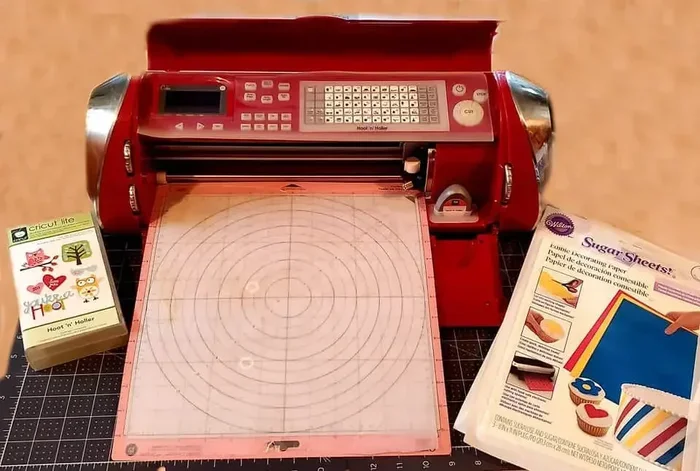
The short answer is yes. A Cricut machine can print on edible paper using the Print Then Cut feature. This built-in function lets you print your design on regular paper first, then the Cricut cuts around the design with precision. When you use edible paper, the same process applies.
Your Cricut works alongside an inkjet printer to produce the design. The machine does not print directly onto the edible paper itself. Instead, you print the image separately, load the edible paper into the Cricut, and let the machine cut around your design. This two-step process gives you full creative control.
It is important to understand that the Cricut is a crafting machine, not a food printer. The actual printing happens on your inkjet printer. The Cricut handles the cutting portion. Think of it as a partnership between your printer and your cutting machine.
The Cricut Explore series and Cricut Maker both support this workflow. These machines are versatile and handle edible paper with ease. As long as you use the correct settings, you will get clean, precise cuts every time.
How the Print Then Cut Feature Works
The Print Then Cut feature is one of the most powerful tools in the Cricut lineup. Here is how it works in simple steps:
- You design your image in Cricut Design Space.
- You send the design to your inkjet printer.
- You print the image on edible paper.
- You place the printed edible paper on the Cricut cutting mat.
- The Cricut scans the printed design and cuts around it precisely.
This feature eliminates the need for manual cutting. The machine reads the printed image and follows its contours. The result is a perfectly shaped edible decal ready to place on your cake or cookie.
Just as a computer relies on the 5 components that are found on the motherboard to process and execute commands, your Cricut machine depends on its internal hardware to scan, interpret, and cut your edible designs with precision.
Setting Up Your Cricut for Edible Paper Printing
Setting up your Cricut for edible paper is straightforward. The key is getting the right materials and correct machine settings. Follow these steps to ensure a smooth experience from start to finish.
What You Will Need
- A Cricut machine (Explore or Maker recommended)
- An inkjet printer (laser printers do not work with edible paper)
- Edible paper (wafer paper, frosting sheets, or icing sheets)
- Cricut Standard Grip Cutting Mat
- Cricut Design Space software (free with your machine)
- High-quality edible ink cartridges
Using an inkjet printer is essential. Laser printers use heat to fuse the toner, which can melt or warp edible paper. Always stick with inkjet for food-safe printing.
Machine Settings for Edible Paper
Getting the settings right is crucial for clean cuts. Here is what you need to do:
- Select “Edible Paper” or “Sticker Paper” as the material type in Design Space.
- Set the pressure to “Fine” or “Standard” depending on the paper thickness.
- Use a new cutting blade for the best results.
- Always use a fresh cutting mat for proper adhesion.
- Run a test cut on scrap paper before cutting your edible design.
Understanding the components found on the motherboard of your Cricut machine helps you appreciate how it processes scan data and translates it into precise cutting paths. The machine’s internal sensors and processors work together just like the internal architecture of any digital device.
Printer Settings for Edible Paper
Your printer settings matter just as much as your Cricut settings. Follow these guidelines:
- Set your printer to “Best” or “High Quality” mode.
- Choose “Plain Paper” or “Sticker Paper” as the paper type.
- Disable any color correction or enhancement features.
- Let the printed edible paper dry for at least 10 minutes before handling.
High-quality ink produces vibrant colors that pop on your baked goods. Cheap or low-quality ink may bleed or fade, ruining your design.
Step-by-Step Guide to Printing on Edible Paper
Now that your setup is ready, let us walk through the actual process. This step-by-step guide will help you create beautiful edible prints with confidence.
Step 1: Design Your Image
Open Cricut Design Space and create your design. You can use free images, uploaded graphics, or custom text. Keep your design simple for your first project. Complex designs with tiny details can be tricky to cut neatly.
Make sure your design fits within the printable area of your edible paper. Most sheets are 8.5 x 11 inches, which matches standard printer paper. Leave a small border around your design for easier handling.
Step 2: Print the Design
Load your edible paper into the inkjet printer with the printed side facing up. Send the design to print and wait for it to finish. Do not touch the printed surface until it is completely dry.
Edible ink dries faster than regular ink, but patience is still important. Rushing this step can cause smudging and ruin your design.
Step 3: Prepare the Cutting Mat
Place your printed edible paper on the cutting mat. Smooth out any bubbles or wrinkles. The mat needs to grip the paper firmly for accurate cutting. If the paper is curling, gently press it down with your hands.
Understanding how the components that are found on the motherboard coordinate with peripheral devices helps you appreciate how your Cricut communicates with the cutting mat and blade assembly to deliver precise cuts.
Step 4: Load and Cut
Load the mat into your Cricut machine. Select the correct material setting and press the flashing C button. The machine will scan the printed design and then begin cutting. Watch the first few cuts to make sure everything is working correctly.
If the cuts look uneven, you may need to adjust the pressure or replace the blade. Always do a test cut before committing to your final design.
Step 5: Apply to Your Baked Goods
Carefully remove the cut edible design from the mat. Place it gently onto your frosted cake, cookie, or cupcake. The design will adhere to the frosting naturally. For wafer paper, you can also place it directly onto dry surfaces like fondant.
Handle the edible paper with clean, dry hands. Any moisture from your fingers can affect the design. A pair of food-safe tweezers works great for delicate placements.
Tips for Best Results with Edible Paper
Getting professional-looking edible prints takes practice. Here are some proven tips that will elevate your results from good to great.
- Use fresh edible paper: Old or stored paper can become brittle and crack during cutting. Always check the expiration date.
- Store paper properly: Keep unused edible paper in a cool, dry place sealed in an airtight bag. Moisture is the enemy of edible paper.
- Design with bold lines: Fine details may not cut cleanly on edible paper. Choose designs with clear, thick lines for the best results.
- Match your frosting color: Dark designs on dark frosting can be hard to see. Choose contrasting colors for maximum visual impact.
- Work in a dry environment: Humidity can warp edible paper and affect ink absorption. Work in a cool, dry room.
- Practice first: Always do a test run with regular paper before using your edible sheets. This saves money and frustration.
Quick Tips for Beginners
Starting out with edible paper printing can feel overwhelming. Keep these quick tips in mind:
- Start with simple shapes and text for your first few projects.
- Use frosting sheets instead of wafer paper for easier handling.
- Buy a few extra cutting blades since edible paper can dull them faster.
- Join online Cricut communities for inspiration and troubleshooting advice.
- Watch video tutorials to see the process in action before trying it yourself.
Common Mistakes to Avoid
Even experienced crafters make mistakes with edible paper. Knowing what to avoid saves time, money, and frustration. Here are the most common errors and how to prevent them.
Using the wrong paper type. Not all paper labeled “edible” is the same. Some are designed for laser printers and will not work with inkjet printers. Always check the packaging for compatibility with your printer type.
Skipping the test cut. This is one of the biggest mistakes beginners make. A quick test cut on scrap paper saves your precious edible paper from being wasted. Always test first.
Using too much pressure. The Cricut cuts through edible paper easily. Too much pressure will tear or distort the design. Start with the lowest setting and increase only if needed.
Handling the printed paper too soon. Wet edible ink transfers easily. Wait until the design is fully dry before placing it on the mat or your baked goods.
Storing paper improperly. Edible paper absorbs moisture from the air. If you leave it out in a humid kitchen, it will warp and become unusable. Always store it in a sealed container.
Just as the components found on the motherboard must work in harmony for a computer to function, every element of your edible printing setup, from the ink to the cutting mat, must work together for flawless results.
Creative Ideas for Edible Paper Projects
Once you master the basics, the creative possibilities are endless. Here are some popular projects to try with your Cricut and edible paper.
- Custom Birthday Cakes: Print the birthday person’s name and age for a personalized cake topper.
- Wedding Cake Toppers: Create elegant monograms or couple silhouettes for a memorable wedding cake.
- Cookie Decorating: Print tiny designs for individual cookies at parties and events.
- Corporate Events: Brand cookies and cupcakes with company logos for professional events.
- Holiday Treats: Make festive designs for Christmas, Halloween, Easter, and other holidays.
- Baby Showers: Print adorable baby-themed designs for celebration cakes and cupcakes.
Edible printing adds a personal touch that store-bought decorations simply cannot match. Your friends and family will be amazed by your custom creations.
Comparing Edible Paper Types
Choosing the right edible paper can be confusing with so many options available. Here is a quick comparison to help you decide.
| Feature | Wafer Paper | Frosting Sheets | Icing Sheets |
|---|---|---|---|
| Thickness | Very thin | Medium | Thin to medium |
| Ease of Use | Moderate | Easy | Easy |
| Best For | Detailed designs | Frosted cakes | Clean, smooth look |
| Adhesion | Needs frosting | Sticky backing | Needs moist surface |
| Price | Low | Medium | Medium |
| Taste | Neutral | Slightly sweet | Neutral |
Each type has its place in your edible printing toolkit. Many crafters keep all three on hand for different projects and occasions.
Expert Insights on Edible Paper Printing
Professional cake decorators and experienced Cricut users share a few insider tips that can take your edible printing to the next level.
First, always calibrate your printer regularly. Even small misalignments can cause your edible designs to print slightly off-center. Most printers have a built-in alignment tool in the settings menu. Take five minutes to run this before each printing session.
Second, invest in high-quality edible ink cartridges. The difference in color vibrancy and longevity is noticeable. Cheap ink may look fine on the paper but can fade or bleed when placed on frosting. Your designs deserve better.
Third, keep your Cricut blades sharp and replace them regularly. Dull blades tear edible paper instead of cutting it cleanly. A fresh blade makes a world of difference, especially for intricate designs.
Fourth, experiment with different paper brands. Not all edible paper is created equal. Some brands feed through printers more smoothly, and others cut more cleanly with the Cricut. Find what works best for your specific setup.
Finally, the components found on the motherboard of any digital device, including your Cricut, remind us that precision engineering matters. The same attention to detail that goes into device hardware should apply to your crafting workflow and material choices.
Key Takeaways
- A Cricut machine can print on edible paper: Using the Print Then Cut feature, you can create custom edible images for cakes, cookies, and cupcakes.
- Wafer paper and frosting sheets work best: These food-safe materials are designed specifically for inkjet printers and Cricut cutting machines.
- Proper setup is essential: Correct printer settings, paper alignment, and cutting pressure make all the difference in your final results.
- Avoid common mistakes: Using the wrong paper type, incorrect ink, or poor storage can ruin your edible prints.
- Edible printing opens creative possibilities: From custom wedding cakes to personalized cookies, the options are endless with a Cricut.
- Practice makes perfect: Your first few attempts may not be flawless, but each project builds your skills and confidence.
- Quality materials matter: Investing in good edible paper and ink produces noticeably better results than budget options.
Conclusion
So, can a Cricut print on edible paper? The answer is a resounding yes. With the right materials, settings, and a little practice, you can create stunning edible designs that impress everyone. The Print Then Cut feature makes the process accessible to beginners and exciting for experienced crafters alike.
Remember to start with simple projects and gradually work your way up to more complex designs. Each project teaches you something new about how edible paper behaves, how your printer performs, and how your Cricut machine cuts. The learning curve is gentle, and the rewards are delicious.
Edible paper printing combines technology and creativity in a unique way. You get to design beautiful images, print them with your inkjet printer, and then use your Cricut to cut them to perfection. The result is a professional-looking decoration that is both beautiful and edible.
Grab your materials, fire up your Cricut Design Space, and start creating. Your next cake, cookie, or cupcake will look like it came straight from a professional bakery. The world of edible printing is waiting for you, and your Cricut is ready to help you bring your ideas to life.
Frequently Asked Questions
Can any Cricut model print on edible paper?
Yes, most Cricut models support the Print Then Cut feature, including the Cricut Explore and Cricut Maker series. You will need a separate inkjet printer for the printing step, but the cutting works with any compatible Cricut machine.
Is edible paper safe to eat?
Absolutely. Edible paper is made from food-safe ingredients like potato starch and sugar. It is completely non-toxic and safe for consumption. The paper itself has little to no taste, making it ideal for decorating without affecting the flavor of your baked goods.
Can I use a laser printer with edible paper?
No, you should always use an inkjet printer for edible paper. Laser printers use heat to fuse toner onto paper, which can melt or warp edible paper. Inkjet printers use liquid ink that dries quickly and adheres safely to food-safe paper.
How long do edible prints last on a cake?
Edible prints typically last 24 to 48 hours on a frosted cake stored at room temperature. Humidity and heat can shorten this timeframe. For best results, apply the edible design close to when the cake will be served and keep the cake in a cool, dry place.
Do I need special ink for edible paper printing?
You can use your regular inkjet printer ink for edible paper. However, food-grade edible ink cartridges produce better color vibrancy and are specifically designed for food-safe printing. They are worth the investment if you plan to do edible printing regularly.
Can I reuse edible paper?
No, edible paper is designed for single use. Once printed and cut, the paper should not be reused. Leftover uncut edible paper can be stored for future use if kept in an airtight container in a cool, dry place away from moisture.