Can A UV Printer Print On Anything And Everything Else
A UV printer can print on a surprisingly wide range of materials, from glass and metal to wood and plastic. The ultraviolet curing process makes prints durable, vibrant, and resistant to fading. However, not every surface is suitable, and proper preparation matters greatly for the best results.
Have you ever wondered if a UV printer can really print on anything and everything? The short answer is yes, but with some important caveats. UV printing technology has opened up incredible possibilities for businesses, hobbyists, and creatives alike. From custom phone cases to promotional signage, the ability to print directly on a wide variety of surfaces is truly remarkable. In this guide, we will explore exactly what a UV printer can handle, what it cannot, and how to get the best results every single time.
The world of digital printing has evolved dramatically over the past decade. Gone are the days when you were limited to paper or basic vinyl. Today, a UV-curable ink printer can transform everyday objects into custom products with stunning detail. But understanding the technology, the materials, and the limitations is key to making the most of this powerful tool. Let us dive deep into everything you need to know about UV printing on different surfaces.
Key Takeaways
- Versatile Printing: A UV printer works on many hard and flat surfaces including glass, wood, metal, acrylic, and ceramics.
- Instant Curing: UV ink dries instantly under ultraviolet light, making the process faster than traditional printing methods.
- Not Universal: Certain flexible, curved, or heat-sensitive materials cannot be printed on effectively with a UV printer.
- Surface Prep Matters: Cleaning and priming your substrate significantly improves ink adhesion and print durability.
- Cost vs. Benefit: UV printers are a great investment for businesses needing high-detail, durable prints on diverse materials.
- Eco-Friendly Option: UV inks are low in VOCs and produce less waste compared to solvent-based alternatives.
📑 Table of Contents
- What Is a UV Printer and How Does It Work?
- What Surfaces Can a UV Printer Print On?
- What Cannot Be Printed with a UV Printer?
- UV Printing vs. Traditional Printing Methods
- How to Get the Best Results with a UV Printer
- Common Mistakes to Avoid with UV Printing
- Is a UV Printer Right for Your Business?
- The Future of UV Printing Technology
- Final Thoughts on UV Printing
What Is a UV Printer and How Does It Work?
A UV printer uses special inks that cure, or dry, instantly when exposed to ultraviolet light. This is very different from traditional inkjet printing, where inks need time to air-dry or absorb into the material. The instant curing process means no smudging, no waiting, and no mess. Each tiny droplet of ink is sprayed onto the surface and immediately hardened by UV lamps built into the printer head.
The Science Behind UV Curing
When the UV-curable ink hits the substrate, the ultraviolet light triggers a chemical reaction. This reaction causes the ink to polymerize, turning from a liquid into a solid almost instantly. The result is a print that is vivid, scratch-resistant, and long-lasting. Because the ink cures on the surface rather than soaking in, the print resolution stays incredibly sharp. This is one reason why UV printing is so popular for detailed graphics and photographic-quality images.
Key Components of a UV Printer
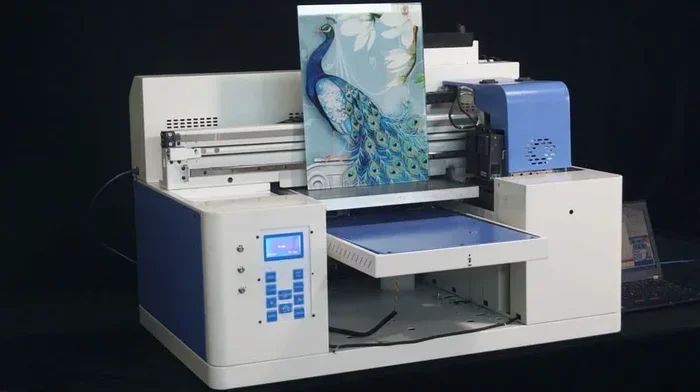
Every UV printer has several important parts that work together. The print head sprays the ink with precision. The UV lamps cure the ink instantly. The flatbed platform holds the material steady during printing. Some models also include a conveyor system for continuous printing of long materials. Understanding these basic parts helps you troubleshoot issues and maintain your machine properly. You can learn more about how printer components work by checking out our guide on the 5 Components That Are Found On The Motherboard, which covers the internal electronics that power many modern devices including printers.
What Surfaces Can a UV Printer Print On?
This is the big question, and the answer might surprise you. A UV printer can print on a wide variety of hard and flat surfaces. Let us break down the most popular materials that work great with UV digital printing.
Glass
Printing on glass is one of the most popular uses for UV printers. Think about custom glass awards, window decals, glass doors, and even mirror prints. The ink adheres well to clean, smooth glass surfaces. The result is a vibrant print that really pops when light hits it. Glass printing is perfect for signage, promotional items, and decorative pieces.
Wood
Wood is another excellent substrate for UV printing. You can print on wooden plaques, custom coasters, furniture panels, and even wooden phone cases. The ink bonds well with the natural grain of the wood, creating a unique and rustic look. However, the wood surface should be smooth and sealed for the best results. Rough or untreated wood may absorb the ink unevenly.
Metal
Metal printing with UV technology is incredibly durable. Aluminum, stainless steel, brass, and copper can all be printed on. This makes UV printers ideal for industrial labels, nameplates, and decorative metal signs. Metal prints resist weather, moisture, and fading, making them perfect for both indoor and outdoor use.
Acrylic and Plastic
Acrylic sheets and various plastics are very compatible with UV flatbed printers. You can create stunning displays, retail signage, and custom product covers. The key is to make sure the plastic surface is clean and free of oils or residues. Some plastics may need a primer for optimal ink adhesion.
Ceramics and Stone
Yes, you can even print on ceramics and stone! Custom tiles, coasters, and decorative plates are just the beginning. The direct-to-substrate printing capability of a UV printer means you skip the transfer paper and print directly onto the material. This produces sharper images and more vibrant colors.
Other Compatible Materials
Here is a quick list of other materials that work well with a UV printer:
- Leather — great for custom wallets, bags, and accessories
- Cardboard and paperboard — ideal for premium packaging
- Corrugated plastic — perfect for real estate signs and advertisements
- Foam board — commonly used for presentations and displays
- PVC sheets — widely used in construction and signage
What Cannot Be Printed with a UV Printer?
While a UV printer is incredibly versatile, it is not magic. There are some materials and surfaces that simply do not work well. Understanding these limitations will save you time, ink, and frustration.
Flexible and Curved Surfaces
UV printers work best on flat, rigid surfaces. Flexible materials like fabric, curved surfaces like balls or cylinders, and uneven textures can be challenging. The print head needs to maintain a precise distance from the material, and curves or folds disrupt this. Some advanced models offer rotary attachments for cylindrical objects, but they are not as versatile as flat printing.
Heat-Sensitive Materials
The UV lamps generate some heat during the curing process. Materials that are sensitive to heat, such as certain thin plastics or foams, may warp or melt. Always test a small area first before committing to a full print run on delicate materials.
Porous and Absorbent Surfaces
Materials that absorb ink too quickly, like uncoated paper or soft fabric, do not work well with UV-curable ink. The ink needs a surface where it can sit and cure properly. Highly absorbent materials may cause the ink to spread or bleed, reducing print quality.
Very Dark or Transparent Surfaces
Printing on very dark or black surfaces can be tricky because the white ink base may not show up well. Similarly, transparent materials like clear glass require a white ink layer underneath for colors to appear vivid. Not all UV printers handle white ink equally, so check your machine’s capabilities.
UV Printing vs. Traditional Printing Methods
How does UV printing compare to other popular printing methods? Let us look at the key differences.
| Feature | UV Printing | Solvent Printing | Dye Sublimation |
|---|---|---|---|
| Drying Time | Instant | Minutes to hours | Requires heat press |
| Materials | Hard, flat surfaces | Vinyl, banners | Fabric, polyester |
| Durability | Very high | Moderate | High on fabric |
| Eco-Friendly | Low VOCs | Higher VOCs | Low emissions |
| Cost | Higher upfront | Lower upfront | Moderate |
| Versatility | Excellent | Limited | Limited to fabric |
As you can see, UV printing offers a unique combination of speed, durability, and versatility. While the upfront cost of a UV flatbed printer is higher than some alternatives, the ability to print on so many different materials makes it a powerful tool for any print business. The instant curing also means you can handle prints immediately after printing, which speeds up production significantly.
How to Get the Best Results with a UV Printer
Owning a UV printer is only half the battle. Knowing how to use it properly makes all the difference. Here are some practical tips to improve your print quality and longevity.
Prepare Your Surface Properly
Always clean your substrate before printing. Dust, oils, and fingerprints can cause adhesion problems. For some materials, applying a primer or coating helps the ink bond better. This simple step can dramatically improve print durability and prevent peeling.
Use the Right Settings
Every material requires different print settings. Adjust the print resolution, ink density, and curing power based on the substrate. Thicker materials may need multiple passes, while thin materials may need lower intensity to avoid damage. Most UV printer software includes material profiles to help you get started.
Test Before You Commit
Always do a small test print before running a full batch. This helps you check color accuracy, adhesion, and drying quality. Testing saves time and materials, especially on expensive substrates like metal or glass.
Maintain Your Printer Regularly
Keep your print heads clean and your UV lamps functioning properly. Regular maintenance prevents clogs, ensures consistent color, and extends the life of your machine. Follow the manufacturer’s guidelines for cleaning and replacement schedules.
Handle Prints with Care
Even though UV prints cure instantly, they are not indestructible. Avoid scratching the surface during handling. Allow prints to cool completely before stacking or packaging them. Proper handling ensures your prints look great for a long time.
Quick Tip: If you are printing on glass or acrylic, apply a protective clear coat after printing. This adds an extra layer of scratch resistance and makes the colors even more vibrant. A simple spray-on clear coat works wonders for UV print durability.
Common Mistakes to Avoid with UV Printing
Even experienced users make mistakes. Here are some common pitfalls and how to avoid them.
- Skipping surface preparation: This is the number one cause of poor adhesion. Always clean and, if needed, prime your substrate.
- Using the wrong material profile: Each material needs its own settings. Using a generic profile leads to faded or peeling prints.
- Over-curing the ink: Too much UV exposure can yellow the ink or make it brittle. Follow recommended curing times.
- Ignoring white ink layers: On dark or transparent surfaces, the white underbase is essential for vibrant colors. Do not skip it.
- Not calibrating the printer: Regular calibration ensures accurate colors and sharp details. Skipping this step degrades print quality over time.
Is a UV Printer Right for Your Business?
Investing in a UV printer is a big decision. If you need to print on a wide variety of hard surfaces, the answer is likely yes. Custom signage, promotional products, awards, and industrial labels are all excellent use cases. The print on demand capability also means you can take custom orders without large inventory costs.
However, if your primary needs involve fabric printing or very flexible materials, a dye sublimation printer might be a better fit. Consider your target market, the materials you plan to work with, and your production volume before making a decision. For many businesses, a UV printer becomes the workhorse of their operation because of its incredible versatility.
The Future of UV Printing Technology
The UV printing industry continues to evolve. New ink formulations offer better adhesion to challenging surfaces. Faster curing lamps increase production speed. And more affordable models are entering the market, making this technology accessible to smaller businesses and hobbyists. The rise of eco-friendly UV inks is also a big trend, with lower emissions and reduced waste. As the technology improves, we can expect even more materials to become compatible with UV digital printing.
The ability to print on almost anything is no longer a dream. With the right UV printer, proper preparation, and a bit of practice, you can create stunning products on glass, wood, metal, plastic, ceramics, and much more. The key is to understand your machine, know your materials, and never stop experimenting.
Final Thoughts on UV Printing
So, can a UV printer print on anything and everything else? The honest answer is almost anything with a flat, hard surface. The versatile printing capabilities of modern UV technology are truly impressive. From custom home decor to commercial signage, the possibilities are endless. Just remember that surface preparation, correct settings, and regular maintenance are the secrets to outstanding results.
If you are new to UV printing, start with simple materials like acrylic or coated wood. Build your confidence, experiment with different settings, and gradually expand into more challenging substrates. The learning curve is manageable, and the rewards are well worth the effort. A UV printer is a powerful tool that can transform your creative projects and business offerings. Embrace the technology, explore its potential, and enjoy the incredible world of UV digital printing.
Frequently Asked Questions
Can a UV printer print on fabric?
UV printers are not ideal for most fabrics because the ink needs a hard, flat surface to cure properly. Some specially coated fabrics may work, but traditional fabric printing is better suited for dye sublimation or screen printing methods.
Is UV printing safe for food-contact surfaces?
Most UV inks are not certified for direct food contact. If you plan to print on items that touch food, check for food-safe certifications and use inks specifically formulated for that purpose.
How durable are UV prints?
UV prints are highly durable and resistant to fading, scratching, and weathering. With proper surface preparation and curing, a UV print can last for many years both indoors and outdoors.
Can a UV printer print on dark surfaces?
Yes, but you will need to use a white ink underbase. The white layer creates a bright foundation that allows colors to appear vibrant even on dark or black substrates.
What is the difference between UV printing and LED UV printing?
LED UV printers use LED lamps instead of traditional mercury vapor lamps for curing. LED UV curing is more energy-efficient, produces less heat, and has a longer lamp lifespan, making it a popular choice for modern print shops.
Do UV prints smell?
UV prints have minimal odor compared to solvent-based prints. The instant curing process means the ink does not release many volatile organic compounds, making it a more pleasant and eco-friendly option for indoor use.
=== CONCLUSION ===
A UV printer truly is one of the most versatile tools in the printing world. From glass and wood to metal and acrylic, the ability to print directly on so many different surfaces sets UV printing technology apart from traditional methods. The instant curing, vibrant colors, and lasting durability make it a favorite for businesses and creatives alike. While there are some limitations with flexible, curved, or heat-sensitive materials, the range of compatible surfaces is still remarkably broad. By preparing your materials properly, using the right settings, and maintaining your equipment, you can achieve professional-quality prints on nearly any hard surface. The world of UV digital printing is waiting for you to explore it.