Can Any USB Charge An iPhone And What You Need To Know
Yes, most USB cables and chargers can charge an iPhone, but not all are created equal. You need the right connector, proper amperage, and an Apple-certified cable to charge safely and quickly. This guide covers everything you need to know about USB charging compatibility, fast charging, and avoiding common mistakes.
We have all been there. You are rushing out the door, and your iPhone battery is about to die. You grab the first USB cable you see and plug it in. But then you wonder, does it actually work? The good news is that most USB cables and chargers can charge an iPhone. But the full story is more interesting than a simple yes or no.
Not all USB charging setups are the same. Some will juice up your phone in record time. Others will crawl so slowly that you might as well forget about it. And some could even pose a risk to your device if you are not careful. This guide breaks it all down for you. We will cover compatibility, speed differences, cable types, and practical tips you can use right away.
Whether you have an older iPhone or the latest model, understanding how USB power delivery works will save you time, money, and frustration. Let us dive in.
Key Takeaways
- Most USB ports can charge an iPhone: Whether it is a wall charger, computer, or car adapter, any USB output can deliver power to your iPhone.
- Connector type matters: Older iPhones use Lightning, while iPhone 15 and newer models use USB-C.
- Charging speed varies: The wattage of your USB power adapter directly affects how fast your iPhone battery charges.
- Use Apple-certified cables: Cheap, uncertified cables can damage your phone or charge very slowly.
- Fast charging is possible: You need a USB-C to USB-C cable and a compatible power delivery charger for the best results.
- Wireless charging is an option: Qi-enabled wireless charging pads work with most recent iPhone models.
- Avoid common mistakes: Using damaged cables, low-quality adapters, or wrong connectors can hurt your device.
📑 Table of Contents
Can Any USB Charge an iPhone?
The short answer is yes. Most USB ports and USB chargers can deliver power to an iPhone. The Universal Serial Bus standard was designed to carry both data and electricity. So any USB power source can technically charge your phone. But here is where it gets nuanced.
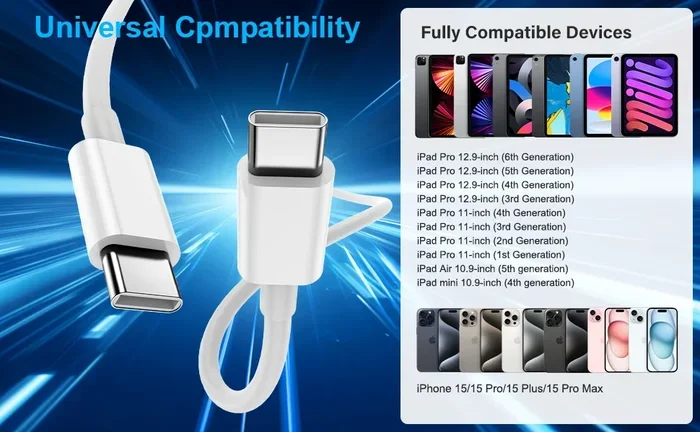
The type of charging cable you use matters a lot. Older iPhones, from the iPhone 5 through the iPhone 14, use the Lightning connector. Apple introduced USB-C starting with the iPhone 15 lineup. This means the cable you need depends on which iPhone model you own.
A USB-A to Lightning cable works with older iPhones when plugged into a standard wall charger or computer. A USB-C to Lightning cable works with both older and newer iPhones when paired with a USB-C power adapter. And for iPhone 15 and beyond, you need a USB-C to USB-C cable.
So while any USB port can provide power, using the right cable and adapter makes a huge difference in charging speed and safety.
Understanding USB Types and iPhone Compatibility
Not all USB connectors are the same. Here is a quick breakdown of the most common types you will encounter:
- USB-A: The classic rectangular port found on most wall chargers, computers, and car adapters. It is the oldest and most widely used USB port type.
- USB-C: A smaller, reversible connector that supports faster power delivery and data transfer speeds. It is now the standard for iPhone 15 and newer models.
- Lightning: Apple’s proprietary connector used on iPhones from the iPhone 5 through the iPhone 14. It is still widely used and supported.
- USB Micro-B: Found on older Android devices. It will not charge an iPhone and is not compatible.
Knowing which connector your iPhone uses is the first step. The next is understanding how much power the USB source can provide.
How USB Charging Works with iPhones
When you plug your iPhone into a USB port, power flows from the source through the cable and into your phone’s battery. The charging speed depends on several factors working together.
Amperage and Voltage Explained
Every USB charger has two key ratings: amperage and voltage. Together, these determine the wattage, which is the actual power your iPhone receives.
- Voltage (V): This is the electrical pressure. Most USB chargers output 5 volts.
- Amperage (A): This is the electrical current. Standard USB ports provide 1 amp, while fast charging adapters can deliver 3 amps or more.
- Wattage (W): This is voltage multiplied by amperage. A 5V, 1A charger gives you 5 watts. A 5V, 3A charger gives you 15 watts.
Your iPhone draws only the power it needs. So plugging a high-wattage adapter into your phone will not fry it. The phone regulates the incoming power automatically.
Standard vs. Fast Charging
Apple supports fast charging on most iPhone models starting with the iPhone 8. Fast charging can take your iPhone battery from zero to 50 percent in about 30 minutes.
To use fast charging, you need three things:
- A USB-C to USB-C cable or a USB-C to Lightning cable.
- A USB-C power adapter rated at 20 watts or higher.
- An iPhone model that supports power delivery (iPhone 8 or newer).
Without a compatible power adapter, your iPhone will charge at the standard rate, which is much slower. This is why the charger you use matters just as much as the cable.
Which USB Chargers Work Best for iPhones
Not all wall chargers are equal. Some are designed specifically for Apple devices, while others work universally. Here is a look at the best options for charging your iPhone with a USB cable.
Apple USB Power Adapters
Apple’s own USB-C power adapter is the gold standard for iPhone charging. The 20-watt adapter is compact, reliable, and supports fast charging on compatible iPhones. Apple also sells 30-watt and higher adapters, but 20 watts is the sweet spot for most users.
One advantage of using an Apple charging brick is MFi certification. This means the charger has been tested and approved by Apple for safety and performance.
Third-Party USB Chargers
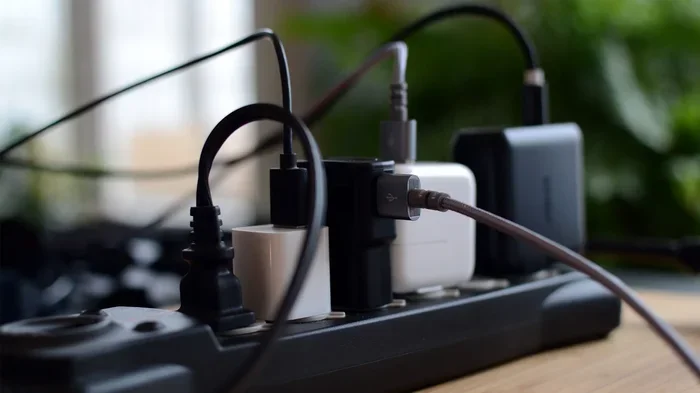
You do not have to buy Apple’s adapter. Many third-party brands offer excellent USB-C chargers that support power delivery and fast charging. Brands like Anker, Belkin, and Google make reliable options.
When choosing a third-party charger, look for these features:
- USB-C Power Delivery (PD) support.
- At least 20 watts of output.
- MFi certification or equivalent safety approvals.
- A good reputation for quality and durability.
Avoid the cheapest no-name brands. They may not regulate power properly, which could harm your iPhone battery over time.
Computer and Laptop USB Ports
You can charge your iPhone through a computer’s USB port. This works, but it is slow. Most computer USB-A ports deliver only 0.5 to 2.5 watts. That means a full charge could take several hours.
If you need to charge quickly, avoid using a computer USB port. Instead, use a wall charger or a portable power bank.
Car Chargers and Portable Power Banks
Car chargers with USB-A or USB-C ports work great for road trips. Look for a car charger that supports at least 12 watts for decent charging speed.
Portable power banks are a lifesaver when you are on the go. Choose a power bank with USB-C output and at least 10,000 mAh capacity. This will give your iPhone one to two full charges on the trail.
USB-C vs. Lightning: What Changed with iPhone 15
The shift from Lightning to USB-C is one of the biggest changes in recent iPhone history. Here is what you need to know.
The Lightning Era
For over a decade, Apple used the Lightning connector on every iPhone. It was reliable, compact, and worked with millions of accessories. However, it was a proprietary Apple standard, which meant you could not use the same cable for other devices.
Lightning cables still work with iPhone 14 and older models. They are widely available and affordable. But they do not support the fastest USB-C power delivery speeds that newer iPhones are capable of.
The USB-C Era
Starting with the iPhone 15, Apple adopted the USB-C standard. This change was driven by European regulations, but it also brought real benefits to users.
With USB-C, you can now use one cable for your iPhone, iPad, Mac, and many other devices. USB-C supports faster power delivery up to 27 watts and beyond on newer models. It also enables faster data transfer speeds for photos and videos.
If you have an iPhone 15 or newer, you need USB-C cables and USB-C chargers to take full advantage of these improvements.
Common Mistakes That Slow Down iPhone Charging
Many people unknowingly make mistakes that hurt their charging speed or damage their iPhone battery over time. Here are the most common ones to avoid.
Using Damaged or Low-Quality Cables
A frayed or bent charging cable can cause intermittent charging, slow speeds, or even safety hazards. Always inspect your cable before plugging it in. If the insulation is worn or the connectors are loose, replace it immediately.
Cheap cables from unknown brands often lack proper power regulation. They may charge slowly or fail to support fast charging altogether.
Charging Through a Computer While Using It
If you plug your iPhone into a computer and then use resource-heavy apps, the charging speed drops significantly. The computer’s USB port may not provide enough power to keep up with the drain from active use.
For the best results, charge your iPhone directly from a wall charger when you need speed.
Ignoring Background App Activity
Apps running in the background can draw significant power, even when your screen is off. This slows down charging speed because the power goes to the apps instead of filling the battery.
To charge faster, close unused apps and turn on Airplane Mode while charging. This reduces power draw and lets your iPhone battery fill up more quickly.
Using the Wrong Charger Wattage
Using a 5-watt charger on a modern iPhone will work, but it will charge very slowly. If your phone supports fast charging, invest in a 20-watt or higher USB-C adapter to get the best results.
Expert Tips for Better iPhone Charging
Want to get the most out of your USB charging setup? Here are some practical tips from charging experts.
Keep Your iPhone Cool While Charging
Heat is the enemy of lithium-ion batteries. If your iPhone gets hot while charging, remove the case and place it on a cool, flat surface. Avoid charging it under a pillow or in direct sunlight.
Enable Optimized Battery Charging
Apple’s Optimized Battery Charging feature learns your daily routine and slows down charging past 80 percent when you do not need a full charge right away. This reduces battery wear and extends the overall lifespan of your iPhone battery.
You can find this feature in Settings, under Battery, then Battery Health.
Invest in a Good Cable
A quality USB-C cable or Lightning cable with MFi certification is worth every penny. It ensures safe power delivery, reliable data transfer, and long-lasting durability.
Use a GaN Charger for Portability
Gallium Nitride (GaN) chargers are smaller and more efficient than traditional silicon chargers. They deliver high wattage in a compact form factor, making them perfect for travel and everyday use.
Key Takeaways
- Most USB sources can charge an iPhone: Wall chargers, computers, car adapters, and power banks all work.
- The right cable is essential: Use Lightning for older iPhones and USB-C for iPhone 15 and newer.
- Fast charging requires the right equipment: A 20-watt or higher USB-C power adapter and a compatible cable.
- Avoid cheap, uncertified cables: They can be slow, unreliable, or unsafe.
- Charging habits matter: Keep your phone cool, close background apps, and use Optimized Battery Charging.
- USB-C is the future: It offers faster speeds, better compatibility, and a universal connector for all your devices.
Conclusion
The answer to whether any USB can charge an iPhone is yes, with some important caveats. Any USB power source can technically deliver power to your phone, but the experience varies widely depending on the cable, adapter, and USB port you use.
Using the right charging cable and a quality power adapter makes a noticeable difference in charging speed and long-term battery health. Whether you have an older iPhone with a Lightning connector or a brand-new model with USB-C, investing in the right USB charging accessories pays off.
Follow the tips in this guide, avoid common mistakes, and your iPhone battery will stay healthy and ready to go whenever you need it. USB charging is simple once you know what to look for. Now you are equipped to make the best choice for your device.
Can Any USB Charge an iPhone?
Yes, most USB cables and chargers can charge an iPhone, but the connector type and power output matter. Older iPhones use Lightning cables, while iPhone 15 and newer models use USB-C cables. Any USB power source can provide power, but using the right cable and adapter ensures the best charging speed and safety.
Will a USB Wall Charger Damage My iPhone?
No, a standard USB wall charger will not damage your iPhone. iPhones regulate incoming power automatically. However, using a cheap, uncertified charger may lead to slow charging or long-term battery issues. Always look for MFi-certified or reputable third-party options.
How Do I Know if My USB Charger Supports Fast Charging?
Check the wattage rating on your USB charger. Fast charging requires at least 20 watts of output and a USB-C connection. If your charger and cable support USB Power Delivery, your iPhone will charge significantly faster.
Can I Charge My iPhone with a Computer USB Port?
Yes, you can charge your iPhone through a computer’s USB port, but it will be slow. Most computer ports deliver only 0.5 to 2.5 watts, which is much less than a wall charger. Use a wall adapter for faster charging.
Do I Need a Special Cable for iPhone 15?
Yes, iPhone 15 and newer models use a USB-C connector. You need a USB-C to USB-C cable and a compatible USB-C charger to charge these models properly. Older Lightning cables will not work with iPhone 15.
Is Wireless Charging Considered USB Charging?
Wireless charging uses a different method, but the charging pad itself is powered through a USB cable connected to a power adapter. So yes, it is part of the USB charging ecosystem, but the connection to your phone is wireless through Qi technology.
Frequently Asked Questions
What is Can Any Usb Charge An Iphone?
Can Any Usb Charge An Iphone is an important topic with many practical applications.