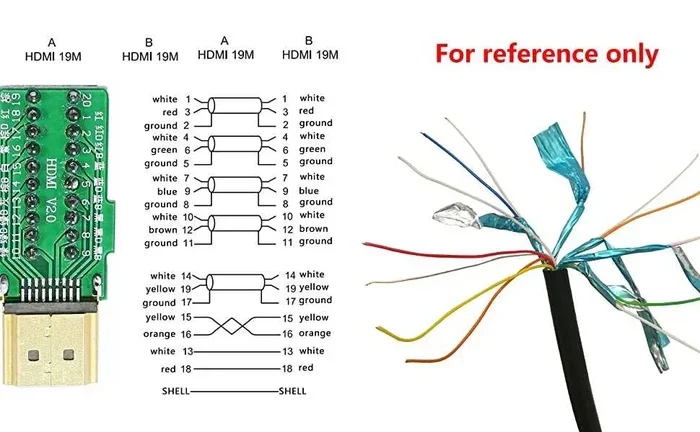
Can Hdmi Cables Be Joined Together Without Losing Quality
Yes, you can join HDMI cables together, but the method you choose matters a lot. Using an HDMI coupler, splitter, or extender lets you connect two cables seamlessly. However, signal loss, resolution drops, and latency are real risks if you pick the wrong approach. This guide breaks down every option so you can make the right choice for your home theater or office setup.
This is a comprehensive guide about Can Hdmi Cables Be Joined Together.
Key Takeaways
- HDMI cables can be joined: You have multiple reliable methods including couplers, splitters, and extenders to connect two cables end to end.
- Quality loss depends on the method: Passive couplers may cause slight signal degradation, while active cables and fiber optic extenders preserve full quality.
- HDMI couplers are the simplest solution: A small female-to-female adapter lets you plug two cables together with no tools needed.
- Active HDMI cables are better for long runs: They boost the digital signal over distances where passive cables fail.
- Avoid cheap adapters: Low-quality couplers can introduce audio video signal problems, intermittent connections, and reduced bandwidth.
- Match your HDMI version: Using mismatched HDMI versions can limit resolution and features like 4K or HDR support.
- Test your setup: Always verify signal strength, resolution, and audio after joining cables to ensure optimal performance.
[FEATURED_IMAGE_PLACEHOLDER]
Have you ever been setting up a home theater or office display and realized your HDMI cable just was not long enough? Maybe you needed to reach a new TV position or extend the run from your media console to the wall mount. The natural question that pops up is, can HDMI cables be joined together? And more importantly, can you do it without losing quality?
The short answer is yes. You absolutely can join HDMI cables together. But the longer answer is that how you join them makes all the difference. Some methods preserve your picture and sound perfectly. Others can cause signal loss, resolution drops, or frustrating intermittent connections. This guide walks you through every option, what works, what does not, and how to get the best results every single time.
Whether you are a casual viewer just trying to get your streaming box to reach a new TV, or a serious home theater enthusiast chasing the perfect 4K setup, this article has you covered. We will explore couplers, splitters, active cables, extenders, and all the practical details you need to know. Let us dive in and make sure your digital signal stays strong from end to end.
What Happens When You Join HDMI Cables Together
Understanding the HDMI Signal
HDMI stands for High Definition Multimedia Interface. It carries both audio and video signals through a single cable. The signal is digital, which means it travels as ones and zeros. Unlike analog signals, digital signals are either perfectly received or not received at all. This is an important concept to understand before you join any cables.
When you connect two HDMI cables using a coupler or adapter, you are essentially creating one longer cable. The digital signal travels through the first cable, hits the junction point, and then continues through the second cable. In theory, this should work perfectly. In practice, though, several factors can affect how well the signal passes through the connection point.
The main things that can go wrong include signal loss at the junction, reduced bandwidth, and impedance mismatch. These issues are more common with low-quality adapters and very long combined cable runs. A high-quality HDMI coupler minimizes these risks significantly.
Does Joining Two HDMI Cables Cause Quality Loss?
Here is the honest truth. Joining two HDMI cables can cause a tiny amount of signal degradation. But in most real world setups, you will not notice any difference at all. The digital nature of HDMI means that as long as the signal reaches the display device correctly, you get the same picture and sound quality as if you had one continuous cable.
However, there are exceptions. If the coupler is cheap and poorly made, it can introduce connection problems. You might see sparkles, flickering, or audio dropouts. Very long combined cable lengths can also push the limits of what HDMI can handle, especially for high resolution content like 4K at 120Hz or 8K.
The key takeaway is this. The quality of your join matters more than the act of joining itself. A good quality HDMI coupler or active cable setup will preserve quality. A bad one will not.
Different Methods to Join HDMI Cables
There are several ways to connect two HDMI cables together. Each method has its own strengths and weaknesses. Let us look at the most popular options so you can pick the right one for your situation.
Method 1: HDMI Coupler (Female to Female Adapter)
An HDMI coupler is the simplest way to join two cables. It is a small adapter with two female HDMI ports. You plug one cable into each side, and you have one longer cable. These couplers are inexpensive and widely available.
Couplers work best for short extensions. If you need to add just a few feet to your cable run, a coupler is a great choice. They are also handy for keeping your setup flexible. You can disconnect and reconfigure easily.
However, couplers add a connection point. Every connection point is a potential spot for signal issues. For best results, buy a gold plated HDMI coupler from a reputable brand. Avoid the cheapest options you find online. They often have loose tolerances that cause poor connections.
Method 2: HDMI Splitter with Return Function
An HDMI splitter takes one input and splits it into multiple outputs. Some splitters also work in reverse, combining signals from multiple sources. If you need to join two cables and split the signal to multiple displays, a splitter can serve double duty.
Not all splitters support bidirectional signal flow. Make sure you buy one that explicitly mentions return channel support or audio return channel functionality. A standard splitter will not let you join cables and send the signal back to a source device.
Splitters are useful in complex setups where you need to route signals in multiple directions. They add a layer of signal processing that can sometimes introduce a small amount of latency. For most home entertainment use, this is not noticeable. For competitive gaming, it might be.
Method 3: HDMI Extension Cable
An HDMI extension cable is essentially a long single cable that replaces the need to join two shorter ones. Instead of connecting two cables, you just use one longer cable from the start. Extension cables come in lengths from 10 feet to 100 feet and beyond.
This method eliminates the junction point entirely. Fewer connection points means fewer chances for signal problems. If you know you need a longer cable, buying an extension cable is almost always the better choice over joining two shorter cables.
Extension cables are available in both passive and active versions. Passive extension cables work well for shorter runs up to about 25 feet. For longer runs, you need an active extension cable that boosts the signal along the way.
Method 4: HDMI Extender Over Cat6 or Fiber Optic
For really long cable runs, an HDMI extender is the best solution. These devices use Cat6 Ethernet cable or fiber optic cable to transmit the HDMI signal over much longer distances than a standard HDMI cable can handle.
Cat6 extenders can push HDMI signals up to 100 feet or more. Fiber optic extenders can reach 300 feet or even longer. They work by converting the HDMI signal at the source end and converting it back at the display end.
Extenders are ideal for commercial setups, large living rooms, or any situation where you need to run a cable more than 50 feet. They do require power and add a small box at each end. But the signal quality they deliver is excellent and completely loss free when you use a quality unit.
Does Joining HDMI Cables Cause Quality Loss?
The Digital Signal Advantage
One of the biggest advantages of HDMI being a digital interface is that it does not suffer from the same quality loss as analog cables. With analog cables like composite or component, joining two cables together almost always causes some visible degradation. The signal weakens, colors shift, and image quality drops.
With HDMI, the digital signal either arrives intact or it does not arrive at all. As long as the joined connection is solid and the combined cable length stays within the supported range, you will get a perfect picture and perfect sound. There is no gradual quality decline like you see with analog cables.
This is why many people can join HDMI cables without ever noticing a problem. The digital signal is resilient as long as the physical connections are good.
When Quality Loss Can Happen
There are specific situations where joining HDMI cables can cause noticeable quality problems. Understanding these helps you avoid them.
- Very long combined cable runs: Standard HDMI cables lose signal strength beyond about 50 feet. If your joined cables total more than 50 feet, you may experience issues.
- Cheap or damaged couplers: A loose or poorly made coupler can cause intermittent signal drops. This shows up as screen flickering or audio cutouts.
- Bent or damaged connectors: If the HDMI connectors on your cables are bent or corroded, the signal will suffer at the join point.
- Mismatched HDMI versions: Joining an HDMI 2.0 cable with an HDMI 1.4 cable means the entire run is limited to HDMI 1.4 speeds. You will not get 4K or HDR if one cable in the chain does not support it.
- Poor shielding: Low quality cables with thin shielding can pick up electromagnetic interference, especially at longer lengths. This can cause sparkles or artifacts in the picture.
Being aware of these potential issues helps you make smarter choices. Invest in good quality cables and couplers, and you will rarely run into problems.
Quick Tips to Prevent Quality Loss
Follow these simple tips to keep your joined HDMI setup running smoothly.
- Use gold plated connectors: Gold plating reduces corrosion and ensures a solid electrical connection at every junction point.
- Keep combined cable length under 50 feet: This is the safe zone for standard passive HDMI cables without signal boosters.
- Check the HDMI version on both cables: Make sure both cables support the same version. If one is HDMI 2.1 and the other is HDMI 2.0, the whole run defaults to HDMI 2.0.
- Avoid tight bends: HDMI cables should not be bent sharply at the join point. Sharp bends can damage the internal wiring and degrade the signal.
- Test your setup before mounting: Plug everything in, play a 4K test video, and check for any flickering or audio issues before you finalize your cable routing.
Active vs Passive HDMI Couplers and Cables
When you join HDMI cables, you will encounter two main categories of solutions. Passive and active. Understanding the difference is key to making the right choice.
What Is a Passive HDMI Coupler?
A passive HDMI coupler is a simple adapter with no electronics inside. It just connects the pins from one cable to the pins of another cable. It does not boost or regenerate the signal. It simply passes it through.
Passive couplers work great for short extensions. If you need to add 3 to 10 feet to your cable run, a passive coupler is all you need. They are small, inexpensive, and easy to use. Just plug and play.
The downside is that passive couplers do nothing to strengthen the signal. If your combined cable length is already near the limit, adding a passive coupler will not help. The signal will weaken just the same as it would with a single long cable.
What Is an Active HDMI Coupler or Cable?
An active HDMI coupler or cable contains built in electronics that boost and regenerate the digital signal. This is crucial for longer cable runs where signal strength would otherwise drop below the threshold needed for a reliable connection.
Active HDMI cables can carry signals over much longer distances than passive cables. Some active cables support runs of 50 to 100 feet without any noticeable quality loss. They are more expensive than passive options, but for long runs, they are worth every penny.
If you are joining two cables and the total length exceeds 25 feet, consider using an active HDMI cable or adding an active signal booster at the junction point. This ensures the digital signal stays strong all the way to your display device.
Comparison Table: Passive vs Active HDMI Solutions
| Feature | Passive HDMI Coupler | Active HDMI Coupler or Cable |
|---|---|---|
| Signal Boosting | No | Yes |
| Max Recommended Length | Up to 25 feet total | Up to 100 feet or more |
| Price Range | $5 to $15 | $15 to $60+ |
| Powers Required | No | Yes (USB or external power) |
| Best For | Short extensions | Long cable runs |
| Signal Quality | Good for short runs | Excellent for all lengths |
| Setup Complexity | Very simple | Simple to moderate |
Best Practices for Connecting HDMI Cables
Getting the best results from your joined HDMI setup comes down to following a few proven practices. These tips will help you avoid common pitfalls and ensure a reliable, high quality connection every time.
Match Your HDMI Version
HDMI has gone through several versions over the years. Each version supports different maximum resolutions and features. HDMI 1.4 supports up to 4K at 30Hz. HDMI 2.0 supports 4K at 60Hz. HDMI 2.1 supports 4K at 120Hz and even 8K at 60Hz.
When you join two cables, the entire connection is only as strong as the weakest link. If one cable is HDMI 2.1 and the other is HDMI 2.0, your setup will be limited to HDMI 2.0 speeds. You will not get the full 4K 120Hz experience that HDMI 2.1 offers.
Always check the HDMI version on both cables and match them. If you are buying new cables, go for the latest version your devices support. Future proofing your setup saves money and frustration down the road.
Check the Bandwidth Rating
Bandwidth is how much data the cable can carry per second. Higher bandwidth means support for higher resolutions, refresh rates, and color depths. HDMI cables are rated by their bandwidth capacity. Standard HDMI cables support 10.2 Gbps. High Speed HDMI cables support 10.2 Gbps to 18 Gbps. Premium High Speed cables support 18 Gbps. Ultra High Speed cables support 48 Gbps.
For 4K content at 60Hz with HDR, you need at least an 18 Gbps cable. For 4K at 120Hz or 8K, you need the 48 Gbps Ultra High Speed rating. When joining cables, make sure both cables meet the bandwidth requirements for your setup.
Keep Connections Clean and Secure
A loose HDMI connection is one of the most common causes of signal problems. Make sure both cables are fully inserted into the coupler and the devices at each end. You should feel a slight click when the connector locks into place.
Dust and debris can also affect HDMI connections. If you have ever pulled a cable out and seen dust in the port, that is a sign to clean it before reinserting. A can of compressed air or a soft brush works well for this. Clean connections mean better signal transfer and fewer problems.
When to Use an HDMI Extender Instead of Joining Cables
Sometimes joining two HDMI cables is not the best solution. If your cable run is very long or your setup has specific requirements, an HDMI extender might be the smarter choice. Here is how to decide.
If your total cable length needs to be under 25 feet, joining two cables with a coupler works perfectly. If you need 25 to 50 feet, an active HDMI extension cable is a better option. If you need more than 50 feet, an HDMI extender over Cat6 or fiber optic cable is the way to go.
Extenders also offer flexibility in cable routing. You can run the Cat6 or fiber optic cable through walls, ceilings, and conduits much more easily than a thick HDMI cable. This makes extenders ideal for in wall installations and commercial setups.
Another advantage of extenders is that they often support the latest HDMI features including 4K 120Hz, HDR, and eARC. Many cheap HDMI extension cables struggle with these advanced features. Dedicated extenders handle them with ease.
Common Mistakes People Make When Joining HDMI Cables
Avoiding common mistakes saves you time, money, and frustration. Here are the errors most people make when they try to join HDMI cables together.
- Using the cheapest coupler available: A $2 coupler from an unknown brand might seem like a good deal. But poor build quality leads to bad connections and signal issues. Spend a little more on a reputable brand.
- Ignoring HDMI version compatibility: Mixing HDMI versions silently limits your setup. Always verify both cables support the same version before joining them.
- Overlooking cable length limits: Standard HDMI cables are rated for about 50 feet. Going beyond that without an active booster or extender almost guarantees problems.
- Forgetting about audio return channel support: If your setup uses eARC or ARC for audio, make sure your coupler and cables support these features. Some cheap couplers do not pass the audio return channel signal correctly.
- Not testing the setup before final installation: Always test your joined cables with actual content before you mount everything on the wall or run cables through conduits. Fixing problems after installation is much harder.
Expert Insights on HDMI Cable Joining
Audio video professionals and AV installers have been joining HDMI cables for decades. Here is what the experts have to say about getting the best results.
Most AV technicians agree that for runs under 25 feet, a quality passive coupler is all you need. The signal loss at the junction point is negligible and completely unnoticeable in everyday use. For longer runs, they strongly recommend active cables or dedicated extenders over simply joining two passive cables together.
Another expert recommendation is to avoid joining more than two cables together. Each additional connection point adds a small risk of signal problems. If you need a very long cable run, invest in one high quality long cable or an extender instead of chaining multiple couplers together.
Professionals also emphasize the importance of cable management. Running cables through tight spaces with sharp bends can physically damage the internal wiring over time. Use gentle curves and cable ties to keep your HDMI cables in good shape for years.
Key Takeaways
- HDMI cables can be joined together: You have multiple reliable methods including couplers, splitters, and extenders to connect two cables end to end.
- Quality loss depends on the method: Passive couplers may cause slight signal degradation, while active cables and fiber optic extenders preserve full quality.
- HDMI couplers are the simplest solution: A small female-to-female adapter lets you plug two cables together with no tools needed.
- Active HDMI cables are better for long runs: They boost the digital signal over distances where passive cables fail.
- Avoid cheap adapters: Low-quality couplers can introduce audio video signal problems, intermittent connections, and reduced bandwidth.
- Match your HDMI version: Using mismatched HDMI versions can limit resolution and features like 4K or HDR support.
- Test your setup: Always verify signal strength, resolution, and audio after joining cables to ensure optimal performance.
Conclusion
The answer to whether can HDMI cables be joined together is a clear yes. You have multiple reliable methods to extend your cable runs without sacrificing quality. From simple HDMI couplers to active cables and fiber optic extenders, there is a solution for every situation and budget.
The key is to choose the right method for your specific needs. Short extension? A passive coupler works great. Long run over 50 feet? Go with an active cable or extender. Complex setup with multiple displays? Consider a bidirectional splitter.
Always pay attention to cable quality, HDMI version compatibility, and combined cable length. These three factors make the biggest difference in whether your joined setup delivers a flawless picture and crystal clear audio. Take the time to get it right, and your HDMI cable joining experience will be smooth and trouble free.
Now that you know exactly how to join HDMI cables without losing quality, you can set up your display with confidence. Whether it is a home theater, gaming setup, or office presentation, you have the knowledge to make it work perfectly. Happy connecting.
Can I join two HDMI cables with a simple adapter?
Yes, you can use an HDMI coupler or female-to-female adapter to join two cables. This is the simplest and most affordable method. Just make sure the coupler is gold plated and from a reputable brand for the best signal quality.
Will joining HDMI cables reduce the resolution?
Not if you use quality cables and a good coupler. HDMI is a digital signal, so as long as the connection is solid, the resolution stays the same. However, if one of the cables does not support the required bandwidth, the entire setup will default to the lower cable’s capabilities.
What is the maximum length for joining HDMI cables?
Standard passive HDMI cables work well up to about 50 feet total. Beyond that, you should use an active HDMI cable or an HDMI extender. Active cables and extenders boost the signal and prevent loss over longer distances.
Do HDMI couplers need external power?
No, passive HDMI couplers do not need any power. They are simple adapters with no electronics. Active HDMI cables or extenders with built in signal boosters do require power, usually through a USB connection.
Can I join an HDMI 2.0 cable with an HDMI 2.1 cable?
You can, but the entire connection will be limited to HDMI 2.0 speeds. You will not get HDMI 2.1 features like 4K at 120Hz or 8K support. Always match the HDMI version on both cables for the best performance.
Is an HDMI extender better than joining two cables?
For long cable runs, yes. An HDMI extender uses Cat6 or fiber optic cable to carry the signal over much longer distances than standard HDMI cables. It also eliminates the junction point, reducing the risk of signal problems. For short extensions, a coupler is perfectly fine.
Frequently Asked Questions
What is Can Hdmi Cables Be Joined Together?
Can Hdmi Cables Be Joined Together is an important topic with many practical applications.