Can You Charge Usb C Laptop With Power Bank Anywhere
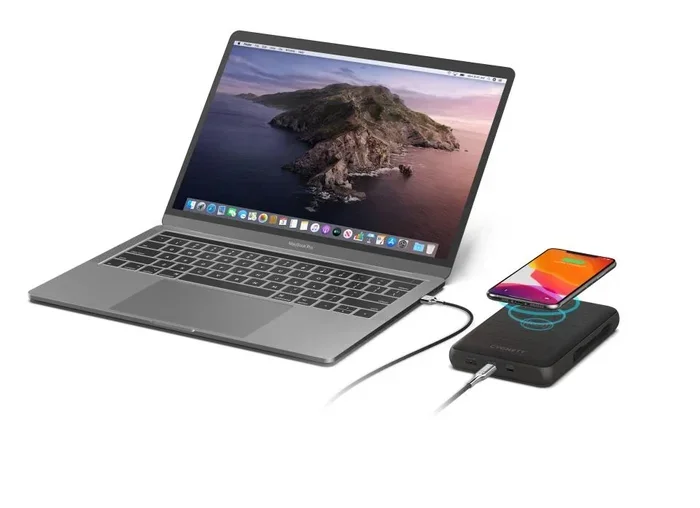
Yes, you can charge a USB C laptop with a power bank, and it is easier than most people think. With the right USB-C power bank and proper wattage, you can keep your laptop running anywhere — from airport lounges to remote workspaces. This guide breaks down everything you need to know about charging your laptop with a power bank, including what to look for, common mistakes, and the best options available.
Have you ever been stuck in a coffee shop, airport, or remote workspace with a dying laptop? It is one of the most frustrating feelings in the modern world. Your screen dims, your work hangs in the balance, and there is not an outlet in sight.
So you look down at your bag and wonder, can you charge USB C laptop with power bank? The short answer is yes. But the full answer is a bit more nuanced. Not every power bank works with every laptop, and using the wrong one can waste your time and money. This guide will walk you through everything you need to know about charging your laptop with a power bank — from the basics to pro tips that most guides skip.
Whether you are a frequent traveler, a remote worker, or just someone who wants a reliable backup, understanding how USB-C laptop charging works with portable power sources will save you from unexpected battery deaths. Let us dive in.
Key Takeaways
- USB-C makes it possible: Most modern laptops use USB-C charging, which means a compatible power bank can fully recharge them.
- Capacity matters a lot: You need a power bank with at least 20,000 mAh to charge a laptop once, and more for multiple charges.
- Wattage is critical: Look for power banks that deliver 45W or more to match your laptop charger’s output.
- Not all cables are equal: Using the wrong USB-C cable can slow charging or prevent it entirely.
- Power banks are great for travel: They offer a convenient backup when outlets are unavailable.
- A power bank cannot fully replace your charger: It works best as a supplement or emergency backup.
📑 Table of Contents
- How USB-C Charging Works with Power Banks
- What You Need to Charge Your Laptop with a Power Bank
- Best Power Banks for Charging USB-C Laptops
- Real-World Charging Scenarios
- Common Mistakes When Using a Power Bank with a Laptop
- Can a Power Bank Fully Replace Your Laptop Charger?
- Expert Tips for Maximizing Your Power Bank’s Performance
- The Future of Portable Laptop Charging
- Conclusion
How USB-C Charging Works with Power Banks
Before you buy any power bank, it helps to understand the technology behind it. USB-C charging has revolutionized how we power our laptops. It replaced the bulky, proprietary chargers that once came with every new computer.
Understanding USB-C and USB-C Power Delivery
USB-C is a connector type, not a charging standard. It is small, reversible, and fast. But what really matters for laptop charging is something called USB Power Delivery, or USB-PD for short. This is a protocol that lets your device negotiate the right amount of power with the charger or power bank.
Here is how it works in simple terms. Your laptop tells the power bank, “Hey, I need 60 watts right now.” The power bank responds, “Got it.” This negotiation happens in milliseconds. It is why USB-C power delivery is so much smarter and safer than older charging methods.
The beauty of USB-PD is that it is universal. A power bank that supports it can charge your phone, tablet, and laptop from the same port. You just need the right cable and enough capacity.
Why USB-C Changed the Game for Portable Charging
Before USB-C, charging a laptop from a power bank was messy. You needed special adapters, proprietary cables, or bulky converters. Now, a single USB-C cable handles it all.
This shift opened the door for portable chargers for laptops. Companies started building power banks specifically designed to handle the higher wattages that laptops demand. Today, you can find a laptop power bank that delivers up to 100 watts or more. That is enough to charge even power-hungry machines like the MacBook Pro or high-end Windows laptops.
The key takeaway here is simple. USB-C made portable laptop charging practical for the first time. But having a USB-C power bank is only half the battle. You also need the right capacity and wattage.
What You Need to Charge Your Laptop with a Power Bank
Not all power banks are created equal. If you want to charge your USB-C laptop on the go, there are a few things you must check before buying.
Power Bank Capacity Matters
Capacity is measured in milliampere-hours, or mAh for short. It tells you how much energy the power bank can store. The higher the number, the more charges it can provide.
For a smartphone, a 10,000 mAh power bank works great. But laptops use way more power. To charge a laptop even once, you need at least 20,000 mAh. For multiple charges or longer trips, look for 30,000 mAh or higher.
Here is a quick way to think about it. A typical laptop battery holds around 50 to 100 watt-hours of energy. A 20,000 mAh power bank at 20 volts gives you roughly 74 watt-hours. That should get you one full laptop charge. A 30,000 mAh unit gives you closer to two charges.
Keep in mind that real-world capacity is always lower than the advertised number. Heat loss, conversion inefficiency, and cable resistance all eat into the usable power. So always plan for some buffer.
Wattage and Voltage Requirements
Capacity is only half the equation. The other half is wattage. This is where many people go wrong. A power bank might have huge capacity but deliver very little power. That means it charges your laptop painfully slowly or not at all.
Most laptops need between 45 and 100 watts to charge properly. Check your laptop charger and look for the wattage rating. If your charger says 65W, you need a power bank that can output at least 65W.
USB-C Power Delivery supports different power profiles:
- 18W: Enough for phones and tablets, not enough for most laptops.
- 45W: Works for lightweight laptops like Ultrabooks and MacBooks.
- 65W: The sweet spot for most standard laptops.
- 100W: Handles even the most powerful gaming and workstation laptops.
Always match the power bank’s output to your laptop’s needs. Using a 45W power bank on a 65W laptop will still charge it, but it will be slower. In some cases, the laptop may even lose battery while using it, because the power bank cannot keep up with the demand.
Best Power Banks for Charging USB-C Laptops
The market is flooded with portable chargers, but not all of them are suitable for laptops. Here is what to look for and some recommendations.
Top Picks for Different Needs
If you want the best power bank for USB-C laptop charging, consider these categories:
- Compact travel power banks: These are around 20,000 mAh and fit easily in a backpack. They are perfect for day trips and short commutes. Look for ones that support at least 45W of output.
- High-capacity power stations: With 30,000 mAh or more, these can charge a laptop two or three times. They are heavier but ideal for long flights or remote work trips.
- Solar power banks: These have built-in solar panels for emergency situations. They charge slowly, but they offer independence from wall outlets in a pinch.
What to Look for in a Laptop Power Bank
When shopping for a battery pack for laptop, keep these factors in mind:
- USB-C Power Delivery support: This is non-negotiable. Without PD, the power bank cannot communicate with your laptop properly.
- Wattage output: Match it to your laptop charger’s wattage or go higher.
- Number of ports: More ports mean you can charge multiple devices at once. Look for at least two USB-C ports and one USB-A port.
- Build quality and safety certifications: Cheap, uncertified power banks can damage your laptop. Stick with reputable brands that have overcharge and short-circuit protection.
- Weight and size: Higher capacity means more weight. Balance your needs with how much you are willing to carry.
Real-World Charging Scenarios
Theoretical knowledge is great, but let us talk about how this works in real life. Charging your laptop with a power bank is not just about having the right gear. It is about using it smartly.
Charging During Travel
Traveling is where laptop power banks really shine. Picture this. You are on a six-hour flight with no seat-back outlet. Your laptop is at 20 percent, and you have three hours of work left. A good travel power bank with 30,000 mAh and 65W output can save your entire trip.
Pro tip. Charge your power bank fully before you leave home. Also, pack the right cable. Not all USB-C cables support high wattage. A cheap cable rated for only 18W will bottleneck your charging speed.
Charging at Home or the Office
You do not need to be traveling to benefit from a portable charger for laptops. Many people use a power bank as a backup at home or in the office. Maybe your desk is far from the nearest outlet. Or maybe you want to work from the couch without being tethered to the wall.
In these situations, a 20,000 mAh power bank works perfectly. It gives you one extra full charge, which is enough to get through a full workday in an emergency.
Another great use case is during power outages. A high-capacity laptop battery pack can keep you productive when the lights go out. Just make sure you have enough stored energy to last through the outage.
Charging on the Go During the Workday
For remote workers and digital nomads, a power bank is an essential tool. Coffee shops, co-working spaces, and parks are great work environments, but outlets are not always available. A USB-C laptop power bank gives you the freedom to work from anywhere without worrying about battery life.
Some people even carry two power banks — one for their phone and one for their laptop. This way, they never run out of power for either device. It sounds like overkill, but once you experience a dead laptop in the middle of an important task, you will understand the value.
Common Mistakes When Using a Power Bank with a Laptop
Even with the right power bank, mistakes can happen. Here are the most common ones to avoid.
Using the Wrong Cable
This is the number one mistake people make. Not all USB-C cables are created equal. Some are designed for data transfer only. Others handle charging but only at low wattages. If you want fast USB-C laptop charging, you need a cable that supports USB Power Delivery and high current.
Look for cables rated for 60W or 100W. They are usually thicker and clearly labeled on the packaging. Using a thin, unmarked cable with a high-wattage power bank is like putting a garden hose on a fire hose. It will not deliver the power your laptop needs.
Ignoring Wattage Requirements
We mentioned this earlier, but it bears repeating. Buying a power bank with great capacity but low wattage is one of the most common mistakes. A 30,000 mAh power bank that only outputs 18W will take forever to charge your laptop. It might not even charge it at all if your laptop demands more power than the bank can provide.
Always check the output wattage, not just the capacity. Both numbers matter for a good laptop charging experience.
Overheating and Safety Concerns
Cheap power banks without proper safety features can overheat. This is dangerous for both the power bank and your laptop. Always buy from reputable brands and look for safety certifications like UL or CE marks.
If your power bank gets hot while charging your laptop, stop using it immediately. Overheating can damage your laptop battery and even pose a fire risk. Better safe than sorry.
Expecting a Power Bank to Fully Replace Your Charger
A power bank is a great supplement, but it is not a full replacement for your wall charger. Wall chargers provide consistent, high-wattage power. Power banks have limited capacity and will eventually run out.
Think of a portable charger for laptops as a backup tool, not a primary one. Use it to extend your laptop’s runtime, not as a permanent charging solution.
Can a Power Bank Fully Replace Your Laptop Charger?
This is one of the most common questions people ask. The honest answer is: it depends.
If you have a lightweight laptop with modest power needs and a high-capacity power bank, you could technically use just a power bank for a full day of work. Many ultrabooks and Chromebooks draw very little power. A 20,000 mAh power bank with 65W output can easily handle these machines.
But for most standard and high-performance laptops, a power bank alone will not cut it. The battery will drain faster than the power bank can replenish it. You will end up carrying a heavy power bank that barely keeps your laptop alive.
The best approach is to use your wall charger as your primary power source and keep a laptop power bank for emergencies and travel. This gives you the best of both worlds. You get fast, reliable charging at your desk and portable backup power when you need it.
Pros and Cons of Using a Power Bank as Your Main Charger
Let us break this down quickly.
- Pros: Portability, freedom from wall outlets, great for travel, works as an emergency backup.
- Cons: Limited capacity, heavier than a wall charger, slower charging speeds, higher cost for high-capacity models, not practical for all-day heavy use.
For most people, the pros of using a power bank as a backup far outweigh the cons. Just do not expect it to replace your charger entirely unless you have a very lightweight laptop and a very powerful power bank.
Expert Tips for Maximizing Your Power Bank’s Performance
Want to get the most out of your USB-C laptop power bank? Follow these expert tips.
- Charge your power bank before every trip. Do not assume it still has leftover charge from last time.
- Turn off the power bank when not in use. Many power banks have an on/off switch. Using it prevents slow battery drain.
- Keep your power bank at room temperature. Extreme heat or cold reduces battery performance and lifespan.
- Use the right USB-C cable. Invest in a high-quality cable rated for the wattage you need.
- Charge your laptop and power bank simultaneously when possible. Some power banks support pass-through charging, which lets you charge the bank and your laptop at the same time using a wall outlet.
- Check compatibility before buying. Not all power banks work well with all laptops. Read reviews and check specifications carefully.
These small habits make a big difference. They extend the life of your power bank and ensure you get the most reliable laptop charging on the go possible.
The Future of Portable Laptop Charging
The technology behind USB-C charging continues to improve. Newer power banks are lighter, more efficient, and more powerful than ever. Some models now support 140W of output, which is enough for even the most demanding laptops.
We are also seeing innovations like gallium nitride chargers and smart power banks that can detect your device and adjust output automatically. These advancements make charging your USB-C laptop with a power bank faster, safer, and more convenient.
As laptops become more energy-efficient and power banks become more capable, the gap between wall charging and portable charging continues to shrink. It is only a matter of time before a single power bank can fully replace a wall charger for most users. Until then, the tips and guidelines in this article will help you get the most out of your portable charging setup.
Conclusion
So, can you charge USB C laptop with power bank? Absolutely. With the right equipment and a little knowledge, you can keep your laptop powered up almost anywhere. The key is understanding your laptop’s power needs, choosing a power bank with sufficient capacity and wattage, and using the right cable.
Charging your laptop with a power bank is not magic. It is science, and it is incredibly practical. Whether you are a traveler, a remote worker, or just someone who wants a reliable backup, a good USB-C laptop power bank is one of the best investments you can make.
Remember the main points from this guide. Capacity matters. Wattage matters. The right cable matters. And a power bank works best as a supplement to your regular charger, not a replacement. Follow these guidelines, avoid the common mistakes, and you will never worry about a dead laptop battery again.
Start by checking your laptop’s charging requirements, then shop for a portable charger that meets or exceeds them. You will be glad you did. Happy charging!
Frequently Asked Questions
Can any power bank charge a USB-C laptop?
No, not just any power bank. You need a power bank that supports USB-C Power Delivery and has enough wattage to match your laptop’s charger. Check your laptop’s charger for its wattage rating and make sure the power bank meets or exceeds it.
How long does it take to charge a laptop with a power bank?
It depends on the power bank’s capacity and wattage output. A 20,000 mAh power bank with 65W output can charge most laptops from zero to full in about two to three hours. Higher-capacity power banks will take longer but can provide multiple charges.
Is it safe to charge a laptop with a power bank?
Yes, as long as you use a quality power bank with proper safety certifications. Avoid cheap, uncertified power banks, as they can overheat and potentially damage your laptop. Always look for overcharge and short-circuit protection features.
Can I use my laptop while charging it with a power bank?
Yes, you can use your laptop while it charges from a power bank. However, if your laptop is using more power than the power bank delivers, the battery may still drain slowly. For best results, use a power bank that matches or exceeds your laptop charger’s wattage.
What size power bank do I need for a 15-inch laptop?
For most 15-inch laptops, a 20,000 mAh power bank with at least 45W to 65W of output is ideal. This will give you one full charge. If you need more, go for 30,000 mAh or higher.
Do I need a special cable to charge a laptop with a power bank?
Yes, you need a USB-C cable that supports Power Delivery and high wattage. Not all USB-C cables can handle the power needed for laptop charging. Look for cables rated for 60W or 100W for the best results.