Can You Connect Usb C To Usb 3 Here Is What You Should Know
Can You Connect Usb C To Usb 3? Yes, you can! The Usb C connector is designed to be backward compatible with older Usb 3.0 ports using the right adapter or cable. This guide will show you exactly how to make it work and what speeds you can expect.
Key Takeaways
- Universal Compatibility: You can connect Usb C to Usb 3 ports with the correct adapter or hybrid cable.
- Speed Matters: Data transfer speeds depend on the specific standard, like Usb 3.0 or Usb 3.1, and will be limited by the older port.
- Power Delivery Works: Charging still functions, but you may need a power delivery adapter and will be limited by the older port’s wattage.
- Check Your Cables: Not all Usb cables support the same features or data rates, so always check the specs.
- Simple Setup: Most connections are plug and play, requiring no extra software or complicated setup.
📑 Table of Contents
Understanding The Shapes And Sizes Of Usb Connectors
Before we dive into the answer, let us look at the physical shapes of these ports. Many people get confused because they hear terms like Usb C and Usb 3 all the time. But these names actually refer to two completely different things. One is a physical shape, and the other is a technology standard. Mixing them up is very common.
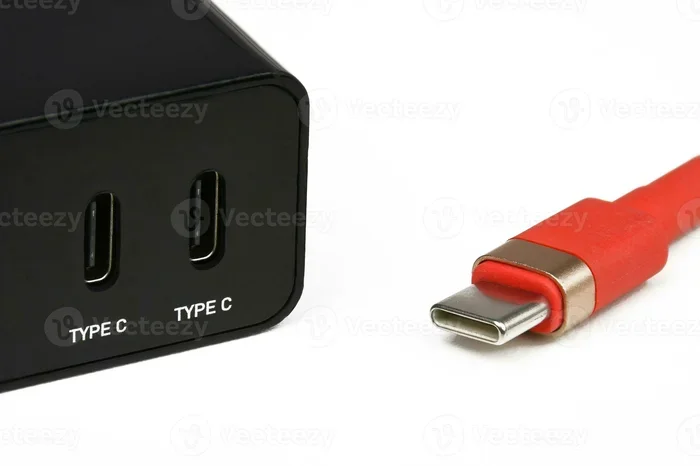
A Usb C connector is a small, oval-shaped plug. It is thin and lightweight. The best part is that it is reversible. This means you can plug it in either way. You do not have to flip it over like an old puzzle piece. This shape has become the new standard for phones, laptops, and tablets everywhere. It is replacing the older, bulkier shapes on almost every new device.
What Is A Usb C Connector?
The Usb type C port is tiny compared to the old ones. It measures about half a centimeter tall and wide. Because it is so small, it fits perfectly into slim modern devices. It also carries a lot of power and data on its tiny pins. This makes it very versatile for all kinds of compatible devices. You can use it for charging, screen output, and fast data.
But shape is just the outer shell. Inside the cable, there are many tiny wires. These wires carry data and electricity from one place to another. The shape does not tell you the speed or the power inside. A Usb cable with a C shape can support old speeds or brand new speeds. You have to check the specs on the box to know for sure. Do not assume all C-shaped cables are the same.
Many people also confuse Usb type C with Thunderbolt. Thunderbolt is a separate technology that sometimes uses the C shape. A Thunderbolt cable can do even more than a standard Usb C cable. But a regular Usb C cable cannot do everything Thunderbolt can. Always check the logo on your cable to see what it really supports.
What Does Usb 3 Look Like?
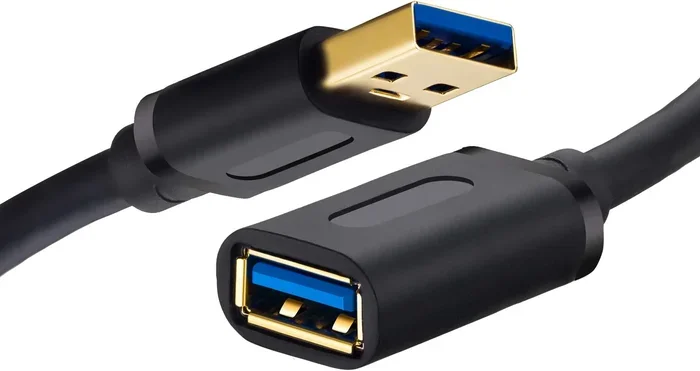
When people say Usb 3, they usually mean a Usb 3.0 or Usb 3.1 port. These are almost always the big, rectangular USB-A ports. You see them on desktop computers, older TVs, and big printers. They have a solid block shape with a top piece that looks like a small lip. This lip helps you guide the plug in the right way.
The USB-A connector is not reversible. You have to look at it carefully to plug it in the correct direction. It takes a bit of trial and error if you are in a hurry. Inside, there are different pins than in a C port. The USB-A port was built for data transfer speed and power in a much older era. But it still works great today and is found on millions of devices.
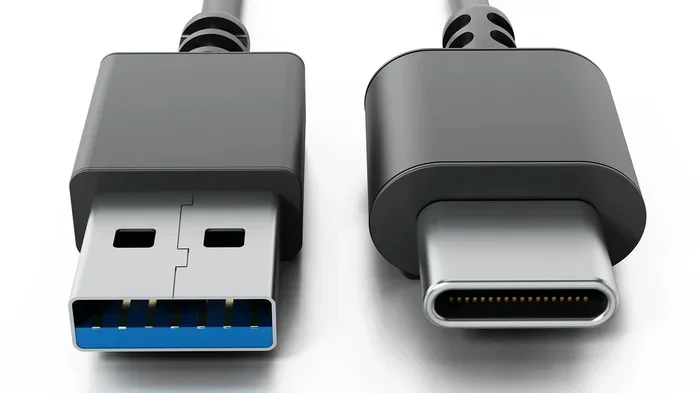
There are also USB-B ports that look like square shapes. These are usually for big printers. But when most people say Usb 3, they mean the standard USB-A rectangle. The key thing to remember is that USB-A is big and blocky. Usb C is small and oval. You cannot plug one into the other without a helper.
So, you have a small oval shape and a big rectangular shape sitting on your desk. They look nothing alike at all. This is exactly why you cannot just jam one into the other. You need a bridge to connect them properly and safely. That bridge comes in the form of a cable or a small adapter box.
Can You Connect Usb C To Usb 3 Directly?
The short answer is no. You cannot connect Usb C directly to a Usb 3 port without some help. The physical shapes will simply not match. Trying to force them together will not work. It could also damage the delicate pins inside the port. Always respect the different shapes of these connectors.
The Physical Connection Problem
Think of it like trying to fit a square block into a round hole. The Usb C plug is oval and smooth. The Usb 3 port is a big, blocky rectangle. They simply do not fit together. The connector shape is completely different from one another. No amount of wiggling will make them match.
You might look at a Usb C plug from the side and think it looks a bit like a USB-A port. But from the front, they are totally different. The Usb C has no lips or flared edges to guide it. The USB-A has a distinct top bar that prevents you from pushing it in too far. You must respect these physical limits to keep your gear safe.
Why They Do Not Fit Together
The pin layouts inside the two connectors are very different. A Usb C port has pins arranged in a very compact, dual-row layout. A USB-A port has its own unique single-row pin layout. If you try to force a Usb C plug into a USB-A port, the pins will not align. You will just be pushing plastic into metal.
This is not just a shape issue. It is an electrical issue too. The pins carry different signals for data and power. A proper connection needs the right pins to touch the right wires inside the cable. Without this exact alignment, you get no data and no power at all. You absolutely need an adapter or a hybrid cable to make the link work right.
This is why the question Can You Connect Usb C To Usb 3 is so common. People see the shapes and assume they should fit. But technology does not always work that way. You have to use the right bridge to cross the gap between the old shape and the new shape.
How To Make The Connection Work
So how do you bridge the gap between the oval and the rectangle? You use a special adapter or a hybrid Usb cable. Both options are easy to find and very affordable. You do not need to be a tech expert to make this work. Let us look at exactly how to set this up the right way.
Using A Usb C To Usb 3 Adapter
An adapter is a small box or dongle. You plug your Usb C device into one side. Then you plug the adapter into the Usb 3 port on your computer or hub. This gives you a brand new Usb port to work with right away.
Adapters are great for laptops with very few ports. If your laptop only has Usb C ports but you need to plug in an old flash drive, an adapter saves the day. You just plug the flash drive into the adapter. It is a simple plug and play solution. Your computer should recognize the drive in seconds.
You can also use an adapter to connect old mice and keyboards. Many people still have these older devices lying around. Instead of buying new ones, just use a small adapter. It is a cheap and easy way to keep using your favorite gear. A docking station often has these adapters built right in.
Buying The Right Cable
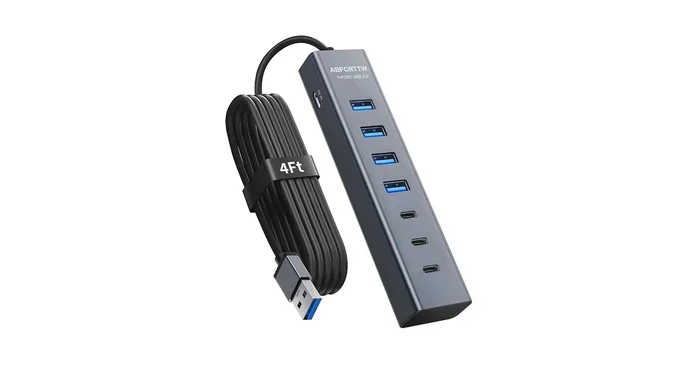
Another option is to buy a direct cable. Look for a cable that has a Usb C plug on one end and a Usb-A plug on the other. This cable acts as your bridge all by itself. You plug the Usb-A end into the computer and the Usb C end into your device. No extra boxes needed.
Not all cables are created equal. Some cheap cables only support charging. They do not support data transfer at all. If you want to move files from your phone to a PC, you must buy a cable that supports data. Check the packaging for words like super speed or Usb 3.0 to be sure you are getting the right one.
When you connect usb c to usb 3, always use quality parts. Cheap adapters can overheat during long transfers. They might also fail to support the fastest speeds. Stick to trusted brands for your docking station or hub needs. A good cable will last for years and keep your data safe.
| Connection Method | Best For | Speed Limit | Ease Of Use |
|---|---|---|---|
| Usb C to Usb 3 Adapter | Adding extra ports to a laptop | Limited by the adapter chip | Very Easy |
| Hybrid Usb C to Usb-A Cable | Plugging in old flash drives | Limited by the cable rating | Extremely Easy |
| Usb C Hub with Usb-A Ports | Connecting multiple old devices | Hub built-in limit | Easy |
Think about what you do most often. If you just need to plug in one old device now and then, a simple cable is best. If you need many ports all the time, a hub or adapter is a better choice. Both options will let you connect usb c to usb 3 without any headaches.
Speed And Data Transfer Rates
One of the biggest questions people have is about speed. They wonder if their data transfer speed will be fast enough for big video files. The answer depends on which part of the connection is the slowest link in the chain.
How Fast Is Usb 3?
The Usb 3.0 standard offers speeds up to 5 gigabits per second. The newer Usb 3.1 standard goes up to 10 gigabits per second. And Usb 3.2 can push 20 gigabits per second. These are very fast numbers for moving big files like movies and photo libraries. You can transfer a full movie in just a few seconds.
But when you use an older USB-A port, you are locked into that older speed. Even if your Usb C device can go faster, the Usb 3 port will slow it down. The connection will always run at the speed of the slowest part. This is a rule of thumb for all backward compatible tech. The old port sets the limit.
Does Usb C Slow Things Down?
A Usb C port itself does not slow things down. It is just a shape, like a doorway. A Usb C port can support the newest Thunderbolt standards. Thunderbolt can move data at 40 gigabits per second. That is super fast. But when you plug into a Usb 3 port, you lose that speed. You are stuck at 5 or 10 gigabits per second.
So, if you plug a super fast external hard drive into an old Usb 3 port via an adapter, the drive will not run at full speed. It will only run as fast as the Usb 3 port allows. For most everyday tasks, this speed is still plenty. You can move photos and documents in seconds. You probably will not even notice the difference.
If you want the fastest speeds, you need a Usb C port that supports Usb 3.1 or higher. You also need a cable that supports those speeds. Using a cheap cable will slow down even the fastest drive. Always match your cable to your device for the best data transfer speed.
Power Delivery And Charging
Can you charge your gadgets this way? Yes, you can. But there are some limits you should know about. Power delivery works differently between the two shapes. The amount of power your device gets depends on the port it is plugged into.
Can You Charge Devices This Way?
When you use a Usb C to Usb-A cable, you can charge your phone or tablet. The Usb 3 port will send power through the cable to your device. Your device will start to charge as soon as you plug it in. It is a very simple process.
However, the charging speed might not be as fast as you want. A standard USB-A port usually sends about 5 watts of power. A modern Usb C wall plug can send up to 100 watts. So your device will charge slower than it would with a Usb C wall plug. It will still charge, just at a more relaxed pace.
Understanding Power Delivery Limits
Some devices need more power to charge quickly. Laptops are a good example of this. You usually cannot charge a laptop through a Usb 3 USB-A port. The port simply does not have enough power output. It is meant for mice and keyboards, not big power-hungry machines.
If you try to charge a power-hungry device through an old port, the device might still charge. But it will take a very long time. Sometimes, the device might even lose battery while you use it. The power going in is less than the power going out. Always check the power requirements before you rely on an old port for a full charge.
Also, not all Usb cables carry the same amount of power. A cheap cable might have thin wires that drop voltage. This means your device gets less power than it should. Use a good quality cable to make sure your device gets the power it needs to charge safely.
Common Mistakes And How To Avoid Them
Making mistakes with Usb connections is very common. Most of these mistakes come from simple confusion about the shapes and speeds. Here are a few things to watch out for so you do not waste your money.
Buying The Wrong Adapter
Not all adapters are the same. Some adapters only support charging. They do not support data at all. If you buy a cheap charging-only adapter, you will not be able to transfer files between your devices. Always read the description carefully on the box. Look for words like data transfer or super speed to make sure you get the right one.
Assuming All Cables Are Equal
This is the biggest mistake people make when they connect usb c to usb 3. They think any Usb cable with a C shape will do the job. But cables have different inside wires. A cheap cable might have thin wires that overheat during long transfers. It might also fail to reach the speeds you need. Do not gamble with your data.
Buy cables from known and trusted brands. Check if the cable supports Usb 3.0 or higher. A good cable will have the super speed logo printed on the plug. This logo looks like a blue trident shape. It tells you the cable is ready for fast and reliable work. Never skip this check if you need good speeds.
Forgetting About Device Compatibility
Sometimes the problem is not the cable or adapter. It is the device itself. Some older devices do not support backward compatible features well. They might not recognize a new Usb C drive at all. Always check your device manual if you run into problems. A quick search online can usually solve any compatible devices issues.
Quick Tips:
- Always check the cable rating before you buy it.
- Use a hub if you need many old ports at once.
- Never force a plug into a port if it does not fit.
- Look for the super speed logo on cables and adapters.
- Keep your adapter in a safe place to avoid damage.
- Test your setup with a small file first before moving big ones.
- Unplug adapters gently to avoid breaking the internal pins.
Conclusion
So, can you connect Usb C to Usb 3? Yes, absolutely. You just need the right bridge to make it happen. Whether you choose an adapter or a hybrid cable, the connection is easy to make. You do not need to be a tech expert to get it working.
Remember that the Usb C shape is just a shape. It does not define the speed or the power inside. When you connect usb c to usb 3, the speed will be limited by the older port. But for everyday tasks, this setup works perfectly fine. You can transfer files and charge your devices with ease and confidence.
Just pick a quality Usb cable or adapter that fits your needs. Look for super speed ratings if you need fast data. And always make sure your gear is backward compatible with the older standards. With the right tools, your old and new devices will work together like a charm. Enjoy the simple plug and play experience and keep your tech running smoothly.
Frequently Asked Questions
Is Usb C the same as Usb 3?
No, they are not the same thing. Usb C refers to the shape of the connector, while Usb 3 refers to the technology and speed standard. A Usb C port can support Usb 3 speeds, but it is not the same as a traditional Usb 3 port.
Can I use a Usb C cable with a Usb 3 port?
Yes, you can if the cable has a Usb C plug on one end and a Usb-A plug on the other. You will need to make sure the cable is built to support the data speeds you want. Always check the cable specifications before buying.
Will my data transfer speed be slower?
Yes, when you connect usb c to usb 3, the speed is limited by the older port. If your Usb 3 port is a standard 5 Gbps port, your transfer speed will max out at that rate. Your Usb C device will not go faster than the port allows.
Can I charge my phone with a Usb C to Usb 3 connection?
Yes, you can charge your phone this way. However, the charging speed might be slower because the Usb-A port usually provides less power than a dedicated Usb C charging port. It will still charge your device, just maybe not as fast.
Do I need a special adapter to make this work?
You do not always need a special adapter if you buy the right cable. A simple cable with a Usb C end and a Usb-A end acts as the bridge. If you need to add a port to your laptop, then a USB hub or adapter is the best choice.
Is plug and play supported for this setup?
Yes, most of the time it is plug and play. Modern computers and devices recognize the connection right away. You usually do not need to install any drivers to use a Usb C to Usb 3 cable or adapter.