Can You Use A Lightning Cable In A USB C Port Safely
You cannot directly plug a Lightning cable into a USB-C port because they use completely different connector designs and communication protocols. The Lightning connector is Apple’s proprietary 8-pin design, while USB-C uses a 24-pin reversible connector. However, you can use adapters and cables with built-in converters to bridge the gap safely. Understanding the differences helps you avoid damage and choose the right accessory for your devices.
Key Takeaways
- Lightning and USB-C are not interchangeable: They have different pin counts, shapes, and communication protocols.
- Direct connection is not possible: You need an adapter or a cable with a built-in Lightning-to-USB-C converter.
- Using the wrong cable can damage your device: Poor-quality adapters may cause overheating or port damage.
- USB-C is becoming the universal standard: Most new devices, including iPads and MacBooks, now use USB-C.
- Apple’s transition to USB-C: Recent iPhone models and Apple accessories are shifting toward USB-C for better compatibility.
- Always buy certified adapters: Look for MFi-certified or USB-IF certified products for safety.
📑 Table of Contents
- Can You Use A Lightning Cable In A USB C Port?
- Understanding the Lightning Connector
- Understanding the USB-C Connector
- What Happens When You Try to Connect Them?
- Safe Ways to Connect Lightning Devices to USB-C Ports
- USB-C in Healthcare and Medical Technology
- Apple’s Transition to USB-C
- Common Mistakes People Make with Cable Compatibility
- Quick Tips for Choosing the Right Cable
- Expert Insights on Connector Evolution
- Conclusion
Can You Use A Lightning Cable In A USB C Port?
Short answer? No, not directly. You cannot plug a Lightning cable into a USB-C port and expect it to work. The two connectors look nothing alike, and they communicate using entirely different protocols. But the full story is more interesting than a simple “no.”
Millions of people use Lightning cables every day for their iPhones, iPads, and AirPods. At the same time, USB-C has become the go-to connector for laptops, Android phones, and modern tablets. This creates a lot of confusion. People wonder if they can just swap one for the other. Let us break it all down for you in plain language.
The good news is that you do not have to throw away your Lightning cables. There are safe and reliable ways to connect Lightning devices to USB-C ports. You just need the right adapter or cable. In this guide, we will walk you through everything you need to know. We will cover compatibility, risks, solutions, and what the future holds for these two connector types.
Why Do These Connectors Not Work Together?
Lightning and USB-C serve the same basic purpose. They transfer power and data. But they do it in completely different ways. Think of them like two different languages. They both express ideas, but they use different words and grammar.
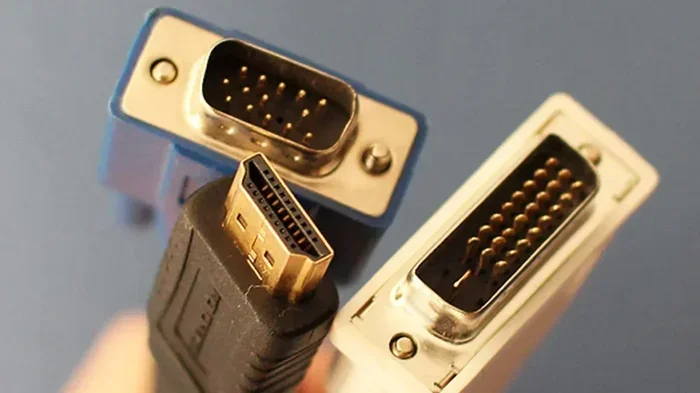
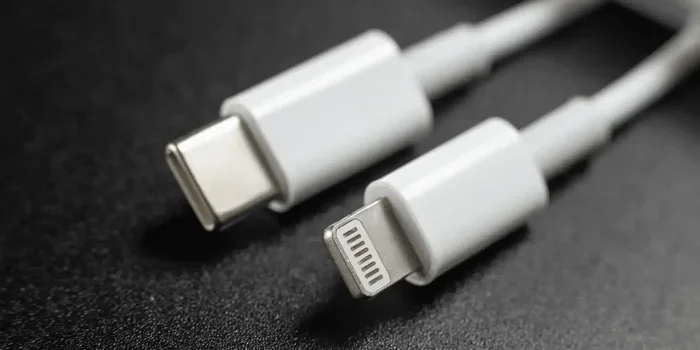
The Lightning connector has eight pins arranged in a specific pattern. It is a proprietary design created by Apple. This means only Apple controls how it works. USB-C, on the other hand, has 24 pins packed into a small reversible connector. It follows a universal standard set by the USB Implementers Forum.
Because of these differences, a Lightning cable simply does not have the right physical shape or the right communication protocol to work with a USB-C port. It is like trying to fit a square peg into a round hole. The shapes do not match, and the signals do not align.
Understanding the Lightning Connector
The Lightning connector has been Apple’s go-to charging solution since 2012. It replaced the older 30-pin dock connector. Lightning is small, reversible, and reliable. It works with iPhones, iPads, iPods, and many Apple accessories.
One of the biggest advantages of Lightning is its reversible design. You can plug it in either way. No more flipping the cable three times to find the right orientation. It also supports fast charging and data transfer. Apple has refined the Lightning connector over the years, and it remains a staple in the Apple ecosystem.
The Proprietary Nature of Lightning
Here is something important to understand. Lightning is a proprietary connector. Apple designed it and controls its licensing. This is part of Apple’s broader strategy around their proprietary operating system and hardware ecosystem. By keeping Lightning exclusive, Apple maintains tight control over the accessories that work with their devices.
This proprietary approach has both benefits and drawbacks. On the plus side, it ensures a consistent experience. You know that a Lightning cable from a reputable brand will work with your iPhone. On the downside, it limits compatibility. You cannot use Lightning cables with non-Apple devices without special adapters.
Apple’s commitment to Lightning has drawn criticism over the years. Many users feel frustrated by the lack of universal compatibility. The European Union has even pushed for standardized charging solutions. This pressure eventually led Apple to adopt USB-C in newer devices like the iPad Pro and MacBook lineup.
Understanding the USB-C Connector
USB-C is a universal connector standard. It was designed to replace older USB types like USB-A and USB-B. Today, USB-C can be found on laptops, tablets, phones, gaming consoles, and even some desktop computers.
The USB-C connector is small, oval-shaped, and fully reversible. It supports a wide range of capabilities. These include power delivery up to 240 watts, data transfer speeds up to 40 gigabits per second with Thunderbolt 4, and video output to external displays.
One of the biggest strengths of USB-C is its versatility. A single USB-C cable can charge your phone, transfer files to your laptop, and connect to a monitor. This makes it incredibly convenient for people who use multiple devices. It also reduces the number of cables you need to carry around.
USB-C and Communication Protocols
USB-C is not just a physical connector. It also supports various communication protocols. These protocols govern how devices talk to each other. For example, USB Power Delivery (USB-PD) manages how much power flows between devices. The USB Configuration Channel (CC) handles negotiation between the connected devices.
These protocols are very different from how Lightning communicates. When you plug a Lightning cable into a Lightning port, Apple’s custom chip inside the cable handles the handshake. USB-C uses a completely different negotiation process. This is another reason why the two connectors cannot work together directly.
The communication differences go beyond simple power negotiation. Data transfer protocols also vary. Lightning uses Apple’s proprietary data protocol. USB-C supports USB 3.0, USB 3.1, USB 3.2, and Thunderbolt protocols. Each of these has different speeds and capabilities. Without the right chip or adapter, these protocols simply cannot talk to each other.
What Happens When You Try to Connect Them?
If you try to plug a Lightning cable into a USB-C port, nothing will happen. The physical shapes are completely different. The Lightning connector is a flat, rectangular plug with metal contacts on the inside. The USB-C port is a small, oval-shaped opening.
You simply cannot force a Lightning cable into a USB-C port. The connector will not fit. This is actually a good thing. It prevents accidental damage that could occur if incompatible connectors were forced together. The physical incompatibility acts as a safety mechanism.
Some people wonder if they can modify a Lightning cable to fit a USB-C port. This is a terrible idea. Cutting and splicing cables can create safety hazards. It can lead to short circuits, overheating, or even fire. Never attempt to modify a cable yourself. Always use proper adapters from reputable brands.
What About Fake or Counterfeit Adapters?
You might find cheap adapters online that claim to convert Lightning to USB-C. Some of these might work temporarily. But many are poorly made and unsafe. Cheap adapters often lack proper voltage regulation. They can deliver inconsistent power to your device.
This can cause several problems. Your device might charge slowly. It might overheat. In worst cases, it could damage the charging port or the battery. Apple devices are particularly sensitive to power irregularities. The company designs its devices to work with certified accessories for a reason.
Always look for adapters that are certified by the USB Implementers Forum (USB-IF) or carry Apple’s MFi certification. These certifications ensure that the adapter meets safety and performance standards. Spending a little extra on a quality adapter saves you from costly repairs down the road.
Safe Ways to Connect Lightning Devices to USB-C Ports
Even though you cannot plug a Lightning cable directly into a USB-C port, there are several safe and effective solutions. These allow you to charge your Lightning devices from USB-C power sources. Let us look at the best options.
Option 1: Lightning to USB-C Adapter
Apple sells a official Lightning to USB-C adapter. This small dongle lets you plug a Lightning cable into a USB-C port. It is the safest and most reliable option. The adapter handles all the protocol conversion internally.
The official Apple adapter is compact and affordable. It works with all Lightning devices. However, it only supports charging. It does not support high-speed data transfer. If you need to transfer files, you will need a different solution.
Option 2: USB-C to Lightning Cable
Apple also sells a USB-C to Lightning cable. This cable has a USB-C connector on one end and a Lightning connector on the other. It is perfect for charging iPhones and iPads from USB-C power banks, laptops, or wall chargers.
This cable supports fast charging on compatible devices. It also works for syncing and data transfer. If you have a newer iPhone model, this cable is the best way to connect it to a USB-C power source. It is certified by Apple and meets all safety standards.
Option 3: Third-Party Certified Cables and Adapters
Several third-party brands make high-quality Lightning to USB-C cables and adapters. Brands like Anker, Belkin, and Baseus offer certified options. These often cost less than Apple’s official accessories while still meeting safety standards.
When buying third-party accessories, look for MFi certification. This stands for “Made for iPhone, iPad, and iPod.” MFi-certified products have been tested by Apple to ensure they work safely with Apple devices. Avoid cheap, uncertified products from unknown brands.
Option 4: USB-C Hubs and Docks
If you need multiple connectivity options, a USB-C hub is a great choice. These hubs add extra ports to your USB-C laptop or tablet. Many hubs include a USB-C port that can accept a Lightning to USB-C cable for charging.
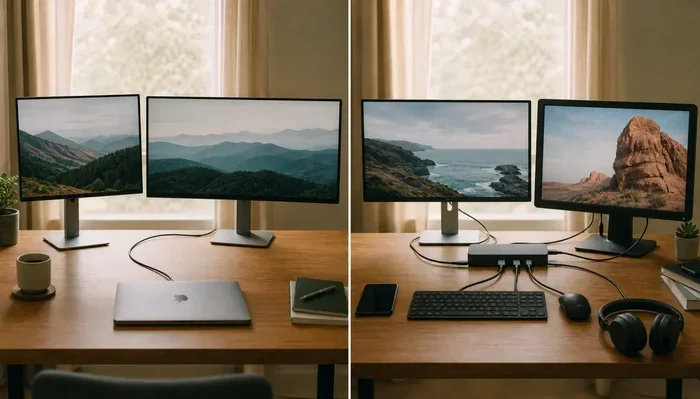
USB-C hubs are especially useful for people who travel. They let you charge multiple devices from a single power source. They also add HDMI, SD card, and USB-A ports to your setup. This reduces cable clutter and makes your workspace more organized.
USB-C in Healthcare and Medical Technology
USB-C is making its way into many industries. One area where it is gaining traction is healthcare and medical technology. Medical devices increasingly use USB-C for charging and data transfer. From patient monitoring systems to portable diagnostic equipment, the universal nature of USB-C makes it very appealing.
In fact, computers are used in medicine in numerous ways, and the shift toward USB-C helps streamline how medical professionals connect and power their devices. Universal connectors reduce the need for multiple cable types in clinical settings. This simplifies equipment management and reduces costs.
The same push toward standardization that affects consumer electronics also impacts the medical field. Hospitals and clinics benefit from having one connector type for most of their devices. USB-C supports this trend perfectly. Its versatility, high power delivery, and fast data transfer make it ideal for demanding medical environments.
This broader adoption of USB-C also means more people are becoming familiar with the connector. As USB-C becomes more common, the demand for Lightning cables decreases. This shift benefits consumers and manufacturers alike.
Apple’s Transition to USB-C
Apple has been gradually moving away from Lightning. The company introduced USB-C on several iPad models starting in 2018. The MacBook line has used USB-C (also called Thunderbolt 3) since 2015. The latest iPad Pro and iPad Air models are entirely USB-C.
Regulatory pressure played a big role in this transition. The European Union mandated a common charging standard for mobile devices. This law pushed Apple to adopt USB-C across its product lineup. The iPhone 15 and iPhone 16 models finally made the switch to USB-C in 2023.
This transition is good news for consumers. It means fewer cables to buy and carry. It also means better compatibility with other devices. However, it also means that Lightning cables are becoming legacy accessories. If you have a collection of Lightning cables, they will still work with older devices. But for new devices, USB-C is the standard.
What This Means for Lightning Cable Users
If you still rely on Lightning cables, do not panic. Your existing cables will continue to work with older Apple devices. You can also use them with USB-C power sources by using the adapters mentioned earlier. Apple has not discontinued Lightning overnight. The transition is happening gradually over several product generations.
That said, it is a good idea to start building a small collection of USB-C cables and adapters. This future-proofs your setup. You will be ready when your older Lightning devices eventually need replacement. It also saves you from the hassle of hunting down Lightning cables as they become less common.
Common Mistakes People Make with Cable Compatibility
Mixing connector types can lead to frustrating mistakes. Here are some common errors to avoid.
- Forcing a connector: Never force a cable into a port. If it does not fit, it is not supposed to go there. Forcing can damage both the cable and the port.
- Using cheap uncertified adapters: Low-quality adapters may seem like a bargain. But they often lack proper safety features. They can damage your devices or even pose a fire risk.
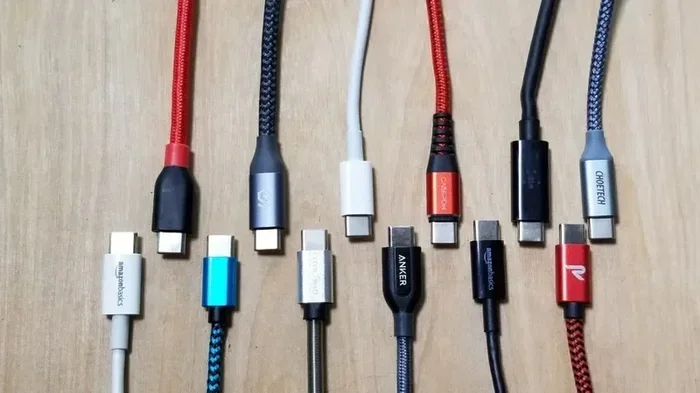
- Assuming all USB-C cables are the same: USB-C cables vary widely in capability. Some only support basic charging. Others support fast charging and high-speed data transfer. Check the specifications before buying.
- Ignoring cable quality: Thin, flimsy cables often have poor internal wiring. This leads to slow charging and intermittent connections. Invest in well-built cables from reputable brands.
- Not checking device compatibility: Some older devices do not support USB-C Power Delivery. Always verify that your device can accept the power output of your USB-C charger.
Quick Tips for Choosing the Right Cable
- Check for certifications: Look for USB-IF or MFi certification on cables and adapters.
- Match your needs: If you need fast charging, choose a cable rated for higher wattage.
- Buy from reputable brands: Stick with known brands like Anker, Belkin, or Apple.
- Read reviews: Customer reviews can reveal real-world performance issues.
- Keep spares: Always have a backup cable. Cables get lost, damaged, or worn out over time.
- Consider a USB-C hub: A hub gives you flexibility and reduces cable clutter.
Expert Insights on Connector Evolution
The shift from proprietary connectors to universal standards is a trend that has been building for years. USB-C represents the culmination of this effort. It combines power delivery, data transfer, and video output into a single, compact connector.
Experts in the tech industry widely agree that USB-C is the future. Its universal compatibility means that one cable can work with virtually any modern device. This is a huge improvement over the old days when every device needed its own special cable.
Lightning served Apple well for over a decade. But the writing is on the wall. Universal standards like USB-C benefit everyone. They reduce e-waste, lower costs, and simplify our lives. Apple’s decision to embrace USB-C is a win for consumers and the environment alike.
Conclusion
So, can you use a Lightning cable in a USB-C port? Not directly, and you should never try to force it. The two connectors are fundamentally different in design, protocol, and purpose. But with the right adapter or cable, you can easily bridge the gap between Lightning and USB-C devices.
The best solution depends on your needs. For simple charging, an official Apple Lightning to USB-C adapter or cable works perfectly. For more advanced setups, a USB-C hub with multiple ports gives you maximum flexibility. Always choose certified products to ensure safety and reliability.
The technology world is moving toward USB-C as the universal standard. Apple’s transition to USB-C on the iPhone and other devices confirms this trend. If you are still using Lightning cables, now is a great time to start adding USB-C options to your collection. This keeps you prepared for the future and ensures your devices stay connected and powered up.
Understanding cable compatibility saves you time, money, and frustration. It also protects your valuable devices from damage. Take a few minutes to learn about your connectors. Make informed choices about the cables and adapters you buy. Your devices will thank you for it.
Frequently Asked Questions
Can I plug a Lightning cable directly into a USB-C port?
No, you cannot. The Lightning connector and USB-C connector have different shapes, pin counts, and communication protocols. They are physically and electronically incompatible. Attempting to force a connection can damage your devices.
What is the safest way to charge an iPhone from a USB-C port?
The safest way is to use Apple’s official Lightning to USB-C adapter or a certified USB-C to Lightning cable. These products are designed specifically for this purpose. They handle all the protocol conversion safely and reliably.
Will a cheap Lightning-to-USB-C adapter damage my device?
Cheap, uncertified adapters can potentially damage your device. They may lack proper voltage regulation and safety features. Always choose adapters that are MFi-certified or USB-IF certified to ensure safe operation.
Does Apple still make Lightning cables?
Yes, Apple still sells Lightning cables for older devices. However, the company has transitioned its newer products to USB-C. The iPhone 15 and later models use USB-C instead of Lightning. Apple is gradually phasing out Lightning over time.
Can I use a USB-C power bank to charge my Lightning devices?
Yes, you can. You just need a Lightning to USB-C cable or a Lightning to USB-C adapter. Connect the Lightning end to your device and the USB-C end to the power bank. This works for charging and data transfer on supported devices.
Why did Apple switch from Lightning to USB-C?
Apple switched to USB-C due to a combination of factors. Regulatory pressure from the European Union mandated a common charging standard. USB-C also offers better compatibility, faster data transfer, and higher power delivery. The switch benefits consumers by reducing cable clutter and improving versatility.