Coaxial Cable Size Identification Made Easy for Beginners
Coaxial Cable Size Identification is simpler than most people think. This guide walks you through every step, from reading cable markings to choosing the right size for your needs. You will learn about RG6, RG59, connectors, and signal performance. By the end, you will feel confident identifying any coaxial cable. Let us make this topic easy and practical for you.
Have you ever held a coaxial cable and wondered what size it was? Maybe you needed to replace a cable for your TV, internet, or security camera setup. The good news is that coaxial cable size identification does not have to be confusing. With a few simple tips, anyone can figure out what kind of cable they are working with. This guide breaks everything down in plain, easy-to-understand language.
Whether you are a DIY enthusiast or just trying to fix a cable at home, knowing your cable sizes saves time and money. You will avoid buying the wrong connector or the wrong cable type. Plus, understanding cable sizes helps you get the best signal quality for your setup. In this article, we cover everything from the basics to practical tips you can use right away.
Key Takeaways
- Know Your Cable Types: RG6 and RG59 are the most common sizes, each suited for different tasks.
- Read the Markings: Printed codes on the cable jacket tell you the size and type instantly.
- Measure the Diameter: Outer diameter and center conductor size are the key measurements for identification.
- Match Connectors Properly: Using the wrong connector size causes signal loss and poor performance.
- Impedance Matters: Most coaxial cables are 75 ohm, but knowing this helps with compatibility.
- Shielding Affects Quality: Better shielding means less interference and a cleaner signal.
- Use This Guide as a Reference: Come back to this article whenever you need to identify a cable quickly.
📑 Table of Contents
- What Is Coaxial Cable Size Identification?
- Understanding Coaxial Cable Types and Sizes
- How to Identify Coaxial Cable Size
- Common Mistakes in Cable Size Identification
- Quick Tips for Easy Cable Identification
- Expert Insights on Coaxial Cable Selection
- How Coaxial Cable Size Affects Signal Performance
- Key Takeaways
- Conclusion
What Is Coaxial Cable Size Identification?
Coaxial cable size identification means figuring out the physical and electrical specs of a coaxial cable. The size refers to the outer diameter, the center conductor thickness, and the overall cable type. Different sizes are built for different purposes. Some carry TV signals, while others handle internet data or radio frequencies.
The most common sizes you will encounter are RG6 and RG59. These are industry-standard names that tell you a lot about the cable. Each size has a specific use case, and using the wrong one can lead to poor performance. That is why learning to identify them correctly matters so much.
Why Does Cable Size Matter?
The size of a coaxial cable directly affects signal strength. Thicker cables carry signals over longer distances with less loss. Smaller cables work well for short runs but may lose signal quality over distance. Choosing the right size ensures your equipment performs at its best.
Understanding Coaxial Cable Types and Sizes
Not all coaxial cables are the same. Different cable types serve different needs. Let us look at the most popular sizes and what they do.
RG6 Cable
RG6 is one of the most widely used cables in homes today. It has a larger diameter, usually around 7 millimeters. This size handles high-frequency signals very well. You will find RG6 cables used for satellite TV, cable internet, and digital TV setups.
The center conductor in RG6 is typically copper or copper-clad steel. It has thicker cable shielding than smaller cables, which reduces interference. If you are running a cable through walls or over long distances, RG6 is usually the right choice.
RG59 Cable
RG59 is a smaller cable, often about 6 millimeters in outer diameter. It was the standard for older TV installations and analog surveillance cameras. It works fine for short distances, usually under 100 feet. Beyond that, you may notice signal loss.
RG59 has a thinner center conductor and less shielding than RG6. For modern HD or 4K setups, RG6 is almost always a better option. But if you are working with older equipment, RG59 may still be the correct fit.
Other Common Cable Sizes
There are other sizes too, though they are less common in home setups. RG11 is a thick cable used for very long runs, sometimes over 500 feet. RG58 is often used in radio and ham radio applications. Each size has its own frequency range and impedance rating.
How to Identify Coaxial Cable Size
Now that you know the main types, let us talk about how to actually identify a cable. The process is straightforward once you know what to look for.
Check the Printed Markings
Most quality coaxial cables have markings printed on the outer jacket. These cable markings tell you the type and size. Look for text like “RG6,” “RG59,” or “RG11” printed along the cable. If you see these codes, you have found the size right away.
Use a flashlight if the markings are hard to read. Run your fingers along the cable to feel for raised text. This is the fastest and most reliable way to identify a cable.
Measure the Outer Diameter
If the markings are worn off or missing, measuring the outer diameter is your next best option. Use a ruler or caliper to get an accurate measurement. RG6 cables typically measure about 6.8 to 7.2 millimeters. RG59 cables usually measure around 6 millimeters.
Here is a quick comparison to help you out.
| Cable Type | Outer Diameter | Center Conductor | Common Use |
|---|---|---|---|
| RG6 | 6.8 – 7.2 mm | 18 AWG copper | TV, internet, satellite |
| RG59 | 5.8 – 6.2 mm | 20 AWG copper | Analog cameras, older TV |
| RG11 | 10.3 – 11.2 mm | 14 AWG copper | Long-distance runs |
| RG58 | 5.0 – 5.2 mm | 20 AWG copper | Radio, ham radio |
This table makes it easy to compare the most common sizes at a glance. Print it out and keep it in your toolbox for quick reference.
Check the Center Conductor
The center conductor is the wire running through the middle of the cable. You can sometimes identify the size by examining this wire. A thicker center conductor usually means a larger cable size. RG6 uses an 18 AWG conductor, while RG59 uses a thinner 20 AWG conductor.
Be careful when cutting into a cable to check this. If you just need to identify the size, measuring the outer diameter is usually enough.
Look at the Connector
The connector size can also give you a clue about the cable type. RG6 cables typically use F connectors, which are crimped or screwed onto the cable. RG59 cables also use F connectors but may use a smaller crimp size. BNC connectors are common on RG58 and radio cables.
Matching the connector to the cable is important. Using the wrong connector size can cause a loose fit or signal problems. Always check both the cable and the connector before making a purchase.
Common Mistakes in Cable Size Identification
Even experienced people make mistakes when identifying cables. Here are some common errors to avoid.
Assuming All Cables Are the Same
The biggest mistake is thinking all coaxial cables are interchangeable. They are not. Using an RG59 cable for a long internet run will result in poor signal quality. Always match the cable size to your specific application.
Ignoring the Shielding
Some people focus only on the diameter and ignore the cable shielding. Shielding protects the signal from outside interference. Cables with double or quad shielding perform better in noisy environments. Always check the shielding type when identifying a cable for quality.
Overlooking Impedance
Most home coaxial cables are 75 ohm impedance. But some cables are 50 ohm, which is used for radio equipment. Mixing up impedance can cause signal reflection and poor performance. Always check the impedance rating when identifying a cable.
Relying Only on Color
Cable jacket color does not indicate size. A black cable can be RG6 or RG59. Never judge a cable by its color alone. Always check the markings or measure the diameter.
Quick Tips for Easy Cable Identification
Here are some fast tips that make the whole process easier.
- Keep a reference chart handy in your toolbox or garage.
- Use a digital caliper for precise outer diameter measurements.
- Feel the cable — thicker cables have more solid feel and heavier weight.
- Check both ends of the cable, as markings may be clearer on one side.
- Buy cables from reputable brands — they tend to have clearer markings.
- When in doubt, measure twice and compare with the reference table above.
These simple habits will save you a lot of frustration. You will spend less time guessing and more time getting your setup right.
Expert Insights on Coaxial Cable Selection
Coaxial cable size identification is just the first step. Choosing the right cable for your specific needs is equally important. Experts recommend always considering the frequency range of your signal. Higher frequency signals, like those used in satellite and digital TV, need better shielding and larger conductors.
Another expert tip is to always leave a little extra cable length. You can always trim excess, but you cannot add length easily. This small habit prevents headaches later on. Also, never bend a coaxial cable too tightly. Sharp bends can damage the center conductor and the dielectric layer inside.
If you are running cables outdoors, look for cables with UV-resistant jackets. This protects the cable shielding and extends the lifespan. For indoor runs, standard jackets work fine. Matching the cable to the environment is a detail that many people overlook.
How Coaxial Cable Size Affects Signal Performance
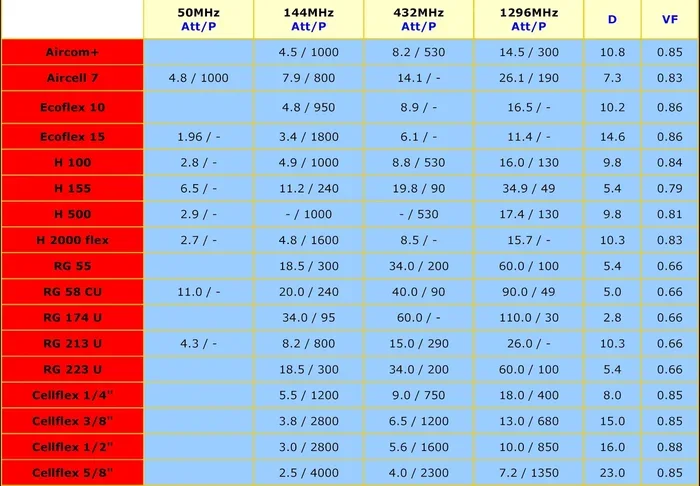
The size of a coaxial cable has a direct impact on signal quality. Larger cables have less signal loss over distance. This is measured in decibels per 100 feet. RG6 cables typically lose about 5 dB per 100 feet at 1 GHz. RG59 loses more, around 7 dB at the same frequency.
For short runs under 50 feet, the difference is barely noticeable. But for runs over 100 feet, the choice of cable size becomes critical. This is why coaxial cable size identification is so important before any installation.
The dielectric material inside the cable also plays a role. This is the insulating layer between the center conductor and the shielding. Different cable sizes use different dielectric materials, which affect the overall performance. Higher-quality dielectrics reduce signal degradation and improve clarity.
Key Takeaways
- Know Your Cable Types: RG6 and RG59 are the most common sizes, each suited for different tasks.
- Read the Markings: Printed codes on the cable jacket tell you the size and type instantly.
- Measure the Diameter: Outer diameter and center conductor size are the key measurements for identification.
- Match Connectors Properly: Using the wrong connector size causes signal loss and poor performance.
- Impedance Matters: Most coaxial cables are 75 ohm, but knowing this helps with compatibility.
- Shielding Affects Quality: Better shielding means less interference and a cleaner signal.
- Use This Guide as a Reference: Come back to this article whenever you need to identify a cable quickly.
Conclusion
Coaxial cable size identification is a skill that anyone can learn. With the tips and tables in this guide, you now have everything you need to identify any coaxial cable with confidence. Remember to check the markings, measure the diameter, and match the right connector for your setup.
Whether you are setting up a new TV, installing security cameras, or working on a home network, using the correct cable size makes all the difference. You will get better signal quality, fewer problems, and a more reliable connection. Keep this guide saved for future reference, and you will never second-guess yourself again when handling coaxial cables.
Take what you learned here and put it into practice. The next time you pick up a coaxial cable, you will know exactly what size it is and what it is best used for. That is the power of knowing your cables well.
Frequently Asked Questions
What is the easiest way to identify a coaxial cable size?
The easiest way is to look for printed markings on the cable jacket. Most cables have “RG6,” “RG59,” or similar codes printed along the length. If the markings are faded, measure the outer diameter with a ruler or caliper and compare it to a reference chart.
Can I use RG59 instead of RG6 for my TV setup?
You can, but only for short runs under 50 feet. RG59 has a thinner center conductor and less shielding than RG6, which means more signal loss over distance. For modern HD or 4K setups, RG6 is always the better choice.
What does RG stand for in coaxial cable names?
RG stands for “Radio Guide.” It is a military designation system that was originally used to classify different types of coaxial cables. Today, RG numbers like RG6 and RG59 are industry-standard names that describe specific cable sizes and specifications.
How do I know if my coaxial cable is 75 ohm or 50 ohm?
Most home coaxial cables are 75 ohm, used for TV and internet signals. 50 ohm cables are typically used for radio and communication equipment. You can check the markings on the cable jacket or look up the specifications from the manufacturer.
Does coaxial cable size affect internet speed?
Yes, it can. Thicker cables like RG6 have less signal loss, which helps maintain faster internet speeds over longer distances. Using a cable that is too small or too old can result in slower speeds and connection drops.
What connector do I need for RG6 cable?
RG6 cables typically use F connectors, which are available in crimp, compression, and screw-on styles. Compression connectors provide the best signal quality and durability. Always make sure the connector size matches the cable diameter for a secure fit.