Can I Convert Hdmi To Rca And What You Need To Know
Yes, you can convert HDMI to RCA using a dedicated converter box or adapter. This process lets you connect modern HDMI devices to older RCA-equipped screens and audio systems. Whether you are hooking up a streaming box to an old TV or linking a gaming console to a vintage receiver, the right HDMI to RCA converter makes it simple and affordable.
Have you ever stared at a pile of old gear and wondered how to make it work with something newer? Maybe you have a classic TV, a vintage stereo, or an older monitor sitting in the garage. And maybe you just bought a shiny new streaming stick or game console that only has HDMI output. So the big question hits you: Can I convert HDMI to RCA?
The short answer is yes. You absolutely can. But the full answer involves knowing what kind of converter to buy, how the signal works, and a few pitfalls to avoid. This guide walks you through everything you need to know about HDMI to RCA conversion. By the end, you will feel confident picking the right gear and getting your setup running smoothly.
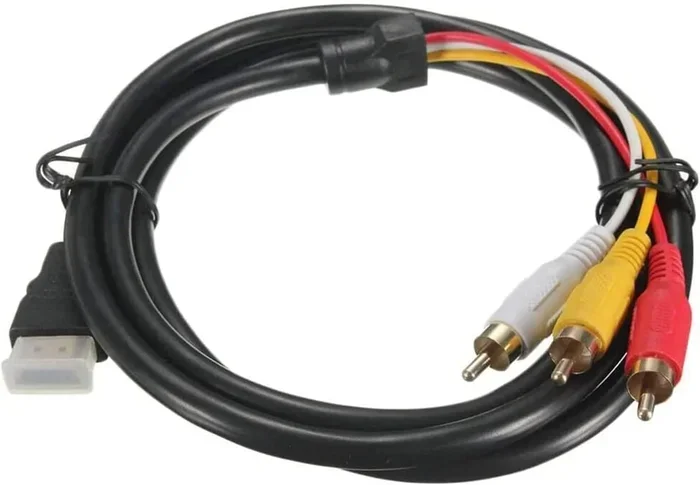
Let us start with the basics. HDMI stands for High-Definition Multimedia Interface. It carries digital audio and video signals through a single cable. RCA, on the other hand, refers to the old-school red, white, and yellow cables that carry analog audio and composite video. These two technologies speak completely different languages. So you need a translator. That translator is a converter.
Key Takeaways
- HDMI to RCA conversion is possible: You need an active converter box to change digital HDMI signals into analog RCA outputs.
- Two main types exist: Active converters do the heavy lifting, while passive adapters only work in limited scenarios.
- Check your device compatibility: Not all HDMI sources support analog output, so verify before buying.
- Signal quality matters: Cheap converters can degrade your picture and sound. Invest in a reputable brand.
- Setup is straightforward: A few cables and about five minutes is all you need.
- Common mistakes cause problems: Using the wrong cable type or skipping power can lead to no signal or poor quality.
📑 Table of Contents
What Is HDMI to RCA Conversion?
When we talk about converting HDMI to RCA, we mean taking a digital signal from an HDMI port and turning it into an analog signal that RCA cables can carry. Think of it like translating a book from one language to another. The story stays the same, but the format changes.
Here is what happens under the hood. Your HDMI device sends a digital signal packed with high-definition video and multi-channel audio. The converter box takes that digital signal, processes it, and outputs it as an analog signal through RCA jacks. This analog signal can then travel to an older TV, monitor, or amplifier that only has RCA inputs.
The conversion process involves a few key steps:
- Signal decoding: The converter reads the digital HDMI signal.
- Digital-to-analog conversion: The chip inside the box translates the digital data into analog waves.
- Signal splitting: The analog signal gets separated into video (yellow RCA) and audio (red and white RCA).
- Output: The analog signals travel through the RCA cables to your display or audio device.
This process is handled entirely by the converter box. You do not need to do any of it manually. Just plug things in, and the box does the work.
Digital vs. Analog Signals
Understanding the difference between digital and analog signals helps you appreciate why a converter is necessary. Digital signals use discrete values, basically ones and zeros, to represent audio and video. They are crisp, clean, and resistant to interference. Analog signals use continuous electrical waves. They are older technology and more prone to picking up noise and distortion over distance.
HDMI carries digital signals. RCA carries analog signals. You cannot plug an HDMI cable into an RCA port and expect it to work. The connector shapes are different, but more importantly, the signal types are incompatible. A converter bridges this gap.
Why Do People Need to Convert HDMI to RCA?
You might be wondering why anyone would need to convert modern HDMI signals to old RCA connections. The reasons are more common than you think. Let us look at a few real-world scenarios where HDMI to RCA conversion comes in handy.
Connecting Modern Devices to Older TVs
Many households still have older CRT televisions or basic flat-screen TVs that only accept RCA inputs. These TVs work perfectly fine, but they lack HDMI ports. If you want to watch Netflix, play a modern game console, or use a streaming stick on that old TV, you need a converter. The HDMI to RCA converter lets you bridge the gap between your new device and your old screen.
Using Vintage Audio Equipment
Audiophiles and music lovers often own vintage amplifiers, receivers, or speakers with only RCA inputs. A modern media player, laptop, or phone with HDMI output needs a converter to connect to this classic audio gear. The converter splits the HDMI signal into audio channels that feed into your stereo system through red and white RCA cables.
Security Camera Systems
Some older security camera setups use RCA composite connections for video. If you have a modern camera or DVR with HDMI output but an older monitor or recording system that only takes RCA, a converter solves the problem.
Retro Gaming Setups
Retro gamers love the nostalgic feel of older displays. Sometimes you want to play modern games on a CRT monitor or an older projector that only accepts RCA input. A HDMI to RCA adapter makes this retro gaming dream possible.
Presentations and Classroom Setup
Schools, churches, and meeting rooms sometimes use older projectors or displays with RCA inputs. Presenters with modern laptops or media players can use a converter to connect to these legacy systems without buying new equipment.
Types of HDMI to RCA Converters
Not all converters are the same. Understanding the different types helps you choose the right one for your needs. The two main categories are active converters and passive adapters.
Active HDMI to RCA Converters
Active converters are the most common and reliable option for converting HDMI to RCA. They contain internal circuitry that performs the digital-to-analog conversion. Most active converters also require external power, usually through a USB cable or a wall adapter.
Key features of active converters include:
- Full signal conversion: They handle both video and audio conversion properly.
- Power requirement: They need a power source to operate the conversion chip.
- Broad compatibility: They work with most HDMI sources and RCA displays.
- Better signal quality: The active processing helps maintain a cleaner output.
Popular brands in this category include RetroTINK, Gefen, and Decimator. Prices typically range from $15 to $80 depending on features and build quality.
Passive HDMI to RCA Adapters
Passive adapters are simpler devices that do not perform actual signal conversion. They change the physical connector shape but do not translate the signal. In most cases, a passive HDMI to RCA adapter will not work because HDMI and RCA use fundamentally different signal types.
You should be very careful with passive adapters. They are often marketed as converters but do not actually convert the signal. If a product claims to be a passive HDMI to RCA converter, it is likely misleading. Always look for active converters with built-in conversion chips.
HDMI to Component RCA Converters
Some converters output to component RCA cables instead of composite RCA. Component cables use three RCA connectors (green, blue, and red) for video and offer better image quality than the single yellow composite RCA connector. If your display supports component input, an HDMI to component converter gives you a sharper picture than composite output.
| Feature | Active Converter | Passive Adapter |
|---|---|---|
| Actual signal conversion | Yes | No |
| Requires power | Yes | No |
| Works with most devices | Yes | Rarely |
| Price range | $15 – $80 | $5 – $15 |
| Output quality | Good to excellent | Usually does not work |
| Audio support | Yes (red/white RCA) | No |
How to Choose the Right HDMI to RCA Converter
Shopping for a converter can feel overwhelming with so many options available. Here are the key factors to consider before making a purchase.
Check Your HDMI Source
Not all HDMI devices support analog output. Some modern devices, especially newer laptops and streaming sticks, may not allow the HDMI port to output a raw analog signal. Before buying a converter, check your device specifications or look for any settings related to analog output or HDCP compliance.
Consider Resolution Support
Most converters handle standard definition (480i or 480p) and high definition (720p or 1080p) inputs. If you need a specific resolution, check the converter specs. For older CRT TVs, standard definition is usually sufficient. For older LCD monitors, you might want a converter that supports at least 720p.
Look for Audio Extraction
A good converter should handle both video and audio. Make sure the converter you choose outputs audio through the red and white RCA jacks. Some budget converters only handle video and ignore the audio channels. Read product descriptions carefully to confirm audio support.
Build Quality and Brand Reputation
Cheap no-name converters often produce poor image quality, static, or no signal at all. Stick with reputable brands and read customer reviews before buying. A reliable converter might cost a bit more, but it saves you the frustration of dealing with a faulty product.
Power Supply
Active converters need power. Check whether the converter uses a USB cable for power (which you can plug into a USB port on your TV or a phone charger) or a dedicated wall adapter. USB-powered options are more convenient for most setups.
Number of Outputs
Some converters offer multiple RCA outputs, including both composite and component options. If you need flexibility, look for a converter with switchable output modes. This lets you use the same converter with different types of older displays.
Step-by-Step Guide to Converting HDMI to RCA
Setting up an HDMI to RCA converter is straightforward. Follow these steps and you will have your older device connected and working in minutes.
Step 1: Gather Your Equipment
You will need the following items:
- HDMI to RCA active converter box
- HDMI cable (to connect your source device to the converter)
- RCA cables (red, white, and yellow) to connect the converter to your display or audio system
- Power source for the converter (USB cable or wall adapter)
- Your HDMI source device (streaming stick, game console, laptop, etc.)
- Your RCA display or audio device (old TV, stereo, monitor, etc.)
Step 2: Connect the HDMI Cable
Plug one end of the HDMI cable into your source device. Plug the other end into the HDMI input on the converter box. Make sure the connection is snug and secure.
Step 3: Connect the RCA Cables
Take your RCA cables and plug them into the corresponding outputs on the converter box. The yellow cable goes into the video output. The red and white cables go into the right and left audio outputs. Plug the other ends of the RCA cables into your display or audio system.
Step 4: Power the Converter
Connect the power supply to the converter box. If the converter uses USB power, plug it into a USB port on your TV or a USB wall charger. The converter should power on and the indicator light should turn on.
Step 5: Switch Input on Your Display
On your TV or monitor, switch the input source to the RCA connection. Use your remote or the input button on the TV to select the correct RCA or AV input. You should see a picture and hear audio.
Step 6: Adjust Settings
If the picture looks wrong, check the converter settings. Some converters have a small button or menu that lets you choose the output resolution. Set it to match your display. Standard definition (480i) works best for older CRT TVs. For older LCD screens, try 720p or 1080p.
Quick Tips for Best Results
- Keep cables short: Shorter RCA cables reduce signal loss and interference.
- Use quality cables: Good RCA cables make a noticeable difference in picture and sound clarity.
- Check HDCP settings: Some HDMI sources block analog output due to copy protection. Check for HDCP bypass options in your converter or source device settings.
- Update firmware: Some advanced converters have updatable firmware. Check the manufacturer website for updates that improve compatibility.
Common Problems and How to Fix Them
Even with the right converter, you might run into issues. Here are the most common problems and how to solve them.
No Signal on the RCA Display
This is the most common issue. Start by checking all cable connections. Make sure the HDMI cable is firmly plugged into both the source device and the converter. Check that the RCA cables are in the correct jacks (yellow for video, red and white for audio). Verify that the converter is powered on and that your display is set to the right input source.
Poor Picture Quality or Static
Static or a grainy picture often results from cheap cables or a low-quality converter. Try using higher-quality RCA cables first. If that does not help, the converter itself may be the problem. Consider upgrading to a better-rated active converter with stronger digital-to-analog conversion hardware.
No Audio Through RCA
If you get video but no sound, check that the red and white RCA cables are properly connected. Some converters have a separate audio output setting. Make sure the converter is set to output audio through RCA and not through a different method like HDMI pass-through or optical output.
HDCP Error or Black Screen
HDCP (High-bandwidth Digital Content Protection) can block analog output on some devices. This is common with streaming services like Netflix or Disney+. If you get a black screen or an HDCP error, try these fixes:
- Check if your converter has an HDCP bypass or stripping feature.
- Try a different source that does not use HDCP, like a DVD player or a retro game console.
- Some converters work better with specific HDMI source devices. Experiment with different sources if possible.
Converter Overheating
Some active converters generate heat during operation. Place the converter in a well-ventilated area and do not stack other devices on top of it. If the converter gets too hot to touch, turn it off and let it cool down. Consider getting a converter with a built-in fan or better heat dissipation design.
Expert Insights on HDMI to RCA Conversion
Signal quality is the biggest factor in a successful conversion. A good converter preserves most of the original image and sound quality. A cheap converter can degrade both. When in doubt, spend a little more on a well-reviewed converter from a trusted brand.
Another expert tip is to test your setup with a known working source first. Before connecting your expensive gaming console or media player, test the converter with a simpler device like a DVD player. This helps you confirm the converter works before troubleshooting a more complex setup.
Experts also recommend keeping your firmware updated if your converter supports it. Manufacturers often release updates that fix compatibility issues with newer HDMI devices. A quick firmware update can solve problems that would otherwise be frustrating to diagnose.
Final Thoughts
So, can I convert HDMI to RCA? Absolutely yes. With the right active converter box, a few cables, and about five minutes of your time, you can connect modern HDMI devices to older RCA-equipped displays and audio systems. The process is simple, affordable, and opens up a world of possibilities for using your existing gear.
Remember to choose an active converter rather than a passive adapter, check your device compatibility before buying, and invest in quality cables for the best results. Avoid the common mistakes we covered, and your setup should work beautifully.
Whether you are setting up a retro gaming station, connecting a streaming device to an old TV, or hooking up modern audio gear to a vintage stereo, HDMI to RCA conversion gives you the flexibility to mix old and new technology. The right converter bridges the gap between generations of electronics and keeps your favorite devices in use.
Take your time picking the right converter for your needs. Read reviews, compare features, and do not be afraid to spend a little extra for quality. A good converter is a small investment that pays off every time you plug in your devices. Happy converting!
Frequently Asked Questions
Do I need a special converter to connect HDMI to RCA?
Yes, you need an active HDMI to RCA converter box. Passive adapters do not convert the digital HDMI signal to analog RCA. The active converter contains the necessary circuitry to handle this signal translation properly.
Will converting HDMI to RCA reduce the picture quality?
Some quality loss is inevitable because you are converting digital to analog. However, a good quality converter minimizes this loss. The output will not match pure HDMI quality, but it will look great on older displays that only accept RCA input.
Can I convert HDMI to RCA without a converter box?
No, you cannot. HDMI and RCA use completely different signal types. You need an active converter box that performs the digital-to-analog conversion. There is no simple cable or adapter that replaces this conversion process.
Does HDMI to RCA conversion support audio?
Yes, most active converters split the HDMI signal into both video and audio. The yellow RCA cable carries the video, while the red and white RCA cables carry the right and left audio channels respectively.
Why does my HDMI to RCA converter show a black screen?
A black screen usually means the converter is not receiving a proper signal or the output settings do not match your display. Check all cable connections, ensure the converter is powered on, and verify that your display is set to the correct RCA input. Also check for HDCP-related issues with your source device.
Are HDMI to RCA converters expensive?
Not at all. Most quality active converters cost between $15 and $80. Budget options under $20 work fine for basic setups. Investing in a slightly more expensive model from a reputable brand usually gives better results and longer reliability.
=== CONCLUSION ===
Converting HDMI to RCA is a practical and accessible solution for connecting modern devices to older equipment. With an active converter box, the right cables, and a basic understanding of how the signal conversion works, you can breathe new life into legacy displays and audio systems. Follow the steps in this guide, avoid the common pitfalls, and you will have a working setup that delivers solid picture and sound quality. The technology may be older, but your gear does not have to be.