Can I Charge My Phone With Car USB On Long Road Trips
Yes, you can charge your phone with car USB on long road trips, but the results depend on your car, cable, and charger type. Many drivers discover that standard USB ports deliver too little power, leaving phones barely charged or not at all. Using the right car USB charger and fast charging adapter makes a huge difference. This guide covers everything you need to know about charging on the go safely and effectively.
Nothing kills the mood of a long road trip faster than a dead phone. You rely on your device for navigation, music, communication, and entertainment. So when your phone battery starts dipping, the first thing you reach for is the car’s USB port. But here’s the thing — not all car USB ports are created equal.
You might plug in your phone, wait thirty minutes, and find the battery barely moved. Frustrating, right? The good news is that you can charge your phone with car USB, but how well it works depends on several factors. In this guide, we break down everything you need to know about charging on the go during long drives.
Whether you are using an old sedan or a brand-new SUV, this article will help you understand your options. We will cover how car USB ports work, which chargers are best, common problems, and practical tips to keep your phone battery alive all day long. Let us get into it.
Key Takeaways
- Car USB ports vary widely — some deliver enough power to charge fast, while others barely trickle charge your phone.
- A dedicated car charger adapter with higher amperage is the best solution for long road trips.
- Fast charging technology like Quick Charge and USB-C Power Delivery can cut charging time significantly.
- Phone battery drain during road trips is common due to GPS, screen brightness, and hotspot usage.
- Using the right USB cable matters just as much as the charger itself.
- Phone overheating during charging is a real issue that can be prevented with simple tips.
- Portable power banks are excellent backup options when car charging isn’t enough.
📑 Table of Contents
How Car USB Charging Works
Most people assume every USB port in a car works the same way. That is not true. Understanding the basics helps you make smarter choices about charging on the go.
What Is a Car USB Port?
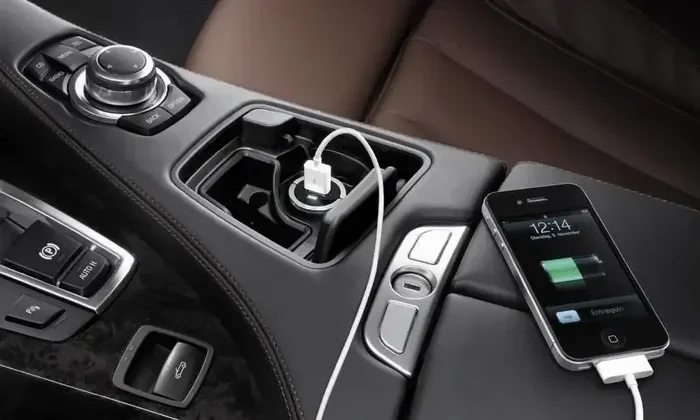
A car USB port is a power source built into your vehicle. It connects to your car’s electrical system and delivers power through a USB cable. The port can charge devices like phones, tablets, and portable speakers.
However, the amount of power it delivers varies a lot. Some ports provide enough voltage output to charge quickly. Others are designed mainly for data transfer or low-power devices like dash cams.
Understanding Amperage and Voltage
Two numbers matter when it comes to car USB charger performance: amperage and voltage.
- Voltage is the electrical pressure pushing power through the cable. Most car USB ports deliver 5 volts.
- Amperage is the amount of current flowing. Standard USB 2.0 ports provide about 0.5 to 1 amp. USB 3.0 ports can deliver up to 1.5 amps.
Modern smartphones need at least 1 to 2 amps to charge properly. Anything less, and your phone may charge very slowly or not at all. This is why many drivers experience slow charging in car issues.
Standard USB vs. Dedicated Charging Ports
Here is an important distinction. Some car USB ports are “charging ports,” while others are “data ports.”
- Data ports limit power output to protect the car’s computer system. They usually provide only 0.5 amps.
- Dedicated charging ports are designed to deliver higher amperage. They can supply 2 amps or more.
Check your car’s manual to find out which type you have. This single detail can save you a lot of frustration on long road trips.
Types of Car USB Chargers and Adapters
Not all car charger adapters are the same. Choosing the right one makes a massive difference in charging speed and safety.
Standard USB Car Chargers
These are the basic car USB charger units you plug into the cigarette lighter or car power outlet. They typically have one or two USB ports and deliver 1 to 2.4 amps per port.
They work fine for basic charging. If you are not in a rush, a standard charger will get the job done. But during a long drive, you want faster results.
Fast Charging Car Chargers
Fast charging car chargers support technologies like Qualcomm Quick Charge, USB Power Delivery, and VOOC. These adapters detect your phone and deliver the maximum safe power delivery it can handle.
With a fast charger, you can gain 30 to 50 percent battery in just 20 to 30 minutes. This is a game-changer for long road trips where every minute counts.
USB-C vs. USB-A Chargers
The type of connector matters too. Here is a quick comparison:
- USB-A ports are the traditional rectangular shape. Most older cars and basic chargers use them.
- USB-C ports are smaller, reversible, and support higher power delivery speeds.
- USB-C chargers can deliver up to 100 watts with the right car power outlet setup.
- USB-A chargers are limited to around 15 to 18 watts maximum.
If your phone supports USB-C, invest in a USB-C car charger for the best charging speed.
Wireless Car Chargers
Wireless charging pads for cars are becoming popular. You simply place your phone on the pad, and it charges without cables.
They are convenient and reduce cable clutter. However, wireless charging is generally slower than wired options. It also works best with phones that support Qi wireless charging.
How to Charge Your Phone Faster in the Car
Want to maximize your charging speed while driving? Follow these practical steps.
Use a High-Amp Charger
The single biggest upgrade you can make is switching to a high-amperage car charger. Look for chargers rated at 2.4 amps or higher per port.
Avoid cheap, no-name chargers. They often underdeliver on power and can even damage your device. Stick with reputable brands that support fast charging protocols.
Choose the Right USB Cable
Your USB cable is just as important as the charger. A low-quality or damaged cable can severely limit charging speed.
- Use cables rated for high current (at least 2.4 amps).
- Look for cables with thicker gauge wires.
- Replace frayed or worn cables immediately.
- USB-C cables generally support higher power delivery than older micro-USB cables.
Turn on Airplane Mode
When your phone is searching for a signal, it drains battery fast. Switching to airplane mode reduces power consumption significantly.
You will still receive calls if you use a Bluetooth headset. And your GPS can still work if you download offline maps beforehand.
Close Background Apps
Apps running in the background eat up phone battery life. Before you start driving, close unnecessary apps and turn off features you do not need.
- Turn off Bluetooth if you are not using it.
- Lower screen brightness.
- Disable location services for apps that do not need it.
- Turn off push email notifications.
Avoid Using Your Phone While Charging
Using your phone while it charges creates a tug-of-war between power input and power output. The battery will charge much slower if you are scrolling through social media or watching videos.
Let the phone charge while you focus on the road. It is safer and more efficient.
Common Problems When Charging Your Phone in the Car
Even with the right setup, you might run into issues. Here are the most common ones and how to fix them.
Phone Not Charging at All
If your phone shows no charging indicator, try these steps:
- Unplug and replug the USB cable firmly.
- Try a different USB port in the car.
- Test the cable with another device to rule out a cable problem.
- Check if the car power outlet is blown or fused.
- Restart your phone to refresh the charging circuit.
Slow Charging
Slow charging is the most common complaint. The usual culprits are:
- A low-amperage car USB charger (under 1 amp).
- A data port instead of a charging port.
- A damaged or low-quality USB cable.
- Heavy app usage while charging.
Upgrading to a fast charging car charger and a quality cable usually solves this problem completely.
Phone Overheating During Charging
Some phones get noticeably warm while charging in the car. This happens because the car charger generates heat, and the car interior heats up too.
To prevent phone overheating:
- Place the phone in a shaded spot or use a vent-mounted holder.
- Remove the phone case while charging to help dissipate heat.
- Avoid fast charging in extreme heat if possible.
- Take a break from using the phone while it charges.
Intermittent Charging
If the charge keeps stopping and starting, the USB cable connection is likely loose. This often happens with worn-out cables or dirty USB ports.
Clean the port with a soft brush and replace the cable. A snug, secure connection ensures steady charging speed.
Best Practices for Long Road Trips
Long drives put extra strain on your phone battery. Planning ahead keeps your device powered throughout the journey.
Pack a Backup Power Bank
A portable charger is one of the best road trip essentials. If your car’s USB port stops working or you take breaks away from the vehicle, a power bank keeps you connected.
Look for power banks with at least 10,000 mAh capacity. They can fully charge most phones two to three times.
Plan Charging Stops
On very long trips, plan rest stops where you can plug in at rest areas or cafes. This gives your phone battery a natural boost and lets you stretch your legs.
Use GPS Wisely
Navigation apps are notorious phone battery drainers. To reduce the impact:
- Download offline maps before you leave.
- Use a dash mount so the screen stays off or dim.
- Set your destination before you start driving.
Share the Charging Load
If you are traveling with passengers, use a multi-port car charger adapter so everyone can charge their devices. This prevents one person from hogging the single car USB charger port.
Keep Cables Organized
Tangled cables are a nightmare. Use cable organizers or a small pouch to keep your charging cables neat and accessible. This small step saves time and frustration.
Expert Insights and Final Thoughts
Charging your phone with a car USB port is simple, but doing it well requires a bit of knowledge. The key takeaway is that you can charge your phone with car USB on long road trips — but only if you use the right equipment and follow smart practices.
Investing in a quality fast charging car charger and a durable USB cable pays off quickly. These small upgrades eliminate the frustration of a dead phone when you need it most.
Remember that every car, cable, and phone is different. What works perfectly for one driver might underperform for another. Test your setup before a big trip to avoid surprises.
Keep your phone battery healthy by avoiding extreme heat, using airplane mode when possible, and closing unnecessary apps. These habits extend battery life both in the car and in daily use.
Finally, never underestimate the value of a portable power bank as a backup. It is a small investment that provides peace of mind on every journey. With the right approach, charging on the go becomes effortless, and your phone stays powered from start to finish.
Now that you know how to make the most of your car’s car power outlet, hit the road with confidence. Your phone will be ready when you arrive.
Frequently Asked Questions
Can I charge my phone with car USB on long road trips?
Yes, you can charge your phone with car USB on long road trips, but the charging speed depends on your car’s USB port type, the charger amperage, and the quality of your USB cable. Standard data ports often charge slowly, while dedicated charging ports and fast chargers deliver much better results.
Why is my phone not charging when plugged into the car USB?
This usually happens because the car USB port is a data port with low power output, the cable is damaged or low quality, or the car power outlet itself has a blown fuse. Try a different cable, a different port, or a dedicated car charger adapter to fix the issue.
What is the best car USB charger for fast charging?
The best car USB charger supports fast charging protocols like Qualcomm Quick Charge or USB Power Delivery. Look for a charger rated at 2.4 amps or higher per port, and make sure it is compatible with your phone’s charging standard for the fastest charging speed.
Does using your phone while charging in the car drain the battery faster?
Yes, using your phone while it charges creates a cycle where power goes in and out simultaneously. This slows down charging speed and can cause phone overheating. It is best to let the phone charge undisturbed while you drive.
Can a portable power bank replace a car charger on road trips?
A portable charger is an excellent backup option, but it cannot fully replace a car charger for long trips. Power banks have limited capacity and need to be recharged themselves. For the best results, use both a car charger and a power bank together.
How can I prevent my phone from overheating while charging in the car?
To prevent phone overheating, place the phone in a shaded spot, remove its case while charging, avoid using heavy apps during charging, and use a high-quality car USB charger that delivers stable power delivery. Taking breaks from charging on very hot days also helps.
=== CONCLUSION ===
Can I charge my phone with car USB on long road trips? Absolutely. The key is understanding your car’s setup and using the right equipment. A quality car USB charger, a reliable USB cable, and smart charging habits make all the difference.
Do not let a dead phone battery ruin your adventure. With the tips and recommendations in this guide, you are fully prepared to keep your device powered up from departure to arrival. Safe travels and happy charging!