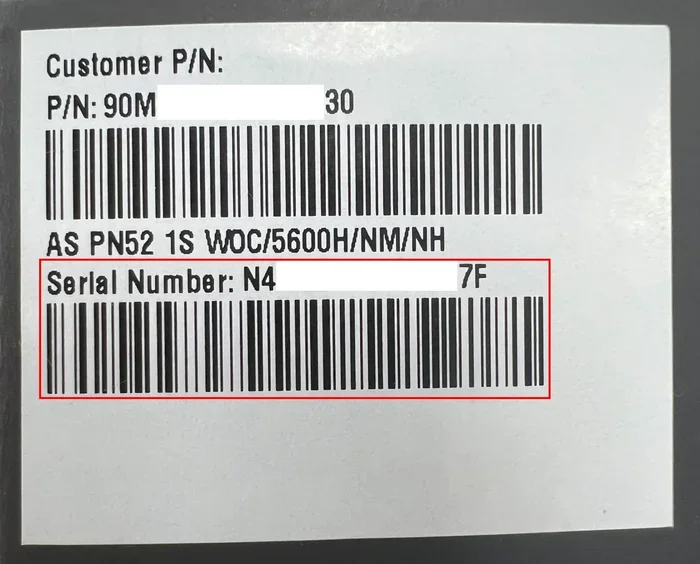
Can I Lookup A Product By Serial Number And Find Details
Can I Lookup A Product By Serial Number And Find Details? Absolutely! You can use your product’s serial number to unlock warranty status, purchase history, and device specifications. This guide shows you exactly how to perform a serial number lookup for computers, electronics, and more.
Have you ever held a product in your hands and wondered what story its serial number tells? Maybe you bought a used laptop and wanted to confirm its history. Or perhaps you just need to check if your warranty is still active. Whatever your reason, Can I Lookup A Product By Serial Number And Find Details? The short answer is yes, and the process is simpler than you think.
Serial numbers are like fingerprints for products. Every device gets a unique code that holds a wealth of information. From manufacturing dates to warranty status, that little string of numbers and letters opens a door to a world of product details. In this guide, we’ll walk you through everything you need to know about looking up a product by its serial number. We’ll cover where to find the number, which tools to use, and how to interpret the results.
Whether you own a desktop computer, a gaming console, or a simple household appliance, this guide has you covered. Let’s dive in and explore how a serial number lookup can save you time, money, and headaches.
Key Takeaways
- Serial number lookup works for most brands: Major manufacturers like Dell, HP, Apple, Lenovo, and others offer online tools for checking product details.
- You can find warranty and support info fast: A quick serial number search reveals your warranty status, purchase date, and eligible services.
- Counterfeit detection is easier than ever: Verifying a serial number helps you spot fake or tampered products before buying.
- Multiple free tools exist online: You don’t need paid services. Most brands offer free lookup portals on their official websites.
- Know where to find your serial number: It’s usually on the back, bottom, or inside the battery compartment of your device.
- Product recalls and safety alerts use serial numbers: Manufacturers use them to notify owners of defective or unsafe products.
📑 Table of Contents
- What Is A Serial Number And Why Does It Matter?
- Where Can You Find Your Product’s Serial Number?
- How To Lookup A Product By Serial Number: Step By Step
- Top Tools And Websites For Serial Number Lookups
- What Details Can You Find Through A Serial Number Lookup?
- Common Mistakes To Avoid When Looking Up Serial Numbers
- Expert Tips For Getting The Most From Your Serial Number Lookup
- Conclusion
What Is A Serial Number And Why Does It Matter?
A serial number is a unique identifier assigned to a product during manufacturing. Think of it as the product’s DNA. No two items share the same serial number, which makes it the perfect tool for identification and tracking. Manufacturers use these codes to manage inventory, provide support, and handle warranty claims.
Here is why serial numbers matter so much:
- Product identification: A serial number tells you the exact model, variant, and production batch of a device.
- Warranty tracking: Companies use serial numbers to verify when your coverage started and when it expires.
- Support and repairs: Service teams need your serial number to pull up your device history and offer the right help.
- Recall notifications: If a product has a safety issue, manufacturers contact owners using serial numbers.
- Anti-counterfeiting: Serial numbers help brands and buyers verify that a product is genuine.
When you learn how to use a serial number effectively, you gain power over your purchases. You can verify authenticity, check support options, and make smarter buying decisions. It is one of the simplest yet most valuable tools in a consumer’s toolkit.
Where Can You Find Your Product’s Serial Number?
Finding the serial number is the first step in any lookup. The good news is that most products make this easy. However, the location varies depending on the type of device you own.
On Computers And Laptops
For desktop computers, the serial number is usually printed on a sticker on the back or side of the tower. Laptops often have it on the bottom surface or underneath the battery. You can also find it in your system settings. On Windows, type “System Information” in the search bar and look for the serial number field. On a Mac, click the Apple menu, choose “About This Mac,” and the serial number appears right there.
On Monitors And Peripherals
Monitors, keyboards, and mice typically have the serial number printed on a label on the back or bottom. Some monitors place it on a sticker near the power cord. Check the packaging too, as the box often displays the serial number alongside the barcode.
On Phones And Tablets
Smartphones and tablets usually have the serial number on the back of the device. For iPhones, it is also found in the Settings app under “General” and then “About.” Android devices often list it under “About Phone” in the settings menu. The original box also includes a sticker with this information.
On Household Electronics
Televisions, routers, and gaming consoles often hide their serial numbers behind the unit or on the bottom panel. For routers, check the underside or the back panel near the serial code sticker. Game consoles like PlayStation and Xbox usually have the serial number on the bottom or back of the unit.
How To Lookup A Product By Serial Number: Step By Step
Now that you know where to find the number, let’s talk about how to actually perform the lookup. The process varies slightly depending on the brand, but the general approach stays the same.
Step 1: Locate The Serial Number
Grab your device and find the serial number. Write it down or take a clear photo of it. Make sure you copy every character exactly, including any dashes or letters that look similar to numbers. A single wrong character can lead to no results or incorrect information.
Step 2: Visit The Manufacturer’s Official Website
Go to the official website of the brand that made your product. Most major companies have a dedicated “Support” or “Warranty Check” section. For example, Dell has its warranty lookup page, HP has the Warranty Check tool, and Apple offers a coverage checker on its support site.
Step 3: Enter The Serial Number
Find the search bar or input field on the support page. Type in your serial number carefully and submit. The system will pull up your product details within seconds.
Step 4: Review The Results
The results page typically shows your warranty status, purchase date, model name, and eligible services. Some tools also display repair options, product recalls, and support resources. Take a moment to review all the information carefully.
Step 5: Contact Support If Needed
If the lookup tool doesn’t return results or you need help interpreting the data, reach out to the manufacturer’s support team. Have your serial number ready and describe your issue clearly. They can pull up your product history and guide you through the next steps.
Top Tools And Websites For Serial Number Lookups
You don’t need to guess where to start. Several reliable tools make the process quick and easy. Here are some of the best options available for checking product details by serial number.
Manufacturer-Specific Lookup Tools
Most major electronics brands offer free lookup tools right on their websites. These tools are the most accurate because they pull directly from the brand’s own database. Dell’s Warranty Check, HP’s Warranty Check, Apple’s Check Coverage page, Lenovo’s Product Support, and Asus’s Warranty Status tool are all excellent starting points. Simply enter your serial number and get instant results.
Third-Party Serial Number Databases
Some third-party websites aggregate serial number data across multiple brands. Websites like SerialNumber.org and CheckSerialNumber.com allow you to look up products from various manufacturers in one place. These tools are helpful when you own devices from different brands and don’t want to visit each company’s site separately.
Retailer Tracking Tools
If you bought your product from a major retailer, they sometimes offer tracking tools too. Amazon, Best Buy, and Newegg allow you to check order details and product information using your purchase receipt or serial number. This is especially useful for verifying where and when you bought a product.
Government And Safety Databases
For safety-related lookups, the U.S. Consumer Product Safety Commission (CPSC) maintains a database of recalled products. You can search by serial number to see if your item has been recalled. This is a crucial step if you suspect a product might be defective or unsafe.
What Details Can You Find Through A Serial Number Lookup?
A serial number lookup can reveal a surprising amount of information about your product. Here is a breakdown of what you can typically expect to find.
Warranty Status And Expiration Date
This is the most common reason people search for serial numbers. You can find out if your warranty is active, when it started, and when it expires. Some tools also show whether your warranty covers repairs, replacements, or both. This information helps you decide whether to pursue a repair claim or purchase an extended warranty.
Purchase Date And Original Retailer
Many lookup tools display the original purchase date and the retailer where the product was bought. This is especially helpful for secondhand purchases. You can verify that the seller’s claims about the product’s age are accurate.
Model Name And Specifications
The serial number can confirm the exact model name and configuration of your device. You might discover additional features or specifications that were not listed in the original product description. This is useful for troubleshooting or when seeking compatible accessories.
Repair History And Service Records
Some manufacturer databases store repair and service records tied to the serial number. This helps support teams understand any previous repairs or issues the product has had. If you are buying used, this information can reveal whether the device has been serviced before.
Product Recalls And Safety Alerts
Manufacturers issue recalls for products with safety defects. A serial number lookup can tell you if your specific unit is affected. This is a critical safety check, especially for items like batteries, appliances, and children’s electronics.
Firmware And Software Updates
Certain lookup tools also display the current firmware or software version of your device. This helps you determine whether your product is running the latest updates, which can affect performance and security.
Common Mistakes To Avoid When Looking Up Serial Numbers
Serial number lookups are straightforward, but people still make avoidable mistakes. Here are some pitfalls to watch out for.
Confusing The Serial Number With A Model Number
This is the most common error. The model number tells you the product line, while the serial number identifies the specific unit. Entering a model number into a serial number lookup field will not return the correct results. Always double-check that you are using the serial number, not the model number.
Entering Characters Incorrectly
Serial numbers often contain letters that look like numbers, such as “O” and “0” or “I” and “1.” Even a single wrong character can cause the lookup to fail. Copy the number carefully and compare it to the original label on your device.
Using Unofficial Or Suspicious Websites
Not every website offering serial number lookups is trustworthy. Some third-party sites may collect your data or provide inaccurate results. Stick to the manufacturer’s official website or well-known, reputable tools. Avoid any site that asks for unnecessary personal information.
Ignoring The Original Packaging
Many people throw away the box and paperwork after unboxing a new product. However, the original packaging often contains the serial number, barcode, and purchase date. Keep these items, especially if you plan to make a warranty claim or resell the product later.
Assuming All Brands Use The Same Format
Serial number formats vary widely between manufacturers. Some use only numbers, while others combine letters and digits. The length can range from 8 characters to over 20. Do not assume that what works for one brand will work the same way for another.
Expert Tips For Getting The Most From Your Serial Number Lookup
Want to get the best results from your serial number search? Here are some expert tips that make a real difference.
Always check multiple sources. If the manufacturer’s tool gives limited information, try a third-party database too. Different tools may pull from different data sets and reveal additional details.
Register your product after purchase. Many manufacturers offer product registration on their websites. Registering your device links your serial number to your account and ensures you receive warranty updates, recall notices, and support offers directly.
Take photos of your serial numbers regularly. Store images of all your product serial numbers in a secure folder on your phone or computer. This saves time if you ever need to look up details quickly or file a warranty claim.
Use the serial number before selling. If you are selling a used product, run a serial number lookup first. This confirms the warranty status and helps you provide accurate information to the buyer, which builds trust and speeds up the sale.
Keep your purchase receipt handy. Some warranty checks require additional verification beyond the serial number. Having your receipt with the purchase date and retailer name makes the process smoother, especially when contacting support.
Conclusion
Can I Lookup A Product By Serial Number And Find Details? Without a doubt, yes. A serial number lookup gives you access to warranty status, purchase history, model specifications, repair records, and safety alerts. It is one of the most powerful yet underused tools available to consumers today.
Whether you are checking a used laptop before buying, verifying your warranty coverage, or confirming a product recall, the process is quick and usually free. All you need is the serial number and access to the right lookup tool. By following the steps in this guide, you can unlock a wealth of information about any product you own or plan to buy.
Start today. Find your serial number, visit your manufacturer’s website, and see what you can discover. A few minutes of effort now can save you significant time, money, and frustration later. Take control of your purchases and get the most out of every product you own.
Frequently Asked Questions
Can I lookup a product by serial number for free?
Yes, most manufacturers offer free serial number lookup tools on their official support websites. You do not need to pay for basic warranty checks or product details. Third-party databases are also free to use in most cases. Just make sure you stick to reputable sites to protect your privacy.
What if my serial number lookup returns no results?
No results can happen if the serial number is entered incorrectly or if the product is too old to be in the manufacturer’s database. Double-check the characters and try again. If the issue persists, contact the manufacturer’s support team directly for assistance.
Can I check warranty status using a serial number?
Absolutely. Warranty status is one of the most common reasons people perform a serial number lookup. The manufacturer’s website will show whether your warranty is active, when it started, and when it expires. This helps you plan repairs or decide on extended coverage.
Is it safe to enter my serial number online?
Yes, it is safe when you use the manufacturer’s official website or a trusted third-party tool. Serial numbers are not personally identifiable on their own. However, avoid entering your serial number on unfamiliar or suspicious websites that ask for additional personal details.
Can I find out where I bought a product using the serial number?
In many cases, yes. Manufacturer lookup tools sometimes display the original purchase date and retailer. If you bought the product from a major retailer, their order tracking tools can also provide this information. Having your receipt makes verification even easier.
Do all products have serial numbers that can be looked up?
Most electronics, appliances, and branded products have serial numbers. However, some very old or generic items may not be tracked in online databases. High-end brands like Apple, Dell, HP, and Lenovo typically have the most comprehensive lookup systems available.