Do 8k Hdmi Cables Make A Difference In Picture Quality
Do 8K HDMI cables make a difference in picture quality? Yes, but only when your source device, TV, and content all support 8K resolution. A proper 8K HDMI cable delivers the ultra-high bandwidth needed for uncompressed 8K video, Dynamic HDR, and eARC audio without signal loss. This guide breaks down exactly when the cable matters, what features to look for, and how to avoid common mistakes that waste your money.
Do 8K HDMI cables make a difference in picture quality? The short answer is yes, but only if your entire setup can handle 8K resolution. A standard 4K cable simply cannot pass the massive amount of data an 8K signal carries. When you connect an 8K source like a PC or next-gen console to an 8K television, the right cable ensures you get every pixel, every color shade, and every frame of motion without compression or artifacts.
Many people buy expensive cables thinking they will magically boost their 4K TV’s image. That’s not how it works. The cable’s job is to carry the signal cleanly from point A to point B. If your devices don’t output 8K, no cable will create extra detail. However, if you have an 8K setup, choosing the correct 8K HDMI cable is essential. In this guide, I’ll walk you through exactly when the cable makes a difference, what features matter, and how to avoid wasting money on marketing hype.
Key Takeaways
- Bandwidth is everything: An 8K HDMI cable must support at least 48 Gbps to carry uncompressed 8K signals at 60Hz.
- Not all cables are equal: Premium certified cables with ultra-high-speed ratings prevent signal degradation over long runs.
- Your TV and source must match: Plugging an 8K cable into a 4K TV won’t improve picture quality beyond 4K resolution.
- HDR and eARC need the right cable: Dynamic HDR and lossless audio formats like Dolby Atmos require the full 48 Gbps bandwidth.
- Cable length matters: Longer runs increase the risk of signal loss, so choose a certified active cable for distances over 3 meters.
- Marketing hype is real: Many expensive cables offer no real benefit over a well-certified standard 8K cable.
📑 Table of Contents
- What Is an 8K HDMI Cable and Why Does It Matter?
- How 8K HDMI Cables Affect Picture Quality
- When Does an 8K HDMI Cable Actually Make a Difference?
- Key Features to Look For in an 8K HDMI Cable
- Common Mistakes That Ruin Your 8K Experience
- Does an 8K HDMI Cable Work with Older Devices?
- How Network Infrastructure Can Affect Your 8K Streaming
- Final Verdict: Do You Need an 8K HDMI Cable?
What Is an 8K HDMI Cable and Why Does It Matter?
An 8K HDMI cable is built to handle the extreme bandwidth required for 7680 x 4320 pixel resolution. This is four times the pixel count of 4K and sixteen times the pixel count of Full HD. To move all that data in real time, the cable needs a massive pipeline. That pipeline is measured in gigabits per second, or Gbps.
The current standard for true 8K is HDMI 2.1. An Ultra High Speed HDMI cable certified for HDMI 2.1 supports up to 48 Gbps. That’s enough bandwidth for uncompressed 8K video at 60Hz, along with 10-bit or 12-bit color depth and Dynamic HDR metadata. Without this level of bandwidth, the signal either drops to a lower resolution, loses HDR information, or suffers from intermittent dropouts.
The Role of Bandwidth in 8K Picture Quality
Think of bandwidth like a highway. A 4K signal is a busy road with lots of cars. An 8K signal is a superhighway with far more lanes. If you try to push an 8K signal through a cable designed for 4K, it’s like forcing a semi-truck onto a narrow country road. The result is congestion, which shows up as banding, color banding, or frames that fail to display properly.
Here’s a quick breakdown of what different HDMI versions can handle:
- HDMI 2.0 (18 Gbps): Supports 4K at 60Hz with HDR. Cannot carry 8K.
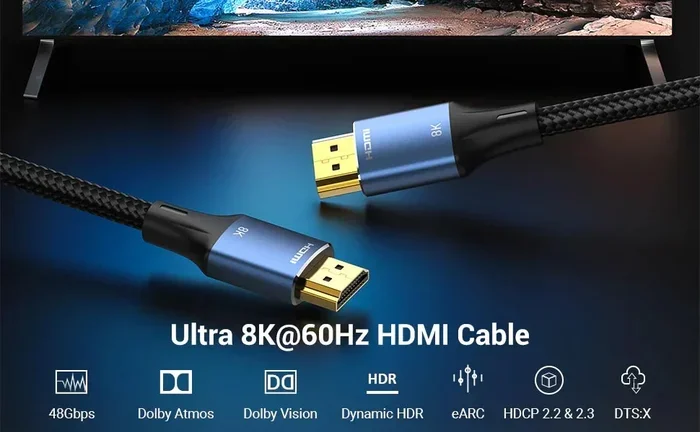
- HDMI 2.1 (48 Gbps): Supports 8K at 60Hz with Dynamic HDR, eARC, and VRR.
- HDMI 2.1a/2.1b: Adds features like Quick Frame Transport and Enhanced Audio Return Channel for even smoother performance.
When you shop for an 8K HDMI cable, always look for the Ultra High Speed HDMI certification logo. This guarantees the cable has been tested to handle 48 Gbps. Any cable without this rating may work for 4K but will fail or downscale when you push it to 8K.
How 8K HDMI Cables Affect Picture Quality
The picture quality on your screen depends on three things: the source device, the display, and the cable connecting them. A good 8K HDMI cable ensures the signal arriving at your TV is identical to the signal leaving your source. It does not add sharpness or improve colors on its own. Instead, it prevents the cable from becoming the weak link in your chain.
Signal Degradation and Cable Quality
Over distance, digital signals can degrade. A cheap, uncertified cable might work fine for a 3-foot run behind your TV stand. But if you need to route the cable through a wall or across a large room, the quality of the shielding and the copper conductors matters a lot. Signal degradation can cause sparkles, flickering, or a complete loss of signal. In some cases, the TV will simply show a black screen and then recover, which is frustrating during a movie.
Premium 8K HDMI cables use dual-layer shielding, larger gauge copper, and gold-plated connectors to resist interference from power cables and Wi-Fi routers. They maintain a clean signal path, which is especially important for high dynamic range content. HDR relies on precise metadata sent along the same cable. A degraded signal can corrupt that metadata, causing washed-out highlights or crushed shadows.
HDR and Color Depth: Why the Cable Matters
High Dynamic Range content looks different from standard HDR because it carries more color information. Formats like HDR10+, Dolby Vision, and HDR10 use dynamic metadata that changes frame by frame. To pass this data without loss, you need the full 48 Gbps of an 8K cable. A 4K cable might pass static HDR10, but it can struggle with dynamic metadata at higher color depths.
For example, if you’re watching a nature documentary on an 8K TV, the cable must handle the subtle gradients between a bright sky and dark forest. A weak cable can introduce banding, where you see steps instead of a smooth transition. This is not a TV problem; it’s a cable problem. Using a certified 8K HDMI cable eliminates this issue entirely.
When Does an 8K HDMI Cable Actually Make a Difference?
Not everyone needs an 8K cable right now. The cable only makes a difference when your entire signal chain supports 8K. Here are the situations where investing in a proper 8K HDMI cable pays off.
You Own an 8K TV or Monitor
If your display is natively 8K, you need an 8K cable to unlock its full potential. Many 8K TVs currently come with 8K content upscaled from lower resolutions, but native 8K broadcasts and media are growing. When you do watch native 8K content, a standard cable will not deliver it. You’ll see a message on screen asking you to check the cable.
You Use a PC or Game Console That Outputs 8K
High-end gaming PCs and the latest consoles can output 8K resolution for gaming and video playback. If you want to experience 8K gaming with features like Variable Refresh Rate (VRR) and Auto Low Latency Mode (ALLM), you need an HDMI 2.1 certified cable. These features rely on the high bandwidth of an 8K cable to reduce screen tearing and input lag.
You Run Long Cable Distances
Longer cables are more prone to signal loss. If your entertainment center is across the room or mounted on a wall far from your devices, a premium 8K HDMI cable with active signal boosting can make a real difference. Passive cables longer than 2 meters often struggle with 48 Gbps signals. Active cables have built-in electronics to regenerate the signal, keeping the picture crisp.
You Use eARC for Lossless Audio
Enhanced Audio Return Channel (eARC) sends uncompressed audio from your TV to a soundbar or AV receiver. Formats like Dolby Atmos and DTS:X require this high bandwidth. A 4K cable might support eARC, but only at reduced quality. An 8K cable ensures you get the full, lossless audio experience that matches the stunning visuals on your 8K screen.
Key Features to Look For in an 8K HDMI Cable
Not all cables marketed as 8K are created equal. To get the best picture quality, focus on these specific features when shopping.
- Ultra High Speed HDMI Certification: This is the official HDMI Forum certification for 48 Gbps performance. Look for the logo on the packaging and the cable itself.
- Copper Conductors with Large Gauge: Thicker copper (24 AWG or lower) carries signal more efficiently over longer distances.
- Double or Triple Shielding: Foil and braid shielding protects against electromagnetic interference from power cords and routers.
- Gold-Plated Connectors: Gold prevents corrosion and ensures a snug, low-resistance fit in your device ports.
- Cable Length Rating: Manufacturers often rate cables for specific lengths. A 3-meter cable rated for 48 Gbps will perform better than a cheap 5-meter cable of the same type.
- Ferrite Choke or Built-In Signal Booster: These reduce high-frequency noise and are especially useful for in-wall installations.
8K HDMI Cable vs 4K HDMI Cable: A Quick Comparison
Here is a simple table comparing the two main types of cables you will encounter:
| Feature | 4K HDMI Cable (HDMI 2.0) | 8K HDMI Cable (HDMI 2.1) |
|---|---|---|
| Maximum Bandwidth | 18 Gbps | 48 Gbps |
| Max Resolution at 60Hz | 4K (3840 x 2160) | 8K (7680 x 4320) |
| HDR Support | Static HDR10 | Dynamic HDR, HDR10+, Dolby Vision |
| eARC Support | Basic eARC (limited bandwidth) | Full eARC (uncompressed audio) |
| VRR and ALLM | Not supported | Fully supported |
| Best For | 4K gaming and streaming | 8K gaming, home theater, future-proofing |
As you can see, the 8K HDMI cable is the clear choice if you want to future-proof your setup. Even if you are not watching 8K content today, an HDMI 2.1 cable will handle everything from 4K up to 8K without needing a replacement later.
Common Mistakes That Ruin Your 8K Experience
Even with the best 8K HDMI cable, mistakes in setup can ruin your picture quality. Here are the most common errors I see people make.
- Buying an uncertified cable: Many cables claim to be 8K but are not tested. Stick with the Ultra High Speed HDMI certification.
- Using a cable that is too long for the bandwidth: A 10-meter passive cable will struggle with 48 Gbps. Choose an active cable or a shorter passive run.
- Ignoring firmware updates: Sometimes a TV or source device needs a firmware update to properly negotiate 8K over HDMI 2.1.
- Bending the cable sharply: Sharp bends can damage the internal conductors and cause intermittent signal loss.
- Assuming all ports on a TV are the same: Some TVs have HDMI 2.1 ports only on specific inputs. Check your TV manual to find the right port.
Expert Insight: The Real-World Impact of Cable Quality
According to testing by HDMI certification labs, a properly certified 8K HDMI cable maintains a perfect digital signal up to its rated length. Unlike analog cables, digital HDMI either works perfectly or it does not work at all. There is no in-between where a better cable looks slightly better. If you see any visual artifact, the cable is failing and needs replacement.
That said, cable build quality affects longevity. A well-shielded, thick cable will last for years without the connectors loosening or the shielding breaking down. Cheap cables often develop intermittent problems after a few months of daily use. Investing in a quality 8K HDMI cable from a reputable brand saves you the hassle of troubleshooting flickering screens.
Does an 8K HDMI Cable Work with Older Devices?
Yes, an 8K cable is fully backward compatible. You can plug it into an older HDMI 2.0 port, and it will work perfectly fine for 4K content. The connection will simply negotiate the highest common standard. This means you can future-proof your cabling now without worrying about compatibility with current devices.
It is worth noting that some very old devices with HDMI 1.4 may not support the cable’s full features. HDMI 1.4 maxes out at 10.2 Gbps, so the 8K cable will automatically downgrade to that speed. For most modern setups, this is not an issue.
Also, keep in mind that device software plays a role in delivering the best picture. If your TV runs on a proprietary operating system, its ability to process 8K signals and apply HDR correctly depends on that software. You can learn more about the advantages and disadvantages of a proprietary operating system to understand how your TV’s internal software might affect your viewing experience.
How Network Infrastructure Can Affect Your 8K Streaming
While the HDMI cable carries the video signal inside your home, the content itself often comes from the internet or a local network. If you stream 8K content from a service, your network must be fast and stable enough to deliver the massive data files. A value added network used for electronic commerce communication can prioritize traffic and ensure smooth delivery, but it also has its trade-offs.
For the best 8K streaming experience, use a wired Ethernet connection to your TV or streaming device. Wi-Fi can introduce latency and packet loss, which shows up as buffering or reduced image quality. The 8K HDMI cable then takes that clean, uninterrupted data stream and displays it on your screen without adding any compression.
You can explore the advantages and disadvantages of using a value added network for electronic commerce communication to see how network infrastructure choices impact high-bandwidth applications like 8K streaming.
Remember, the 8K HDMI cable is only one piece of the puzzle. A fast network, a powerful source device, and a capable display all work together to deliver the stunning picture quality that 8K promises.
Final Verdict: Do You Need an 8K HDMI Cable?
The answer depends on your setup. If you have an 8K TV, an 8K source, and you watch native 8K content or play games at 8K resolution, then yes, a certified 8K HDMI cable is absolutely necessary. It provides the 48 Gbps bandwidth required to pass all the data without compression or artifacts.
If you are still watching 4K content on a 4K TV, an 8K cable will not improve your picture quality. It will, however, future-proof your setup for the day when 8K content becomes mainstream. Think of it as buying a wide road for traffic that has not yet arrived, but will eventually.
For most people, the best approach is to buy one or two certified 8K HDMI cables for your most important connections, like the one linking your gaming PC or console to your TV. Use your existing cables for secondary devices. This balances cost with performance and ensures you are ready when 8K content becomes the standard.
In short, do 8K HDMI cables make a difference in picture quality when your devices and content demand that level of performance. They are not magic, but they are the essential bridge between your 8K source and your 8K display. Choose a certified cable, match it to your needs, and enjoy the full potential of your home theater or gaming setup.
Frequently Asked Questions
Will an 8K HDMI cable improve the picture on my 4K TV?
No, an 8K cable will not improve the picture on a 4K TV beyond what the TV is already capable of displaying. The cable will simply negotiate the highest common resolution, which is 4K. The cable’s extra bandwidth remains unused in this scenario.
What is the difference between HDMI 2.0 and HDMI 2.1 cables?
HDMI 2.0 cables support up to 18 Gbps, which is enough for 4K at 60Hz with HDR. HDMI 2.1 cables support up to 48 Gbps, enabling 8K at 60Hz, Dynamic HDR, VRR, and eARC. An HDMI 2.1 cable is backward compatible and works with older devices.
Can I use a long 8K HDMI cable without signal loss?
Passive 8K HDMI cables longer than 2 to 3 meters may suffer signal loss at 48 Gbps. For longer runs, use an active 8K cable with built-in signal boosting. Active cables have electronics that regenerate the signal, ensuring a clean picture even over 10 meters or more.
Do all 8K HDMI cables support Dolby Vision?
Most certified 8K HDMI cables support all HDR formats, including Dolby Vision, because they carry the full 48 Gbps bandwidth. However, always check the cable specifications to confirm it supports dynamic HDR metadata, which is required for Dolby Vision.
Is it worth paying more for a premium 8K HDMI cable?
For most users, a well-certified standard 8K cable from a reputable brand is sufficient. Premium cables offer better shielding, durability, and gold-plated connectors, which can extend the cable’s lifespan. You do not need the most expensive option, but avoid the cheapest uncertified cables that may fail under heavy use.
How do I know if my device supports 8K over HDMI?
Check your device’s specifications for an HDMI 2.1 port that supports 48 Gbps. Many modern gaming PCs, consoles, and 8K TVs list this clearly. If your device only has HDMI 2.0 ports, it can still use an 8K cable but will be limited to 4K resolution.