Difference Between Ir Blaster And Ir Extender Explained
The difference between an IR blaster and an IR extender lies in how each device handles infrared signals. An IR blaster sends infrared commands from a smart device to control electronics, while an IR extender boosts and retransmits existing IR signals across longer distances. Understanding this difference between IR blaster and IR extender helps you choose the right tool for your home automation or entertainment setup.
If you have ever tried to control your TV, AC, or sound system from a distance and ran into signal problems, you are not alone. Many people run into this issue when setting up smart home devices or universal remotes. That is where infrared control solutions come in. Two popular options are the IR blaster and the IR extender. They sound similar, but they do very different jobs. In this guide, we will break down the difference between IR blaster and IR extender in simple terms. By the end, you will know exactly which one you need for your setup.
Let us start with the basics. An IR blaster is a device that sends infrared signals to control electronics. Think of it as a virtual remote control. An IR extender, on the other hand, takes an existing infrared signal and pushes it further so it can reach devices that are out of range. Both tools use infrared technology, but they solve different problems. Understanding this difference between IR blaster and IR extender will save you time, money, and frustration.
Key Takeaways
- IR Blasters transmit commands: They act as a bridge between your smart device and infrared-controlled electronics like TVs and ACs.
- IR Extenders boost signals: They extend the range of existing IR remotes so you can control devices from farther away.
- They serve different purposes: A blaster sends new signals; an extender repeats and amplifies old ones.
- Both support home automation: Each plays a unique role in smart home setups and universal remote systems.
- Setup varies: Blasters often need software or app integration, while extenders focus on positioning and line-of-sight placement.
- Price points differ: IR blasters tend to cost more due to smart features, while extenders are generally more affordable.
- Compatibility matters: Always check if your device works with your chosen IR blaster or IR extender before buying.
📑 Table of Contents
What Is an IR Blaster?
An IR blaster is a small device that mimics the infrared signals your original remote control sends. It connects to a smart device, a streaming box, or a home automation hub and then “blasts” those signals to your electronics. You can think of it as a remote control translator. It takes digital commands from your phone or tablet and turns them into infrared light pulses that your TV, AC, or stereo can understand.
How Does an IR Blaster Work?
Here is how it works in plain language. Your phone or smart device sends a command through an app or software. The IR blaster receives that command and converts it into an infrared signal. That signal then travels through the air to your device, just like a regular remote. The device receives the signal and performs the action, like turning on or changing the volume.
Most IR blasters plug into a headphone jack, USB port, or connect via Bluetooth or Wi-Fi. Some come as small dongles that sit right next to your TV. Others are built into smart home hubs. The key thing is that the IR blaster needs to have a clear line of sight to the device it is controlling. Infrared light does not pass through walls, so placement matters a lot.
Common Uses for an IR Blaster
People use IR blasters in many different situations. Here are some of the most common ones:
- Smart home automation: Control your TV, cable box, or AC using voice commands through Alexa or Google Home.
- Streaming device control: Use your phone to control a Roku, Fire Stick, or Apple TV when the original remote is lost.
- Centralized control: Run multiple devices from one app on your phone or tablet.
- Home theater setups: Control your projector, soundbar, and TV with a single universal remote system.
- Security systems: Arm or disarm systems that use infrared sensors.
Popular IR Blaster Brands and Models
The market has many options when it comes to IR blasters. Some well-known brands include BroadLink, SwitchBot, and Logitech Harmony. The BroadLink RM4 Pro is a popular choice for smart home users. SwitchBot makes a simple plug-and-play IR blaster that works well with Alexa and Google Assistant. Logitech Harmony remotes have been a go-to option for years, though the company has shifted its focus in recent years.
What Is an IR Extender?
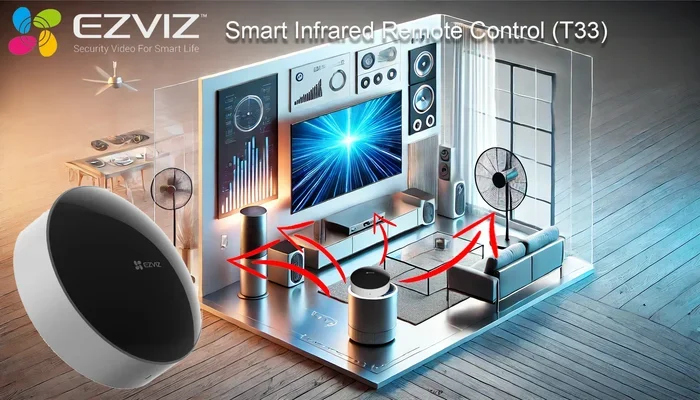
An IR extender does something different. Instead of creating new signals, it takes an existing infrared signal from your remote and extends its range. Imagine your remote control has a limited range of about 10 feet. You place your TV inside a cabinet, and now the signal cannot reach because the door is blocking it. An IR extender solves this problem by placing a receiver near your device and a transmitter near where you stand. The receiver picks up the remote signal and sends it through a cable or wirelessly to the transmitter, which then blasts the signal to your device.
How Does an IR Extender Work?
The process is straightforward. You place the IR receiver in front of your device, inside a cabinet or behind a glass door. When you press a button on your remote, the receiver captures the infrared signal. It then sends that signal to the IR transmitter, which is placed near your device. The transmitter repeats the signal, and your device responds as if the remote were right in front of it.
Some IR extenders use a wire to connect the receiver and transmitter. Others use wireless technology like radio frequency. Wireless extenders give you more flexibility in placement, but wired ones tend to be more reliable because they do not suffer from interference.
Common Uses for an IR Extender
IR extenders are very useful in specific situations. Here are some examples:
- Wall-mounted TVs in cabinets: Place the receiver inside the cabinet and the transmitter in front of the TV.
- Glass display cases: Control devices behind glass that blocks infrared signals.
- Large rooms: Extend your remote range so you can control devices from across the room or even another room.
- Commercial setups: Use in conference rooms or retail displays where devices are hidden from plain sight.
- Old remotes with weak signals: Boost the signal of an aging remote that no longer reaches your device reliably.
Popular IR Extender Brands and Models
Some trusted IR extender brands include Nyrius, Mediabridge, and Cmple. Nyrius offers wireless extenders that are easy to set up. Mediabridge makes wired kits that provide a strong, stable connection. Cmple is known for budget-friendly options that still deliver solid performance. Each brand offers different ranges and features, so you can pick one that fits your needs.
How Do They Work: A Closer Look
Now that you know what each device does, let us look at how they actually work under the hood. Both devices rely on infrared light, which is invisible to the human eye. Infrared light is part of the electromagnetic spectrum, and it carries signals between your remote and your device.
An IR blaster generates its own infrared signals. It acts as a new source of commands. When you tap a button on your phone app, the blaster creates a matching infrared pulse that your device recognizes. It is like the blaster is pretending to be your original remote.
An IR extender does not create new signals. It captures existing ones and retransmits them. Think of it as a relay runner. The receiver catches the signal, and the transmitter passes it along to the device. The signal itself stays the same; it just travels a longer distance.
This fundamental difference is at the heart of the difference between IR blaster and IR extender. One creates signals, and the other extends them. This affects how you set them up, where you place them, and what problems they solve.
IR Blaster vs IR Extender: Key Differences
Understanding the difference between IR blaster and IR extender is easier when you compare them side by side. Here is a breakdown of the most important distinctions:
| Feature | IR Blaster | IR Extender |
|---|---|---|
| Primary Function | Sends new infrared commands from a smart device | Extends the range of an existing remote signal |
| Signal Source | Creates its own signals via app or software | Captures and retransmits signals from your remote |
| Line of Sight Required | Yes, must face the device directly | Receiver needs line of sight; transmitter can be placed strategically |
| Smart Home Integration | Yes, works with Alexa, Google, and smart home apps | No, works with any standard remote |
| Range | Typically 10 to 30 feet | Can extend up to 50 feet or more with wireless models |
| Setup Complexity | Moderate, requires app configuration | Simple, plug and play in most cases |
| Price Range | $15 to $80 | $10 to $40 |
| Best For | Smart home control, universal remote setups | Solving signal range or obstruction problems |
The table above makes the difference between IR blaster and IR extender very clear. An IR blaster is your best bet if you want smart home integration and app-based control. An IR extender is ideal when you simply need to boost the reach of your existing remote.
Quick Tip: Do You Really Need Both?
In some cases, yes. If you have a smart home setup and also store your TV inside a closed cabinet, you might need both. The IR extender gets the signal past the cabinet door, and the IR blaster lets you control everything from your phone. Many smart home enthusiasts use both together for a seamless experience.
Which One Should You Choose?
Choosing between an IR blaster and an IR extender depends on your specific needs. Let us walk through some scenarios to help you decide.
Choose an IR Blaster If…
- You want to control your devices using your phone or voice assistant.
- You are building a smart home and want everything integrated into one system.
- You have lost your original remote and need a replacement control method.
- You want to control multiple devices from a single app.
- You enjoy automation, like setting your AC to turn on before you get home.
Choose an IR Extender If…
- Your remote signal does not reach your device because of distance or obstacles.
- Your device is hidden inside a cabinet or behind glass.
- You are happy with your current remote and just need better range.
- You want a simple, plug-and-play solution with no app setup.
- You have an older device that does not support smart home features.
Expert Insight: The Hybrid Approach
Many smart home experts recommend a hybrid approach. Use an IR extender to solve physical placement problems, like getting the signal past a cabinet door. Then add an IR blaster on top of that to enable smart control. This combination gives you the best of both worlds. You get reliable signal delivery and full smart home integration.
When deciding on the difference between IR blaster and IR extender, always think about your specific pain points. Are you struggling with range? Go with an extender. Do you want app control and automation? Go with a blaster. If both problems exist, consider using both.
Common Use Cases for IR Blasters and IR Extenders
Both devices shine in different real-world scenarios. Let us look at some practical examples where each one makes a big difference.
Home Theater Setups
A home theater is one of the most popular places to use both devices. Your TV, soundbar, and streaming box might all be hidden inside a media console. An IR extender gets the remote signal past the cabinet doors. An IR blaster lets you control everything from your phone or tablet without ever picking up a remote. Together, they create a clean, clutter-free entertainment area.
Living Room with Wall-Mounted TV
When your TV is mounted on the wall and the console is below, the remote signal can sometimes struggle. Placing an IR extender receiver inside the console and transmitter in front of the TV solves this. If you also want to control the TV using Alexa, add an IR blaster to the setup.
Bedroom AC Control
Many people use their phones to control bedroom AC units. An IR blaster placed near the AC lets you adjust the temperature from bed using your phone. If the AC is far from where you sit, an IR extender can boost the signal from your physical remote so it reaches the AC unit from across the room.
Office Conference Rooms
In office settings, AV equipment is often hidden from view. A projector, speaker system, and laptop might all be inside a closed cabinet. An IR extender ensures the presenter’s remote works. An IR blaster can add the ability to control the setup from a laptop or scheduling software.
Setting Up Your IR Blaster or Extender
Setting up either device is usually straightforward, but there are a few tips that make the process smoother.
IR Blaster Setup Tips
- Place the blaster with a clear view of your device. Infrared signals need a direct path. Do not hide the blaster behind objects.
- Use the companion app to configure your device. Most IR blasters come with an app that lets you select your device brand and model.
- Test each command after setup. Make sure every button works correctly before relying on the system.
- Keep the blaster plugged in or charged. It needs power to send signals at all times.
- Update the firmware regularly. Manufacturers often release updates that improve compatibility and performance.
IR Extender Setup Tips
- Place the receiver in front of your device. It must capture the remote signal clearly.
- Position the transmitter near the device. It needs to be close enough to send the repeated signal effectively.
- Use high-quality cables for wired models. Cheap cables can cause signal loss.
- Avoid placing extenders near other electronics. Electromagnetic interference can weaken the signal.
- Test from different angles and distances. Make sure the extender works from every spot where you normally sit.
Common Mistakes to Avoid
- Ignoring line-of-sight requirements. Both devices rely on infrared light, which travels in straight lines and cannot go through walls.
- Placing the device too far away. Even with an extender, there is a maximum range. Stay within the manufacturer’s recommended distance.
- Using incompatible devices. Not every IR blaster works with every TV or AC brand. Always check compatibility first.
- Skipping firmware updates. Outdated software can cause connection issues and reduced performance.
- Overlooking battery quality. Weak batteries in your remote can produce weak signals that neither a blaster nor extender can fully compensate for.
Frequently Asked Questions
Can an IR blaster work without Wi-Fi?
Most IR blasters need Wi-Fi or Bluetooth to connect to your phone or smart home hub. However, some standalone models can work with a direct connection. Check the product specifications to confirm whether Wi-Fi is required for your specific model.
Do IR extenders work with all remote controls?
Most IR extenders work with standard infrared remotes. However, some remotes use radio frequency or other signal types. If your remote uses RF, you will need a different type of extender designed for that technology.
Can I use both an IR blaster and an IR extender together?
Yes, absolutely. Many users combine both devices for the best results. The extender boosts the signal range, and the blaster adds smart control features. This hybrid setup is very popular in home theater and smart home environments.
Are IR blasters and extenders safe to use?
Yes, both devices are safe. They use low-power infrared light, which is the same technology found in your TV remote. There are no harmful emissions or health risks associated with regular use.
What is the typical range of an IR blaster?
A standard IR blaster has a range of about 10 to 30 feet, depending on the model and environment. Placing the blaster closer to your device improves reliability and signal strength.
How much does an IR blaster or extender cost?
IR blasters typically cost between $15 and $80, depending on features and brand. IR extenders are generally more affordable, ranging from $10 to $40. Wireless models and those with smart features tend to cost a bit more.
Final Thoughts
The difference between IR blaster and IR extender comes down to one simple idea. An IR blaster creates new infrared commands from your smart device. An IR extender takes your existing remote signals and pushes them further. They are two different tools that solve two different problems.
If you want smart home integration, app-based control, and automation, an IR blaster is the way to go. If you just need to boost your remote signal past a cabinet wall or across a large room, an IR extender does the job perfectly. And if you have both problems, using both devices together gives you complete control over your entertainment and smart home setup.
Take some time to assess your needs. Think about where your devices are placed, what controls you currently use, and what problems you want to solve. With the right choice, you can enjoy seamless control over all your infrared devices without ever reaching for a lost remote again.