Do I Really Need A Separate Router With A Mesh System
Many homeowners wonder if a mesh WiFi system can fully replace a traditional router. The short answer is that most modern mesh systems include a built-in router, so you typically do not need a separate router. However, some setups benefit from adding extra network hardware for better performance. This guide breaks down exactly when you need a separate router and when a mesh system handles everything on its own. You will learn how mesh nodes work, what your ISP modem does, and how to set up a whole-home WiFi network without confusion.
If you have been shopping for better home WiFi, you have probably seen mesh WiFi systems everywhere. These systems promise to kill internet dead zones and give you strong wireless coverage from corner to corner. But one question keeps popping up: do I need a separate router with a mesh system? The answer is not always a simple yes or no. It depends on your home, your internet plan, and the equipment you already have.
Many people assume they need extra hardware when they buy a mesh system. Others think the mesh unit replaces everything. The truth sits somewhere in the middle. This article will walk you through exactly what a mesh system does, when you need a separate router, and how to set up your home network the right way. By the end, you will feel confident about your network hardware choices.
Key Takeaways
- Mesh systems act as both a router and a WiFi hub: Most mesh kits include a built-in router, so a separate router is often unnecessary.
- You only need extra hardware in specific situations: Large homes, ISP gateway combos, or advanced setups may require a separate router.
- Your ISP modem is not the same as a router: Understanding this difference is key to setting up your network correctly.
- Mesh nodes create seamless whole-home WiFi: They eliminate dead zones and offer smooth roaming without a separate router.
- Setting up a mesh system is simple: You can usually connect it directly to your modem and start using it right away.
- Performance depends on your internet plan and home size: A mesh system boosts wireless coverage but cannot increase your internet speed beyond what your plan offers.
- Always check compatibility before buying: Make sure your mesh system works with your ISP equipment and internet plan.
📑 Table of Contents
- What Is a Mesh WiFi System and How Does It Work?
- Can a Mesh System Replace Your Existing Router?
- When You DO Need a Separate Router With a Mesh System
- When You Do NOT Need a Separate Router
- Mesh System vs. Router: Head-to-Head Comparison
- How to Set Up Your Mesh System Without a Separate Router
- Expert Insights on Mesh Networks and Router Setup
What Is a Mesh WiFi System and How Does It Work?
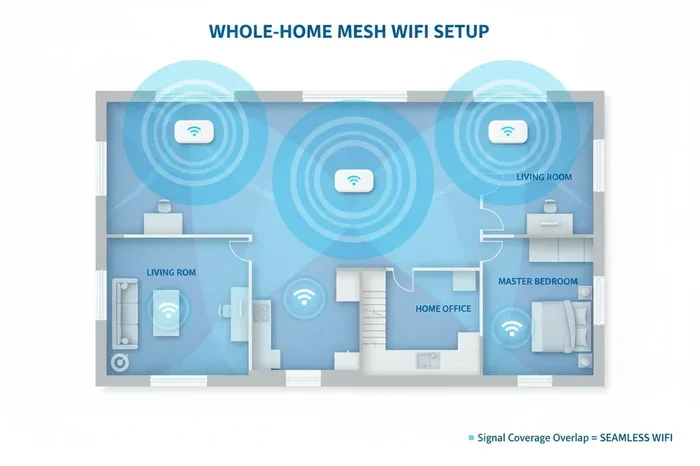
A mesh WiFi system is a set of devices that work together to cover your entire home with wireless internet. Instead of relying on one single router, a mesh system uses multiple units called nodes. Each node talks to the others and to your devices. This creates a seamless network that follows you from room to room without dropping your connection.
How Mesh Nodes Create Whole-Home WiFi
Each mesh node acts like a mini router and WiFi hub combined. The main node connects directly to your ISP modem. Then it passes the internet signal to the other nodes placed around your home. These nodes all share the same network name and password. So when you walk from the living room to the bedroom, your phone stays connected without any annoying pauses.
This is very different from a traditional single router setup. A single router sends out a signal that gets weaker the farther you move from it. Walls, floors, and furniture all block the signal. A mesh system spreads the signal evenly across your home by placing nodes in strategic spots. The result is better internet speed and fewer connectivity issues in every room.
Mesh WiFi vs. Traditional Routers
A traditional router handles two jobs. It connects to your modem to receive internet. Then it broadcasts a WiFi signal for your devices. A mesh system does both of these jobs and more. It adds smart features like automatic band steering and seamless roaming. This means your devices automatically switch to the fastest node without you lifting a finger.
Some mesh systems also use tri-band technology. This means they have three wireless bands instead of two. The extra band helps the nodes communicate with each other faster. This boosts overall network performance, especially in homes with many connected devices.
Can a Mesh System Replace Your Existing Router?
In most cases, yes. A mesh WiFi system replaces your current router completely. The main mesh unit plugs into your ISP modem and takes over all routing duties. You can then unplug your old router and start using the mesh system right away.
What the Main Mesh Unit Does
The main mesh unit serves as your primary router. It assigns IP addresses to your devices. It manages traffic between your gadgets and the internet. It also handles security features like firewall protection. So when you set up a mesh system, you are essentially getting a brand-new router built into the package.
This is why most people do not need a separate router with a mesh system. The mesh kit is designed to be a complete router replacement. You just need to make sure your ISP modem is compatible with the mesh system you choose.
When Your ISP Gateway Complicates Things
Here is where things get tricky. Many internet providers give you a combo device. This device acts as both a modem and a router. It is often called a gateway. If you use a gateway from your ISP, you already have a router built in. So adding a mesh system means you now have two routers on the same network.
Having two routers can cause problems. It can lead to double NAT issues. Double NAT can slow down your internet speed and block certain apps from working properly. In this case, you may need to put your ISP gateway into bridge mode. Bridge mode turns off the router part of the gateway and lets the mesh system take over. This is the cleanest setup for most homes.
When You DO Need a Separate Router With a Mesh System
While mesh systems handle most setups on their own, there are real situations where adding a separate router makes sense. Let us look at those cases in detail.
You Have a Very Large Home
Mesh systems work great for most homes up to 3,000 or even 5,000 square feet. But if your home is larger than that, you might need extra help. A separate router can act as an additional access point. You can connect it to one of the mesh nodes using an Ethernet cable. This adds more wireless coverage in areas the mesh nodes cannot reach alone.
For example, if you have a sprawling ranch-style house or a home with thick concrete walls, a single mesh system might struggle. Adding a separate router in the farthest room can boost your wireless coverage and keep your internet speed strong throughout the house.
You Run a Home Office or Server
If you work from home and need a rock-solid wired connection, a separate router can help. You can connect your work computer directly to the router using an Ethernet cable. This gives you the most stable and fastest connection possible. Meanwhile, the mesh system handles WiFi for all your other devices.
This setup also works well for people who run a home server or game console that needs low latency. A wired connection to a separate router ensures your critical devices always get the best network performance.
Your Mesh System Lacks Advanced Features
Some mesh systems focus on simplicity and ease of use. They may not offer advanced features like VPN support, detailed parental controls, or custom DNS settings. If you need these features, adding a separate router gives you more control over your network settings.
You can set up the mesh system for basic WiFi coverage. Then you plug in a separate router behind it for advanced network management. This gives you the best of both worlds: easy whole-home coverage and powerful customization options.
You Have Older Devices That Need a Dual-Band Router
Older devices may not support the latest WiFi standards. A separate dual-band router can provide a stable connection for these older gadgets. You can dedicate one mesh node to newer devices and use the separate router for older ones. This keeps your entire home network running smoothly without any slowdowns.
When You Do NOT Need a Separate Router
For most average households, a mesh system is all you need. Here are the situations where you can skip the extra router entirely.
Your Home Is Under 3,000 Square Feet
If you live in a small to medium home, a single mesh system with two or three nodes will cover every room easily. You do not need a separate router. The mesh nodes will handle all your WiFi needs. Just place the main node near your modem and spread the other nodes around the house for the best signal strength.
You Have a Standard Internet Plan
If your internet plan delivers speeds under 1,000 Mbps, a mesh system will handle everything without breaking a sweat. You do not need extra routing hardware to get good performance. The mesh system will manage your internet speed efficiently across all connected devices.
Your ISP Gateway Is Already in Bridge Mode
If your ISP gateway is set to bridge mode, it is no longer acting as a router. It is just a modem that passes the signal through. In this case, your mesh system becomes the sole router. There is no need for any additional routing hardware. This is the simplest and most common setup for mesh WiFi systems.
You Want a Simple, Clean Setup
One of the biggest benefits of mesh systems is their simplicity. You do not need to configure multiple devices or deal with conflicting settings. A mesh system with two or three nodes gives you whole-home WiFi without the hassle of managing a separate router. Less hardware means fewer things to go wrong and less time spent troubleshooting connectivity issues.
Mesh System vs. Router: Head-to-Head Comparison
Let us look at how a mesh system stacks up against a traditional router. This comparison will help you understand why most people do not need a separate router when they switch to mesh.
| Feature | Mesh WiFi System | Single Router |
|---|---|---|
| Whole-home coverage | Excellent with multiple nodes | Limited to one device range |
| Seamless roaming | Yes, automatic switching | No, manual switching needed |
| Easy setup | Yes, app-based | Moderate, manual config |
| Scalability | Add more nodes easily | Requires additional hardware |
| Dead zone elimination | Very effective | Struggles with thick walls |
| Price | Higher upfront cost | Lower upfront cost |
| Advanced features | Varies by model | More options on high-end models |
As you can see, a mesh system wins in almost every category for average home use. The only area where a single router might still be useful is for very specific advanced configurations. But for 90% of households, a mesh system provides everything you need without a separate router.
How to Set Up Your Mesh System Without a Separate Router
Setting up a mesh system without a separate router is straightforward. Here is a step-by-step guide to get you started.
- Unplug your old router. If you have a separate router, unplug it from the power source. You will not need it for this setup.
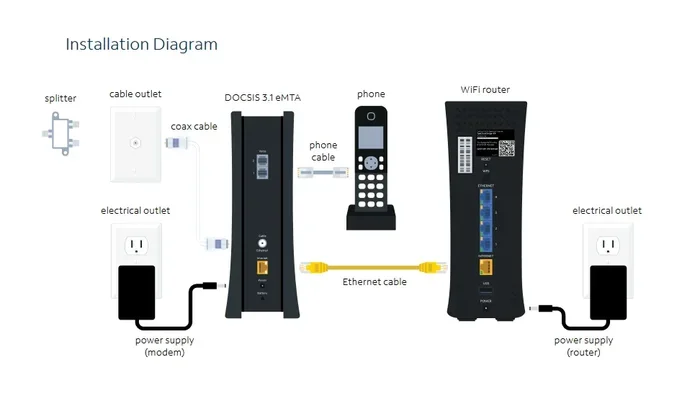
- Connect your ISP modem to the main mesh node. Use an Ethernet cable to connect the modem’s output to the WAN port on the main mesh unit.
- Power on the main node. Plug it in and wait for the LED light to turn solid or follow the setup instructions.
- Download the mesh app. Most mesh systems come with a free app. Download it on your phone and follow the on-screen prompts.
- Add satellite nodes. Place the other mesh nodes around your home. The app will guide you to the best spots for maximum WiFi signal strength.
- Test your network. Walk around your home and check the internet speed in different rooms. Make sure there are no dead zones or slow spots.
That is it. You now have a whole-home WiFi network running on a mesh system without any separate router. Your network performance should be strong, and your internet speed should be consistent in every room.
Quick Tips for the Best Setup
- Place the main mesh node in a central location in your home.
- Keep nodes within good range of each other. They should not be too far apart.
- Avoid placing nodes behind thick walls or inside cabinets.
- Use the mesh app to run a speed test and check WiFi signal strength in each room.
- Update the firmware on all mesh nodes regularly for the best network performance.
Common Mistakes to Avoid
One common mistake is placing the main node too far from the modem. Keep the distance short with a direct Ethernet connection. Another mistake is putting a mesh node in a basement surrounded by concrete. This blocks the wireless signal and creates dead zones. Also, do not connect your old router to the mesh system unless you have a specific reason to do so. Running two routers in the same network can cause conflicts and slow things down.
Expert Insights on Mesh Networks and Router Setup
Networking experts agree that mesh systems have changed the way we think about home WiFi. According to industry professionals, most households do not need a separate router when they invest in a quality mesh system. The built-in router in the main mesh unit handles everything from IP assignment to traffic management.
Experts also point out that mesh systems are designed for the average user. They come with simple apps that walk you through setup in minutes. You do not need to know how to configure port forwarding or adjust DNS settings. The mesh system takes care of it all behind the scenes. This makes mesh WiFi one of the best router replacements for non-technical users.
However, experts do recommend checking your internet speed before and after setup. A mesh system improves wireless coverage and WiFi signal strength. But it cannot make your internet plan faster than what your ISP provides. If you need faster internet speeds, you will need to upgrade your internet plan, not add more hardware.
Final Thoughts on Whether You Need a Separate Router
So, do I need a separate router with a mesh system? For most people, the answer is no. A mesh WiFi system replaces your router and gives you better coverage, faster speeds, and fewer dead zones. You only need a separate router in special situations like very large homes, home offices, or advanced networking setups.
The beauty of a mesh system is its simplicity. You get a complete home network solution in one box. No extra hardware, no complicated configurations, no conflicting settings. Just plug in, set up, and enjoy strong WiFi everywhere in your home.
Before you buy anything, check what your ISP provides. If you have a gateway combo device, put it in bridge mode and let the mesh system take over. Then place your mesh nodes strategically for the best wireless coverage. Follow these steps, and you will have a fast, reliable home network without ever needing a separate router.
Take the time to compare mesh systems and find one that fits your home size and internet needs. Read reviews, check compatibility, and set up your system correctly. With the right mesh WiFi setup, you will never worry about weak signals or internet dead zones again.
Frequently Asked Questions
Can I use a mesh WiFi system without a router at all?
Yes, you can. A mesh WiFi system includes a built-in router in its main unit. You just need to connect the main mesh node to your ISP modem, and it will handle all routing duties. You do not need any separate router hardware for a standard home setup.
What happens if I connect a mesh system to my ISP gateway?
If your ISP gateway is not in bridge mode, you will have two routers running at the same time. This can cause double NAT issues and slow down your internet speed. The best practice is to put your ISP gateway into bridge mode so the mesh system becomes the only router on your network.
Does adding a separate router improve mesh WiFi performance?
In most cases, no. A mesh system is designed to work on its own. Adding a separate router can actually cause conflicts and reduce network performance. However, in very large homes or specialized setups, a separate router can supplement the mesh system for extra coverage.
How many mesh nodes do I need for my home?
As a general rule, one mesh node covers about 1,000 to 1,500 square feet. A two-pack works well for homes up to 2,000 square feet. A three-pack is ideal for homes between 2,000 and 3,500 square feet. Add more nodes if you have a larger home or many thick walls.
Will a mesh system make my internet speed faster?
A mesh system will not increase your internet speed beyond what your ISP plan provides. However, it will improve how that speed reaches your devices. By eliminating dead zones and weak signals, a mesh system ensures you get the full speed of your internet plan in every room of your home.
Can I keep my old router and add a mesh system to it?
You can, but it is not recommended for most users. Running both a mesh system and a separate router creates a more complex network. It can lead to connectivity issues and slower performance. If you want the simplest setup possible, let the mesh system replace your old router entirely.
=== CONCLUSION ===
So, do I really need a separate router with a mesh system? The answer for most people is a clear no. A mesh WiFi system replaces your traditional router and gives you better whole-home coverage, seamless roaming, and stronger WiFi signal strength. You just plug it into your ISP modem, add the satellite nodes, and enjoy fast internet in every room.
The only times you need extra hardware are for very large homes, specialized home office setups, or situations where your ISP gateway causes conflicts. In those cases, a separate router can supplement your mesh system for better network performance.
Take the time to understand your home, your internet plan, and your current equipment. Then choose a mesh system that fits your needs. Follow the setup tips in this guide, avoid common mistakes, and you will have a fast, reliable home network without the hassle of managing extra hardware. Say goodbye to internet dead zones and hello to seamless WiFi coverage throughout your entire home.