Can I Use Any Wifi Router With Spectrum And Find Out
Yes, you can use your own WiFi router with Spectrum internet, but there are a few important steps to follow. You need to check compatibility, put your Spectrum modem into bridge mode, and configure your new router correctly. This guide walks you through everything you need to know about Spectrum router compatibility so you can ditch the rental fee and get better performance.
Are you tired of paying Spectrum every month just to rent their WiFi router? Maybe you have been wondering, can I use any WiFi router with Spectrum and actually get it to work? The short answer is yes. But like most things in life, there is a little more to it than just plugging in a new router and calling it a day.
Whether you want better range, faster speeds, or simply to stop throwing money at a rental fee, bringing your own router to Spectrum is a smart move. This guide covers everything you need to know. We will walk through compatibility, setup, common mistakes, and expert tips to make the whole process smooth.
By the end of this article, you will feel confident enough to pick out a new router, set it up with your Spectrum internet, and enjoy a faster, more reliable home network. Let us dive right in.
Key Takeaways
- You can use any compatible WiFi router with Spectrum: Most modern routers work, but you must check specifications first.
- Bridge mode is essential: Your Spectrum modem needs to be in bridge mode to avoid double NAT issues.
- You can save money: Spectrum charges a monthly rental fee for their gateway, and using your own router eliminates that cost.
- WiFi 6 routers offer the best performance: If you have a fast Spectrum plan, a WiFi 6 router will unlock full speed potential.
- Setup is straightforward: With the right steps, you can configure a third-party router in under 30 minutes.
- Check DOCSIS compatibility: Your modem must support the correct DOCSIS standard for your Spectrum internet tier.
- Spectrum customer service can help: They can walk you through bridge mode activation and troubleshooting.
📑 Table of Contents
- Understanding Spectrum Internet and How Routers Work Together
- Can I Use Any WiFi Router With Spectrum?
- Why People Switch to Their Own Router With Spectrum
- How to Set Up Your Own Router With Spectrum
- Best Routers to Use With Spectrum Internet
- Common Mistakes to Avoid When Setting Up a Router With Spectrum
- Expert Tips to Get the Most Out of Your Spectrum Setup
- Frequently Asked Questions
- Conclusion
Understanding Spectrum Internet and How Routers Work Together
Before you rush out and buy a new router, it helps to understand how Spectrum internet actually works. Spectrum delivers internet to your home through a cable connection. That cable comes into your house and connects to a device called a modem. The modem then talks to your router, and the router broadcasts the WiFi signal throughout your home.
Spectrum offers a combo device called a gateway. This single box acts as both a modem and a router. It is convenient, but it is not always the best performer. Many people find that the gateway provided by Spectrum is bulky, runs hot, and has weak WiFi coverage in larger homes.
What Is a Modem vs. a Router?
People often confuse these two devices, so let us clear it up. A modem connects your home to the internet through the cable line. A router takes that internet connection and shares it with your devices over WiFi or ethernet cables. When you use your own router with Spectrum, you still need a modem. Spectrum provides one, or you can buy your own compatible modem.
The key thing to remember is that your router and modem need to work together. Not every router will play nice with every modem. And not every router will work well with Spectrum’s network setup. That is why checking Spectrum router compatibility matters so much.
Can I Use Any WiFi Router With Spectrum?
Here is the big question. The answer is mostly yes, but with some important conditions. Can I use any WiFi router with Spectrum and expect it to work perfectly? Not quite. You need a router that is compatible with Spectrum’s network and your specific modem.
Spectrum uses cable internet, which means your equipment needs to support DOCSIS technology. DOCSIS stands for Data Over Cable Service Interface Specification. It is the standard that cable modems use to communicate with your internet provider. If your modem or gateway does not support the right DOCSIS version, you will not get the full speed of your Spectrum plan.
Spectrum Internet Plans and Speed Tiers
Spectrum offers several internet speed tiers. These range from basic plans starting around 200 Mbps to ultra-fast gigabit plans. The router you choose needs to handle the speed tier you are paying for. A budget router on a fast Spectrum plan will bottleneck your connection. You will not get the speeds you are paying for.
Here is a quick look at what to consider based on your plan:
- Basic plans (200 Mbps): A standard WiFi 5 router will handle this just fine.
- Mid-tier plans (400 Mbps to 1 Gbps): You will want a WiFi 6 router for the best performance.
- Gigabit plans (1 Gbps and above): A WiFi 6 or WiFi 6E router is highly recommended to avoid bottlenecks.
When shopping for a compatible router for Spectrum, look at the router’s maximum speed rating. It should match or exceed your Spectrum internet speed. Otherwise, you are leaving performance on the table.
Why People Switch to Their Own Router With Spectrum
There are several reasons why homeowners decide to ditch the Spectrum gateway and bring their own router. Understanding these reasons can help you decide if it is the right move for you.
Saving Money on Rental Fees
Spectrum charges a monthly rental fee for their gateway. This fee typically runs around $14 to $15 per month. Over a year, that adds up to about $180. A good third-party router costs between $100 and $250. You can pay off the router in just a few months and then enjoy zero rental fees for the rest of its life.
Better WiFi Performance and Coverage
Spectrum gateways are designed to be one-size-fits-all. They work for most homes, but they are not optimized for any specific setup. If you have a larger home, multiple floors, or thick walls, the Spectrum gateway may struggle to reach every room. A dedicated router, especially a mesh WiFi system, can dramatically improve your coverage.
More Features and Control
When you use your own router, you get access to better settings and features. You can set up parental controls, prioritize traffic for gaming or streaming, create guest networks, and customize your security settings. Spectrum gateways offer basic features, but they do not give you the same level of control.
How to Set Up Your Own Router With Spectrum
Setting up a third-party router with Spectrum is not as hard as it might sound. You just need to follow the right steps in order. Here is a simple walkthrough to get you started.
Step 1: Check Your Modem Compatibility
First, you need to know what modem you are using. If you are using the Spectrum gateway, you will need to put it into bridge mode. Bridge mode turns off the router function inside the gateway and lets it act only as a modem. This prevents conflicts with your new router.
If you are using a separate modem, make sure it is DOCSIS 3.0 or DOCSIS 3.1. You can find this information on the modem itself or in the manual. Spectrum also has a list of approved modems on their website if you need to check.
Step 2: Put Your Spectrum Gateway Into Bridge Mode
Bridge mode is the most important step in this process. Without it, you will run into something called double NAT, which can cause all kinds of connection problems. Double NAT happens when two routers are both trying to assign IP addresses on the same network.
To activate bridge mode, log into your Spectrum gateway’s admin panel. The default IP address is usually 10.0.0.1. From there, you can find the bridge mode setting and turn it on. If you have trouble, you can also call Spectrum customer service and they will walk you through it.
Step 3: Connect Your New Router
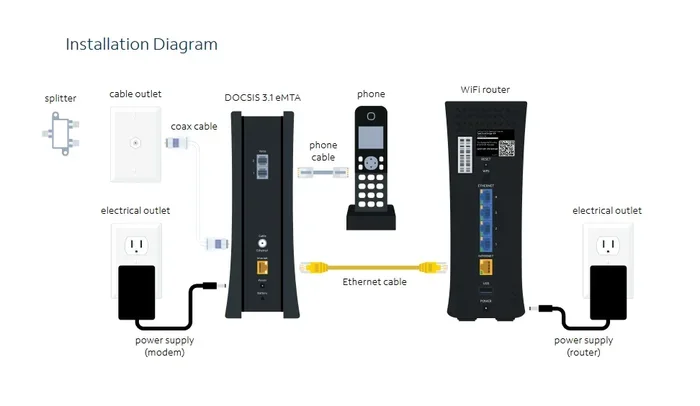
Once bridge mode is active, connect your new router to the Spectrum modem using an ethernet cable. Plug one end into the modem and the other into the WAN or internet port on your router. Power on both devices and wait for them to fully start up.
Next, connect to your new router’s WiFi network. You will find the network name and password on a sticker on the bottom of the router. Open a browser and go to the router’s setup page to configure your settings.
Step 4: Configure Your Router Settings
During setup, you will want to set a few key things. Choose a strong WiFi password and a network name you will remember. If your router supports it, enable WPA3 security for the best protection. Also, make sure your router’s firmware is up to date. Firmware updates fix bugs and improve performance.
For the best results, set your router to the 5GHz band for faster speeds and the 2.4GHz band for better range. Many modern routers handle this automatically with a feature called band steering.
Best Routers to Use With Spectrum Internet
Not all routers are created equal. Some work better with Spectrum than others. Here are a few top picks that are known to be compatible with Spectrum internet and deliver great performance.
Budget-Friendly Option: TP-Link Archer A7
The TP-Link Archer A7 is a solid WiFi 5 router that costs around $60 to $70. It handles speeds up to 1750 Mbps, which is more than enough for most Spectrum plans. It is reliable, easy to set up, and a great choice if you are on a tighter budget.
Mid-Range Pick: Netgear Nighthawk R6700
The Netgear Nighthawk R6700 is a WiFi 5 router that delivers strong performance and solid range. It supports speeds up to 1750 Mbps and works well with Spectrum’s internet tiers up to gigabit. It is a popular choice among homeowners who want a step up from the Spectrum gateway.
Premium Choice: ASUS RT-AX86U
If you have a fast Spectrum plan and want the best performance, the ASUS RT-AX86U is a WiFi 6 router that is worth the investment. It supports speeds up to 5700 Mbps and handles multiple devices with ease. It is perfect for households with lots of smart home devices, streamers, and gamers.
Best for Large Homes: Google Nest WiFi or Eero Pro
If you have a larger home or multiple floors, a mesh WiFi system is the way to go. The Google Nest WiFi and Eero Pro systems are easy to set up and provide seamless coverage throughout your home. They work perfectly with Spectrum and eliminate dead zones.
Common Mistakes to Avoid When Setting Up a Router With Spectrum
Even when you follow the steps carefully, it is easy to make a few mistakes. Here are some common errors that can cause problems with your setup.
Forgetting to Enable Bridge Mode
This is the number one mistake people make. If you do not put your Spectrum gateway into bridge mode, your new router and the gateway will conflict. You will experience slow speeds, dropped connections, and devices that cannot connect to the internet.
Using an Incompatible Modem
Not every modem works with Spectrum. Before you buy a separate modem, make sure it is on Spectrum’s approved list. Using an incompatible modem can lead to poor performance or no internet connection at all.
Skipping Firmware Updates
Router firmware keeps your device secure and running smoothly. Skipping updates can leave you vulnerable to security issues and performance problems. Check for updates regularly, especially after you set up a new router.
Placing the Router in a Bad Spot
Where you put your router matters more than you might think. Do not hide it in a closet or behind a TV. Place it in a central, elevated location for the best coverage. Walls, metal objects, and appliances can all weaken your WiFi signal.
Expert Tips to Get the Most Out of Your Spectrum Setup
Once your new router is up and running, there are a few things you can do to squeeze out even better performance. These tips come from networking professionals and experienced home users.
Use an Ethernet Cable for Key Devices
WiFi is convenient, but a wired ethernet connection is always faster and more stable. If you have a smart TV, gaming console, or desktop computer in the same room as your router, plug it in with a cable. You will notice an immediate difference in speed and reliability.
Restart Your Equipment Regularly
Routers and modems benefit from regular restarts. Just like your phone, these devices can get sluggish over time. A quick restart once a week can clear out glitches and keep your network running smoothly.
Monitor Your Internet Speed
After you set up your new router, run a speed test to make sure you are getting the speeds you are paying for. You can use free tools like Speedtest.net or Fast.com. If your speeds are much lower than expected, check your router settings and make sure everything is configured correctly.
Consider a WiFi Extender if Needed
If you still have dead zones in your home even with a good router, a WiFi extender can help. These devices boost your signal to areas that your router cannot reach. They are affordable and easy to set up. Just keep in mind that extenders can sometimes reduce speeds slightly.
Frequently Asked Questions
Do I need to contact Spectrum before using my own router?
You do not need to contact Spectrum before using your own router. However, you will need to call them if you want help putting your gateway into bridge mode. Spectrum customer service can also activate your modem remotely if you are using a third-party modem instead of the Spectrum gateway.
Will using my own router void my Spectrum contract?
No, using your own router will not void your Spectrum contract. You are free to use any compatible router you want. Spectrum cannot require you to rent their equipment. However, you should still follow their terms of service and make sure your equipment meets their technical requirements.
Can I use a WiFi 6 router with Spectrum internet?
Yes, you can absolutely use a WiFi 6 router with Spectrum internet. In fact, WiFi 6 routers are the best choice for modern Spectrum plans. They offer faster speeds, better handling of multiple devices, and improved range. Just make sure your modem is compatible and your gateway is in bridge mode.
What happens if I do not put my Spectrum gateway in bridge mode?
If you do not put your Spectrum gateway in bridge mode, you will likely experience double NAT issues. This means two devices are both trying to manage your network, which causes conflicts. Symptoms include slow internet, devices that cannot connect, and poor overall performance. Bridge mode is essential for a smooth setup.
Is it cheaper to use my own router with Spectrum?
Yes, it is almost always cheaper in the long run. Spectrum charges a monthly rental fee for their gateway, typically around $14 to $15. A good router costs between $60 and $250 one time. After a few months, you break even and then save money every month going forward.
Can I use any modem with Spectrum, or do I need an approved one?
You should use a modem that is on Spectrum’s approved list. Using an unapproved modem can lead to compatibility issues and poor performance. You can find the full list of approved modems on the Spectrum website or by contacting their customer service team.
Conclusion
So, can I use any WiFi router with Spectrum? Yes, you can. But the key is to choose a compatible router, set your Spectrum modem to bridge mode, and configure everything correctly. It is a simple process that can save you money, improve your internet speeds, and give you more control over your home network.
Whether you pick a budget-friendly router or invest in a premium mesh system, the benefits are clear. No more rental fees. Better coverage. Faster speeds. And a network that is truly yours to customize.
Take the time to research your options, follow the setup steps in this guide, and you will be enjoying a better internet experience in no time. Your home network deserves better than a rental gateway. Give your own router a try and feel the difference.
Start today. Pick a router that fits your needs and your budget, follow the steps outlined here, and join the thousands of Spectrum customers who have already made the switch. You will wonder why you did not do it sooner.