Do Tesla Dealerships Have Wifi Everything You Need To Know
Do Tesla dealerships have WiFi? The short answer is yes, most Tesla locations offer wireless internet access to customers and visitors. Tesla dealerships and service centers are designed to provide a seamless digital experience, allowing owners and potential buyers to browse, test drive vehicles, and stay connected while they wait. Whether you are visiting for a test drive, a service appointment, or just exploring, you can expect reliable connectivity at most locations.
Key Takeaways
- WiFi Availability: Most Tesla dealerships and service centers provide free WiFi to all visitors.
- Network Name: The WiFi network is typically branded as Tesla Guest or similar, making it easy to find.
- Speed and Reliability: Connections are generally strong enough for browsing, streaming, and using the Tesla mobile app.
- Service Centers vs. Showrooms: Service centers tend to have better WiFi infrastructure than smaller showrooms.
- Tesla Vehicle Connectivity: Your Tesla car also has built-in WiFi and can share its connection with your phone.
- Limitations Exist: Some locations may have restricted bandwidth or time limits on WiFi usage.
- Alternative Options: If WiFi is unavailable, Tesla showrooms often have charging stations where you can use your own data hotspot.
📑 Table of Contents
- Do Tesla Dealerships Have WiFi? The Full Breakdown
- What to Expect When You Connect to Tesla Dealership WiFi
- Tesla Dealership WiFi vs. In-Car WiFi
- Tesla Service Centers and WiFi: A Closer Look
- Tesla Showrooms vs. Service Centers: WiFi Differences
- Tips for Getting the Most Out of Tesla Dealership WiFi
- Common Mistakes People Make with Tesla Dealership WiFi
- The Future of Connectivity at Tesla Dealerships
- Final Thoughts
Do Tesla Dealerships Have WiFi? The Full Breakdown
If you have ever walked into a Tesla dealership wondering whether you could hop online, you are not alone. The question do Tesla dealerships have WiFi comes up more often than you might think. People want to check emails, browse the web, or just stay entertained while they wait for a test drive or a service appointment.
The good news is that Tesla has invested heavily in creating a connected experience across all its retail locations. Most Tesla dealerships, showrooms, and service centers offer wireless internet access. This is part of Tesla’s broader strategy to make every interaction with the brand feel modern, seamless, and tech-forward.
But the details matter. Not all locations are the same. The quality of the WiFi connection, the speed, and the ease of access can vary depending on the size of the location, the number of visitors, and the specific infrastructure in place. In this article, we will cover everything you need to know about WiFi at Tesla dealerships.
We will look at how the network works, what you can expect during different types of visits, and tips to get the most out of the connection. By the end, you will know exactly what to expect when you walk through the doors of a Tesla location.
Why WiFi Matters at Tesla Dealerships
Tesla is a technology company first and a car manufacturer second. This identity shapes every part of the customer experience. When you visit a Tesla dealership, you are stepping into a digital ecosystem. The vehicles themselves are essentially computers on wheels. The Tesla mobile app lets you control your car from your phone. And the in-car browser and entertainment systems rely on a strong internet connection.
So it makes sense that the physical spaces where Tesla interacts with customers would also be highly connected. WiFi at a Tesla dealership is not just a nice-to-have. It is a core part of the experience. Here is why it matters:
- Test Drives: During a test drive, you may want to connect your phone to the car’s infotainment system. A stable WiFi connection helps with this.
- Research on the Spot: Many visitors use their time at the dealership to research Tesla models, compare features, and read reviews.
- Service Wait Times: If you are waiting for a service appointment, WiFi keeps you productive or entertained.
- Tesla Owner Community: Owners often share tips, ask questions, and connect with other Tesla fans while at the dealership.
- Demo Vehicle Interaction: You can explore the features of a demo car, which often requires an internet connection for full functionality.
Tesla understands that a connected showroom creates a better customer experience. It reinforces the brand’s identity as a leader in technology and innovation.
What to Expect When You Connect to Tesla Dealership WiFi
So what happens when you walk into a Tesla dealership and look for WiFi? The process is usually straightforward, but there are some things you should know beforehand.
How to Find and Connect to the Network
When you enter a Tesla dealership or service center, open the WiFi settings on your phone or laptop. You will likely see a network named something like Tesla Guest, Tesla Visitor, or simply Tesla WiFi. The exact name can vary by location, but it is almost always branded with the Tesla name.
Connecting is usually simple. You may need to accept a terms-of-use page that pops up in your browser. Some locations require no password at all, while others may have a basic captive portal. The captive portal is just a web page that confirms you agree to use the network responsibly.
Here is what the connection process typically looks like:
- Open your device’s WiFi settings.
- Look for a network with the Tesla name.
- Tap or click to connect.
- Open your browser to trigger the login page.
- Accept the terms and start browsing.
The entire process takes less than a minute. Tesla has designed it to be frictionless because they want you to have a positive experience from the moment you arrive.
Speed and Bandwidth
Speed is where things can vary. At larger Tesla service centers and flagship showrooms, the WiFi is usually fast enough for streaming videos, video calls, and large downloads. These locations often have enterprise-grade routers and dedicated bandwidth for guest access.
At smaller Tesla galleries or retail spaces, the connection might be slower. This is especially true during busy hours when many people are connected at the same time. If you need to do something that requires a lot of bandwidth, like downloading a large file or joining a high-quality video call, it is a good idea to check the speed first.
A quick tip: run a speed test on your phone right after connecting. This tells you exactly what you are working with. If the speed is too slow for your needs, you can always fall back to your mobile data.
Security Considerations
Public WiFi always comes with some security considerations, and Tesla dealership WiFi is no exception. Because it is a shared network used by many visitors, you should take basic precautions.
Avoid accessing sensitive accounts or entering passwords for banking or financial services if you can. If you must do so, make sure the website uses HTTPS encryption. Using a VPN (Virtual Private Network) is also a smart move if you plan to spend a long time on the network.
Tesla does not monitor or log individual user activity on its guest networks, but the open nature of public WiFi means your data could potentially be intercepted by others on the same network. Simple caution goes a long way.
Tesla Dealership WiFi vs. In-Car WiFi
One of the most interesting aspects of Tesla’s connectivity ecosystem is the relationship between dealership WiFi and the WiFi built into Tesla vehicles. These are two different systems, but they serve complementary purposes.
In-Car WiFi Features
Every Tesla vehicle comes with built-in WiFi connectivity. When you are near a Tesla dealership, your car can connect to the Tesla WiFi network just like your phone does. This is especially useful for updating your vehicle’s software, downloading maps, or streaming music while you sit in the parking lot.
Tesla vehicles also connect to the internet through the Tesla cellular network. This provides connectivity even when you are not near a Tesla dealership. The in-car browser, live traffic data, and over-the-air updates all rely on this connection.
Here is a quick comparison of the two types of WiFi:
- Dealership WiFi: Available only when you are physically at a Tesla location. Free to use. Best for large downloads and software updates while you wait.
- In-Car WiFi: Available anywhere there is a Tesla cellular signal or a compatible WiFi network. Requires a Tesla account. Some features may require a Premium Connectivity subscription.
Using Dealership WiFi to Update Your Tesla
One of the best uses of Tesla dealership WiFi is downloading software updates for your vehicle. Tesla releases updates regularly, and they can be quite large. If you have a strong WiFi connection at the dealership, you can download the update while you are there and install it later.
This saves cellular data and ensures you get the full update without interruptions. Just park your car near the showroom, connect to the Tesla WiFi network, and initiate the download through the Tesla mobile app or the car’s touchscreen.
Tesla Service Centers and WiFi: A Closer Look
Tesla service centers are the locations where most owners spend the most time. Whether you are there for a routine maintenance check, a repair, or a warranty claim, you will likely be waiting for at least part of the visit.
Tesla service centers tend to have the best WiFi infrastructure of any Tesla retail location. They are typically larger facilities with more space for networking equipment. Many service centers have dedicated IT support to keep the network running smoothly.
While you wait for your service appointment, you can use the WiFi to work remotely, stream content, or stay in touch with family and friends. Some service centers even have lounges or waiting areas with comfortable seating, making it easy to spend time online while your car is being serviced.
What If the WiFi Is Down?
Like any public WiFi network, Tesla dealership WiFi can sometimes go down. This might happen due to technical issues, maintenance, or high traffic. If the WiFi is not working, do not panic.
Most Tesla service centers and showrooms have charging stations where you can plug in your phone and use your own data connection. Some locations also have outlets near seating areas. Tesla staff are usually happy to help if you are having trouble connecting.
It is also worth noting that Tesla vehicles themselves can act as WiFi hotspots in some situations. If your car is connected to the Tesla cellular network, you may be able to share its connection with your phone using a mobile hotspot feature.
Tesla Showrooms vs. Service Centers: WiFi Differences
Not all Tesla locations are created equal. Tesla operates two main types of retail spaces: showrooms and service centers. Each has its own approach to WiFi and connectivity.
Tesla Showrooms
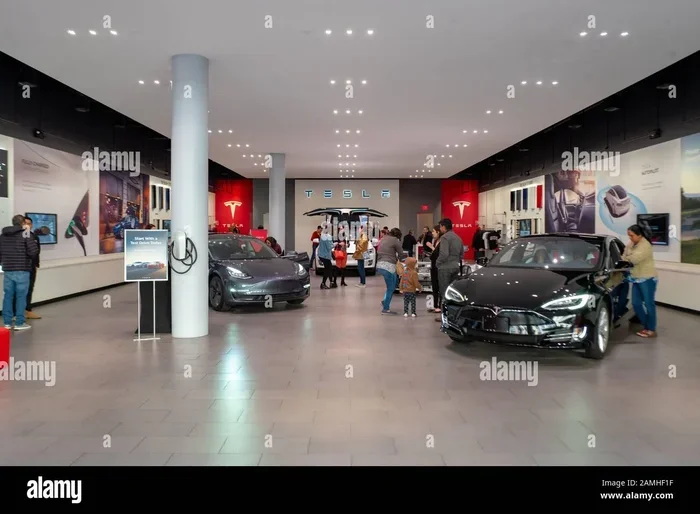
Tesla showrooms are typically smaller, sleek spaces located in shopping malls or high-traffic retail areas. They are designed for browsing, exploring vehicles, and talking with sales advisors. The WiFi in showrooms is usually sufficient for basic browsing and app use.
However, because showrooms are often smaller and have fewer networking resources, the WiFi might not be as fast or reliable as at a full-size service center. If you are visiting a showroom, keep your expectations realistic. Use the WiFi for light tasks like checking email or browsing the Tesla website.
Tesla Service Centers
Service centers are larger facilities with dedicated service bays, parts inventory, and customer waiting areas. They tend to have better WiFi infrastructure because they serve more people over longer periods. The network is designed to handle multiple simultaneous connections without slowing down.
If you have a choice between visiting a showroom and a service center for a longer stay, the service center is usually the better option for WiFi access. You will get a more stable connection and more bandwidth.
Tesla Supercharger Stations and WiFi
It is also worth mentioning Tesla Supercharger stations. While Superchargers are primarily for charging your vehicle, many of them are located near Tesla dealerships or service centers. If you are charging your car and need WiFi, you can often connect to the dealership’s network from the Supercharger area.
Some Supercharger stations themselves do not offer WiFi, but the proximity to a Tesla dealership means you usually have options. This is a great tip to keep in mind if you are on a long road trip and need to stay connected while your car charges.
Tips for Getting the Most Out of Tesla Dealership WiFi
Now that you know what to expect, here are some practical tips to help you make the most of the WiFi at Tesla dealerships.
1. Bring a Portable Charger
Even though Tesla showrooms have outlets, they are not always conveniently located. Bringing a portable charger ensures your phone stays powered while you browse or work online.
2. Download Content Before You Go
If you know you will be spending time at a Tesla dealership, download any movies, music, or documents you need beforehand. This way, you do not have to rely entirely on the WiFi for entertainment.
3. Use the Tesla Mobile App
The Tesla mobile app works great on Tesla dealership WiFi. You can check your vehicle’s status, schedule service appointments, and even control certain features of your car while you are at the dealership.
4. Ask Staff for the Network Name
If you cannot find the WiFi network, just ask a Tesla sales advisor or service advisor. They deal with this question all the time and can point you in the right direction quickly.
5. Check for Tesla Owner Events
Tesla dealerships sometimes host owner events, meetups, and community gatherings. These events often have enhanced WiFi setups to accommodate larger groups. Attending these events is a great way to connect with other Tesla owners while staying online.
6. Be Respectful of Bandwidth
Remember that the WiFi is shared among all visitors. Avoid downloading very large files or streaming ultra-high-definition video if the network seems slow. Being considerate ensures everyone has a good experience.
Common Mistakes People Make with Tesla Dealership WiFi
To help you avoid frustration, here are some common mistakes to watch out for when using WiFi at Tesla dealerships.
- Assuming the WiFi Is Always Available: Not every Tesla location has WiFi. Some smaller galleries or temporary pop-up locations may not offer it. Always have a backup plan.
- Ignoring the Captive Portal: If a login page does not automatically open, try opening any website in your browser. This usually triggers the portal.
- Using the WiFi for Sensitive Transactions: Public WiFi is never 100% secure. Avoid banking or shopping that involves entering credit card details.
- Not Asking for Help: Tesla staff are knowledgeable and helpful. If you cannot connect, just ask. They have likely solved this issue many times before.
- Expecting Home-Speed Internet: Public WiFi is shared and slower than a home connection. Adjust your expectations and plan accordingly.
The Future of Connectivity at Tesla Dealerships
Tesla is constantly evolving its retail experience. As the company grows, so does its investment in customer-facing technology. WiFi at Tesla dealerships is likely to improve over time, with faster speeds, better coverage, and more seamless connectivity.
Tesla has already demonstrated its commitment to connectivity through features like over-the-air updates, live traffic visualization, and streaming services built into the car. Extending this philosophy to physical retail spaces is a natural next step.
In the future, we might see Tesla dealerships with even more advanced connectivity options. Think interactive displays, augmented reality car configurators, and virtual test drive experiences. All of these would rely on robust WiFi infrastructure.
For now, the current setup works well for most visitors. Tesla dealerships and service centers provide a solid WiFi experience that supports browsing, app usage, and vehicle connectivity. It is one of the many ways Tesla makes its retail spaces feel modern and tech-forward.
Final Thoughts
So, do Tesla dealerships have WiFi? Yes, they do. Most Tesla locations offer free wireless internet access to customers and visitors. The connection is generally reliable, easy to use, and well-suited for browsing, app usage, and staying connected during your visit.
Whether you are visiting for a test drive, a service appointment, or just to explore the latest Tesla models, you can count on WiFi being available. Just remember that the quality of the connection can vary by location, so it is always a good idea to have a backup plan.
Tesla has built its brand around technology and innovation. WiFi at dealerships is a small but meaningful part of that commitment. It ensures that every interaction with the Tesla brand feels connected, modern, and seamless.
Next time you visit a Tesla dealership, connect to the WiFi and enjoy the experience. And if you ever have trouble, just ask the friendly staff. They are there to help you get the most out of your visit.
Frequently Asked Questions
Is Tesla dealership WiFi free to use?
Yes, WiFi at Tesla dealerships and service centers is free for all visitors. You do not need to be a Tesla owner or have a service appointment to connect. Simply look for the Tesla-branded network and follow the connection steps.
Can I use Tesla dealership WiFi to update my vehicle’s software?
Absolutely. Tesla dealership WiFi is a great option for downloading software updates for your vehicle. The connection is usually stable enough to handle the download, and you can initiate the update through the Tesla mobile app or the car’s touchscreen.
What should I do if the Tesla dealership WiFi is not working?
First, try refreshing your browser or reconnecting to the network. If that does not work, ask a Tesla staff member for assistance. They can help troubleshoot the issue or provide alternative ways to stay connected, such as using your mobile data or a charging station outlet.
Can I use my Tesla car as a WiFi hotspot at the dealership?
Yes, if your Tesla is connected to the Tesla cellular network, you can use it as a mobile hotspot. This is a great backup option if the dealership WiFi is unavailable or too slow. Keep in mind that using your car as a hotspot will consume cellular data.
Are there any time limits on Tesla dealership WiFi?
Most Tesla dealerships do not impose strict time limits on WiFi usage. However, some locations may have fair-use policies in place to ensure all visitors can access the network. If you are planning a very long stay, it is a good idea to check with the staff about any usage guidelines.
Do all Tesla locations have WiFi, including pop-up stores?
Not necessarily. While most permanent Tesla dealerships, showrooms, and service centers offer WiFi, temporary pop-up stores or smaller galleries may not have it. Always check ahead of time if WiFi is important for your visit. The Tesla website and mobile app can help you find details about specific locations.