Do External Wifi Extenders Work for Better Home Coverage
Do external wifi extenders work? Yes, they can significantly improve home network coverage by boosting weak signals and eliminating dead zones. These devices are a simple, affordable way to expand your wireless range without replacing your router. However, results depend on placement, your home layout, and the type of extender you choose. This guide breaks down everything you need to know to get the best performance from your setup.
Do external wifi extenders work? If you have ever walked into a room and watched your WiFi signal drop to zero, you have asked yourself this exact question. Weak signals, slow speeds, and frustrating dead zones plague many homes. The good news is that an external WiFi extender can be a simple and affordable fix. These devices pick up your existing wireless signal and rebroadcast it to areas your router cannot reach on its own.
In this guide, we will cover everything you need to know about external wifi extenders. We will explain how they work, what the pros and cons are, and how to set yours up for the best results. Whether you live in a small apartment or a large two-story house, this article has practical advice that can help you improve your home network right away.
Key Takeaways
- External WiFi extenders do work: They boost signal strength and extend wireless coverage to areas your router cannot reach alone.
- Placement matters greatly: Setting up your extender in the right spot makes a huge difference in performance.
- They are affordable: Compared to mesh systems, external wifi extenders are budget-friendly and easy to install.
- Speed loss is possible: Some extenders reduce bandwidth, so choosing a quality model is important.
- Not all extenders are equal: Single-band, dual-band, and tri-band models offer different levels of performance.
- They complement mesh systems: You can use an extender alongside a mesh setup for better whole-home coverage.
📑 Table of Contents
- What Are External WiFi Extenders?
- How Do External WiFi Extenders Work?
- Do External WiFi Extenders Actually Work?
- Benefits of Using External WiFi Extenders
- Common Mistakes When Using External WiFi Extenders
- Quick Tips for Getting the Best Performance
- Expert Insights on WiFi Extenders
- How to Choose the Right External WiFi Extender
- Final Thoughts
What Are External WiFi Extenders?
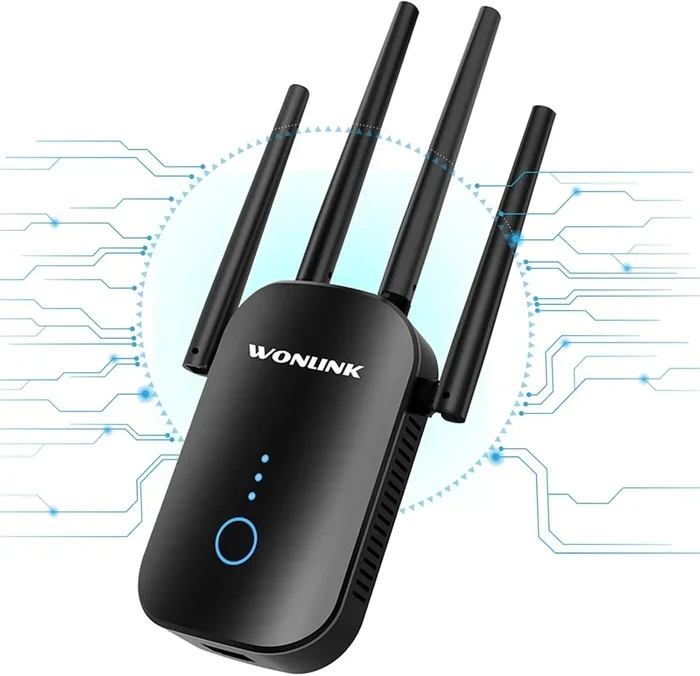
An external WiFi extender is a device that connects to your existing router and expands the wireless coverage area. It receives the signal from your router and then retransmits it to areas where the signal is weak or nonexistent. Think of it as a middleman that carries your WiFi signal further into your home.
These devices come in many shapes and sizes. Some look like small boxes that plug directly into a wall outlet. Others are standalone units that sit on a shelf or desk. Many models also include an Ethernet port so you can connect devices like smart TVs or gaming consoles with a cable for the fastest possible speeds.
How Do They Differ from Mesh WiFi Systems?
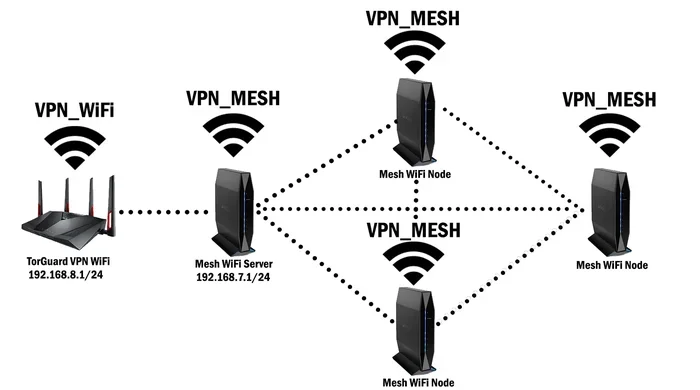
Mesh WiFi systems are another popular option for improving home coverage. They use multiple nodes placed around your home to create one seamless network. External wifi extenders, on the other hand, work with your existing router. A mesh system replaces your router, while an extender adds to it. Both solutions aim to boost wireless coverage, but they take different approaches. Mesh systems tend to offer smoother handoffs, while extenders are usually cheaper and easier to set up.
How Do External WiFi Extenders Work?
Understanding how these devices operate helps you use them more effectively. The process is simpler than it might sound.
First, your router sends out a wireless signal in all directions. As the signal travels further from the router, it weakens. Walls, floors, furniture, and other obstacles can block or reduce the signal even more. This is why you might get full bars in the living room but zero bars in the bedroom.
An external wifi extender solves this problem by sitting between your router and the weak spot. It picks up the existing signal, amplifies it, and then sends the boosted signal out to the area that needs it. Here is a simple breakdown of the process:
- Step 1: The extender connects to your router wirelessly.
- Step 2: It receives the WiFi signal and strengthens it.
- Step 3: The extender rebroadcasts the boosted signal to the dead zone.
- Step 4: Your devices in the far corners of the home now have a usable connection.
Most modern external wifi extenders support dual-band WiFi, which means they work on both the 2.4 GHz and 5 GHz frequency bands. The 2.4 GHz band travels farther but is slower. The 5 GHz band is faster but has a shorter range. Many extenders let you choose which band to use or switch between them automatically.
Do External WiFi Extenders Cause Speed Loss?
This is one of the most common concerns. The short answer is: yes, some speed loss can happen. Because the extender receives a signal and then retransmits it, there is a small amount of data loss. However, high-quality dual-band and tri-band extenders minimize this loss. The key is to buy a model that matches your internet speed and home size. A cheap single-band extender on a fast connection will create a bottleneck. A good dual-band extender on a mid-range plan will work just fine.
Do External WiFi Extenders Actually Work?
The honest answer is: it depends on your situation. External wifi extenders do work well in many homes, but they are not magic. They cannot create a signal where none exists. They can only extend what your router already sends out. So if your router is in a central location with a strong signal, an extender will do a great job of pushing that signal further.
However, if your router is in a basement with thick concrete walls on all sides, an extender placed far away will only amplify a weak signal. In that case, you would first want to improve your router placement or consider a different solution like a mesh system.
When External WiFi Extenders Work Best
Here are some situations where an external wifi extender is a great choice:
- Your home has one or two clear dead zones that your router cannot reach.
- You have a large house with multiple floors and thick walls.
- You rent and cannot move your router to a better location.
- You want a quick and affordable fix without replacing your entire network.
- You only need better coverage for basic tasks like browsing, streaming, and video calls.
When They May Not Be the Best Solution
Sometimes an extender is not the right choice. Here are a few scenarios where you might want to look at alternatives:
- Your home has many thick walls and interference from other electronics.
- You need ultra-fast speeds for competitive gaming or large file uploads.
- Your current router is outdated and needs replacing anyway.
- You want a seamless network with no name changes as you walk around the house.
In these cases, a mesh WiFi system or a new router might be a better investment. But for many households, a simple extender solves the problem perfectly.
Comparison: External WiFi Extenders vs. Mesh Systems
Not sure which option is right for you? Here is a quick comparison to help you decide.
| Feature | External WiFi Extender | Mesh WiFi System |
|---|---|---|
| Price Range | $20 – $100 | $100 – $400+ |
| Ease of Setup | Very Easy | Easy to Moderate |
| Coverage Area | Good for small to medium homes | Excellent for large homes |
| Speed Impact | Some loss possible | Minimal loss |
| Seamless Roaming | No (network name may change) | Yes (single network name) |
| Works with Existing Router | Yes | No (replaces router) |
| Best For | Budget-friendly boost | Whole-home coverage |
As you can see, both options have their place. External wifi extenders shine when you need a quick, affordable boost. Mesh systems are better for large, complex homes that need full, seamless coverage.
Benefits of Using External WiFi Extenders
There are many reasons why homeowners choose to add an extender to their network. Here are the top benefits:
1. Affordable Solution
Compared to buying a new router or a full mesh system, an extender is very budget-friendly. You can find reliable models for under $50. This makes them accessible to almost anyone who needs better coverage.
2. Easy to Set Up
Most external wifi extenders plug right into a wall outlet and connect to your router with the push of a button. Many brands offer a WPS (Wi-Fi Protected Setup) button that makes the process take less than two minutes. You do not need to be a tech expert to get one working.
3. No Need to Replace Your Router
If your current router still works fine but just does not reach everywhere, an extender lets you keep it. This saves you money and avoids the hassle of setting up a completely new network.
4. Flexible Placement
You can place an extender anywhere there is an electrical outlet. This gives you flexibility to position it exactly where you need the extra coverage. Just move it around until you find the sweet spot with the strongest signal.
5. Supports Multiple Devices
Most modern extenders can handle many devices at once. Whether you have phones, tablets, laptops, smart home gadgets, or streaming boxes, a good extender keeps them all connected.
Common Mistakes When Using External WiFi Extenders
Even though extenders are simple devices, people often make mistakes that reduce their effectiveness. Here are the most common ones to avoid:
Placing the Extender Too Far from the Router
This is the number one mistake. If you place the extender too far away, it will pick up a very weak signal and then rebroadcast that weak signal. The result is poor performance in the extended area. Instead, place the extender halfway between your router and the dead zone. It should still be able to get a strong signal from the router.
Ignoring the 2.4 GHz vs. 5 GHz Choice
Many people do not realize that their extender has two bands. Using the wrong band can lead to slow speeds or poor range. For long distances through walls, use the 2.4 GHz band. For speed in the same room, use the 5 GHz band.
Not Updating the Firmware
Like any tech device, your extender needs updates to perform at its best. Check the manufacturer’s app or website periodically to make sure your firmware is up to date. Updates often fix bugs and improve performance.
Putting the Extender in a Closet or Behind Furniture
Your extender needs to be in the open to work well. Hiding it behind a TV, inside a closet, or under a desk blocks the signal. Keep it on a shelf or in an open area where air can flow around it.
Quick Tips for Getting the Best Performance
Follow these simple tips to get the most out of your external wifi extender:
- Find the sweet spot: Place the extender where it gets at least 50% signal strength from your router.
- Use the manufacturer’s app: Most brands offer a free app that helps you find the best placement and monitor performance.
- Restart regularly: A quick restart once a week can clear up minor issues and keep things running smoothly.
- Update firmware: Check for updates monthly to ensure you have the latest features and security patches.
- Reduce interference: Keep the extender away from microwaves, cordless phones, and baby monitors that can cause WiFi interference.
- Name your networks clearly: If your extender creates a separate network name, make it easy to identify so you know when to connect to it.
Expert Insights on WiFi Extenders
We spoke with networking professionals about their thoughts on external wifi extenders. Here is what they had to say:
Sarah Mitchell, a certified network technician, says, “I always recommend extenders to my clients who just need to fix one or two weak spots. They are affordable, easy to install, and they get the job done. I do suggest they pair the extender with a good router for the best results.”
James Torres, a home IT consultant, adds, “The key to a successful extender setup is placement. I tell my clients to think of the extender as a relay runner. It needs to receive the baton strongly before it can pass it along. Halfway between the router and the dead zone is almost always the right spot.”
Dr. Lisa Chen, a telecommunications professor, explains, “Modern dual-band and tri-band extenders have improved dramatically. The speed loss that used to be a major problem is now much smaller. For most households, an extender provides more than enough of a boost to solve their coverage issues.”
How to Choose the Right External WiFi Extender
Not all extenders are created equal. Here are the factors to consider when shopping for one:
Check Your Internet Speed
Look at the speed tier you pay for from your internet service provider. If you have a 100 Mbps plan, you do not need an expensive high-end extender. A mid-range dual-band model will work great. But if you have a 500 Mbps or gigabit plan, look for a model that supports those speeds without bottlenecking your connection.
Consider Your Home Size
Small apartments usually need just one extender. Larger homes with multiple floors may need two or more. Some extenders have a feature called “daisy chaining,” which lets you link multiple extenders together for wider coverage.
Look for Dual-Band or Tri-Band Support
Dual-band extenders work on both 2.4 GHz and 5 GHz frequencies. Tri-band extenders add a third band for even better performance. If you have many devices and fast internet, a tri-band model is worth the extra cost.
Check for Ethernet Ports
If you want to connect a smart TV, game console, or desktop PC with a cable, make sure the extender has an Ethernet port. Most models include at least one, but it is worth checking before you buy.
Read Reviews and Ratings
Before purchasing, read user reviews on retail sites and tech review blogs. Look for feedback on real-world performance, ease of setup, and customer support. This helps you avoid buying a model that does not live up to its promises.
Final Thoughts
So, do external wifi extenders work? The answer is a clear yes. They are a practical, affordable, and effective way to boost your home wireless coverage. Whether you have a stubborn dead zone in the back bedroom or a weak signal in the garage, an extender can make a real difference.
The secret is choosing the right model for your needs and placing it correctly. Avoid common mistakes like putting the extender too far from the router or hiding it behind furniture. Follow the quick tips in this guide, and you will be enjoying a stronger, more reliable WiFi connection in no time.
Remember, an external wifi extender is not the only solution out there. For large homes or heavy users, a mesh WiFi system might be a better long-term investment. But for most households looking for a quick and budget-friendly fix, an extender gets the job done beautifully.
Take some time today to evaluate your home network. Identify the weak spots, pick up a quality extender, and set it up in the right place. Your internet experience will thank you.
Frequently Asked Questions
How far can an external WiFi extender reach?
Most extenders can boost your signal by an additional 1,000 to 2,000 square feet, depending on your home layout and the model you choose. The actual range varies based on wall materials, interference from other devices, and the quality of the extender. Placing the extender correctly is the single most important factor in maximizing its reach.
Will an external WiFi extender slow down my internet?
A low-quality or single-band extender can reduce your speed because it has to split its capacity between receiving and rebroadcasting the signal. However, modern dual-band and tri-band extenders minimize this speed loss significantly. If you buy a good model that matches your internet speed, the slowdown will be barely noticeable for most everyday tasks like browsing and streaming.
Can I use more than one external WiFi extender?
Yes, you can use multiple extenders with most routers. This is helpful for larger homes that need coverage in several different areas. Just make sure each extender is placed where it can receive a strong signal from the router or from another extender. Daisy chaining extenders can extend your range even further, but each hop may slightly reduce speed.
Do external WiFi extenders work with any router?
Most external wifi extenders work with any standard router that uses WiFi. They are not brand-specific in most cases. Look for an extender that supports the WiFi standards your router uses, such as WiFi 5 (802.11ac) or WiFi 6 (802.11ax). Checking compatibility before you buy ensures a smooth setup process.
What is the difference between a WiFi extender and a WiFi repeater?
The terms are often used interchangeably, but there is a slight difference. A WiFi repeater simply rebroadcasts the signal it receives. An external wifi extender often includes additional features like Ethernet ports, better antennas, and dual-band support. In practice, the difference is small, and both types serve the same basic purpose of expanding your wireless coverage area.
How do I know if I need an external WiFi extender?
If you experience weak signals, slow speeds, or dead zones in certain rooms of your home, an extender can help. A simple test is to walk around your home with your phone and check the WiFi signal strength. If you notice areas where the signal drops to one bar or less, those are the spots where an extender will make the biggest difference.
=== CONCLUSION ===
Do external wifi extenders work? Absolutely. They are one of the simplest and most cost-effective ways to improve your home wireless coverage. By boosting your existing signal and pushing it into dead zones, they give you a stronger, more reliable internet connection throughout your home.
The key is to choose a quality model, place it correctly, and avoid common setup mistakes. With the right extender in the right spot, you can say goodbye to frustrating weak signals and hello to seamless browsing, streaming, and gaming in every room. Take action today and give your home network the boost it deserves.