Can You Game On A Framework Laptop And Why It Matters
Can You Game On A Framework Laptop? Yes, you absolutely can, but the experience depends on the model and your gaming expectations. The Framework Laptop offers a unique modular design that lets you upgrade components over time. Whether you want to play indie games or tackle esports titles, a Framework machine can deliver solid performance with the right configuration.
Can You Game On A Framework Laptop? That is the question on a lot of people’s minds right now. The Framework Laptop has taken the tech world by storm with its modular design and upgradeable laptop philosophy. But can it really handle gaming? The short answer is yes, and the longer answer is even more interesting. In this guide, we will break down everything you need to know about gaming on a Framework Laptop. We will cover which models work best, how to boost performance, and which games you can expect to run smoothly.
If you have been sitting on the fence about buying a Framework Laptop for gaming, this article is for you. We will walk through the real-world experience, the pros and cons, and give you practical tips to get the most out of your machine. Let us dive right in.
Key Takeaways
- Framework Laptops Can Game: They handle indie, esports, and lighter AAA titles well, especially with upgrades.
- Modularity Is the Big Advantage: You can swap out parts like RAM, storage, and even the GPU module over time.
- The Framework 16 Is the Better Gaming Option: It supports discrete GPU modules and has a larger screen.
- Thermal Management Matters: Cooling pads and smart settings can boost your gaming performance significantly.
- It Won’t Replace a Dedicated Gaming Rig: But for portable and budget-friendly gaming, it’s surprisingly capable.
- Upgrade Path Is a Game-Changer: Unlike most laptops, you can improve gaming performance without buying a new device.
- Best Games Are Indie and Esports Titles: These run smoothly and showcase what the Framework can do.
📑 Table of Contents
- What Makes the Framework Laptop Different for Gaming?
- Can You Game on a Framework Laptop?
- Framework Laptop Models for Gaming
- How to Improve Gaming Performance on a Framework Laptop
- Framework Laptop vs. Traditional Gaming Laptops
- Common Mistakes to Avoid When Gaming on a Framework Laptop
- Expert Insights: What Gamers Are Saying About Framework Laptops
- Key Takeaways
- Conclusion
What Makes the Framework Laptop Different for Gaming?
Most gaming laptops come locked down. You cannot upgrade the CPU, GPU, or RAM easily. The Framework Laptop flips this model on its head. It is built from the ground up to be expandable and repairable. This means you can swap out components as technology evolves or as your gaming needs grow.
This modular laptop approach has some real advantages for gamers. You are not stuck with the same hardware for the entire life of the device. Instead, you can upgrade laptop parts like the processor, add more memory, or even attach a better graphics module when one becomes available.
The Modular Advantage
The biggest selling point of the Framework Laptop is its modularity. You can replace almost every major component. This includes the keyboard, battery, screen, and ports. For gamers, this means your machine can evolve with the latest gaming technology trends. You are not forced to buy a whole new laptop just because a newer GPU came out.
Think about it this way. A traditional gaming laptop might feel outdated in three years. A Framework Laptop? You can keep it fresh by swapping in newer parts. This long-term value is something very few laptops on the market can offer.
Why This Matters for Gamers
Gaming hardware changes fast. New games demand more processing power and better graphics every year. With a Framework Laptop, you can stay ahead of the curve. You simply upgrade the parts that matter most. This is a huge advantage over traditional gaming laptops that force you into a dead end after a couple of years.
Can You Game on a Framework Laptop?
The honest answer is yes, but with some caveats. Can You Game On A Framework Laptop depends largely on which model you have, what games you want to play, and what settings you are comfortable with. Let us get into the details.
The Framework 13 is the entry-level model. It comes with Intel integrated graphics or AMD integrated options. These are great for indie games, retro games, and older titles. You can play games like Stardew Valley, Hollow Knight, and Minecraft at high settings without breaking a sweat. For esports games like League of Legends, Valorant, and Rocket League, the Framework 13 delivers smooth gameplay at medium to high settings.
The Framework 16 is a different story entirely. It is the bigger sibling and comes with support for discrete GPU modules. This opens up a whole new world of gaming possibilities. With a discrete GPU, you can tackle more demanding titles and enjoy better frame rates and visual quality.
Real-World Gaming Performance
So what does gaming performance look like on a Framework Laptop in practice? Here is a quick breakdown of what you can expect:
- Indie Games: Run flawlessly at 60 FPS or higher. These games are lightweight and designed to be accessible.
- Esports Titles: Play well on medium to high settings. Valorant and CS2 can hit 100+ FPS on the Framework 16 with a discrete GPU.
- Older AAA Games: Many titles from two or three years ago run nicely at medium settings. Think Cyberpunk 2077 on lower presets.
- Newer AAA Games: These will struggle on integrated graphics. You will need to lower settings significantly or wait for GPU module upgrades.
- Cloud Gaming: Services like GeForce Now and Xbox Cloud Gaming work great. This is a solid workaround for demanding titles.
What Games Can You Actually Play?
The game compatibility of a Framework Laptop depends on its hardware configuration. Here are some examples of games and how they perform:
- Minecraft (Java Edition): Runs beautifully. The modular design does not affect game performance here, but the upgrade path means you can keep up as mod packs get heavier.
- Fortnite: Playable at medium settings on the Framework 16 with a discrete GPU. The Framework 13 can handle it on lower settings.
- Elden Ring: Demanding but possible on the Framework 16 with a discrete GPU at medium settings. The Framework 13 will struggle here.
- Among Us and Fall Guys: Lightweight and run perfectly on any Framework model.
- GTA V: Runs well on medium settings with a discrete GPU in the Framework 16.
Framework Laptop Models for Gaming
Not all Framework Laptops are created equal when it comes to gaming. Let us look at the two main models and what they bring to the table.
Framework 13: The Compact Gamer
The Framework 13 is a 13.5-inch laptop that prioritizes portability. It is lightweight and easy to carry around. For gaming, it works well with Intel integrated graphics or AMD integrated options. You will not be running the latest AAA blockbusters on ultra settings, but you can enjoy a wide range of lighter games and esports titles.
The Framework 13 is perfect for gamers who want a machine they can carry to friends’ houses or gaming sessions at school or work. Its portable gaming capability is one of its strongest selling points.
Framework 16: The Powerhouse
The Framework 16 is the bigger, more powerful option. It features a 16-inch display and supports discrete GPU modules. This makes it the better choice for serious gaming on a Framework machine. The larger screen also helps with immersion, and the extra thermal headroom means better sustained performance during long gaming sessions.
If you want to game on a Framework Laptop and do not want to compromise on visuals, the Framework 16 is the way to go. It is the closest thing to a gaming laptop that Framework offers.
Comparison Table: Framework 13 vs. Framework 16 for Gaming
| Feature | Framework 13 | Framework 16 |
|---|---|---|
| Screen Size | 13.5 inches | 16 inches |
| GPU Options | Integrated only | Integrated + Discrete GPU module |
| Best For | Indie games, esports, portability | AAA titles, higher settings, immersion |
| Battery Life (Gaming) | 2-3 hours | 1.5-2.5 hours |
| Portability | Excellent | Good |
| Upgrade Potential | High (RAM, storage, ports) | High (RAM, storage, ports, GPU) |
| Price Range | More affordable | Higher cost |
How to Improve Gaming Performance on a Framework Laptop
Want to get more out of your Framework Laptop for gaming? There are several steps you can take to boost gaming performance and make your experience smoother.
Upgrade Your RAM
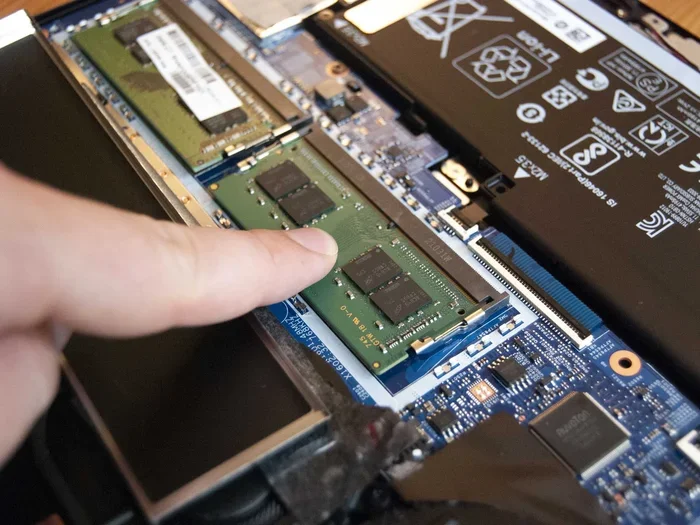
Laptop RAM upgrades are one of the easiest ways to improve gaming performance. The Framework Laptop makes this simple. You can open the back panel and swap in more memory. Most games benefit from at least 16 GB of RAM. If you are currently running 8 GB, upgrading to 16 GB or even 32 GB can make a noticeable difference in frame rates and multitasking while gaming.
Add an SSD for Faster Load Times
The Framework Laptop supports M.2 SSD upgrades. Swapping in a faster NVMe SSD can drastically reduce game load times. It also helps with overall system responsiveness. If your laptop came with a smaller drive, adding a second SSD is a great way to expand storage and speed things up.
Use an eGPU for Desktop-Level Graphics
One of the most powerful upgrades you can make is connecting an external GPU (eGPU). The Framework Laptop has Thunderbolt ports that support eGPU enclosures. This means you can plug in a desktop-grade graphics card and get desktop-level gaming performance on the go. It is an expensive option, but it transforms your Framework Laptop into a serious gaming machine.
Optimize Thermal Management
Laptop cooling is critical for sustained gaming performance. The Framework Laptop can get warm during intense sessions. Here are some tips:
- Use a cooling pad underneath the laptop to improve airflow.
- Elevate the back of the laptop with a stand for better ventilation.
- Clean the fans and vents regularly to prevent dust buildup.
- Use thermal paste replacements if you feel comfortable opening the laptop.
- Monitor temperatures with software like HWMonitor or Core Temp.
Adjust In-Game Settings
Sometimes the simplest fix is to lower your in-game settings. Reducing shadow quality, draw distance, and anti-aliasing can boost frame rates significantly without making the game look terrible. Most modern games also offer performance modes that automatically optimize settings for smoother gameplay.
Keep Your Drivers Updated
Updating your graphics drivers regularly can improve game compatibility and performance. Both Intel and AMD release driver updates that optimize for new game releases. Make it a habit to check for updates before launching a new title.
Framework Laptop vs. Traditional Gaming Laptops
How does the Framework Laptop stack up against a traditional gaming laptop? Let us compare the two approaches.
Performance
A dedicated gaming laptop from brands like ASUS, MSI, or Alienware will typically outperform a Framework Laptop in raw gaming power. These machines come with powerful discrete GPUs built in from the start. The Framework 16 with a discrete GPU module comes closer, but it still trails behind a purpose-built gaming machine with the same GPU.
Upgradeability
This is where the Framework Laptop wins hands down. A traditional gaming laptop might let you upgrade the RAM and storage, but that is usually it. The Framework Laptop lets you upgrade almost everything. This expandable laptop philosophy means your investment lasts longer and adapts to new demands.
Portability
The Framework 13 is lighter and more portable than most gaming laptops. Traditional gaming laptops tend to be bulky and heavy. If you value portable gaming, the Framework has a clear edge.
Price
Framework Laptops are competitively priced, especially considering the upgradeability. A traditional gaming laptop with similar specs might cost more upfront. But when you factor in the ability to upgrade parts over time, the Framework can offer better long-term value.
Which One Should You Choose?
If you want the best possible gaming performance right out of the box, a traditional gaming laptop is the way to go. But if you value longevity, upgradeability, and portability, the Framework Laptop is a compelling choice. It is not a pure gaming machine, but it is a remarkably capable one that grows with you.
Common Mistakes to Avoid When Gaming on a Framework Laptop
Even with a great machine, there are some pitfalls that can hurt your gaming experience. Here are mistakes to watch out for.
- Expecting Ultra Settings on Every Game: The Framework Laptop is not a dedicated gaming powerhouse. Set realistic expectations and adjust your settings accordingly.
- Ignoring Thermal Throttling: If your laptop gets too hot, it will slow down. Use cooling solutions and monitor temperatures.
- Skipping Driver Updates: Outdated drivers can cause performance drops and compatibility issues. Keep them current.
- Overlooking Cloud Gaming: If a game will not run locally, try cloud gaming services. They offload the heavy lifting to remote servers.
- Not Upgrading RAM Early: 8 GB is the minimum for comfortable gaming. Upgrade to 16 GB or more as soon as possible.
- Running Too Many Background Apps: Close unnecessary programs before gaming to free up system resources.
Expert Insights: What Gamers Are Saying About Framework Laptops
The gaming community has taken notice of the Framework Laptop. Many users praise its customizability and build quality. The ability to upgrade components gives it a unique edge in a market dominated by sealed, non-repairable devices.
However, some hardcore gamers point out that it is not a replacement for a high-end gaming desktop or a top-tier gaming laptop. The integrated graphics options are best suited for casual and moderate gaming. But with the Framework 16 and its discrete GPU support, the gap is closing.
One thing everyone agrees on is the future-proofing aspect. As gaming technology trends continue to evolve, the Framework Laptop gives you the tools to keep up without replacing the entire device. That is a value proposition that is hard to beat.
Key Takeaways
- The Framework Laptop Can Game: It handles indie, esports, and lighter AAA titles with ease, especially when properly configured.
- The Framework 16 Is the Better Gaming Choice: Its discrete GPU support and larger screen make it more capable for demanding games.
- Upgrades Make a Huge Difference: Adding RAM, swapping in a faster SSD, or connecting an eGPU can dramatically improve performance.
- Thermal Management Is Essential: Good cooling keeps your laptop performing at its best during long gaming sessions.
- It Offers Better Long-Term Value: The upgradeable design means you can keep your laptop relevant for years without buying a new one.
- It Is Not a Pure Gaming Machine: If you need maximum frame rates on every new release, a dedicated gaming laptop or desktop is still the better choice.
- Cloud Gaming Is a Great Fallback: Services like GeForce Now let you play demanding titles even on hardware that cannot run them locally.
Conclusion
Can You Game On A Framework Laptop? Absolutely. The Framework Laptop is a surprisingly capable machine for gaming, especially when you take advantage of its upgradeable features and modular design. Whether you are a casual gamer who loves indie titles or an esports enthusiast looking for a portable setup, the Framework Laptop delivers.
The key is to set realistic expectations and invest in the right upgrades. With a discrete GPU module, extra RAM, and a solid cooling setup, you can turn your Framework Laptop into a respectable gaming machine. It may not replace a dedicated gaming laptop, but it comes closer than most people expect.
The real magic of the Framework Laptop is its longevity. You are not locked into a static piece of hardware. You can upgrade, adapt, and evolve your machine as gaming demands change. That is a philosophy that every gamer should appreciate.
If you are on the fence about buying a Framework Laptop for gaming, now is a great time. The ecosystem is growing, GPU modules are on the horizon, and the community is expanding. Give it a try, and you might be surprised by what this innovative laptop can do.
Frequently Asked Questions
Can You Game on a Framework Laptop for Competitive Esports?
Yes, you can. The Framework 16 with a discrete GPU handles esports titles like Valorant, CS2, and Rocket League very well. You can expect smooth frame rates and responsive gameplay, making it a solid choice for competitive gaming.
Is the Framework Laptop Good for Gaming on a Budget?
It can be. The Framework 13 is more affordable and handles lighter games and esports titles well. By upgrading RAM and storage over time, you can build a capable gaming machine without spending a fortune upfront.
Can You Connect an External GPU to a Framework Laptop?
Yes. The Framework Laptop has Thunderbolt ports that support eGPU enclosures. This lets you connect a desktop-grade graphics card for a significant boost in gaming performance. It is one of the best upgrades you can make for demanding games.
What Is the Best Framework Laptop Model for Gaming?
The Framework 16 is the best model for gaming. It has a larger screen, better thermal headroom, and support for discrete GPU modules. The Framework 13 works well for lighter gaming but is more limited in its graphical capabilities.
Does the Framework Laptop Overheat During Gaming Sessions?
It can get warm, especially during extended sessions. Using a cooling pad, elevating the laptop, and keeping the vents clean helps a lot. The Framework 16 has better thermal management than the 13, but both benefit from good airflow.
Are There Any Games That Will Not Run on a Framework Laptop?
The latest AAA titles with ultra-demanding graphics will struggle on integrated graphics. Games like Cyberpunk 2077 or Alan Wake 2 will need lowered settings or an eGPU to run well. However, most indie, esports, and older titles run just fine.