Does Carnival Cruise Ships Have Free Wifi On Board
Carnival Cruise Ships do not offer completely free WiFi on board. Most internet packages come at an additional cost, though select cabins and loyalty tiers may include limited complimentary access. Understanding the pricing tiers, using Wi-Fi calling apps, and timing your usage can help you stay connected without overspending.
Does Carnival Cruise Ships Have Free Wifi On Board?
Planning a cruise vacation is exciting. You picture sunny decks, delicious food, and maybe even a few nights out on the town. But one question almost everyone asks is about staying connected. Does Carnival Cruise Ships have free WiFi on board? The short answer is no, not entirely free. But the full story is a bit more interesting than that. Let us walk you through everything you need to know about WiFi on Carnival Cruise Ships.
Cruise ships have come a long way when it comes to internet connectivity. A few years ago, shipboard WiFi was painfully slow and ridiculously expensive. Today, Carnival and other major cruise lines have invested heavily in satellite and shore-based internet systems. The result is faster speeds and more flexible pricing options. Still, truly free unlimited WiFi is not something you will find on most Carnival ships.
Understanding how WiFi works on a cruise ship helps you make smart choices before you set sail. You do not want to arrive at port only to discover you have no way to post your vacation photos or check in with family back home. So let us break down the options, the costs, and the best ways to stay connected without draining your wallet.
Key Takeaways
- Carnival Cruise Ships do not include free unlimited WiFi: Internet access typically requires purchasing a package, though some plans include limited free data.
- Multiple WiFi tiers exist: Carnival offers Basic, Standard, and Premium internet packages at different price points to suit various needs.
- Wi-Fi calling works at sea: Apps like WhatsApp, FaceTime, and Skype can help you communicate without using expensive ship WiFi.
- Loyalty members get perks: Elite-level Carnival loyalty members may receive free or discounted internet packages.
- Smart usage tips save money: Downloading content before boarding and turning off auto-updates helps conserve data while cruising.
- Speed varies by package: Higher-tier packages offer faster speeds suitable for streaming, while basic plans may only support browsing and messaging.
- Port WiFi is often free: When docked at ports, you can often connect to free local networks for internet access.
📑 Table of Contents
- What You Need to Know About Carnival Cruise Ship WiFi
- Comparing Carnival WiFi Packages
- How to Stay Connected Without Spending a Fortune
- WiFi Calling and Connectivity on Cruise Ships
- Carnival WiFi Speed and Performance
- Common Mistakes People Make With Cruise Ship WiFi
- Expert Tips for Staying Connected at Sea
- The Future of WiFi on Carnival Cruise Ships
- Final Thoughts
What You Need to Know About Carnival Cruise Ship WiFi
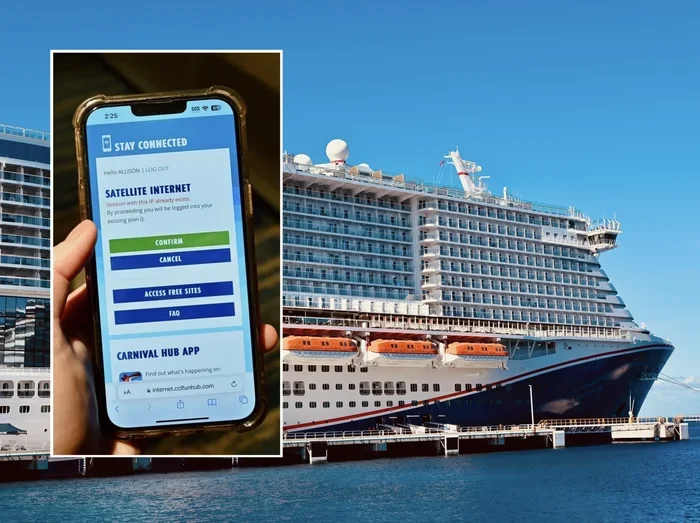
Carnival Cruise Ships use satellite-based internet systems to provide connectivity while at sea. Unlike home WiFi that connects to a local ground-based provider, cruise ship WiFi relies on satellites orbiting the Earth. This is why internet speeds on ships can vary depending on your location and the number of people using the network at the same time.
The satellite system works by connecting your device to a receiver on the ship, which then communicates with satellites in space. These satellites beam the signal back to ground stations on land, which connect you to the broader internet. It is a complex process, and that complexity is a big reason why WiFi at sea is not free.
How Carnival WiFi Packages Work
Carnival offers several WiFi packages to choose from. These packages are designed to fit different budgets and usage needs. Here is a quick look at what you can typically expect:
- Basic Package: This is the most affordable option. It usually supports browsing, email, and light social media use. Streaming videos is not recommended on this tier.
- Standard Package: A mid-range option that offers faster speeds. You can handle video calls, social media, and some streaming with this plan.
- Premium Package: The top-tier option. It provides the fastest speeds available on the ship. This is ideal for families, remote workers, or anyone who needs reliable connectivity.
Prices for these packages vary depending on the length of your cruise and the specific ship. You can purchase WiFi packages before your trip through the Carnival website or app. Buying in advance usually saves you a bit of money compared to purchasing on board. Some packages are sold per device, while others cover multiple devices on the same cabin.
Does Carnival Offer Any Free WiFi?
Here is where things get a little tricky. Carnival does not offer completely free unlimited WiFi on its cruise ships. However, there are a few situations where you might get some free access. For example, select staterooms in higher categories sometimes include a complimentary WiFi package. Luxury suites and certain loyalty program tiers may also receive free or discounted internet access.
Additionally, Carnival often runs promotions that include free WiFi for a limited time. These deals can pop up during holiday seasons or special onboard events. It is always worth checking the Carnival website or speaking with a travel agent before booking to see if any free WiFi offers are available.
When you are docked at a port, you may also find free WiFi options. Many ports offer free public WiFi networks that you can connect to while exploring the shore. This is a great way to check messages or send emails without using your shipboard data allowance.
Comparing Carnival WiFi Packages
Choosing the right WiFi package can feel overwhelming. There are different tiers, pricing structures, and speed claims. Here is a simple comparison to help you decide.
| Package | Speed | Best For | Approximate Cost |
|---|---|---|---|
| Basic | Slow | Email and browsing | $10-$15/day |
| Standard | Moderate | Social media and video calls | $15-$25/day |
| Premium | Fast | Streaming and remote work | $25-$50/day |
Keep in mind that these prices are estimates and can change. The actual cost depends on your specific cruise itinerary and the ship you are sailing on. Always check the current pricing on the Carnival website before making a purchase.
One thing many people do not realize is that WiFi speed on cruise ships depends heavily on how many people are online at the same time. If you are sailing with a large group of friends or family, everyone sharing the same network can slow things down. This is why the Premium package often feels worth it for larger groups.
How to Stay Connected Without Spending a Fortune
Nobody wants to blow their vacation budget on WiFi. The good news is there are several smart strategies you can use to stay connected while keeping costs low.
Use Wi-Fi Calling Apps When Possible
One of the best ways to save money is to use Wi-Fi calling apps that work with your phone’s cellular connection or free port networks. Apps like WhatsApp, Skype, and Facebook Messenger allow you to make voice and video calls over the internet. If you have a strong cellular signal near the coast, these apps can work without using your shipboard WiFi at all.
Can Facetime work without wifi? Yes, it can work over cellular data when you are near shore. This means you can make video calls to loved ones without touching your ship WiFi package. Just be aware that roaming charges from your cellular provider may apply when you are near port or in certain coastal areas.
Download Content Before You Board
This is a game-changer for staying entertained without using internet data. Download movies, TV shows, music, podcasts, and even maps to your phone or tablet before you leave port. Most streaming services like Netflix and Spotify allow offline downloads. That way, you can enjoy hours of entertainment without needing to connect to the ship WiFi at all.
You can also download offline maps using Google Maps or similar apps. This is especially handy if you plan on exploring ports of call and want navigation without using data.
Turn Off Auto-Updates and Background Data
Your phone and apps love to update in the background. This can eat through your WiFi data allowance quickly without you even noticing. Before your cruise, go into your device settings and turn off automatic app updates. Switch to manual updates so you control when and how much data you use.
You should also disable background app refresh for non-essential apps. This prevents apps from using data when you are not actively using them. These small changes can add up to significant data savings over a week-long cruise.
Take Advantage of Port WiFi
When your ship docks at a port, you often have access to free or low-cost local WiFi networks. Use this time to catch up on emails, update social media, or video call family. Port WiFi is typically much faster and more reliable than shipboard WiFi because it connects to local ground-based networks rather than satellites.
Just be cautious about security when using public WiFi networks. Avoid logging into sensitive accounts like banking unless you are using a VPN. A virtual private network encrypts your connection and keeps your data safe even on public networks.
Connect Only When You Need To
It sounds simple, but many people leave their WiFi on all the time while cruising. This causes your device to constantly search for and connect to the ship WiFi network, using up data even when you are not actively browsing. Turn off WiFi when you do not need it. This alone can extend the life of your data package significantly.
Consider a Portable WiFi Hotspot
If you are a heavy internet user, a portable WiFi hotspot might be worth considering. These devices create your own personal WiFi network using cellular data. Some hotspots work well near coastal areas where cellular signals are strong. You can check if this option works for your cruise route by looking into whether you can get pocket wifi in areas where your ship will be sailing.
Keep in mind that portable hotspots rely on cellular towers, and their effectiveness depends on your location relative to the coast. They work best in coastal regions and may not work at all when you are far out at sea.
WiFi Calling and Connectivity on Cruise Ships
WiFi calling has become a popular way for people to stay in touch while traveling. The idea is simple. Instead of using your cellular network for calls, you use the internet. This works great when you have strong WiFi, but cruise ship WiFi can be tricky.
Can you connect your wifi only iPad to your iPhone? Yes, you can use your iPhone as a personal hotspot to share its internet connection with your iPad. This is useful if you have a cellular data plan on your iPhone and want to extend that connection to other devices while at sea or near the coast.
Shipboard WiFi calling quality varies widely. During peak hours, when hundreds of passengers are online, calls may drop or sound choppy. Early mornings and late nights tend to offer the best WiFi calling quality because fewer people are using the network.
If you need reliable connectivity for work calls, consider purchasing the Premium WiFi package. The faster speeds make a noticeable difference for video conferencing and voice calls. You might also want to explore whether your phone can connect to a 2.4 GHz WiFi frequency, as some cruise ships use this band for better range and stability.
Carnival WiFi Speed and Performance
Internet speed is one of the biggest complaints about cruise ship WiFi. And honestly, it is not hard to understand why. When you are used to fast home internet, satellite-based ship WiFi can feel painfully slow.
Several factors affect WiFi speed on Carnival ships. The number of passengers online at any given time is the biggest one. A fully booked ship with 3,000 passengers and 1,000 crew members all trying to use the internet at once will experience slower speeds than a half-full ship.
Your location also matters. When the ship is far from shore, it relies entirely on satellite connections, which tend to be slower. When the ship is near the coast or in port, it can connect to shore-based networks, which are much faster.
Here are a few tips to get the best WiFi speed on your Carnival cruise:
- Use WiFi during off-peak hours: Early morning and late night are usually the best times.
- Avoid streaming on basic packages: This will slow down the network for everyone.
- Close apps you are not using: Background apps consume bandwidth even when you are not actively using them.
- Choose the right package: Premium packages offer priority bandwidth and faster speeds.
Some passengers have reported that they can browse the web and check social media on the Basic package without major issues. Others say they need the Premium tier just to send emails without frustration. Your experience will depend on the ship, the time of day, and how many people are online.
Common Mistakes People Make With Cruise Ship WiFi
Avoiding common mistakes can save you money and frustration on your Carnival cruise. Here are the pitfalls to watch out for.
Buying WiFi on board without comparing prices. WiFi packages are almost always cheaper when purchased before your cruise through the Carnival website or app. Take five minutes before your trip to compare prices and buy the package that fits your needs.
Assuming all packages are the same. The Basic, Standard, and Premium packages offer very different speeds and data allowances. Buying the cheapest package and then trying to stream movies will lead to frustration. Be honest about how you will use the internet and choose accordingly.
Not setting data limits on your devices. Most smartphones allow you to set data usage warnings and limits. Use these features to avoid accidentally blowing through your WiFi allowance before the end of your cruise.
Leaving auto-updates on. As mentioned earlier, auto-updates can consume a surprising amount of data. Turn them off before your trip.
Expecting home internet speeds. Even the best Premium package on a cruise ship will not match the speeds you get at home. Adjust your expectations and use the internet for essential tasks rather than heavy streaming.
Expert Tips for Staying Connected at Sea
We asked seasoned cruisers and tech experts for their best tips on staying connected on Carnival cruises. Here is what they recommend.
Download a VPN before you board. A virtual private network protects your data when using public WiFi networks at ports and helps you access region-locked content while at sea. Some passengers also find that a VPN improves their browsing experience by compressing data and reducing load times.
Bring a power strip with USB ports. You will likely be charging multiple devices while on the ship. A good power strip means you do not have to fight over outlets in your cabin or in the WiFi lounge.
Use offline modes for everything. Google Maps, Spotify, Netflix, and many other apps have offline modes. Set these up before your cruise so you can enjoy them without using any shipboard WiFi.
Schedule important calls during off-peak hours. If you need to make an important work call or video chat with family, schedule it for early morning or late night when fewer passengers are online.
Check if your cellular plan includes cruise Wi-Fi. Some cellular providers offer add-on packages that include WiFi access on cruise ships. These can be a cost-effective alternative to buying Carnival’s own WiFi packages. Check with your carrier before your trip to see what options are available.
The Future of WiFi on Carnival Cruise Ships
The cruise industry is constantly evolving, and WiFi technology is improving every year. Carnival has been investing in newer satellite systems that promise faster speeds and better coverage. Some newer ships in the fleet are equipped with advanced connectivity systems that offer speeds closer to what you would experience at home.
There is also growing interest in free basic WiFi as a standard amenity. Some cruise lines have started offering limited free internet access to all passengers, and it is possible that Carnival will follow suit in the future. For now, however, you should plan to pay for WiFi if you need reliable connectivity during your cruise.
Technology like 5G and low-earth orbit satellite networks is also making its way into the cruise industry. These technologies promise even faster speeds and lower latency. It is an exciting time for cruise ship internet, and the experience will only continue to improve in the coming years.
Final Thoughts
So, does Carnival Cruise Ships have free WiFi on board? The honest answer is no, not in the traditional sense. You will need to purchase a WiFi package if you want reliable internet access during your cruise. However, there are ways to minimize costs and stay connected without overspending.
By understanding the different packages, downloading content before you board, using port WiFi, and following the tips in this guide, you can make the most of your internet access at sea. The key is to plan ahead and set realistic expectations about what cruise ship WiFi can and cannot do.
Remember that a cruise is about disconnecting and enjoying the experience. You do not need to be online every second of your vacation. Use WiFi for the moments that matter, and leave the rest for the beautiful ocean views and onboard experiences that make cruising so special.
Whether you are a social media enthusiast, a remote worker, or just someone who wants to check in with family occasionally, there is a WiFi solution that works for you on Carnival Cruise Ships. Do your research, buy the right package, and enjoy your time on the waves.
Frequently Asked Questions
Is WiFi completely free on Carnival Cruise Ships?
No, Carnival Cruise Ships do not include completely free unlimited WiFi. Internet access requires purchasing a package, though some loyalty tiers and select cabins may receive limited complimentary access.
How much does WiFi cost on a Carnival Cruise?
WiFi packages range from approximately $10 to $50 per day depending on the tier. Basic packages are the most affordable, while Premium packages offer the fastest speeds at the highest price point.
Can I use Wi-Fi calling on a Carnival Cruise Ship?
Yes, Wi-Fi calling apps like WhatsApp, Skype, and FaceTime work over Carnival WiFi. However, quality depends on your package tier and network congestion. Can Facetime work without wifi? It can use cellular data near shore instead of ship WiFi.
What is the best WiFi package for streaming on Carnival?
The Premium package is recommended for streaming. It offers the fastest speeds and priority bandwidth, which makes a noticeable difference when watching videos or attending video calls.
Can I use my phone as a hotspot on a Carnival Cruise?
Yes, you can use your phone as a personal hotspot if you have a cellular data plan. This works best near the coast where cellular signals are strong. Check if you can get pocket wifi in the areas your ship will sail to explore other options.
Are there any free internet options on Carnival Cruises?
Free port WiFi networks are available when the ship is docked at ports. Some loyalty program members and suite guests may also receive complimentary WiFi packages. Always check for promotional offers before booking.
=== CONCLUSION ===
Does Carnival Cruise Ships have Free Wifi on board? The reality is that free unlimited WiFi is not part of the standard Carnival cruise experience. You will need to purchase a package to stay connected at sea. But with the right strategy, you can manage your costs and still enjoy reliable internet access throughout your trip.
Choose the package that matches your usage habits. Download content before you leave port. Use Wi-Fi calling apps when you can. And take advantage of free port WiFi whenever the ship is docked. These simple steps will help you stay connected without blowing your vacation budget.
Remember, a cruise is a chance to unwind and enjoy the journey. Use the internet when it adds value to your experience, and do not let connectivity concerns take away from the magic of being out on the open sea. With the tips and insights in this guide, you are fully prepared to make the best decision about WiFi on your next Carnival cruise.