Does Every Jetblue Flight Have Free Wi Fi On Board
Not every JetBlue flight offers completely free unlimited Wi-Fi. JetBlue provides a free basic Wi-Fi tier with limited speeds, while faster streaming and full-speed plans come at a cost. Your experience depends on the route, aircraft type, and the WiFi package you choose. Understanding JetBlue’s WiFi options helps you stay connected without surprises. Here is everything you need to know about inflight connectivity.
This is a comprehensive guide about Does Every Jetblue Flight Have Free Wi Fi.
Key Takeaways
- JetBlue offers free basic Wi-Fi: All JetBlue aircraft provide a free tier with limited browsing speeds.
- Full-speed WiFi is not always free: Streaming and high-speed plans require a paid subscription or one-time purchase.
- Coverage varies by route: Most domestic flights have WiFi, but some international routes may have limited or no connectivity.
- Aircraft type matters:Newer Airbus A321neo and A220 planes offer better WiFi than older models.
- You can buy WiFi passes:Day passes and monthly plans give you flexible options for occasional travelers.
- Free WiFi is not unlimited:Even the free tier has data restrictions and may throttle speeds during peak times.
- Connecting is simple:Just select the JetBlue WiFi network and follow the login portal instructions.
[FEATURED_IMAGE_PLACEHOLDER]
Does every JetBlue flight have free Wi-Fi? This is a question many travelers ask before booking a seat. The short answer is no, not completely free in the way most people hope. JetBlue does provide a free basic Wi-Fi tier on most flights, but if you want to stream movies, join video calls, or browse without delays, you will likely need to pay.
JetBlue has been a leader in airline WiFi since it started offering free in-flight internet years ago. But the definition of “free” has changed over time. What used to be an open connection with decent speeds now comes in tiers. Some passengers get a solid experience at no cost, while others need to upgrade.
This guide breaks down everything about JetBlue WiFi in a clear and honest way. You will learn about the different WiFi plans, which routes have connectivity, how fast the internet really is, and tips to get the most out of your inflight experience. Whether you are a frequent flyer or planning your first JetBlue trip, this article has you covered.
What JetBlue WiFi Looks Like Today
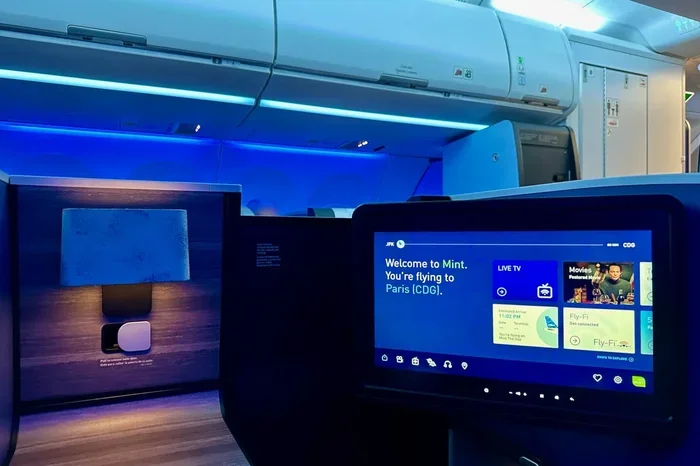
JetBlue partners with Viasat and other providers to deliver inflight internet to passengers. The airline was one of the first major U.S. carriers to offer WiFi on every aircraft. This was a big deal when it started, but the landscape of airline WiFi has changed a lot since then.
The Free Basic Tier
Every JetBlue flight that has WiFi capabilities offers a free basic plan. This tier lets you browse the web, check email, and use messaging apps like WhatsApp and iMessage. The speeds are usually enough for text-based activities. But if you try to stream a movie or join a video call, you will run into buffering fast.
The free tier also has a data cap. You might find your connection slows down after a certain amount of usage. This is common across most airlines that offer free WiFi. The idea is to give everyone a basic level of access without letting a few heavy users slow things down for everyone else.
Paid Plans for Faster Speeds
JetBlue offers paid upgrades for passengers who need more speed. These plans typically include full-speed browsing, HD streaming, and video calling. You can buy a day pass for a single flight or opt for a monthly subscription if you fly often. The pricing varies, so it is smart to check the JetBlue app before your trip.
Some passengers compare JetBlue WiFi pricing with other airlines. While JetBlue does offer a free tier, competitors like Delta and Alaska also have their own WiFi models. JetBlue’s approach is generally considered more generous than most, but it still falls short of truly free unlimited high-speed internet.
Does Every JetBlue Route Have WiFi?
Not every JetBlue route has WiFi coverage. The airline works hard to equip its fleet, but there are gaps. Let us look at the details.
Domestic Flights
Most domestic JetBlue flights in the United States have WiFi. This includes popular routes like New York to Los Angeles, Boston to Miami, and Chicago to Fort Lauderdale. The vast majority of JetBlue aircraft are WiFi-enabled, so your chances of getting connected are high on domestic trips.
However, some older planes in the fleet may not have WiFi at all. JetBlue has been upgrading its aircraft over the years, but older Airbus A320s and Boeing 717s may not support the same connectivity as newer models. If having WiFi is important to you, you can check the aircraft type before booking.
International Flights
International routes are a different story. JetBlue flies to destinations in the Caribbean, Latin America, and parts of South America. Many of these routes do offer WiFi, but the coverage can be spotty. Over-water flights or routes that pass through areas with limited satellite coverage may experience disconnections.
If you are flying internationally with JetBlue WiFi needs, it is a good idea to plan ahead. Download entertainment before you board. Do not rely solely on inflight internet for work or communication on long international hops.
Flights Without WiFi
Some JetBlue flights simply do not have WiFi. This can happen for a few reasons. The aircraft might be an older model without the equipment. The route might pass through a zone where satellite coverage is weak or unavailable. Or there could be a technical issue that prevents WiFi from working on a given day.
JetBlue does not always notify passengers in advance if a specific flight will not have WiFi. This is why having a backup plan is important. Download movies, podcasts, and work files before you head to the airport.
How Fast Is JetBlue WiFi Really?
Speed is one of the most common concerns for passengers. Nobody wants to sit on a plane for five hours with a slow and frustrating connection. Let us break down what to expect.
Free Tier Speeds
The free basic WiFi tier on JetBlue typically offers speeds between 1 and 5 Mbps. That is enough for browsing, checking emails, and sending messages. But it is not enough for streaming video or large downloads. If you try to watch a show, the quality will likely be poor, and buffering will be constant.
During peak travel times, the free tier can slow down even more. When hundreds of passengers are all connected at once, the shared bandwidth gets stretched thin. Morning flights and holiday routes tend to be the slowest.
Paid Plan Speeds
JetBlue’s paid WiFi plans can offer speeds up to 20 Mbps or more. That is enough for HD streaming, video calls, and larger downloads. The experience is much closer to what you would get at home or in a coffee shop. For remote workers who need to attend video meetings during a flight, the paid plan is a worthwhile investment.
The actual speed you experience can vary based on several factors. The number of connected users, the aircraft type, the route, and the satellite coverage all play a role. Think of it like home internet during a neighborhood rush hour.
How to Connect to JetBlue WiFi
Connecting to JetBlue WiFi is simple and straightforward. Here is what you need to do.
Step-by-Step Connection Guide
- Turn on your device’s WiFi settings after the captain allows electronic devices.
- Select the JetBlue WiFi network from your list of available connections.
- Open your web browser. You will be redirected to the JetBlue WiFi portal.
- Choose your plan. You can select the free basic tier or a paid option.
- Follow the prompts to complete your purchase or confirm your free connection.
- Start browsing once you see the connected confirmation.
Tips for a Better Connection
- Connect early:Get on the WiFi as soon as it becomes available. Early connection means less competition for bandwidth.
- Use the JetBlue app:The app sometimes offers a smoother login experience than a web browser.
- Close unused apps:Apps running in the background can eat up your data and slow things down.
- Bring a portable WiFi booster:If you struggle with weak signals, a WiFi signal booster can help improve your device’s reception.
- Download before you fly:Always have offline entertainment and work files ready in case the WiFi is unavailable.
Comparing JetBlue WiFi With Other Airlines
How does JetBlue WiFi stack up against the competition? Let us take a quick look.
JetBlue vs. Delta
Delta offers WiFi on most of its flights but does not provide a free tier. Delta WiFi typically requires a paid plan starting around $7 to $17 depending on the flight length. JetBlue’s free basic tier gives it an edge for budget-conscious travelers who just need to check messages and browse lightly.
JetBlue vs. Alaska Airlines
Alaska Airlines offers WiFi on most flights with a free tier for messaging apps only. Full browsing and streaming require a paid plan. JetBlue is similar in that it offers free basic browsing, but Alaska’s free messaging tier is slightly more restrictive.
JetBlue vs. Southwest
Southwest charges for WiFi on all flights with no free tier. Prices range from about $8 to $25 per flight. JetBlue’s free basic option makes it more appealing for travelers who want at least some connectivity at no extra cost.
Common Mistakes Passengers Make With JetBlue WiFi
Avoid these common pitfalls to get the best experience with inflight WiFi.
Assuming WiFi Is Always Free
Many passengers assume that because JetBlue offers WiFi, everything is free. This is not true. The free tier has limits. If you need real productivity or entertainment, you must pay for an upgrade. Do not assume you can stream your favorite show without a paid plan.
Not Checking Before You Fly
WiFi availability can change based on the aircraft assigned to your flight. Always check the JetBlue app or your booking details to confirm WiFi is available on your specific flight. Do not wait until you are in the air to find out it is not working.
Relying Only on In-Flight WiFi for Work
If you have important work to do, do not rely solely on JetBlue WiFi. The connection can be unreliable, especially on busy routes or older aircraft. Always have a backup plan, such as downloading files or working offline. Also, some passengers find that connecting to a WiFi range extender at home before heading to the airport helps them test their own connection setup.
Expert Tips for Getting the Most Out of JetBlue WiFi
Buy WiFi Before You Fly
JetBlue often offers discounted WiFi if you purchase it in advance through the app or website. Buying before your flight can save you a few dollars and saves time at the gate when you are eager to connect.
Use the Right Devices
Laptops and tablets generally handle inflight WiFi better than smartphones. If you need to work, bring a laptop. The larger screen and keyboard make a big difference when you are trying to be productive at 35,000 feet.
Stay Updated on JetBlue WiFi Changes
JetBlue regularly updates its WiFi offerings. The airline has been investing in better satellite technology and faster connections. Follow JetBlue’s blog or app notifications to stay informed about any changes to WiFi plans, pricing, or coverage.
The Future of WiFi on JetBlue Flights
JetBlue continues to invest in improving its inflight connectivity. The airline has been rolling out newer aircraft with better WiFi hardware. Satellite technology is advancing fast, and JetBlue is positioned to benefit from these improvements.
In the coming years, passengers may see faster free tiers, more reliable international coverage, and more competitive pricing. The goal for JetBlue and other airlines is to make WiFi feel seamless and almost invisible to the passenger. Until then, understanding what you are getting and planning accordingly is the best approach.
JetBlue WiFi is a work in progress. The airline is moving in the right direction, but there is still room for improvement. If you are a frequent flyer, keep an eye on JetBlue’s announcements about WiFi upgrades and new features.
Conclusion
So, does every JetBlue flight have free Wi-Fi? The answer is nuanced. JetBlue does offer a free basic WiFi tier on most flights, which covers light browsing and messaging. But if you want reliable, fast internet for streaming or work, you will need to pay for an upgrade. Not every route has WiFi, and not every aircraft on every route is equipped with the latest technology.
The best approach is to plan ahead. Check your flight details, download your entertainment, and decide if a paid WiFi plan is worth it for your trip. JetBlue remains one of the better options for airline WiFi, especially with its free tier. But managing your expectations will save you from frustration at 30,000 feet.
Staying connected in the sky is getting easier every year. JetBlue is investing in better connectivity, and passengers stand to benefit. Next time you fly JetBlue, you will know exactly what to expect from the WiFi and how to get the best experience possible.
Does Every Jetblue Flight Have Free Wi Fi On Board?
Not every JetBlue flight has fully free unlimited Wi-Fi. Most flights offer a free basic tier for light browsing, but faster speeds and streaming require a paid plan. Always check your specific flight for WiFi availability before you travel.
Frequently Asked Questions
Is JetBlue WiFi completely free?
JetBlue offers a free basic WiFi tier on most flights, but it comes with speed limits and data restrictions. For full-speed browsing, streaming, and video calls, you need to purchase a paid plan. The free tier is great for messaging and light web browsing only.
Can I stream Netflix on JetBlue WiFi?
Streaming Netflix on JetBlue WiFi is possible with a paid WiFi plan. The free basic tier does not support video streaming. Even with a paid plan, streaming quality may vary based on the flight, aircraft type, and number of connected passengers.
How do I buy JetBlue WiFi?
You can buy JetBlue WiFi through the JetBlue app or the inflight WiFi portal. Simply connect to the JetBlue WiFi network, open your browser, and follow the prompts to select and purchase a plan. Buying in advance through the app often saves you money.
Does JetBlue WiFi work on international flights?
JetBlue WiFi works on many international flights, but coverage can be limited. Over-water routes and flights through areas with weak satellite coverage may experience disconnections. Always download offline content before international flights as a backup.
Why is JetBlue WiFi so slow sometimes?
JetBlue WiFi can slow down during peak times when many passengers are connected at once. The free tier is especially affected by heavy usage. Aircraft type, route, and satellite coverage also impact speed. Paid plans generally offer faster and more stable connections.
Can I use a VPN on JetBlue WiFi?
Yes, you can use a VPN on JetBlue WiFi. A VPN can help protect your privacy when using inflight internet. However, using a VPN may further slow down your connection, especially on the free basic tier. Consider this if you need fast speeds for work or streaming.