Can I Extend My Wi Fi To 200 Feet Away From Router
Yes, you can extend your Wi-Fi to 200 feet away from your router using the right tools and setup. A Wi-Fi range extender, mesh network system, or powerline adapter can all help you reach far corners of your property. This guide covers every option, with practical tips to get strong signal coverage at 200 feet.
Have you ever walked to the far end of your yard or the back of your property and suddenly lost your Wi-Fi connection? It is a frustrating experience. You are streaming music, answering emails, or just browsing, and then — nothing. The screen spins. The buffering wheel appears. And you are left wondering, can I extend my Wi-Fi to 200 feet away from my router?
The short answer is yes. You absolutely can. But the how-to part depends on your home layout, the type of router you own, and what obstacles stand between your device and the signal. In this guide, we will walk through every practical option. You will learn about Wi-Fi range extenders, mesh network systems, powerline adapters, and more. By the end, you will know exactly which solution fits your situation and budget.
Let us get into it. Your wireless signal should not stop at your back door.
Key Takeaways
- Multiple solutions exist: Wi-Fi extenders, mesh systems, powerline adapters, and outdoor access points can all bridge the 200-foot gap.
- Router placement matters: Moving your router to a central, elevated spot can dramatically improve your wireless signal strength before you add any extra hardware.
- Frequency bands play a role: The 2.4GHz frequency travels farther than 5GHz, making it better for long-distance coverage.
- Mesh networks are the top choice: They provide seamless roaming and stronger Wi-Fi coverage over large areas compared to traditional extenders.
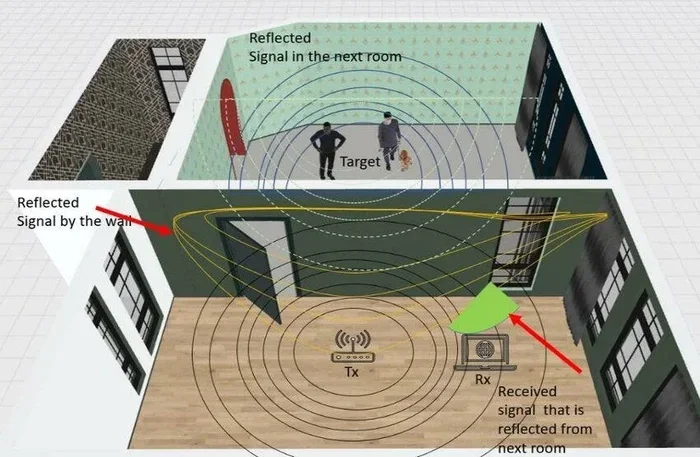
- Obstacles reduce range: Walls, floors, and metal objects weaken your signal, so planning your setup around physical barriers is essential.
- Outdoor access points work best for extreme distances: If 200 feet is outdoors, a dedicated outdoor Wi-Fi access point delivers the most reliable results.
📑 Table of Contents
- Understanding Wi-Fi Range and Signal Strength
- Can You Extend Wi-Fi to 200 Feet? Yes — Here Is How
- Comparing the Best Options for 200-Foot Wi-Fi Extension
- Step-by-Step: How to Extend Your Wi-Fi to 200 Feet
- Tips to Maximize Your Extended Wi-Fi Performance
- Common Mistakes People Make When Extending Wi-Fi
- Final Thoughts on Extending Wi-Fi to 200 Feet
Understanding Wi-Fi Range and Signal Strength
Before you buy any equipment, it helps to understand why your Wi-Fi signal weakens over distance. Your router sends out radio waves on specific frequency bands. These waves travel through the air and carry data to your devices. But they do not travel forever. Several factors eat away at that signal strength as the distance grows.
How Wi-Fi Signals Travel
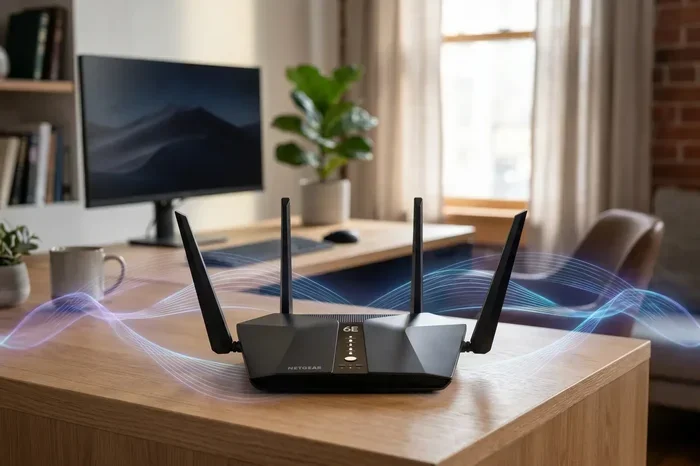
Think of your router like a flashlight. The beam starts bright right at the source. But as you move farther away, the light spreads out and dims. Wi-Fi signals work the same way. They radiate outward in all directions and lose energy the farther they travel. The 2.4GHz frequency band can punch through walls and travel longer distances. The 5GHz frequency band is faster but has a shorter range. So if you need distance, 2.4GHz is your friend.
What Affects Wi-Fi Range?
Several things can reduce how far your wireless coverage reaches:
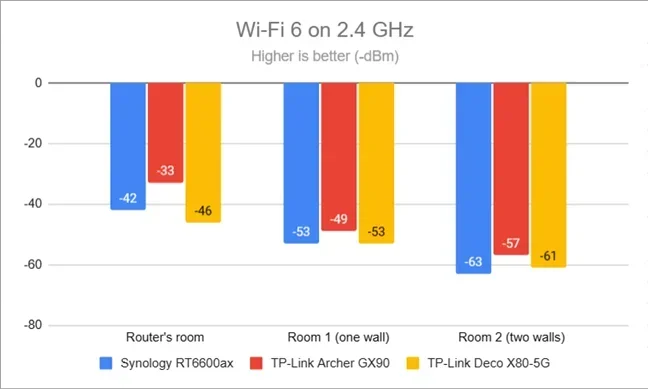
- Walls and floors: Concrete, brick, and metal studs block signals. Each wall your signal passes through weakens it.
- Furniture and appliances: Large metal objects, refrigerators, and even fish tanks can absorb or reflect Wi-Fi signals.
- Distance: The farther you are from the router, the weaker the signal becomes.
- Interference: Microwaves, baby monitors, and neighboring Wi-Fi networks can create network congestion on the same channel.
- Router age and quality: Older routers simply do not have the power or antenna quality to push signals very far.
Understanding these factors helps you choose the right solution. If your main problem is a few thick walls, a simple Wi-Fi extender might do the trick. If you are trying to reach a detached garage or backyard, you may need something more powerful.
Can You Extend Wi-Fi to 200 Feet? Yes — Here Is How
So, can you extend Wi-Fi to 200 feet away? Absolutely. Many homeowners face this exact challenge. Whether you want coverage in a backyard office, a detached shop, or a guest house 200 feet from your main router, there are proven methods to get it done.
The key is choosing the right technology for your situation. Let us break down every option so you can make an informed decision.
Option 1: Wi-Fi Range Extenders
A Wi-Fi range extender (also called a Wi-Fi repeater) picks up your existing signal and rebroadcasts it. Think of it as a middleman between your router and your device. You place the extender halfway between your router and the dead zone. It receives the signal, amplifies it, and sends it further.
Pros:
- Affordable. Most extenders cost between $20 and $60.
- Easy to set up. Many plug directly into a wall outlet.
- No need for new cables or wiring.
Cons:
- Extenders can cut your bandwidth in half because they use the same radio to receive and transmit.
- They create a separate network name in some cases, which can cause roaming issues.
- Placement is critical. Put it too far from the router and it gets a weak signal to begin with.
Quick Tip: Place your extender where it still gets a strong signal from the router — around 100 feet or less. This ensures it has enough strength to rebroadcast effectively to the 200-foot mark.
Option 2: Mesh Wi-Fi Systems
A mesh network is the most elegant solution for extending Wi-Fi coverage over long distances. Instead of one router doing all the work, a mesh system uses multiple nodes (or units) placed around your property. These nodes talk to each other and create one seamless Wi-Fi network with a single name and password.
Pros:
- Seamless roaming. Your phone and laptop switch between nodes without dropping the connection.
- Better bandwidth than traditional extenders because mesh systems use dedicated backhaul channels.
- Easy to manage through a smartphone app.
- Scalable. Add more nodes if 200 feet is still not enough.
Cons:
- More expensive than extenders. A good mesh Wi-Fi system runs $150 to $400 for a two- or three-pack.
- Requires a clear line of sight or minimal obstacles between nodes for best results.
Expert Insight: Mesh systems like Google Nest Wi-Fi, Eero, and TP-Link Deco are among the most popular choices for homeowners looking to cover large properties. They are especially effective when you need Wi-Fi to reach 200 feet or more from the main router.
Option 3: Powerline Adapters
A powerline adapter uses your home’s existing electrical wiring to carry the network signal. You plug one adapter near your router and connect it with an Ethernet cable. Then you plug the second adapter near the device that needs internet. The signal travels through the wiring, bypassing walls and obstacles entirely.
Pros:
- Not affected by Wi-Fi dead zones caused by thick walls.
- Provides a stable, wired connection at the far end.
- Works well in older homes with multiple floors.
Cons:
- Performance depends on your home’s electrical wiring quality and age.
- Both adapters must be on the same electrical circuit for best results.
- Does not provide wireless coverage unless you pair the second adapter with a Wi-Fi access point.
Quick Tip: If you pair a powerline adapter with a built-in Wi-Fi access point, you get the best of both worlds — a wired backbone with wireless coverage at the far end of your property.
Option 4: Outdoor Wireless Access Points
For serious long-distance coverage, an outdoor Wi-Fi access point is the most powerful option. These weather-resistant devices are designed to withstand rain, heat, and cold. You mount them outside, run an Ethernet cable from your router, and they broadcast a strong Wi-Fi signal across your yard or property.
Pros:
- Designed specifically for outdoor use with weatherproof housing.
- Can cover distances well beyond 200 feet with the right model.
- Provides strong, dedicated signal without the bandwidth loss of indoor extenders.
Cons:
- Requires running an Ethernet cable from your router to the outdoor unit.
- More expensive than indoor solutions, typically $80 to $200 per unit.
- Installation requires basic wiring knowledge.
Common Mistakes: Many people skip the Ethernet cable and try to use an outdoor extender wirelessly. This often fails because the outdoor signal has to travel through too much open space and still needs a strong source signal to begin with. Always use a wired connection to the outdoor access point for the best results.
Comparing the Best Options for 200-Foot Wi-Fi Extension
Choosing between a Wi-Fi extender, mesh system, powerline adapter, and outdoor access point can feel overwhelming. Here is a side-by-side comparison to help you decide.
| Feature | Wi-Fi Extender | Mesh System | Powerline Adapter | Outdoor Access Point |
|---|---|---|---|---|
| Max Distance | Up to 150 ft wireless | Up to 200+ ft per node | Limited by wiring | 200+ ft easily |
| Ease of Setup | Very Easy | Easy | Moderate | Moderate to Hard |
| Cost Range | $20 – $60 | $150 – $400 | $40 – $100 | $80 – $200 |
| Bandwidth Loss | Up to 50% | Minimal | None (wired) | None (wired) |
| Weatherproof | No | No | No | Yes |
| Best For | Indoor coverage gaps | Whole-home coverage | Multi-floor or thick walls | Outdoor long range |
As you can see, each option has its strengths. If your 200-foot distance is outdoors, the outdoor access point wins hands down. For indoor coverage across a large home, a mesh Wi-Fi system is the most reliable choice. Budget-conscious users who just need a quick fix should look at a simple Wi-Fi range extender.
Step-by-Step: How to Extend Your Wi-Fi to 200 Feet
Now that you know the options, let us talk about the actual setup process. Here is a practical roadmap to get your Wi-Fi signal reaching 200 feet from your router.
Step 1: Optimize Your Current Router Placement
Before adding any hardware, make sure your router is positioned correctly. This alone can improve your range significantly.
- Place your router in a central location in your home, not tucked away in a corner or closet.
- Elevate the router on a shelf or mount it on a wall. Signals spread better downward from a higher position.
- Keep it away from metal objects, microwaves, and other electronics that cause interference.
- Point the antennas vertically for horizontal coverage across one floor, or position one vertically and one horizontally for multi-floor coverage.
Quick Tip: Even moving your router just a few feet can make a noticeable difference. Try different spots and test your signal strength at the 200-foot mark before buying anything.
Step 2: Choose the Right Equipment
Based on your situation, pick the solution that fits best:
- Indoor, moderate obstacles: Go with a mesh Wi-Fi system or a Wi-Fi range extender.
- Thick walls, multiple floors: Choose powerline adapters with a built-in Wi-Fi access point.
- Outdoor, open space: Invest in an outdoor wireless access point with a long-range antenna.
Make sure your equipment supports the latest Wi-Fi standards (Wi-Fi 5 or Wi-Fi 6). Newer standards offer better range, faster speeds, and improved handling of network congestion.
Step 3: Set Up and Test
Once your equipment arrives, follow the manufacturer’s setup instructions. Most modern devices have companion apps that walk you through everything step by step.
- Place your extender, mesh node, or access point at the halfway point first.
- Run a speed test at the 200-foot mark using a phone or laptop.
- Adjust the placement if needed. Even moving a few feet can improve signal strength dramatically.
- Test at different times of day to check for bandwidth drops during peak usage.
Tips to Maximize Your Extended Wi-Fi Performance
Getting your Wi-Fi signal to 200 feet is only half the battle. You also want it to be fast and stable. Here are some proven tips to get the most out of your setup.
Use the Right Frequency Band
Most modern routers broadcast on both 2.4GHz and 5GHz bands. For long distances, stick with 2.4GHz. It penetrates walls and travels farther. Reserve 5GHz for devices close to the router that need high-speed connections for gaming or video streaming.
Reduce Interference
Network congestion is a real problem, especially in apartment buildings or dense neighborhoods. To reduce interference:
- Change your Wi-Fi channel to a less crowded one using your router’s settings.
- Keep your router away from Bluetooth devices, baby monitors, and cordless phones.
- Use a Wi-Fi analyzer app on your phone to find the clearest channel.
Keep Firmware Updated
Router and extender manufacturers regularly release firmware updates that improve performance, fix bugs, and patch security vulnerabilities. Check for updates every few months to keep your wireless network running at its best.
Consider a Dedicated Guest Network
If you have many devices connected, setting up a guest network for your extended coverage area can help. This separates traffic and prevents bandwidth throttling on your main network. Your extended devices get their own clean connection without competing with your primary devices.
Common Mistakes People Make When Extending Wi-Fi
Even with the best equipment, poor setup can ruin your results. Here are the most common mistakes to avoid.
Placing the Extender Too Far from the Router
This is the number one mistake. If you place a Wi-Fi extender too far from the source router, it receives a weak signal and simply rebroadcasts a weak signal. The result is slow, unreliable Wi-Fi coverage at the far end. Always place your extender where it gets a strong, clear signal from the router first.
Ignoring Physical Barriers
People often underestimate how much walls, trees, and metal structures block wireless signals. A 200-foot Wi-Fi extension through open air works very differently than 200 feet through three brick walls and a metal garage door. Account for real-world obstacles when planning your setup.
Buying the Cheapest Extender
Ultra-budget Wi-Fi repeaters often have poor antennas, weak processors, and limited range. They may not deliver the bandwidth you need at 200 feet. Spending a little more on a quality range extender or mesh node pays off in reliability and speed.
Forgetting About Security
When you extend your wireless network, make sure the extended access point uses the same strong password and encryption (WPA3 or WPA2) as your main router. An open or weakly secured extended network is an open door for unauthorized users.
Final Thoughts on Extending Wi-Fi to 200 Feet
Extending your Wi-Fi to 200 feet away from your router is entirely doable with the right approach. Whether you choose a Wi-Fi range extender for a quick and affordable fix, a mesh Wi-Fi system for seamless whole-home coverage, powerline adapters for tough-wall situations, or an outdoor access point for serious yard coverage, the solution exists.
Start by optimizing your current router placement. Then choose the technology that matches your specific needs and budget. Set up carefully, test thoroughly, and avoid the common mistakes that trip up most people. With a little patience and the right gear, you will enjoy strong, reliable Wi-Fi coverage at every corner of your property — even 200 feet from your router.
The best part? You do not need to be a tech expert. Most of these solutions are designed for everyday homeowners. Follow the steps in this guide, and you will have your wireless signal reaching far beyond your router in no time.
Frequently Asked Questions
Can a standard Wi-Fi router reach 200 feet on its own?
Most standard routers can reach about 100 to 150 feet indoors under ideal conditions. At 200 feet, you will almost certainly experience signal loss or dead zones. You will need a Wi-Fi extender, mesh node, or other boosting device to reliably cover that distance.
Does a Wi-Fi extender slow down my internet speed?
Yes, traditional Wi-Fi extenders can cut your bandwidth in half because they use the same radio to receive and rebroadcast the signal. However, modern mesh systems and dual-band extenders minimize this speed loss significantly. For the best performance at 200 feet, consider a mesh system or a wired solution like a powerline adapter.
What is the best Wi-Fi extender for 200 feet?
Look for a dual-band range extender with external antennas and support for the latest Wi-Fi standards (Wi-Fi 5 or Wi-Fi 6). Popular reliable options include the TP-Link RE650, Netgear EX7300, and the TP-Link Deco mesh series for a more seamless experience.
Can I extend Wi-Fi to an outdoor shed or garage 200 feet away?
Yes. An outdoor wireless access point or a weatherproof mesh node works best for detached structures. Running an Ethernet cable from your router to an outdoor access point gives you the strongest and most stable connection at that distance.
Do I need special equipment to extend Wi-Fi outdoors?
You need an outdoor-rated access point or a weatherproof Wi-Fi extender designed for outdoor use. Standard indoor equipment will not hold up to rain, sun, or temperature changes. You will also need an Ethernet cable to connect the outdoor unit to your router or network switch.
How can I test my Wi-Fi signal at 200 feet?
Use a smartphone app like Wi-Fi Analyzer or NetSpot to measure your signal strength at various distances. Walk to the 200-foot mark and check the dBm reading. A reading between -30 and -67 dBm is considered good. Anything below -70 dBm means you need to adjust your setup or add more hardware.
=== CONCLUSION ===
Extending your Wi-Fi to 200 feet away from your router is not just possible — it is straightforward when you have the right information. Whether you go with a Wi-Fi range extender, a mesh network system, powerline adapters, or an outdoor access point, each option has its place depending on your needs and environment.
Start with proper router placement, choose the right technology, and avoid the common setup mistakes we covered. Test your signal strength at the 200-foot mark and fine-tune your setup until you get the results you want. With the right approach, strong Wi-Fi coverage is well within your reach — no matter how far from the router you are.