Does Orbi Have WiFi 6E and Why It Matters for You Today
Does Orbi have WiFi 6E? Yes, several Orbi models now support the WiFi 6E standard, giving you access to the 6GHz band for faster, less crowded wireless connectivity. This guide covers everything you need to know about Orbi WiFi 6E features, benefits, and whether it is worth the upgrade for your home network.
Does Orbi have WiFi 6E? If you have been shopping for a new mesh WiFi system, you have probably seen the term WiFi 6E thrown around a lot. The short answer is yes, several Orbi models now support WiFi 6E. But what does that actually mean for you and your home network?
WiFi 6E is the latest evolution in wireless technology. It opens up a brand new 6GHz frequency band that was previously unused for WiFi. This means less interference, faster speeds, and a smoother experience for everyone connected to your network. Whether you are a gamer, a streamer, or just someone who wants reliable internet throughout your house, understanding WiFi 6E matters.
In this article, we will break down exactly what WiFi 6E is, which Orbi models support it, and whether upgrading is worth your money. We will also compare it to older WiFi standards and help you decide if now is the right time to make the switch. By the end, you will have a clear picture of how Orbi WiFi 6E fits into your home setup.
Let us dive in and explore everything you need to know about this advanced wireless standard and what it can do for your wireless connectivity.
Key Takeaways
- Orbi WiFi 6E exists: Multiple Orbi models now support the WiFi 6E standard with the 6GHz band for faster, cleaner wireless performance.
- Less congestion matters: The 6GHz band opens up new channels that reduce network congestion in homes with many connected devices.
- Tri-band advantage: Orbi WiFi 6E systems use three bands simultaneously, giving your high-priority devices the speed and low latency they need.
- Setup is straightforward: Proper placement and avoiding common mistakes will help you get the most out of your Orbi WiFi 6E system.
- Not for everyone yet: If your current WiFi 6 system works well and your devices do not support 6GHz, you may want to wait before upgrading.
- Future-proof investment: WiFi 6E prepares your home network for the growing number of devices that will support the 6GHz band in the coming years.
📑 Table of Contents
What Is WiFi 6E and Why Should You Care
WiFi 6E is an extension of the WiFi 6 (802.11ax) standard. The “E” stands for “Extended,” and it refers to the addition of the 6GHz frequency band. Think of it like adding a new highway lane to a busy road. When the existing lanes (2.4GHz and 5GHz) are crowded, the new 6GHz lane gives your devices more space to travel without slowing down.
Before WiFi 6E, WiFi routers could only use the 2.4GHz and 5GHz bands. Both of these bands have been around for a long time, which means they are getting crowded. Smart home devices, smartphones, laptops, tablets, and smart TVs all compete for space on these bands. This leads to network congestion, slower speeds, and frustrating lag spikes.
The Basics of WiFi 6E Technology
WiFi 6E builds on everything WiFi 6 offers, including faster speeds, better efficiency, and improved handling of multiple devices. The key difference is the extra 6GHz band. This band offers up to 1,200 MHz of new spectrum, which is a huge upgrade compared to the limited space available on older bands.
Here is why the 6GHz band is a game changer:
- More channels: The 6GHz band offers 59 new 20MHz channels and 7 new 80MHz channels. This is a massive increase compared to what the 2.4GHz and 5GHz bands offer.
- Less interference: Because the 6GHz band is new, very few devices currently use it. This means less interference from neighboring networks and household electronics.
- Lower latency: With more space and fewer competing signals, your devices experience lower latency. This is great for online gaming and video calls.
- Higher throughput: The wider channels available on 6GHz allow for faster data transfer speeds, making it ideal for heavy bandwidth tasks.
Why the 6GHz Band Matters for Your Home
If you have ever noticed your WiFi slowing down during peak hours, the 6GHz band can help. It gives your network breathing room. Devices that need the most speed and lowest latency can be assigned to the 6GHz band, while older devices stay on the 2.4GHz or 5GHz bands.
For example, if you are streaming a 4K movie on one screen while someone else is gaming on another, the 6GHz band can handle both tasks without breaking a sweat. This is a big improvement over older WiFi standards where both activities might compete for the same limited bandwidth.
You might also want to check Can I Force My Phone to Use 2.4 GHz WiFi to understand how different bands affect your device performance and overall wireless connectivity.
Does Orbi Have WiFi 6E? The Definitive Answer
So, does Orbi have WiFi 6E? The answer is yes. Netgear has released several Orbi models that support WiFi 6E. These models are designed to take full advantage of the 6GHz band and deliver the fastest possible wireless speeds in your home.
Which Orbi Models Support WiFi 6E
Not all Orbi routers support WiFi 6E. Netgear has a wide range of models, and only the newer ones include WiFi 6E support. Here are some of the key models you should look at:
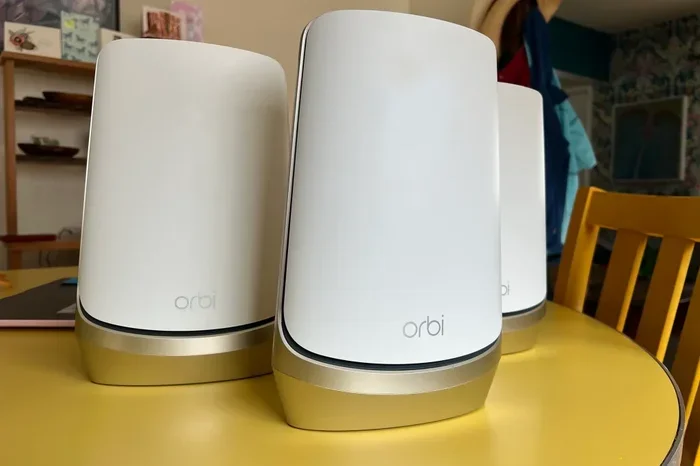
- Orbi WiFi 6E (RBKE963): This is the flagship WiFi 6E model from Orbi. It is a tri-band system that uses the 2.4GHz, 5GHz, and 6GHz bands simultaneously. It is designed for large homes with many connected devices and delivers top-tier WiFi performance.
- Orbi WiFi 6E RBK863S: This is a slightly more compact option that still delivers full WiFi 6E performance. It is a great choice for medium-sized homes that need reliable coverage without a bulky setup.
- Orbi Pro WiFi 6E (SRK60): Designed for small businesses and professionals who need reliable, high-speed wireless connectivity across office spaces. It brings the same 6GHz benefits to the workplace.
When shopping for an Orbi WiFi 6E system, always check the model number. If it includes “6E” in the name, it supports the 6GHz band. Older models that only say “WiFi 6” do not have access to the 6GHz spectrum.
Key Differences Between WiFi 6 and WiFi 6E
It is easy to confuse WiFi 6 and WiFi 6E, but they are not the same thing. WiFi 6 is an excellent standard that brought faster speeds and better device handling. However, it only uses the 2.4GHz and 5GHz bands. WiFi 6E adds the 6GHz band on top of that.
Here is a quick comparison of the two standards:
- WiFi 6: Uses 2.4GHz and 5GHz bands. Great for most homes. Supports speeds up to 9.6 Gbps. Handles dozens of devices well but can get crowded in busy households.
- WiFi 6E: Uses 2.4GHz, 5GHz, and 6GHz bands. Best for homes with many high-bandwidth devices. Also supports speeds up to 9.6 Gbps but with much less congestion on the 6GHz band.
The main advantage of WiFi 6E is the extra band. Think of it like having three lanes instead of two on a highway. More lanes mean less traffic and faster travel for everyone.
Benefits of Choosing an Orbi WiFi 6E System
Now that you know Orbi does offer WiFi 6E, let us talk about why it matters. What real benefits can you expect from an Orbi WiFi 6E system in your home?
Faster Speeds for Heavy Users
The 6GHz band provides significantly faster wireless speeds than the 5GHz band. In real-world testing, WiFi 6E devices can see speeds that are 20 to 30 percent faster than WiFi 6 devices on the 5GHz band. For households where multiple people are downloading large files, uploading videos, or running cloud backups at the same time, this speed boost makes a noticeable difference.
If you are someone who works from home and needs a stable, fast connection for video conferencing, the 6GHz band can provide the wireless speed and reliability you need. You will experience fewer frozen screens and clearer audio during your calls. Streaming bandwidth is also greatly improved, meaning you can run multiple 4K streams across different rooms without a hitch.
Less Congestion in Busy Households
One of the biggest problems with modern home networks is congestion. The average household now has over 20 connected devices. Smart TVs, phones, tablets, laptops, smart speakers, security cameras, and even smart refrigerators all compete for WiFi bandwidth.
With an Orbi WiFi 6E system, you can spread your devices across three bands instead of two. This dramatically reduces congestion. Your high-priority devices like gaming consoles and laptops can use the 6GHz band, while smart home devices can stay on the 2.4GHz band where they do not need as much speed.
For gamers, this is especially important. Gaming latency drops significantly on the 6GHz band because there is less interference and more available bandwidth. You will experience smoother gameplay and fewer lag spikes during competitive matches.
Better WiFi Coverage and Range
Orbi systems are known for their excellent WiFi coverage. The mesh network design uses satellite nodes to extend your signal throughout your home. With WiFi 6E, these satellite nodes can communicate with the main router on the 6GHz band, providing faster backhaul speeds. This means every part of your home gets the best possible performance.
The Orbi WiFi 6E system also uses intelligent bandwidth allocation. It automatically directs each device to the best available band based on its needs. You do not need to manually manage which device connects to which band. The system handles it all for you, making it one of the easiest mesh WiFi systems to manage.
Future-Proofing Your Home Network
Investing in a WiFi 6E router is a smart move for the future. As more devices become WiFi 6E compatible, having a router that supports the 6GHz band ensures your network is ready. It is a form of future-proof router planning that protects your investment for years to come.
New smartphones, laptops, and tablets are increasingly shipping with WiFi 6E support. By upgrading to an Orbi WiFi 6E system now, you ensure your home network can take full advantage of these new devices as they enter your household. It is a smart way to stay ahead of the curve in wireless technology.
How to Set Up Your Orbi WiFi 6E System
Setting up an Orbi WiFi 6E system is straightforward, but there are a few things you should keep in mind to get the best results. Here is a step-by-step guide to help you get started.
Placement Tips for Best Coverage
Where you place your Orbi router and satellite nodes matters a lot. Here are some tips to maximize your WiFi coverage:
- Place the main router centrally: Put your Orbi router in a central location in your home. This gives the satellite nodes the best starting point to distribute the signal evenly.
- Keep it elevated: Place the router on a shelf or table rather than on the floor. WiFi signals spread downward and outward, so elevation helps improve coverage.
- Avoid walls and metal objects: Thick walls, metal cabinets, and large appliances can block WiFi signals. Keep your router away from these obstacles for the best wireless performance.
- Space satellite nodes wisely: Place satellite nodes within range of the main router but in areas where you need better coverage. Each node should be close enough to maintain a strong connection to the others.
Common Setup Mistakes to Avoid
Even with a great system like Orbi WiFi 6E, poor setup can limit your performance. Here are common mistakes to avoid:
- Placing the router in a closet or cabinet: This blocks the signal and reduces coverage significantly. Always keep your router in an open, central area.
- Ignoring firmware updates: Netgear regularly releases firmware updates that improve performance and fix bugs. Always keep your system updated for the best results.
- Not using the Orbi app: The Orbi mobile app makes setup and management much easier. It helps you monitor your network, check speeds, and manage connected devices with ease.
- Overloading a single band: Let the system distribute your devices across all three bands. Forcing everything onto one band will slow things down and reduce your WiFi performance.
If you want to optimize your router’s signal further, you can also explore options like adding external antennas. Check out Can I Add an Antenna to My WiFi Router for more information on boosting your router’s reach and improving signal strength.
Quick Tips for Optimal Performance
- Restart your Orbi system once a month to clear the cache and refresh all connections.
- Use the Orbi app to run a speed test and identify any weak spots in your coverage area.
- Enable QoS (Quality of Service) settings to prioritize bandwidth for important devices like your work laptop or gaming console.
- Keep your satellite nodes within 30 to 40 feet of each other for the best mesh performance and consistent internet speed throughout your home.
Orbi WiFi 6E vs. Other Mesh WiFi Systems
How does Orbi WiFi 6E stack up against the competition? Let us take a look at how it compares to other popular mesh WiFi systems on the market.
Orbi WiFi 6E vs. Google WiFi
Google WiFi is a popular mesh system, but it does not support WiFi 6E. Google WiFi operates on WiFi 5 (802.11ac) and WiFi 6 standards. While it is a solid system for basic home use, it cannot take advantage of the 6GHz band.
In contrast, Orbi WiFi 6E offers the tri-band advantage with the 6GHz band. This gives it a clear edge in homes with many high-bandwidth devices. If you are looking for the best performance and future-proofing, Orbi WiFi 6E is the stronger choice.
You might also be interested in learning more about how mesh systems function as access points. Read Can Google WiFi Be an Access Point to understand more about access point capabilities in mesh networks and how they compare to traditional router setups.
Orbi WiFi 6E vs. Other WiFi 6E Competitors
There are other WiFi 6E mesh systems available, including options from ASUS, TP-Link, and Linksys. Here is how Orbi compares to the competition:
- Orbi WiFi 6E: Known for excellent range, easy setup, and reliable performance. Best for large homes and power users who need consistent coverage throughout their property.
- ASUS ZenWiFi AXE: A strong WiFi 6E competitor with good speeds and features. Slightly more complex setup but offers advanced customization options for tech-savvy users.
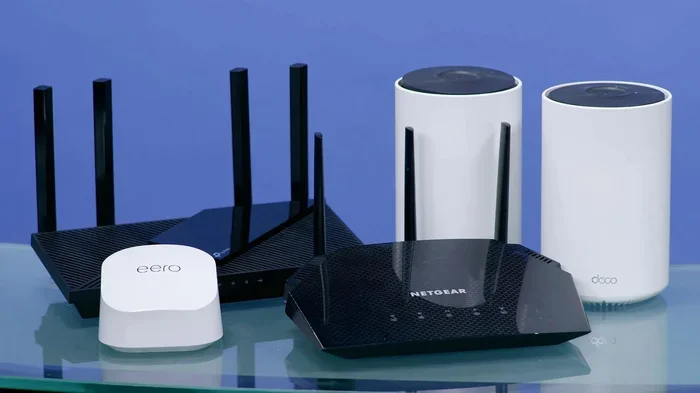
- TP-Link Deco XE75: A budget-friendly WiFi 6E option. Good for smaller homes but may not match Orbi’s range and overall performance in larger spaces.
Orbi stands out for its consistent performance and user-friendly interface. The Orbi app is one of the best in the business, making network management simple for everyone, from tech beginners to advanced users.
Who Should Upgrade to Orbi WiFi 6E?
Not everyone needs a WiFi 6E system right now. But for certain households, the upgrade can make a big difference. Here is a closer look at who benefits most from Orbi WiFi 6E and when it might be worth holding off.
Ideal Use Cases for Orbi WiFi 6E
- Large households with many devices: If you have 15 or more connected devices, the extra 6GHz band provides the breathing room your network needs to handle the load without slowdowns.
- Gamers: Lower latency and faster speeds on the 6GHz band create a noticeably better gaming experience with smoother gameplay and fewer interruptions.
- Remote workers: Stable, high-speed connections for video calls and file uploads are essential, and WiFi 6E delivers the reliability you need for productive work-from-home days.
- Streaming enthusiasts: Multiple 4K streams across different rooms work flawlessly on the 6GHz band, so everyone in the family can enjoy their favorite content simultaneously.
- Smart home users: With many smart home devices competing for bandwidth, spreading them across three bands keeps everything running smoothly without sacrificing performance.
When to Wait Before Buying
While Orbi WiFi 6E is impressive, it is not for everyone right now. Here are a few reasons you might want to wait:
- Your current WiFi 6 system works fine: If your existing router handles your needs without issues, there is no urgent need to upgrade. WiFi 6 is still a great standard that serves most households well.
- Budget constraints: WiFi 6E systems cost more than WiFi 6 models. If you are on a tight budget, a WiFi 6 system is still an excellent choice that will serve you well for years.
- Few WiFi 6E devices: If most of your devices only support WiFi 5 or WiFi 6, the 6GHz band will not make much difference yet. Wait until you have more compatible devices before making the switch.
As more devices gain WiFi 6E support, the value of upgrading will continue to grow. For now, it is most beneficial for households with high-bandwidth needs and many connected devices. If you are still deciding, consider your current usage patterns and whether the 6GHz band would solve a real problem in your home.
If you are also exploring other WiFi connectivity options, you might want to check out Can I Buy My Own Portable WiFi for alternatives that might suit your needs, especially if you need on-the-go connectivity in addition to your home network setup.
Final Thoughts on Orbi WiFi 6E
So, does Orbi have WiFi 6E? Absolutely. The Orbi WiFi 6E lineup offers some of the best mesh WiFi performance available today. With the addition of the 6GHz band, these systems deliver faster speeds, less congestion, and better coverage for modern homes.
If you are tired of slow WiFi, dropped connections, or buffering streams, upgrading to an Orbi WiFi 6E system is a smart move. It is an investment in better wireless connectivity that will serve your household well for years to come. The 6GHz band is the future of home networking, and Orbi is leading the way with reliable, high-performance systems that make the most of this new spectrum.
Take some time to evaluate your home network needs. Consider how many devices you have, what you use the internet for most, and whether the extra speed and capacity of WiFi 6E would make a real difference in your daily life. With Orbi WiFi 6E, you will be well equipped to handle whatever the future of wireless connectivity brings.
Frequently Asked Questions
What does WiFi 6E stand for?
WiFi 6E stands for WiFi 6 Extended. The “E” refers to the extended 6GHz frequency band that WiFi 6E adds on top of the existing 2.4GHz and 5GHz bands. This extra band provides more channels, less interference, and faster speeds for compatible devices.
Is Orbi WiFi 6E backward compatible?
Yes, Orbi WiFi 6E systems are fully backward compatible with older WiFi standards. Devices that only support WiFi 5 or WiFi 6 can still connect to your Orbi router. The system automatically directs each device to the best available band based on its capabilities.
Do I need WiFi 6E devices to benefit from Orbi WiFi 6E?
You do not need WiFi 6E devices to see some benefits. The tri-band design and improved bandwidth allocation still help reduce congestion for all devices. However, to access the 6GHz band and its full speed advantages, your devices must support WiFi 6E.
How many devices can an Orbi WiFi 6E system handle?
Orbi WiFi 6E systems can handle dozens of connected devices simultaneously. The three-band design distributes the load across 2.4GHz, 5GHz, and 6GHz, which helps maintain strong performance even in homes with 20 or more connected smart home devices and electronics.
Are Orbi WiFi 6E systems expensive?
Orbi WiFi 6E systems are priced higher than standard WiFi 6 models, typically ranging from $400 to $800 depending on the package size. The cost reflects the advanced technology and the tri-band design. For households with high bandwidth needs, the investment is well worth it.
Can I use Orbi WiFi 6E outdoors?
Orbi WiFi 6E systems are designed primarily for indoor use. However, placement near windows or exterior walls can extend coverage to outdoor areas like patios or garages. For dedicated outdoor coverage, you may want to explore additional networking solutions designed specifically for exterior use.
=== CONCLUSION ===
Does Orbi have WiFi 6E? Yes, and it is one of the best ways to future-proof your home network. Orbi WiFi 6E systems bring the speed, capacity, and low latency of the 6GHz band into your home, making them ideal for households with heavy internet usage. Whether you are gaming, streaming, working remotely, or running a smart home, the benefits of WiFi 6E are clear and tangible.
Upgrading to an Orbi WiFi 6E system is not just about faster speeds today. It is about preparing your home for the next generation of wireless devices and applications. As more devices adopt WiFi 6E support, having a router that can use the 6GHz band will become increasingly important. Start exploring your options today and take the first step toward a faster, more reliable home network.