Can I Add An Antenna To My Wifi Router For Stronger Signal
Yes, you can add an antenna to your wifi router in many cases, and it is one of the easiest ways to boost your signal strength and extend your wireless range. Whether your router has detachable antennas or you need a workaround for internal ones, the right antenna upgrade can transform your home network. This guide covers everything you need to know about compatibility, antenna types, and installation steps.
Have you ever walked into another room and suddenly your wifi dropped to nothing? Or maybe you have a smart home setup and certain devices just will not connect properly. If you have ever wondered whether can I add an antenna to my wifi router, the short answer is yes in many cases. Adding an antenna to your wifi router is one of the simplest and most affordable ways to get a stronger signal and better wireless coverage.
This guide walks you through everything you need to know. We will cover how router antennas work, whether your router supports an upgrade, the different types of antennas available, and how to install one yourself. By the end, you will feel confident about boosting your home network without spending money on a whole new system.
Let us be honest. Most people do not think about their wifi router antenna until something goes wrong. Then they are stuck with slow speeds, dead zones, and frustrated family members. A simple antenna upgrade can solve many of these problems. So let us dive in and explore how you can improve your wifi signal today.
Key Takeaways
- Adding an antenna can significantly improve your wifi signal strength and coverage throughout your home.
- Not all routers support external antenna upgrades. Check your model before purchasing.
- Omnidirectional antennas spread signal in all directions, while directional antennas focus the signal in one path.
- DBI rating matters when choosing an antenna higher gain means longer range but narrower coverage.
- Matching the antenna connector type to your router is essential for a proper fit.
- Proper placement and orientation of your new antenna makes a big difference in performance.
- Adding an antenna is cheaper and easier than buying a whole new router or range extender.
📑 Table of Contents
- Understanding How Your Wifi Router Antenna Works
- Can You Add An Antenna To Your Wifi Router?
- Types of Antennas You Can Add to Your Router
- How to Choose the Right Antenna for Your Router
- Step-by-Step: Adding an Antenna to Your Router
- Common Mistakes to Avoid When Adding a Router Antenna
- Expert Tips for Getting the Most Out of Your New Antenna
- Key Takeaways
- Conclusion
Understanding How Your Wifi Router Antenna Works
Before you can add an antenna, it helps to understand what your current antenna does. A router antenna sends and receives radio signals. These signals connect your phones, laptops, tablets, and smart devices to the internet. The better the antenna, the stronger and farther those signals travel.
What Does a Router Antenna Actually Do?
Your wifi router antenna turns electrical signals into radio waves. Those radio waves travel through the air and reach your devices. When your device sends data back, the antenna picks up those waves and converts them back into electrical signals. This two-way process happens millions of times per second.
The strength of your antenna directly affects your wifi signal strength. A weak antenna means a weak signal. A strong antenna means better speeds and more reliable connections. This is why upgrading your antenna can make such a noticeable difference.
Internal vs External Antennas
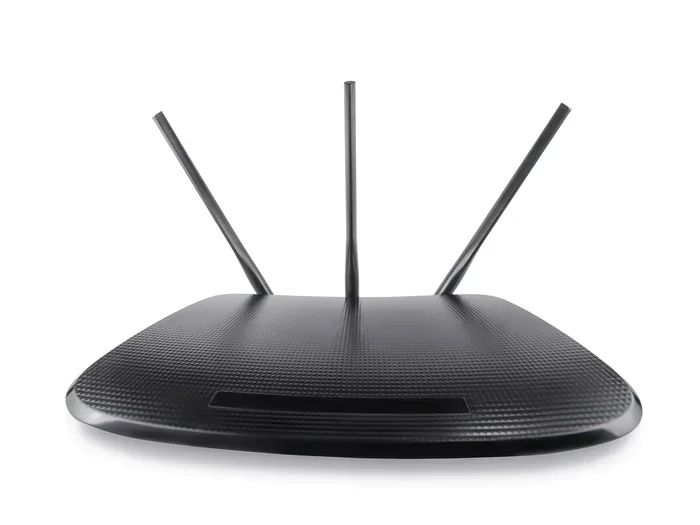
Most modern routers come with one of two types of antennas. Some have internal antennas built into the router body. These are hidden and sleek but often less powerful. Other routers have external antennas that stick out from the top or sides of the device.
External antennas are generally easier to upgrade. You can simply unscrew them and attach a new one. Internal antennas are trickier. You may need to open the router casing or use a special connector. We will cover both scenarios later in this article.
Can You Add An Antenna To Your Wifi Router?
The answer depends on your router model and design. Some routers are built to accept external antennas easily. Others do not support any kind of antenna upgrade at all. Let us break this down so you know exactly where you stand.
Check Your Routers Compatibility First
Before buying anything, check whether your router supports external antenna connections. Look at the back or top of your router. Do you see antenna connectors? These are usually called RP-SMA connectors. They look like small threaded ports.
If your router has these ports, you are in luck. You can likely add or replace antennas. If your router has no visible connectors and the antennas are sealed inside, you have an internal antenna design. In that case, adding an external antenna may require opening the router or using a different solution.
You can also check your routers manual or the manufacturers website. Search for your router model number and look for specifications. The spec sheet will tell you whether the router supports detachable antennas. Can I add an antenna to my wifi router? Now you know the first step to finding out.
What Happens When You Upgrade Your Antenna
When you add a better antenna to your router, several things improve. Your signal range increases. Your connection becomes more stable. And your overall wifi performance gets better, especially in areas of your home that previously had weak coverage.
Think of it this way. Your current antenna is like a small flashlight. It lights up a small area. A better antenna is like a spotlight. It reaches farther and shines brighter in a specific direction. Of course, the type of antenna you choose determines the shape and spread of that light.
Types of Antennas You Can Add to Your Router
Not all antennas are the same. Different antenna types serve different purposes. Understanding the options helps you pick the right one for your home setup.
Omnidirectional Antennas
An omnidirectional antenna sends and receives signals in all directions. It is shaped like a stick or a cylinder and spreads the wifi signal evenly around the router. This is the most common type for home use.
If you want equal coverage throughout your house, an omnidirectional antenna is a great choice. It works well for open floor plans and homes where devices are spread out in every direction. Most stock router antennas are omnidirectional.
Directional Antennas
A directional antenna focuses the signal in one specific direction. It is like a funnel for wifi. These antennas are perfect when you need to push a strong signal to one particular area. Maybe there is a backyard office or a detached garage that needs better coverage.
Directional antennas are also called Yagi antennas or panel antennas. They have a narrow beamwidth, which means they concentrate the signal in a focused path. This gives you excellent range in that direction but less coverage on the sides.
High-Gain Antennas
A high-gain antenna amplifies your routers signal output. The gain is measured in dBi, which stands for decibels relative to isotropic. The higher the dBi number, the stronger the signal and the farther it reaches.
Most stock router antennas have a gain of about 2 to 5 dBi. You can find aftermarket antennas with gains of 8, 10, or even 15 dBi. These high-gain options dramatically improve your wireless range. But keep in mind that higher gain also narrows the signal spread. You trade width for distance.
How to Choose the Right Antenna for Your Router
Choosing the right antenna can feel overwhelming with so many options available. But it does not have to be complicated. A few key factors will guide your decision.
Consider Your DBI Rating
The DBI rating tells you how powerful the antenna is. A higher DBI means a stronger signal that reaches farther. But as mentioned earlier, higher DBI also narrows the coverage area.
For most homes, an antenna with a DBI rating between 5 and 9 works well. It gives you a good balance of range and coverage. If you have a large property or need to reach a specific distant spot, consider an antenna with a DBI of 10 or higher.
Here is a quick comparison to help you decide:
- 3-5 dBi: Standard range. Good for small apartments or offices.
- 6-9 dBi: Extended range. Great for medium-sized homes.
- 10-15 dBi: Long-range coverage. Best for large properties or pointing signal at a specific location.
Match the Connector Type
Not all antennas fit all routers. The connector on the antenna must match the port on your router. The most common connector type for consumer routers is RP-SMA. It is a small threaded connector that screws on and off easily.
Before you buy an antenna, check what connector your router uses. Some routers use SMA connectors instead of RP-SMA. They look similar but are slightly different. Buying the wrong connector means the antenna will not fit. Always double-check your routers specifications.
Think About Your Wifi Band
Many modern routers operate on two frequency bands: 2.4 GHz and 5 GHz. Some antennas work on both bands, while others are designed for only one. If you have a dual band router, make sure the antenna you choose supports both frequencies.
The 2.4 GHz band travels farther but is slower. The 5 GHz band is faster but has a shorter range. A good dual-band antenna gives you the best of both worlds. It extends your range on the 2.4 GHz band and improves stability on the 5 GHz band.
Step-by-Step: Adding an Antenna to Your Router
Now that you know which antenna to buy, let us walk through the installation process. Adding an antenna to your router is straightforward in most cases.
What You Will Need
Before you start, gather these items:
- A compatible external antenna with the right connector
- Your router and its power cable
- A small flathead screwdriver (optional, for opening the router)
- A clean, flat workspace
That is it. You do not need any special tools or technical skills. Most antenna installations take less than five minutes.
Installation Steps
Follow these simple steps to add your new antenna:
- Power off your router. Unplug it from the wall. This prevents any electrical damage during the installation.
- Locate the antenna port. Find the RP-SMA connector on your router. It is usually labeled “ANT” or “Wi-Fi.”
- Remove the old antenna. If your router has a detachable antenna, gently twist it counterclockwise to unscrew it.
- Screw on the new antenna. Align the new antenna with the port and twist it clockwise until it is snug. Do not overtighten.
- Power on your router. Plug it back in and wait for it to fully boot up.
- Test your signal. Walk around your home and check the wifi signal on your devices. You should notice improved strength and range.
If your router has internal antennas and no detachable ports, the process is different. You may need to open the router casing and connect the antenna internally. This requires more technical comfort and should only be done if you are confident in your abilities. In some cases, you can use a pigtail cable to connect an external antenna without opening the router.
Common Mistakes to Avoid When Adding a Router Antenna
Even though the process is simple, some common mistakes can reduce your results. Avoid these pitfalls to get the best performance from your new antenna.
Buying the wrong connector type. This is the number one mistake. Always verify the connector type before purchasing. RP-SMA and SMA look almost identical but are not interchangeable.
Choosing too high a DBI rating. A very high-gain antenna can actually reduce your coverage area. If you need all-around coverage, stick with a moderate DBI rating. High DBI antennas work best when you need to direct the signal somewhere specific.
Placing the antenna poorly. Where you position the antenna matters a lot. Do not hide it behind a wall or inside a cabinet. Place it in an open, elevated position for the best signal spread.
Ignoring router placement. Even the best antenna will not help if your router is buried in a closet or tucked behind a TV. Place your router in a central, open location for optimal results.
Expecting miracles. An antenna upgrade improves your signal, but it cannot create internet speed that your ISP does not provide. If your internet plan is slow, an antenna will not fix that. It improves how the signal reaches your devices, not the speed of your internet connection itself.
Expert Tips for Getting the Most Out of Your New Antenna
Want to squeeze every bit of performance from your upgraded setup? Here are some expert-backed tips that make a real difference.
Position your antenna vertically for horizontal coverage. If your devices are on the same floor, keep the antenna pointing straight up. This spreads the signal horizontally across your home.
Adjust the antenna angle for multi-floor coverage. If you have multiple floors, tilt the antenna at a 45-degree angle. This helps the signal reach both above and below the router.
Keep the antenna away from metal objects. Metal blocks wifi signals. Do not place your router or antenna near metal shelves, appliances, or filing cabinets. Even large mirrors and water tanks can interfere with your signal.
Combine your antenna upgrade with other optimizations. Changing the wifi channel on your router, updating the firmware, and using the right frequency band all work together with your new antenna to maximize performance.
Consider a wifi mesh system if your home is very large. An antenna upgrade works great for most homes. But if you have a very large property or thick walls throughout, a mesh network might be a better long-term solution. You can always add an antenna to individual mesh nodes for even better coverage.
Key Takeaways
- Adding an antenna to your wifi router is possible in most cases and can dramatically improve your signal strength and range.
- Check your routers compatibility before purchasing. Look for RP-SMA or SMA connector ports on the back of your device.
- Omnidirectional antennas spread signal evenly, while directional antennas focus the signal in one direction for longer reach.
- The DBI rating determines antenna strength. Choose a rating that matches your home size and coverage needs.
- Matching the connector type is critical. RP-SMA is the most common, but always verify before buying.
- Proper antenna placement and orientation significantly impact your results. Keep it elevated and away from obstructions.
- An antenna upgrade is affordable and easy compared to replacing your entire router or buying a range extender.
Conclusion
If you have been struggling with weak wifi signals and dead zones in your home, adding an antenna to your wifi router is a practical and cost-effective solution. It is one of the simplest upgrades you can make to improve your wireless range and signal strength without replacing your entire router.
The process starts with checking your routers compatibility. Then you choose the right antenna type based on your coverage needs. Whether you go with an omnidirectional antenna for all-around coverage or a directional antenna to target a specific area, the right choice makes a real difference.
Remember to match the connector type, consider the DBI rating, and place your antenna properly. Avoid common mistakes like buying the wrong connector or hiding the antenna in a closed space. And combine your antenna upgrade with good router placement and other network optimizations for the best results.
Can I add an antenna to my wifi router? Yes, and now you have everything you need to do it successfully. Your stronger, more reliable wifi is just one antenna away.
Frequently Asked Questions
Can I Add An Antenna To Any Wifi Router?
Not every router supports external antenna additions. Routers with detachable RP-SMA or SMA connectors can accept new antennas. Routers with internal, sealed antennas may not support upgrades without opening the device. Always check your routers specifications before purchasing an antenna.
Will Adding an Antenna Improve My Internet Speed?
Adding an antenna improves signal strength and range, which can lead to better speeds in areas with weak coverage. However, it does not increase the internet speed provided by your ISP. The antenna helps your router deliver the speed you already pay for more reliably to distant devices.
How Much Does a Replacement Antenna Cost?
Most external wifi router antennas cost between $10 and $40. High-gain antennas or specialty directional models may cost a bit more. Compared to buying a new router or range extender, an antenna upgrade is one of the most affordable ways to improve your network.
Can I Remove the Internal Antenna and Add an External One?
Some routers allow you to disconnect the internal antenna and connect an external one using a pigtail cable. However, this depends on your router model. Opening your router may void the warranty. Check with the manufacturer before attempting any internal modifications.
Does Antenna Orientation Really Matter?
Yes, antenna orientation has a significant impact on signal distribution. A vertical antenna spreads signal horizontally. A tilted or angled antenna changes the coverage pattern. For multi-floor homes, adjusting the angle helps the signal reach different levels more effectively.
Is It Better to Add an Antenna or Buy a Range Extender?
An antenna upgrade is usually simpler, cheaper, and more effective than a range extender. A range extender creates a separate network that can cause latency and slow speeds. An antenna improves the original routers signal directly, giving you better overall performance without adding extra devices.