Does Portable Wi Fi Work Anywhere In The World Today
Does portable Wi-Fi work anywhere in the world? The short answer is yes, but with some important limits. A portable Wi-Fi device can connect you to the internet in most countries, but coverage, speeds, and costs vary widely. You need the right data plan, a compatible SIM card, and realistic expectations about signal strength in different regions.
Does portable Wi-Fi work anywhere in the world? It is a question many travelers ask before heading abroad. The truth is, a portable Wi-Fi device can connect you to the internet in most countries on Earth. But the experience is not always the same everywhere. You might get blazing fast speeds in one city and zero bars in the next village. This guide breaks down everything you need to know about using a mobile hotspot around the globe.
Whether you are a digital nomad, a frequent flyer, or just planning a two-week vacation, staying connected matters. A portable hotspot device gives you Wi-Fi on the go without relying on public networks. But how well does it really work internationally? Let us dive in and find out.
Key Takeaways
- Portable Wi-Fi works in most countries: You can stay connected in over 190 nations with the right device and plan.
- Coverage depends on local networks: Your portable hotspot relies on existing cellular infrastructure in each country.
- Costs vary a lot: Some plans charge per day, while others offer monthly international packages with better rates.
- Not everywhere has strong signal: Remote areas, islands, and developing regions may have limited or no Wi-Fi coverage.
- Prepaid global SIMs are a great option: They let you avoid roaming charges and keep costs predictable.
- Check compatibility before you travel: Make sure your device supports the right frequency bands for your destination.
📑 Table of Contents
- What Is Portable Wi-Fi and How Does It Work?
- Can You Use Portable Wi-Fi in Every Country?
- Factors That Affect Portable Wi-Fi Coverage Worldwide
- How to Get Portable Wi-Fi for International Travel
- Portable Wi-Fi vs. Other Connectivity Options for Travel
- Common Problems and How to Fix Them
- Expert Insights and Practical Tips
- Key Takeaways
- Conclusion
What Is Portable Wi-Fi and How Does It Work?
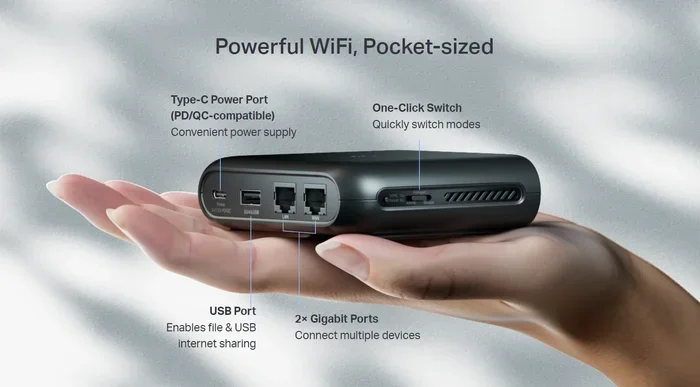
A portable Wi-Fi device is a small, battery-powered gadget that creates a local Wi-Fi network. It connects to cellular networks just like your phone does. Then it shares that connection with your laptop, tablet, or other devices. Think of it as a personal wireless router that fits in your pocket.
These devices are also called mobile hotspots, travel routers, or pocket Wi-Fi units. They use a SIM card to connect to a local carrier. When you travel internationally, the device hops onto the available cellular network in each country. This is how you get internet access almost anywhere.
Most portable hotspots support 4G LTE. Some newer models even support 5G. The signal strength you get depends on the local tower density and your distance from it. In cities, you will usually have a strong connection. In rural areas, things can get tricky.
How Does Global Roaming Fit In?
When you use your portable device abroad, you are using a feature called global roaming. This means your SIM card connects to partner networks in other countries. Your home carrier has agreements with local networks to let you use their towers. This is what makes international data possible.
However, not all carriers offer the same roaming deals. Some charge high roaming charges that can wreck your budget. Others include international data in their plans. This is why many travelers prefer a dedicated portable Wi-Fi device with a prepaid global SIM.
Can You Use Portable Wi-Fi in Every Country?
The honest answer is no, not every country. But most countries do support portable Wi-Fi coverage. Let us look at where it works well and where it might be a challenge.
Countries With Excellent Portable Wi-Fi Coverage
Many developed nations have strong cellular networks that work perfectly with portable hotspots. Countries like the United States, Canada, the United Kingdom, Australia, and most of Western Europe offer reliable internet connection almost everywhere. In these places, your mobile hotspot will feel just like home.
Major cities in Japan, South Korea, and Singapore also have outstanding coverage. You can stream videos, join video calls, and browse without issues. If you are heading to these places, you can feel confident about your connectivity options.
Where Portable Wi-Fi Might Struggle
Some regions have limited network coverage. Remote islands, rural parts of Africa and South America, and mountainous areas can be tough. In these places, a portable Wi-Fi device might show signal but deliver very slow speeds. Sometimes there is no signal at all.
For example, if you visit a small village in the Himalayas or a remote atoll in the Pacific, do not expect strong Wi-Fi coverage. The cellular network infrastructure simply may not exist there. Always research your destination before you go.
Can I Get Pocket Wi-Fi in Japan?
Japan is actually a great place for portable Wi-Fi. The country has excellent cellular network coverage, even in many rural areas. You can rent a pocket Wi-Fi device at the airport or order one online before your trip. Many rental services offer global roaming with data plans that cover all of Japan. If you are planning a trip there, check out our guide on getting pocket Wi-Fi in Japan for more details.
Factors That Affect Portable Wi-Fi Coverage Worldwide
Several things determine how well your portable device works abroad. Understanding these factors helps you plan better and avoid surprises.
Local Network Infrastructure
The biggest factor is the local cellular network infrastructure. Countries that invested heavily in 4G and 5G towers give you the best experience. Nations with older or limited infrastructure will not deliver the same speeds. Before you travel, look up the network coverage map for your destination.
Frequency Band Compatibility
Different countries use different frequency bands for their cellular networks. Your portable device must support the right bands to connect. Most modern hotspots cover the major global bands. But older or cheaper models might miss some. Check the specs of your device before you book a flight.
Data Speed and Throttling
Even if you connect, your speeds might vary. Some data plans throttle speeds after a certain amount of use. Others slow down during peak hours. If you need fast internet access for work, choose a plan with unlimited or high-speed data. Read the fine print of any plan before you commit.
Signal Obstacles
Physical barriers affect signal strength just like they do at home. Thick walls, dense forests, and deep valleys can block your connection. Being indoors in a concrete building might weaken your signal. Standing near a window or going outside usually helps.
How to Get Portable Wi-Fi for International Travel
Setting up portable Wi-Fi for international trips is easier than most people think. You have several options to choose from.
Option 1: Use Your Current Carrier’s International Plan
Many US carriers offer international data plans or day passes. You can add global roaming to your existing line. This is convenient because you do not need a new device. But it can get expensive. Some carriers charge $10 to $15 per day for international data. Over a two-week trip, that adds up fast.
If you are traveling to a place like Canada or Mexico, some plans include free roaming. Check with your carrier to see what they offer. You can also look into AT&T’s international Wi-Fi options if you are already an AT&T customer.
Option 2: Buy a Dedicated Portable Hotspot Device
This is the best option for frequent travelers. You buy a portable hotspot device and pair it with a global SIM card. The device stays in your bag. You power it on whenever you need internet access. It creates a private Wi-Fi network just for you and your travel companions.
Popular brands include GlocalMe, Skyroam, and TEZDA. These devices work in over 130 countries. You pay for data by the day, week, or month. The cost is usually much lower than roaming charges from your home carrier.
Option 3: Rent a Portable Wi-Fi Device
If you do not want to buy a device, renting is a smart choice. You can rent a pocket Wi-Fi unit at the airport or order it online. Rental services include preloaded data plans for your destination. This is a great option for one-time or occasional trips.
Rental costs typically range from $5 to $15 per day. You return the device when you come home. No long-term commitment. No need to worry about roaming charges on your personal phone.
Option 4: Buy a Local SIM Card at Your Destination
Another approach is to buy a local SIM card when you arrive. This gives you a local phone number and data plan. Your portable device can use this SIM to connect to the local network. This option often provides the fastest speeds and lowest costs. But it requires an unlocked device and some setup time at the airport.
Portable Wi-Fi vs. Other Connectivity Options for Travel
How does a portable Wi-Fi device compare to other ways of staying connected abroad? Let us look at the main alternatives.
Portable Wi-Fi vs. Phone Hotspot
Using your phone as a mobile hotspot is the most common alternative. It is free if you already have a data plan. But it drains your phone battery fast. You also cannot make calls or use apps while tethering. A dedicated portable hotspot device keeps your phone free and charged.
A portable device also creates a separate Wi-Fi network. This means you can connect multiple devices at once. Your phone hotspot usually limits you to five or fewer connections.
Portable Wi-Fi vs. Public Wi-Fi
Public Wi-Fi is everywhere in cafes, airports, and hotels. But it comes with serious security risks. Hackers can intercept your data on open networks. A portable Wi-Fi device gives you a private, encrypted connection. This is much safer for banking, shopping, and video calls.
Also, public Wi-Fi is not available everywhere. On a long train ride or in a remote village, you will have no public network. A portable device keeps you connected as long as there is a cellular network nearby.
Portable Wi-Fi vs. eSIM
eSIM technology is gaining popularity. It lets you download a digital SIM profile without a physical card. Many modern phones and tablets support eSIM. You can switch carriers instantly without swapping cards.
However, eSIM is not available everywhere yet. Some countries and carriers do not support it. Also, not all devices have eSIM capability. A portable Wi-Fi device works with almost any device that can connect to Wi-Fi. It is more universal than eSIM.
Quick Comparison Table
- Portable Wi-Fi Device: Best for multiple devices, private connection, and frequent travel.
- Phone Hotspot: Free if you have data, but drains battery and limits connectivity.
- Public Wi-Fi: Convenient but insecure and not always available.
- eSIM: Modern and flexible, but limited device and country support.
Common Problems and How to Fix Them
Using a portable Wi-Fi device abroad is not always smooth. Here are common issues and how to solve them.
No Signal or Weak Signal
If your device shows no signal, try moving to a higher floor or going outside. Buildings and terrain can block cellular signals. Restarting the device can also help. Sometimes a simple reboot reconnects you to a stronger tower.
Slow Speeds
Slow speeds are common in crowded areas. Airports, train stations, and busy streets often have overloaded towers. Try connecting during off-peak hours for better performance. You can also check your data plan to see if you have hit a speed cap.
Device Not Connecting
If your device will not connect, check the SIM card first. Make sure it is properly inserted and activated. Also verify that your plan covers your destination country. Some global plans exclude certain regions. Contact the provider if you need help troubleshooting.
Battery Draining Fast
Portable hotspots run on small batteries. Continuous use can drain them in a few hours. Carry the charging cable with you. Some devices also support power banks. Turn off the device when you are not using it to save battery life.
Expert Insights and Practical Tips
Traveling with a portable Wi-Fi device gets easier with experience. Here are some tips from seasoned travelers and tech experts.
Tip 1: Always check coverage maps. Before you travel, visit the carrier or device provider website. Look up the network coverage for your destination. This helps you set realistic expectations.
Tip 2: Buy data in bulk. Many providers offer discounts for larger data packages. A weekly or monthly plan usually costs less than daily passes. If you are traveling for more than a few days, bulk data saves money.
Tip 3: Keep your device charged. A dead hotspot is useless. Make it a habit to charge your device every night. Carry a portable power bank as a backup. This ensures you always have internet access when you need it.
Tip 4: Use a VPN for security. Even with a private Wi-Fi network, a VPN adds an extra layer of protection. It encrypts all your data and hides your online activity. This is especially important when using public networks or in countries with strict internet monitoring.
Tip 5: Share the connection wisely. A portable hotspot works best with two to four devices. Too many connections slow down the speed. If you are traveling with a group, consider getting two devices to spread the load.
Key Takeaways
- Portable Wi-Fi works in most countries: You can stay connected in over 190 nations with the right device and plan.
- Coverage depends on local networks: Your portable hotspot relies on existing cellular infrastructure in each country.
- Costs vary a lot: Some plans charge per day, while others offer monthly international packages with better rates.
- Not everywhere has strong signal: Remote areas, islands, and developing regions may have limited or no Wi-Fi coverage.
- Prepaid global SIMs are a great option: They let you avoid roaming charges and keep costs predictable.
- Check compatibility before you travel: Make sure your device supports the right frequency bands for your destination.
Conclusion
So, does portable Wi-Fi work anywhere in the world? Yes, it does. With the right device, a good data plan, and some preparation, you can stay connected in most countries you visit. The key is understanding your destination and choosing the right connectivity options.
A portable hotspot device gives you freedom and flexibility. It keeps you connected without relying on public networks or expensive roaming charges. Whether you are exploring cities or trekking through remote areas, a portable device keeps your internet connection alive.
Do your research before every trip. Check network coverage, compare data plans, and test your device before you leave. A little preparation goes a long way toward a smooth and stress-free travel experience. Stay connected, stay safe, and enjoy your adventures with reliable portable Wi-Fi by your side.
Frequently Asked Questions
Can I use my portable Wi-Fi device in every country?
Most portable Wi-Fi devices work in over 130 countries. However, some remote regions may not have the cellular network infrastructure needed. Always check the coverage map for your specific destination before you travel.
How much does international portable Wi-Fi cost?
Costs vary depending on the provider and plan. Daily passes typically cost $5 to $15. Monthly global plans can range from $50 to $150. Buying a dedicated device and a prepaid global SIM usually saves money compared to roaming charges.
Do I need a special device for portable Wi-Fi abroad?
You need a portable hotspot device that supports international frequency bands. Most modern devices are multi-band and work worldwide. You also need an unlocked device if you plan to use a local SIM card at your destination.
Is portable Wi-Fi faster than phone hotspot?
Not necessarily. Both use the same cellular networks. However, a dedicated portable device has a better antenna and battery. It can also connect more devices without slowing down. This gives you a more stable and faster experience overall.
Can I make phone calls using portable Wi-Fi?
Most portable Wi-Fi devices only provide data, not voice calls. However, you can use apps like WhatsApp, Skype, or Zoom over the Wi-Fi connection to make calls. Some advanced travel routers do support VoIP calling directly.
What happens if my portable Wi-Fi has no signal?
Try moving to a different location, preferably near a window or outdoors. Restarting the device can also help. If there is truly no network coverage in your area, you may need to switch to a different connectivity method or wait until you reach an area with better signal.