How Can I Boost Wifi Upstairs With These Simple Tips
Struggling with weak wifi upstairs? You are not alone — most homes have dead zones on upper floors. This guide covers simple, budget-friendly ways to boost your wifi signal upstairs, from router repositioning to mesh networks and signal extenders. With the right setup, you can enjoy fast, reliable internet on every floor of your home.
Do you love your downstairs wifi but hate what happens when you walk upstairs? You are not alone. Almost every multi-story home has this problem. The wifi signal upstairs gets weaker, slower, or disappears completely. It is frustrating when you are trying to stream a show in bed or take a video call from your second-floor office.
The good news is that fixing this problem is easier than you think. You do not need to be a tech expert. There are simple, affordable solutions that can make a huge difference. In this guide, I will walk you through proven ways to boost your wifi upstairs. Whether you have a small apartment or a large house, there is a solution that fits your needs and budget.
Let us dive into the tips and tricks that will give you strong, reliable wireless coverage on every floor of your home.
Key Takeaways
- Router placement matters most: Moving your router to a central, elevated location can significantly improve wifi upstairs coverage.
- Mesh networks are the gold standard: A mesh router system eliminates dead zones and provides seamless coverage throughout your home.
- WiFi extenders and repeaters work well for small gaps: They are affordable and easy to set up for boosting wireless coverage on upper floors.
- Adjusting router settings can help: Switching to the 2.4 GHz band and changing channels can improve signal strength upstairs.
- Physical barriers weaken signals: Thick walls, metal objects, and appliances block wifi signals — understanding this helps you troubleshoot.
- Wired backhaul offers the best performance: Using an ethernet cable or powerline adapter gives the most stable upstairs internet connection.
- Upgrade your router if it is old: Older routers lack the range and technology needed for modern multi-floor wifi coverage.
📑 Table of Contents
- Why Does Your Wifi Struggle Upstairs?
- Test Your Current Wifi Signal Upstairs
- Simple Router Adjustments That Boost Upstairs Wifi
- Upgrade Your Equipment for Better Upstairs Coverage
- Optimize Your Router Settings for Upstairs Performance
- Advanced Solutions for Tough Upstairs Wifi Problems
- Quick Tips to Remember
- Common Mistakes People Make When Trying to Boost Upstairs Wifi
- Expert Insights: What Networking Professionals Recommend
- How to Choose the Right Solution for Your Home
- Conclusion
Why Does Your Wifi Struggle Upstairs?
Before we fix the problem, let us understand why it happens. When you know the cause, the solution becomes much clearer.
Distance From the Router
Your router sends out wifi signals in all directions. The further you move from it, the weaker the signal becomes. If your router sits on the ground floor, the signal has to travel up through multiple floors. Each wall, ceiling, and floor it passes through weakens the signal a little more. By the time it reaches upstairs, it may be too weak to work well.
Physical Barriers Weaken Signals
Walls, floors, and other objects block wifi signals. Thick concrete walls are the worst offenders. Metal objects, mirrors, and even large appliances can interfere with your wireless coverage. Brick and stone walls are also tough for signals to penetrate. The more obstacles between your router and your upstairs devices, the worse your connection will be.
Interference From Other Devices
Many household devices use the same frequency as your wifi signal. Microwaves, baby monitors, cordless phones, and even Bluetooth devices can cause interference. This is especially true on the 2.4 GHz band, which most routers use. Upstairs, where the signal is already weaker, this interference can make your connection almost unusable.
Old or Outdated Equipment
Older routers simply do not have the power or technology to push signals through multiple floors. If your router is more than five years old, it may be time for an upgrade. Newer routers support dual band and even tri band technology, which helps distribute wireless coverage more effectively throughout your home.
Test Your Current Wifi Signal Upstairs
Before you try any fixes, it helps to know exactly what you are working with. Testing your wifi signal strength upstairs gives you a baseline to measure your progress.
How to Test Your Signal
You can test your wifi signal in a few simple ways:
- Use your phone: Walk upstairs and check the wifi bars in your status bar. This gives you a quick visual idea of signal strength.
- Run a speed test: Use a free app like Speedtest.net or Fast.com upstairs. Compare the results to what you get downstairs. This tells you how much speed you are losing.
- Use a wifi analyzer app: Apps like NetSpot or WiFi Analyzer show you a detailed map of your signal strength throughout your home. They can identify dead zones and areas of weak coverage.
Write down your results. This will help you decide which solution works best for your situation.
Simple Router Adjustments That Boost Upstairs Wifi
Sometimes the fix is free and takes just a few minutes. Before spending any money, try these simple adjustments to your home network setup.
Move Your Router to a Central Location
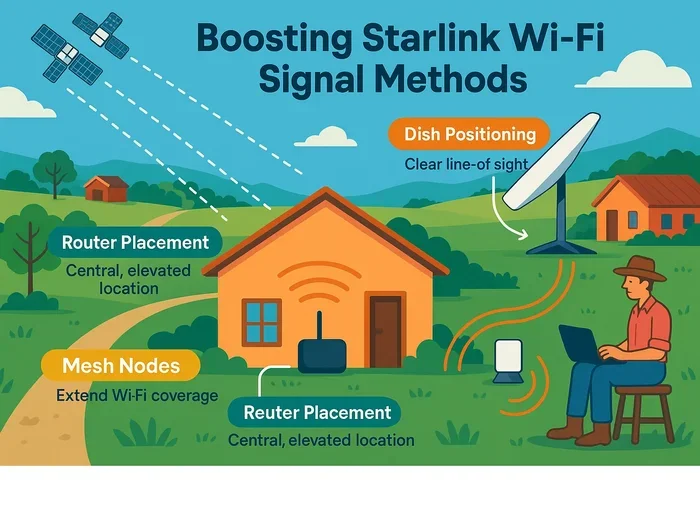
This is the single most effective thing you can do. Most people hide their router in a corner, closet, or behind furniture. This blocks the wifi signal and limits its range. Instead, place your router in a central, open area of your home. If possible, put it on the main floor between the first and second stories. This gives the signal a better chance of reaching upstairs.
Elevate Your Router
Wifi signals spread out and down from the antenna. Placing your router on the floor or tucked under a desk limits its reach. Put it on a shelf, a table, or mount it on a wall. Elevating your router helps the signal travel more evenly across floors and through rooms.
Keep It Away From Obstacles
Do not place your router near thick walls, metal cabinets, fish tanks, or large appliances. These objects absorb and block wifi signals. A clear line of sight from your router to the upstairs area makes a big difference.
Adjust the Antenna Position
If your router has external antennas, try adjusting them. Pointing one antenna straight up and one to the side can help spread the signal across multiple floors. Some routers have internal antennas, which are less flexible, but positioning the router itself correctly still helps.
Change Your Wifi Channel
Your neighbors might be using the same wifi channel as you, causing interference. Log into your router settings and change the channel to a less crowded one. For the 2.4 GHz band, channels 1, 6, and 11 are usually the best choices. For the 5 GHz band, there are more channels available, so you have more options to find a clear one.
Upgrade Your Equipment for Better Upstairs Coverage
If simple adjustments are not enough, it may be time to upgrade your equipment. There are several devices designed specifically to extend wireless coverage to upper floors.
Buy a WiFi Booster or Extender
A wifi booster or extender is one of the easiest and most affordable solutions. These devices pick up your existing wifi signal and rebroadcast it to areas with weak coverage. You place the extender halfway between your router and the upstairs area. It receives the signal and sends it further.
If you are considering this option, check out Can I Buy A Wi-Fi Booster for a detailed guide on choosing the right one. Boosters typically cost between $20 and $100 and are very easy to set up.
Set Up a Mesh WiFi System
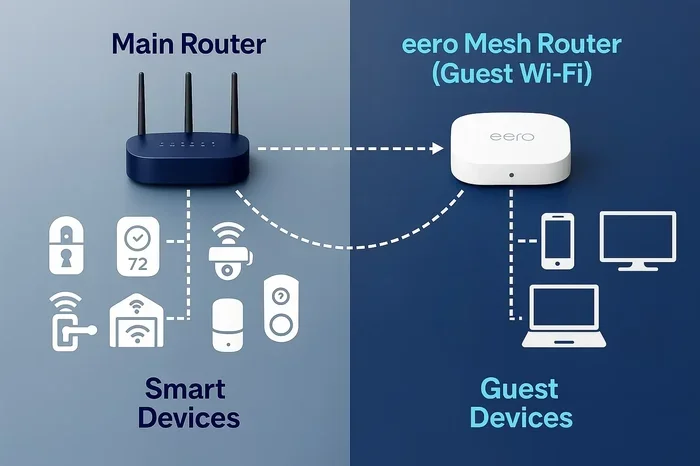
A mesh network is the best solution for whole-home wifi coverage. Instead of one router trying to cover everything, a mesh system uses multiple nodes placed around your home. Each node works together to create a single, seamless network. You get strong signal strength upstairs without any dead zones.
Popular mesh systems include Google Nest WiFi, TP-Link Deco, and Netgear Orbi. They are more expensive than extenders but offer much better performance. If you want to learn more about connecting a mesh system to your existing router, read Can I Connect A Mesh Router To An Existing Router.
Use a Powerline Adapter
A powerline adapter uses your home’s electrical wiring to transmit internet signals. You plug one adapter near your router and another one upstairs. This creates a wired connection to your second floor without running cables through walls. It is a great option if ethernet cables are not practical in your home.
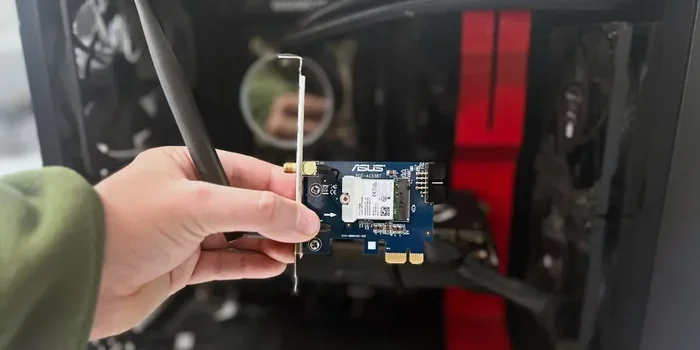
Add an Antenna to Your Router
Some routers allow you to add or replace antennas with higher-gain models. A better antenna can significantly increase your wireless range and signal strength upstairs. If your router has detachable antennas, this is a simple and cost-effective upgrade. To learn more about this option, check out Can I Add An Antenna To My Wi-Fi Router.
Optimize Your Router Settings for Upstairs Performance
Your router has settings that can make a big difference in how well it covers your upstairs area. You do not need to be a tech expert to adjust these.
Switch Between 2.4 GHz and 5 GHz Bands
Most modern routers support two frequency bands: 2.4 GHz and 5 GHz. The 2.4 GHz band has a longer range and better wall penetration, making it ideal for reaching upstairs. The 5 GHz band is faster but has a shorter range. If your main concern is getting a signal upstairs at all, use the 2.4 GHz band. If you need speed and your upstairs area is close to the router, try 5 GHz.
If you want more details on switching bands, read Can I Change My Wi-Fi From 5Ghz To 2 4 Ghz.
Enable QoS (Quality of Service)
QoS is a setting that prioritizes certain types of traffic on your network. For example, you can set video calls and streaming to have higher priority than background downloads. This ensures that your most important activities get the bandwidth they need, even when the signal upstairs is weaker.
Update Your Router Firmware
Router manufacturers release firmware updates that improve performance and fix bugs. Check your router’s admin panel or app for updates. Keeping your firmware current ensures you are getting the best possible wireless coverage from your equipment.
Change the SSID and Password
While this does not directly boost your signal strength, changing your SSID (network name) and password can reduce interference from neighbors. Use a less crowded channel and a strong password to keep your network optimized.
Advanced Solutions for Tough Upstairs Wifi Problems
If the basic and intermediate solutions above do not solve your problem, there are more advanced options to consider.
Run an Ethernet Cable to the Upper Floor
This is the most reliable solution for upstairs internet. Running an ethernet cable from your router to a second router or access point upstairs gives you the fastest, most stable connection possible. You can set up the upstairs router in access point mode to extend your network without creating a separate one.
Use a MoCA Adapter
A MoCA adapter uses your home’s existing coaxial TV cables to transmit internet data. It is faster and more reliable than powerline adapters. If your home has coax outlets upstairs, this is an excellent option for getting strong wifi coverage on the second floor.
Consider a Second Router
Adding a second router upstairs can boost your wireless coverage significantly. You can connect the second router to your main router using an ethernet cable or powerline adapter. This creates a wired backbone for your upstairs network while still providing wifi to your devices.
For homes with difficult layouts, you might also explore whether you can get Wi-Fi without a traditional router using alternative setups.
Install a Wireless Access Point
A wireless access point is similar to a second router but is designed specifically to extend your existing network. It connects to your main router and broadcasts a new wifi signal in the upstairs area. Access points are more powerful and reliable than extenders for covering larger spaces.
Quick Tips to Remember
- Always test your signal before and after making changes to measure improvement.
- Place your router in an open, elevated, central location for the best upstairs coverage.
- Use the 2.4 GHz band for better range through walls and floors.
- Keep your router firmware updated for the best performance.
- Avoid placing your router near metal objects, mirrors, and large appliances.
- If you have thick walls or a large home, a mesh network is your best bet.
- Consider wired solutions like ethernet or MoCA for the most reliable upstairs connection.
Common Mistakes People Make When Trying to Boost Upstairs Wifi
Avoid these common pitfalls that can make your wifi problems worse:
- Buying the wrong extender: Not all extenders are created equal. Cheap ones can actually slow down your network instead of speeding it up.
- Placing the extender too far from the router: The extender needs a strong signal from the router to rebroadcast effectively. Place it where it still gets a good connection.
- Ignoring interference: If your neighbors’ networks are on the same channel, you will still have problems even with a booster.
- Using an old router: No extender or mesh node can fix a weak signal from an outdated router. Start with modern equipment.
- Expecting miracles from one device: In large homes, one solution might not be enough. Sometimes you need a combination of tools.
Expert Insights: What Networking Professionals Recommend
Networking experts agree on a few key principles when it comes to boosting wifi upstairs:
- Start with placement: Before buying anything, optimize your router’s position. This costs nothing and often solves the problem.
- Mesh is the future: Most professionals recommend mesh systems over traditional extenders because they provide seamless, whole-home coverage.
- Wired is always better: Whenever possible, use a wired connection for the most stable and fastest upstairs internet.
- Upgrade together: If your router is more than five years old, consider upgrading it along with your coverage solution for the best results.
How to Choose the Right Solution for Your Home
Not every solution works for every home. Here is a quick guide to help you decide:
- Small home or apartment: Router repositioning and a single wifi extender should be enough.
- Medium home with moderate interference: A mesh system provides reliable coverage without much hassle.
- Large home with thick walls: Combine a mesh system with wired backhaul for the strongest possible upstairs signal.
- Budget-friendly option: A powerline adapter or a single wifi booster can solve the problem for under $100.
- Maximum performance: Run an ethernet cable upstairs and connect a second router or access point.
Conclusion
Boosting your wifi upstairs does not have to be complicated or expensive. You can start with simple, free steps like moving your router to a better location and adjusting your settings. If that is not enough, affordable tools like wifi extenders, powerline adapters, and mesh systems can transform your wireless coverage. The key is to test your signal, understand your home’s layout, and choose the right solution for your needs.
With the tips in this guide, you can say goodbye to weak signals and dead zones upstairs. Enjoy fast, reliable internet everywhere in your home. Start with one tip today and see the difference for yourself.
Frequently Asked Questions
What is the best way to boost wifi upstairs?
A mesh WiFi system is widely considered the best way to boost wifi upstairs. It uses multiple nodes to create seamless coverage throughout your home. Unlike traditional extenders, mesh systems do not slow down your speed or create separate network names. They are easy to set up and manage through a smartphone app.
Can a WiFi extender boost the signal upstairs?
Yes, a wifi extender can boost your signal upstairs. Place the extender halfway between your router and the upstairs area for the best results. Keep in mind that extenders can sometimes reduce your speed slightly because they receive and rebroadcast the signal. For the best performance, choose a dual-band or tri-band extender.
Why is my wifi weak upstairs but strong downstairs?
This is a very common problem. The most likely reasons are distance from the router, thick walls and floors blocking the signal, and interference from other devices. Your router’s wireless range may not be strong enough to penetrate multiple floors. Moving the router to a more central location or adding a booster can fix this issue.
Do I need a new router to get better wifi upstairs?
Not necessarily. Before buying a new router, try repositioning your current one and adjusting its settings. If those steps do not help, a new router with better range and dual band support can make a big difference. However, for the best results, pairing a new router with a mesh system or extender is the most effective approach.
Is a mesh WiFi system worth the investment?
Yes, a mesh WiFi system is worth the investment if you have a multi-story home or persistent dead zones. Mesh systems provide strong, consistent wireless coverage throughout your entire home. They are easy to expand, manage, and maintain. While they cost more than a single extender, the performance and convenience they offer make them a smart long-term choice.
Can I use a powerline adapter to improve wifi upstairs?
Yes, a powerline adapter is a great option for improving upstairs wifi. It uses your home’s electrical wiring to carry the internet signal to the upper floor. You then connect a wifi access point or router to the adapter upstairs. This gives you a stable, wired connection that you can broadcast as wifi to your devices.