Can You Have A Guest Wifi Password And Protect Your Network
Yes, you can have a guest wifi password to keep your private network safe. Setting up a separate network lets visitors get online without risking your personal data or smart home devices. It is a simple way to boost internet security and prevent unauthorized users from slowing down your bandwidth.
Have you ever wondered if you can have a guest wifi password? It is a very common question today. Almost every home has a wireless network. We use the internet for work, school, and fun. When friends or family visit, they always ask for the Wi-Fi password. It feels natural to just share it. But sharing your main password can be a big mistake.
You might trust your visitors completely. However, you cannot control what their devices bring with them. A laptop or phone might carry hidden malware. If that device connects to your main network, it can cause big problems. It could steal your private data or lock your files. This is why having a guest wifi password is so important. It is one of the smartest things you can do for your home network. It keeps your internet safe and your mind at ease.
Setting up a separate network is not hard. Most modern routers make it very simple. You do not need to be a computer expert to do it. You just need a few minutes and a little bit of knowledge. In this guide, we will show you exactly how to do it. We will explain what a guest network is and why you need one. We will also share tips on how to protect your network while giving others access. Let us get started and keep your home network secure.
Key Takeaways
- Enhanced Security: A guest wifi password isolates visitors from your private data and smart home devices.
- Easy Setup: Most modern routers allow you to create a separate network in just a few minutes.
- Bandwidth Control: You can limit guest access so their devices do not slow down your internet speed.
- Prevent Cyber Threats: Network segmentation stops unauthorized users from accessing your main wireless network.
- Peace of Mind: Sharing a password for guest access becomes safe when you use proper password protection.
📑 Table of Contents
What Is A Guest Wifi Password?
A guest wifi password is a special code for visitors. It lets them use your internet connection safely. But it keeps them away from your main network. Think of it like a side door to your house. Your guests can come in through the side door. They can enjoy the living room and the backyard. But they cannot open your private rooms or your safe. This is exactly how a guest network works.
Most modern routers support this feature today. It creates a second wireless network. This second network has its own name and its own password. You can share this guest network password freely with anyone. You do not need to worry about your main network security. It is a simple way to practice good internet hygiene. Many people do not realize they can do this. They think they must choose between sharing internet and staying secure. But you do not have to choose. You can have both.
How Guest Networks Work
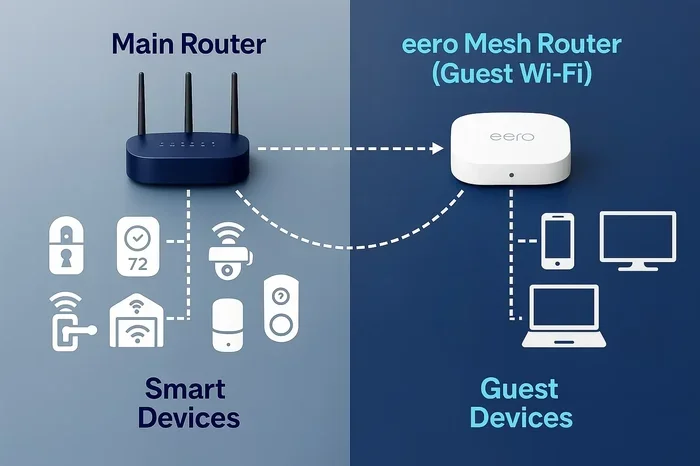
Your router acts like a traffic cop for your data. It decides where information goes and who can see it. When you set up a guest wifi password, the router creates a fence. This fence separates guest traffic from your main traffic. Devices on the guest network can only reach the internet. They cannot see your computers or your phones. This is called network isolation. It is a very powerful tool for protecting your digital life.
The router gives the guest network a different name. You might call it “Smith Family Guest” or “Home WiFi Visitors.” This helps visitors know which network to pick. It also helps you keep track of who is on what network. The guest network uses the same internet connection. But it stays completely separate from your personal files. Your private photos and documents stay hidden. No one on the guest network can reach them. This is the core of network segmentation. It keeps your online safety intact.
Why You Need One
You might think, “I trust my friends. Why do I need a guest wifi password?” Trust is a wonderful thing. But you cannot control what their devices carry. A friend’s laptop might have a virus. If that laptop connects to your main network, it can spread the virus quickly. A guest network stops this dead in its tracks. It keeps your private data safe from accidental threats. It also protects your smart home devices.
Hackers often target smart TVs and security cameras. These devices sometimes have weak security. They rarely get updated by their manufacturers. If a guest brings a threat to your main network, your smart devices are at risk. A guest network keeps these devices safe. It acts as a buffer zone. Even if a guest brings a threat, your smart home stays protected. This is why password protection for guests is so essential. It is a small step that makes a huge difference for your internet security.
Can You Have A Guest Wifi Password On Any Router?
The short answer is yes, most of the time. Almost all modern routers have this feature built in. But older routers might not support it. If you have an old router, you might need to upgrade. Let us check how you can find out if your router allows guest access.
Checking Your Router Capabilities
To check your router, you need to log into its admin page. You usually do this by typing 192.168.1.1 or 192.168.0.1 into your web browser. Look for a section called “Guest Network” or “Guest Access.” If you see it, you are in luck. You can set up a guest wifi password right away. If you do not see it, your router might be too old. In that case, buying a new router is a smart move. New routers offer much better wireless network security anyway.
You can also check your router’s manual. The manual will list all the features. Many router companies have online support pages too. You can search for your router model number there. Look for “guest network” in the features list. If it is there, you are all set. If not, consider upgrading your equipment. A new router will improve your whole internet experience. It will give you better control over your network access.
Setting Up The Guest Network
Setting up a guest wifi password is very easy. First, log into your router admin panel. Find the wireless settings menu. Look for the guest network option. Turn it on. Then, create a name for your guest network. Make it different from your main network name. Next, set a strong password. Use a mix of letters, numbers, and symbols. Save your settings. Your guest network is now live!
Here is a simple step-by-step guide to follow:
- Open your web browser and go to your router’s IP address.
- Log in with your admin username and password.
- Find the wireless settings or advanced settings menu.
- Look for the guest network option and enable it.
- Create a unique network name for your guests.
- Set a strong guest network password.
- Make sure network isolation is turned on.
- Save your settings and restart the router if needed.
Once you finish these steps, your guest wifi password is ready. You can now share it with visitors. They will connect to the guest network. They will have full internet access. But they will not be able to see your main network. This simple process keeps your home network safe and sound. You will feel much better knowing your private data is protected.
How To Protect Your Network While Sharing Access
Having a guest wifi password is only half the battle. You also need to protect your main network. You want to make sure visitors cannot sneak into your private space. There are several ways to keep your network secure while sharing access. Let us look at the best methods you can use today.
Changing Default Passwords
Never use the default password on your router. Hackers know these default passwords by heart. They can easily log into your network if you do not change them. Many people leave the admin password as “admin” or “password.” This is a huge security risk. You must change both your admin password and your main wifi password. Choose a strong main password. Use at least twelve characters. Mix uppercase letters, lowercase letters, numbers, and symbols. Your main network should be locked down tight. Only trusted family members should know this password.
For your guest wifi password, you can be a little more flexible. But it should still be strong. Do not use simple words like “guest” or “visit.” Create a fun phrase and use the first letters. For example, “I love pizza on Fridays” becomes “Ilp0F!”. This makes a great password. It is hard to guess but easy for you to remember. Strong passwords are the first line of defense against unauthorized users. They keep your wireless network safe from prying eyes.
Network Isolation Settings
Network isolation is a key setting you must check. It stops guest devices from talking to your main devices. Without isolation, a guest could access your shared folders. They could even try to change your router settings. Always make sure this setting is turned on. It is a vital part of password protection. It ensures that guest access stays limited to the internet only. This setting is sometimes called “AP Isolation” or “Client Isolation.” Check your router manual to find the exact name.
When isolation is on, your guests can browse the web. They can stream videos and check email. But they cannot see your computers or printers. They cannot access your network drives. This separation is what makes a guest network so valuable. It gives you the freedom to share your internet. It also gives you the security of a private network. Always test this setting after you set it up. Try to access a shared folder from the guest network. If you cannot see it, your isolation is working perfectly. This is a key step for keeping your internet security strong.
Common Mistakes People Make With Guest Networks
Even with a guest wifi password, people make mistakes. These mistakes can leave your network open to danger. It is important to know what not to do. Let us look at the most common errors. Avoiding these will keep your internet safe and your data secure.
Using Weak Passwords
Some people make their guest wifi password too simple. They use “password123” or “guest123” or even “12345678.” This is a big mistake. Weak passwords are easy to guess. Anyone in your house could guess them. Worse, strangers nearby could hack in. They might use your internet for illegal activities. This could put you in a bad situation. Always use a strong password for your guest network too. It keeps unauthorized users out of your wireless network. A strong password is your best friend for online safety.
Forgetting To Enable Isolation
Another big mistake is forgetting to turn on isolation. If you do not turn on network isolation, your guests can see your devices. They might try to connect to your printer or main PC. This defeats the whole purpose of a guest network. Always double-check your isolation settings. It is a quick step that makes a huge difference. Many people set up the guest network and forget about it. They assume it is safe. But without isolation, it is not fully safe. Take the extra minute to check this setting. It saves you from future cyber threats.
Leaving The Guest Network On All The Time
Some people leave the guest network on forever. This is not always a good idea. If no one is visiting, the network is just sitting there. It is an open door for hackers. They can try to guess the guest wifi password. They can also use it to attack your main network. A simple fix is to turn off the guest network when you do not need it. You can turn it back on when guests arrive. This limits the time your network is exposed. It is a smart habit to build. It keeps your connected devices safe from unneeded risks.
Expert Insights On Network Security
Cybersecurity experts always recommend using a guest wifi password. They know how fast online threats can spread. A single infected device can compromise an entire network in minutes. Here is what the pros say about keeping your network safe and secure.
Keeping Your Smart Home Safe
Smart home devices are often the weakest link in a network. Many smart cameras and lights have poor built-in security. They rarely get updated by their manufacturers. If a guest connects a virus to your main network, your smart devices are at risk. A guest network keeps these devices safe. It acts as a buffer zone. Even if a guest brings a threat, your smart home stays protected. The Wi-Fi Alliance recommends separating IoT devices from main computers. A guest network is a great way to do this. It gives you peace of mind every single day.
Managing Bandwidth Usage
Guests can use a lot of your internet bandwidth. If they stream movies or play games on your main network, your internet speed drops. You might not be able to work or stream your own shows. Many routers let you limit guest bandwidth. This ensures your main devices keep their fast internet speed. You can still give guests access without slowing down your own browsing. It is a win-win situation for everyone. You get to be a good host. And you get to keep your internet speed fast. This is a great benefit of having a separate guest access point.
Monitoring Connected Devices
Most modern routers have a way to see connected devices. You can log into your router admin panel and check the list. Look for any unknown devices on your main network. If you see something strange, change your main password right away. You can also check the guest network list. See who is using your guest wifi password. This helps you understand who is on your network. It is a great way to maintain control of your online safety. Regular checks keep your network healthy and secure.
Quick Tips For Guest Network Setup
Setting up a guest network does not have to be complicated. Follow these quick tips to make the process smooth and easy. These small steps will save you a lot of trouble later.
- Use a unique name: Make your guest network name different from your main one. This helps visitors find it easily.
- Change passwords often: Update your guest wifi password every few months. This keeps old visitors from using it.
- Limit access: Turn off guest access when no visitors are around. Close the side door when no one is visiting.
- Check connected devices: Regularly look at your router to see who is online. This helps you spot strangers.
- Use WPA3 security: Choose the strongest encryption available. WPA3 is the latest and best security standard.
- Set a bandwidth limit: Prevent guests from slowing down your internet speed. Limit their data usage if possible.
Guest Network vs Main Network
Understanding the difference between your main and guest networks helps you manage them better. Here is a simple comparison to show you how they differ. Use this table as a quick reference guide.
| Feature | Main Network | Guest Network |
|---|---|---|
| Access Level | Full access to all devices | Internet access only |
| Password | Shared with trusted people only | Shared with all visitors |
| Security Level | High (WPA3 or WPA2) | High (WPA3 or WPA2) |
| Bandwidth Priority | Highest priority | Lower priority |
| Device Visibility | Can see all devices on the network | Cannot see any devices on the network |
As you can see, the guest network is designed for safety. It gives your visitors what they need. It keeps your private network completely separate. This comparison shows why having a guest wifi password is so important. It is not just a nice feature. It is a necessary security tool for every home. Your internet speed and your private data will both thank you.
Conclusion
So, can you have a guest wifi password? Absolutely yes. It is one of the easiest ways to protect your home network. By setting up a separate network, you keep your private data safe. You also keep your internet speed fast. A guest wifi password gives you peace of mind when friends visit. You do not have to worry about cyber threats or unauthorized users.
Take a few minutes today to set up your guest network. Check your router settings and create a strong password. Share the guest network password with your visitors. Keep your main network private and secure. Your future self will thank you. A little effort now saves a lot of trouble later. Stay safe, stay secure, and enjoy your internet.
Frequently Asked Questions
Is it safe to share a guest wifi password?
Yes, it is very safe when you set it up correctly. A guest network keeps visitors away from your private data. It uses network isolation to separate their devices from yours. As long as you enable isolation, your main network stays protected.
Can guests see my devices on a guest network?
No, they cannot see your devices if you turn on isolation. Guest network settings block access to your main devices. They can only reach the internet. This keeps your computers and smart home devices hidden from visitors.
How do I find the guest network password on my router?
You can find it in your router admin panel. Log in and look for the wireless settings section. Find the guest network option. The password is listed there. You can change it anytime to keep your network access secure.
What happens if someone hacks my guest network?
If someone hacks your guest network, they still cannot reach your main data. The isolation fence stops them. They only get internet access. However, you should still use a strong password to prevent strangers from using your bandwidth or launching attacks.
Do I need to turn off my guest network when no one is visiting?
It is a good habit to turn it off when not needed. This closes an open door for hackers. It also saves a little bit of your router’s resources. But leaving it on is fine too if you have strong password protection and isolation enabled.
Can I set a data limit for my guest wifi password?
Yes, many modern routers let you limit guest bandwidth. This prevents guests from slowing down your internet speed. You can set data caps or priority levels. This ensures your own devices keep running fast while visitors browse the web.
=== CONCLUSION ===
Setting up a guest wifi password is one of the best things you can do for your home. It protects your private data and keeps your internet speed fast. You give your visitors the access they need without taking any risks. Follow the simple steps in this guide to set up your network today. Stay safe, stay secure, and enjoy peace of mind.