Can You Put Your Laptop In Your Backpack Without A Case
Can I put my laptop in my backpack without a case? Yes, you can, but it comes with real risks. Laptop protection matters, and skipping a cushioned sleeve or padded backpack can lead to scratch damage, screen protection issues, and even hinge damage. Learn how to carry laptop safely and when a laptop sleeve is a must.
Can I put my laptop in my backpack without a case? This is a question many students, freelancers, and office workers ask every day. The short answer is yes, you can. But the real question is whether you should. Laptop protection is not just about fancy gear. It is about keeping your device safe from scratches, drops, and pressure. In this guide, we will walk you through everything you need to know about carrying laptop gear without a hard shell. We will cover the risks, the best alternatives, and simple tips to keep your tech gear safe on the go.
Whether you are heading to class, traveling with laptop gear, or just running errands, your backpack choices matter. A backpack without padding can expose your computer to all kinds of hazards. On the other hand, a padded backpack or a simple sleeve can make a big difference. Let us break down the facts so you can make a smart choice every time you grab your bag.
Key Takeaways
- You can put your laptop in a backpack without a case, but it is not risk-free. Direct contact can cause scratches, pressure marks, and hinge damage.
- A soft laptop sleeve or cushioned sleeve adds cheap, light protection. It is the easiest way to boost safety.
- Padded backpacks with dedicated compartments offer shock absorption and better drop protection.
- Avoid overpacking and keep the laptop in the main compartment away from sharp objects like keys or pens.
- For daily commute or travel with laptop, a laptop case is still the safest choice.
- Quick tips can make a backpack without padding safer if you must skip a hard case.
📑 Table of Contents
- The Short Answer: Can You Safely Skip the Laptop Case?
- Why People Put Their Laptop in a Backpack Without a Case
- The Hidden Risks of No Protection
- How to Protect Your Laptop Without a Hard Case
- Comparison: Backpack Alone vs. Sleeve vs. Hard Case
- When You Really Need a Laptop Case
- Quick Tips for Carrying Your Laptop Without a Case
- Common Mistakes to Avoid
- Expert Insights: How to Keep Your Laptop Safe
- Conclusion
The Short Answer: Can You Safely Skip the Laptop Case?
Can I put my laptop in my backpack without a case? Yes, but you need to understand what you are risking. A laptop is a delicate piece of tech gear. The screen, the hinges, and the internal components can all suffer from a lack of drop protection. When you toss a laptop directly into a backpack, it bounces around. Keys, water bottles, and other hard objects can press against the screen or the body of the computer. Over time, this leads to scratch damage, pressure marks, and even hinge damage.
However, not every trip requires a hard case. A short walk across campus or a quick trip to the coffee shop may be low-risk. The key is to match your safe transport method to your daily routine. If you are just moving between rooms, a simple laptop sleeve might be enough. If you are on a crowded bus, you need more shock absorption.
What the Experts Say
Most tech experts agree that a bare laptop in an unprotected backpack is a bad idea. Even a backpack without padding can cause micro-scratches on the chassis. These tiny marks add up and can reduce the resale value of your device. The best practice is to use at least a soft cushioned sleeve. This adds a layer of impact protection without adding bulk. Many people also choose a padded backpack with a dedicated laptop compartment. This setup offers both screen protection and shock absorption.
Why People Put Their Laptop in a Backpack Without a Case
There are many reasons why people skip the hard case. Understanding these reasons can help you find a better solution. Let us look at the common motivations behind this choice.
The Appeal of Minimalist Travel
Traveling light is a goal for many. A hard laptop case can be heavy and bulky. When you are already carrying a lot of tech gear, every ounce counts. A backpack without padding feels lighter and more flexible. Some people prefer the sleek look of a simple backpack. They want to avoid the bulk of a computer bag or a padded sleeve. This minimalist approach is appealing, but it comes with trade-offs.
When a Case Feels Like Overkill
If you only use your laptop at a desk, you might think a case is overkill. You carry it from the car to the office and then leave it on the desk. In this scenario, a laptop sleeve might seem unnecessary. But even short trips can lead to accidents. A sudden bump or a quick drop can cause scratch damage or a cracked screen. Safe transport is about consistency, not just long journeys.
The Cost Factor
Good laptop cases can be expensive. A high-quality hard shell or a premium padded backpack can cost a lot. Many people try to save money by using their backpack alone. This is a common mistake. The cost of repairing a damaged laptop far exceeds the price of a simple cushioned sleeve. Investing in basic laptop protection is always a smart move.
The Hidden Risks of No Protection
Putting your laptop in a backpack without any case is like sending it into battle without armor. The risks are real and can lead to costly repairs. Let us explore the hidden dangers in detail.
Scratch Damage and Screen Scratches
The outer shell of a laptop can easily get scratched. Keys, pens, and zippers in the same backpack can rub against the surface. Over time, these scratch damage marks become permanent. The screen is even more vulnerable. A single press from a sharp object can leave a visible scratch on the screen protection layer. Even if the screen does not crack, deep scratches can distort your view and reduce the clarity of your display.
Pressure Marks and Hinge Damage
When a backpack is overstuffed, the weight presses down on everything inside. If your laptop is at the bottom, it absorbs a lot of pressure. This can lead to pressure marks on the lid or the keyboard area. More seriously, the hinges that hold the screen can get damaged. Hinge damage is one of the most expensive repairs. A cushioned sleeve helps distribute pressure evenly and prevents these issues.
Impact and Shock Absorption
A backpack without padding offers zero shock absorption. If you drop the bag or bump it against a wall, the laptop takes the full force. Drop protection is essential for carrying laptop devices daily. Even a short fall onto a hard floor can crack the chassis or damage internal components. A padded backpack with foam padding acts as a buffer. It absorbs the impact and keeps your computer safe.
Water and Moisture Damage
Many backpacks are not water-resistant. A sudden rain shower or a spilled drink can seep into the bag. Without a laptop sleeve or a waterproof case, moisture can reach the keyboard and the internal electronics. Water resistance is a key factor in laptop protection. A simple sleeve can add a layer of defense against liquids.
How to Protect Your Laptop Without a Hard Case
If you decide to skip the hard case, you can still keep your laptop safe. The trick is to use smart laptop protection strategies. Here are the best ways to carry your laptop without a bulky shell.
Use a Soft Laptop Sleeve
A laptop sleeve is the easiest and cheapest upgrade. It is a thin, padded cover that slides right over your computer. You can find sleeves made of neoprene, fleece, or bubble wrap material. These provide excellent cushioned sleeve protection. They guard against scratches, minor bumps, and pressure marks. A sleeve adds almost no weight to your backpack. It is the best safe transport option for people who want minimal bulk.
Choose a Backpack with a Padded Compartment
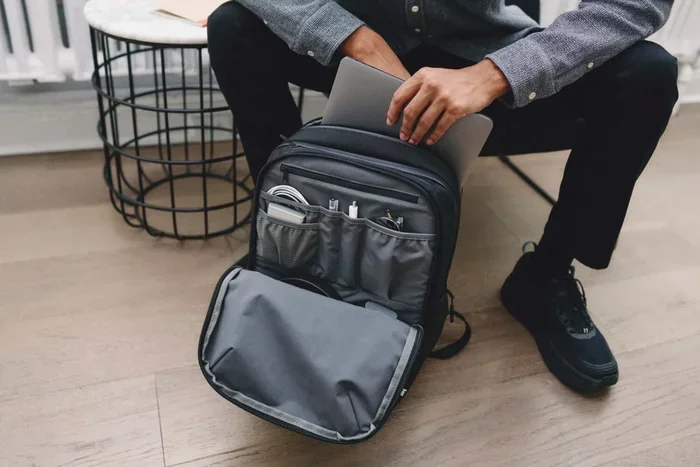
Not all backpacks are created equal. A padded backpack with a dedicated laptop compartment is a game-changer. These bags have thick foam padding that surrounds the laptop. They often include backpack compartments that separate your tech gear from other items. This design provides built-in impact protection. You do not need a separate case if your backpack already has a padded sleeve built in. Look for bags that are specifically designed for carrying laptop gear.
Packing Techniques to Minimize Risk
How you pack your backpack matters just as much as the bag itself. Follow these simple rules to reduce the risk of damage. First, always place your laptop in the main compartment, not in an outer pocket. The main compartment is usually the most cushioned area. Second, keep sharp objects like keys, pens, and knives in a separate pouch. Never let them touch the laptop surface. Third, avoid overpacking. When a backpack is too full, the contents press against the laptop and cause pressure marks. Fourth, try to keep the backpack upright when you are sitting down. This prevents the laptop from sliding around and hitting the sides of the bag.
Add a Layer of Bubble Wrap for Extra Safety
If you are in a pinch, a layer of bubble wrap can work as a temporary cushioned sleeve. Wrap the laptop in a sheet of bubble wrap before placing it in the backpack. This provides basic shock absorption and drop protection. It is not a permanent solution, but it works well for occasional use. Just remember to remove the wrap when you are at your destination to avoid overheating.
Comparison: Backpack Alone vs. Sleeve vs. Hard Case
Not all laptop protection methods are the same. Let us compare the three main options so you can choose the best one for your needs.
| Protection Level | Convenience | Weight | Cost | Best For |
|---|---|---|---|---|
| Low (Backpack Only) | High | None added | Free | Very short trips, low-risk environments |
| Medium (Backpack + Soft Sleeve) | High | Very light | Low | Daily commute, office use, student life |
| High (Padded Backpack) | Medium | Moderate | Medium | Regular travel, crowded spaces, outdoor use |
| Maximum (Hard Case) | Low | Heavy | High | Frequent travel, rough conditions, high-value devices |
As you can see, a backpack without padding offers the least protection. A soft laptop sleeve gives you a big safety boost with very little effort. A padded backpack is a great middle ground. It provides good shock absorption without the bulk of a hard case. The best choice depends on your lifestyle and how much laptop protection you need.
When You Really Need a Laptop Case
There are times when skipping a case is simply not smart. Knowing when to upgrade your safe transport setup can save you from expensive repairs.
Daily Commute and Crowded Spaces
If you ride public transportation or walk through crowded streets, your backpack gets jostled a lot. People bump into you, and the bag gets tossed around. In these situations, a simple laptop sleeve is not enough. You need a padded backpack or a hard case. The impact protection from a padded bag can absorb the shocks of a busy commute. It keeps your tech gear safe even in chaotic environments.
Travel and Outdoor Adventures
Traveling with laptop gear means dealing with uneven surfaces, bumps, and changing weather. A backpack without padding is a risky choice for travel. You need water resistance and strong drop protection. A hard case or a rugged padded backpack is the best option for outdoor adventures. It shields your computer from rain, dust, and hard impacts. Always prioritize laptop protection when you are away from familiar surroundings.
Long-Term Storage and Hinge Health
Even if you do not carry your laptop every day, storage matters. A laptop stored in a backpack without a sleeve can develop pressure marks over time. The constant pressure on the hinges can weaken them. Using a cushioned sleeve during storage keeps the computer in good condition. It also prevents scratch damage from dust or minor contact with other items in the bag.
Quick Tips for Carrying Your Laptop Without a Case
Sometimes you just have to go without a hard case. Here are some quick tips to make backpack without padding safer.
- Use a soft cloth or old t-shirt as a buffer between the laptop and the bag.
- Place the laptop screen-side down to protect the keyboard from pressure.
- Keep the backpack zipped fully so the laptop does not slide out.
- Avoid placing heavy items on top of the laptop. Put the laptop in the center of the bag.
- Check your backpack for sharp objects before you close it.
- Consider a waterproof liner if you worry about rain or spills.
Common Mistakes to Avoid
Many people make simple mistakes that put their laptop at risk. Avoid these common errors to keep your device in top shape.
- Overpacking the backpack. This creates too much pressure on the laptop and causes pressure marks.
- Leaving the laptop in an outer pocket. Outer pockets offer no impact protection and expose the computer to the elements.
- Ignoring scratch damage early. Small scratches can lead to corrosion and deeper damage over time.
- Using a wet backpack. Moisture can seep through and damage internal components, even without a direct spill.
- Thinking a cheap sleeve is enough for rough use. A thin sleeve may not provide the shock absorption you need for a busy commute.
Expert Insights: How to Keep Your Laptop Safe
We asked a few tech experts for their top tips on laptop protection. Here is what they had to say.
One expert recommends always using a cushioned sleeve, even if you have a padded backpack. The sleeve adds an extra layer of drop protection. Another expert suggests choosing a backpack with a separate laptop compartment that is completely padded. This prevents the laptop from shifting during movement. A third expert highlights the importance of water resistance. Even if your backpack is not fully waterproof, a water-resistant sleeve can save your device from a sudden downpour. All experts agree that safe transport is a habit, not a one-time decision.
Conclusion
Can I put my laptop in my backpack without a case? Yes, you can, but it is not the safest choice. Laptop protection is essential for keeping your device in good condition. Whether you use a laptop sleeve, a padded backpack, or a combination of both, the goal is the same: safe transport. By understanding the risks and following the tips in this guide, you can carry your laptop with confidence. Do not wait for an accident to teach you the importance of drop protection and shock absorption. Start protecting your tech gear today and enjoy peace of mind on every trip.
Frequently Asked Questions
Can I put my laptop in my backpack without a case if I just walk a short distance?
Even for short walks, a laptop sleeve is a good idea. A backpack without padding can still expose your computer to scratches and pressure. A thin cushioned sleeve adds very little weight but gives you basic laptop protection. It is a simple habit that can prevent scratch damage and pressure marks over time.
What is the best type of sleeve for a backpack without padding?
A neoprene laptop sleeve is the best choice. It is soft, lightweight, and provides excellent shock absorption. Neoprene also offers some water resistance. Look for a sleeve that fits your laptop snugly so it does not slide around inside the backpack. This gives you screen protection and impact protection without adding bulk.
Does a padded backpack replace the need for a hard case?
A padded backpack offers good drop protection for everyday use. It is not a replacement for a hard case if you travel in rough conditions. But for daily commutes, office trips, and school, a padded backpack with a dedicated compartment is often enough. It provides safe transport and shock absorption for most people.
Can pressure from a backpack damage a laptop screen?
Yes, pressure can cause pressure marks on a laptop screen. These marks appear as darkened spots on the display. They happen when heavy items press against the closed lid. Using a laptop sleeve and placing the laptop in the center of the bag can prevent this. Always avoid putting heavy books or water bottles directly on top of the laptop.
How can I tell if my backpack offers enough laptop protection?
Check if your backpack has a thick, padded compartment specifically designed for a laptop. The padding should be at least a few centimeters thick. The compartment should fully surround the laptop, not just have a thin layer of fabric. If your backpack is just a regular bag with no padding, you need a cushioned sleeve or a padded backpack for proper impact protection.
Is it worth buying a hard case if I already have a padded backpack?
For most daily users, a padded backpack is enough. A hard case is worth it if you travel often, work in harsh environments, or carry a very expensive laptop. Hard cases offer the highest level of drop protection and shock absorption. If you only commute or work from home, a laptop sleeve combined with a padded backpack gives you excellent safe transport without the extra weight.