Are All Laptop Chargers The Same You Might Be Surprised
Are all laptop chargers the same? Definitely not! Different laptops need different charger types, wattage, and connectors. Using the wrong one can damage your device or slow charging. This guide breaks down charger specs, USB-C options, and how to pick the right power adapter safely.
You plug in your laptop, and nothing happens. You grab another charger from a drawer, and it fits—but still no charge. Frustrating, right? The truth is, are all laptop chargers the same? The short answer is no. A lot has changed in the world of laptop power adapters, and the differences matter more than most people realize.
Your laptop charger is not just a cable. It is a carefully matched power supply that delivers the right voltage, amperage, and connector type. A mismatch can lead to slow charging, overheating, or even permanent damage. Whether you are buying a replacement, traveling, or just curious, this guide will clear up the confusion. You will learn what makes each charger unique, how to read the fine print, and what to look for when you need a new one.
Key Takeaways
- Not all chargers fit all laptops: Connectors, voltage, and wattage vary by brand and model.
- Check your charger specs: Match voltage and amperage to avoid damage or slow charging.
- USB-C is changing the game: Many modern laptops use USB-C with power delivery for universal charging.
- Using the wrong charger is risky: It can harm your battery, motherboard, or void your warranty.
- Universal chargers exist: They come with interchangeable tips but must still meet voltage and wattage needs.
- Safety matters: Stick to OEM or reputable third-party chargers to avoid fire hazards.
📑 Table of Contents
Why Laptop Chargers Are Not One-Size-Fits-All
Every laptop has specific power needs. These needs are built into the hardware and software. A charger that works for a gaming desktop replacement will not work for a slim ultrabook. The differences come down to three main factors: voltage, amperage, and the physical connector.
Understanding Charger Specifications
When you look at a laptop charger, you will see numbers printed on the label. The most important ones are volts (V), amps (A), and watts (W). Voltage is the electrical pressure. Amperage is the flow of electricity. Watts equal volts times amps. Your laptop is designed to pull a specific amount of power. If the charger delivers too much voltage, it can fry the motherboard. Too little, and the laptop will not charge at all or will charge very slowly.
Here is a simple way to think about it. Imagine water flowing through a pipe. Voltage is the water pressure. Amperage is the width of the pipe. Your laptop needs the right pressure and width to work correctly. A power adapter that does not match these specs is like a pipe that is too narrow or too wide. It just will not work right.
The Role of Wattage and Power Delivery
Wattage is the total power output. A light-use laptop might need 45 watts. A powerful gaming machine might need 180 watts or more. The charger wattage must meet or exceed what the laptop requires. Many modern laptops support USB-C power delivery, which allows for flexible wattage negotiation between the charger and the device. This smart feature helps prevent overloads and can even charge other devices like phones.
Some older laptops use a fixed barrel connector with a specific tip size. These charger connectors are not interchangeable. Even if two barrels look similar, the inner and pin diameters can differ by a millimeter. That tiny difference is enough to stop charging or cause a short circuit.
Different Types of Laptop Chargers
Laptop chargers come in several shapes and designs. Each type serves a specific purpose and fits a certain group of devices. Knowing the common types helps you understand why one charger does not fit all.
Barrel Connectors (The Classic Round Tip)
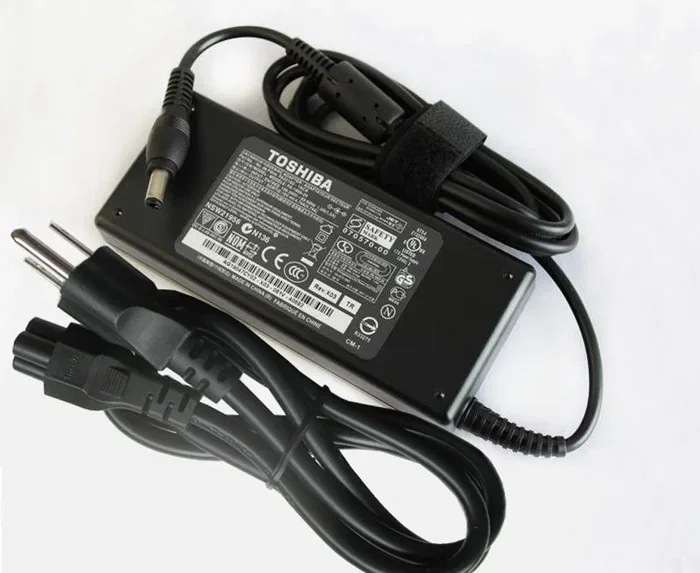
The barrel charger is the most traditional type. It has a cylindrical plug that slides into a matching port on the laptop. These chargers are common on business laptops, older models, and Chromebooks. The barrel size varies by brand. Dell, Lenovo, HP, and Asus all use different barrel diameters and lengths. You cannot swap a Dell charger into a Lenovo laptop just because the plug looks similar.
Barrel chargers also come in different polarities. The center pin can be positive or negative. If you use a charger with the wrong polarity, it can damage the charging circuit. Always check the charger label and the laptop manual for polarity information.
USB-C Chargers and Power Delivery
USB-C has revolutionized how we charge laptops. Many modern ultrabooks, including MacBook Air, Dell XPS, and HP Spectre, now use a single USB-C charger for power and data. USB-C power delivery, or PD, is a standard that allows chargers and devices to negotiate the right voltage and current. A 65-watt USB-C charger can power a laptop, while a 100-watt charger can handle even high-performance machines.
The beauty of USB-C PD is its flexibility. You can use one universal charger with a USB-C cable to charge a laptop, phone, and tablet. However, the charger must support the required wattage. A 30-watt USB-C charger might work for a lightweight laptop but will fail to charge a gaming laptop under heavy load.
Proprietary Connectors and Magnetic Tips
Apple uses its own MagSafe connector for MacBooks. The magnetic snap prevents the cord from tearing if someone trips over it. Other brands have proprietary designs that are exclusive to their lineup. These proprietary chargers are not cross-compatible. You must buy a replacement that matches the exact model number of your laptop.
Some brands also use unique charging port shapes that are not USB-C and not a standard barrel. These connectors often require a specific adapter or dock to work with other chargers. Always check the manufacturer’s website for the correct part number.
Can You Use Any Charger on Your Laptop?
This is one of the most common questions people ask. The answer is a cautious no. You can only use a different charger if it meets the exact voltage requirement and delivers enough amperage or watts. Using an incompatible charger is a gamble with your laptop’s health.
Matching Voltage and Amperage
Voltage must match exactly. If your laptop requires 20 volts, the replacement charger must also output 20 volts. The amperage rating is different. Your laptop will only draw the current it needs. A charger with a higher amperage rating is safe, as long as the voltage matches. For example, a laptop that needs 3.25 amps will work fine with a 5-amp charger of the same voltage. The laptop simply takes what it needs.
However, a charger with too low an amperage will struggle. The laptop may charge slowly, run poorly, or shut down unexpectedly. The charger can also overheat because it is being pushed beyond its limits.
What Happens If You Use the Wrong Charger
Using the wrong laptop power adapter can cause several problems. A voltage mismatch is the most dangerous. Too much voltage can fry the motherboard and other internal components. Too little voltage usually just means no charge, but it can sometimes cause the laptop to behave erratically.
A physical connector mismatch is also risky. Forcing a barrel plug into the wrong port can bend the pins or damage the charging jack. A USB-C cable that does not support power delivery will simply not charge the laptop at all, even if it fits. In some cases, a poor-quality third-party charger can overheat, melt, or even start a fire. This is why buying from reputable brands matters so much.
How to Find the Right Charger for Your Laptop
Finding a replacement charger does not have to be stressful. You just need to know what to look for. The process is simple if you follow a few steps.
Checking Your Current Charger
Flip your existing power adapter over and read the label. Write down the output voltage, amperage, and wattage. Also note the connector type. Is it a barrel plug, a USB-C cable, or a proprietary tip? Take a photo of the label with your phone for quick reference. This information is your golden ticket to finding a compatible charger.
Next, check the laptop itself. Many models have a sticker on the bottom that lists the power requirements. You can also check the manufacturer’s website by entering your laptop serial number. The support page will list the exact charger specifications and compatible part numbers.
Using Universal Chargers
A universal laptop charger comes with multiple interchangeable tips. You can swap the tip to fit different barrel sizes. These chargers are great for households with multiple laptops or for travelers. They are usually adjustable in voltage, so you can set them to match your laptop’s needs. However, you must still ensure the wattage capacity is high enough for your device.
When buying a universal charger, look for one with a clear voltage selector switch. Avoid models with flimsy tips that feel loose in the port. A secure connection prevents sparking and intermittent charging. Universal chargers are a budget-friendly option, but they should still come from a trusted brand with safety certifications.
The Rise of USB-C and Universal Charging
The industry is moving toward a single charging standard. USB-C power delivery is leading this shift. More laptops, monitors, and accessories now share one connector type. This trend makes charger compatibility much simpler for consumers.
USB-C Power Delivery and Fast Charging
USB-C PD is a smart charging protocol. It allows the charger and the laptop to communicate and agree on the best power level. A 100-watt USB-C charger can deliver up to 100 watts if the laptop supports it. If you plug that same charger into a phone, it will negotiate a lower wattage to protect the battery. This dynamic adjustment is what makes universal charging possible.
Fast charging is another benefit. Many modern laptops can charge from zero to 50 percent in under 30 minutes when paired with the right USB-C charger. This speed depends on the laptop’s battery management system and the charger’s wattage. You will need a charger that meets the laptop’s fast-charging requirements, which are often listed in the product specifications.
Future-Proofing Your Setup
When buying a new laptop, consider how easy it is to find a charger. A USB-C laptop with power delivery gives you flexibility. You can use a single charger for your laptop, tablet, and phone. You can buy replacements anywhere in the world. This reduces clutter and saves money in the long run.
On the other hand, a laptop with a proprietary barrel connector locks you into a specific ecosystem. Replacement chargers may only be available from the manufacturer or authorized resellers. If you lose your charger, you might face long wait times or high prices. The shift to USB-C is a win for consumers, but the transition is not complete yet.
Expert Tips for Charger Safety and Longevity
Your charger works hard every day. Treating it well extends its lifespan and keeps your laptop safe. A few simple habits make a big difference.
Avoiding Counterfeit and Cheap Chargers
The market is full of cheap chargers that look like the real thing but cut corners. These counterfeit power adapters often lack proper insulation, surge protection, and correct voltage regulation. They can overheat during use and damage your laptop’s battery or motherboard. Always buy from the manufacturer or a reputable retailer. If the price seems too good to be true, it probably is.
Look for safety certifications on the charger label. UL, CE, and FCC marks indicate the product has been tested for electrical safety. A genuine OEM charger will have clear labeling, a serial number, and a warranty. Third-party chargers from brands like Anker, Belkin, or Baseus are also reliable if they carry the same certifications.
Storing and Handling Your Charger
Do not wrap the cable tightly around the charger brick. This creates internal stress on the wires and can lead to fraying. Use a loose loop or a cable tie. Avoid placing the charger on soft surfaces like beds or couches, which can block ventilation and cause overheating. Keep the charging port on your laptop free of dust and debris. A dirty port can cause poor contact and intermittent charging.
If you travel often, invest in a charger carry case. This protects the tips and cables from bending and crushing. A well-maintained charger will last for years and keep your laptop powered safely.
Conclusion
So, are all laptop chargers the same? They are definitely not. Each laptop has unique power needs based on its design, battery size, and hardware. The connector type, voltage, amperage, and wattage all play a role in keeping your device running safely. Using the wrong charger is a risk you should not take. It can lead to slow charging, overheating, or permanent damage.
The good news is that understanding charger basics is not hard. Check the label on your current power adapter. Match the voltage exactly. Ensure the amperage or wattage is sufficient. Consider the connector type, whether it is a barrel plug, USB-C, or proprietary design. If you are buying a new charger, stick with reputable brands and look for safety certifications. The rise of USB-C power delivery is making things easier, but you still need to verify compatibility.
Take a few minutes today to review your charger specs. Keep a spare charger for travel or emergencies. Your laptop will thank you with reliable performance and a longer lifespan. A little knowledge goes a long way in protecting your investment and staying powered up wherever you go.
Can I use a higher-wattage charger on my laptop?
Yes, as long as the voltage matches exactly. A higher-wattage charger simply means the laptop can draw more power if it needs it, but it will not force extra power into the device. The laptop controls the power draw.
What happens if I use a charger with the wrong voltage?
Using the wrong voltage is dangerous. Too much voltage can fry the internal components. Too little voltage usually results in no charging or erratic behavior. Always match the voltage specified on your laptop label.
Are all USB-C chargers compatible with laptops?
No. The USB-C cable must support power delivery, and the charger must be capable of delivering the required wattage. A basic 15-watt USB-C charger will not charge a gaming laptop that needs 180 watts. Check both the laptop and charger specifications.
Can I use a universal charger with my laptop?
Yes, if the universal charger has the correct tip for your laptop and you set the voltage to match. Universal chargers are convenient but always double-check the output settings before plugging in.
Why does my laptop charger get warm?
A warm charger is normal during use. The power conversion process generates heat. However, if the charger is hot to the touch, smells burnt, or the casing is deformed, unplug it immediately. This could indicate a faulty charger or a ventilation problem.
How do I know if my charger is OEM or counterfeit?
OEM chargers have clear branding, a serial number, and proper safety certifications like UL or CE. Counterfeit chargers often have blurry labels, missing information, or feel lightweight and poorly built. Buy from authorized sellers to avoid fakes.
Frequently Asked Questions
What is Are All Laptop Chargers The Same?
Are All Laptop Chargers The Same is an important topic with many practical applications.