Can Bose Sunglasses Make Phone Calls Hands Free Today
Yes, Bose sunglasses can make phone calls hands-free. The Bose Frames line, including the Tenor and Soprano models, comes with built-in speakers and a microphone that let you place and receive calls without touching your phone. These smart sunglasses blend style with Bluetooth calling technology to give you a truly wireless experience on the go.
Can Bose sunglasses make phone calls? The short answer is yes. But there is so much more to know about how these smart glasses work, what makes them special, and whether they fit your daily routine.
Bose has been a leader in audio technology for decades. Their headphones and speakers set the standard for sound quality. Now, they have taken that expertise and packed it into eyewear. The result is a pair of Bose Frames that look like regular sunglasses but do so much more. You can stream music, get directions, and yes, make and receive phone calls all without ever touching your phone.
This article dives deep into the world of Bose sunglasses with calling features. We will explore how they work, what you can expect, and whether they are worth your money. Whether you are a tech enthusiast or just someone who wants a simpler way to stay connected, this guide has you covered.
Key Takeaways
- Hands-Free Calling Is Real: Bose Frames support Bluetooth phone calls with a built-in microphone and speakers, making them true hands-free devices.
- Two Models to Choose From: The Bose Frames Tenor and Bose Frames Soprano both offer calling features with different lens styles and designs.
- Open-Ear Audio Keeps You Aware: Unlike traditional earbuds, Bose sunglasses use open-ear speakers so you can hear your surroundings while on calls.
- Battery Life Supports All-Day Use: A single charge provides enough power for several hours of calling and music playback throughout the day.
- Voice Assistant Integration: You can use Siri, Google Assistant, or Amazon Alexa to make calls through your Bose Frames.
- They Are Not Noise-Canceling: The open-ear design means background noise can affect call quality in loud environments.
- Worth the Investment for Active Lifestyles: If you value convenience and hands-free communication, Bose Frames are a solid choice.
📑 Table of Contents
- What Are Bose Frames and How Do They Work
- Can Bose Sunglasses Actually Make Phone Calls
- How Hands-Free Calling Works on Bose Frames
- Bose Frames vs Other Bluetooth Sunglasses
- Features That Make Bose Sunglasses Stand Out
- Are Bose Sunglasses Worth It for Hands-Free Calling
- Common Mistakes People Make with Bose Frames
- Expert Insights on Smart Eyewear and Hands-Free Calling
- Quick Tips for Better Call Quality on Bose Frames
- Final Thoughts
What Are Bose Frames and How Do They Work
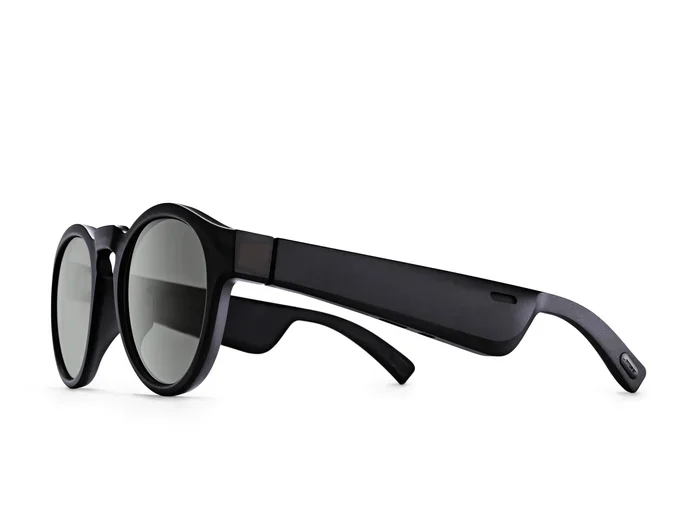
Bose Frames are a line of smart sunglasses made by Bose. They look like regular designer sunglasses, but they have hidden technology built right into the frames. Tiny speakers sit in the hinges near your ears. A small microphone sits on the frame so you can talk and be heard clearly.
These glasses connect to your phone through Bluetooth. Once paired, they act like wireless earbuds but without anything going inside your ears. This is called open-ear audio, and it is a big part of what makes Bose Frames unique.
The Two Main Models
Bose currently offers two main models of calling-capable sunglasses:
- Bose Frames Tenor: These are aviator-style sunglasses with a classic look. They have a slightly larger frame that houses the speakers and microphone comfortably. The Tenor model offers a bold, masculine design that many men love.
- Bose Frames Soprano: These feature a rounded, cat-eye shape that appeals to those who prefer a more feminine or trendy look. The Soprano delivers the same audio and calling power in a smaller frame.
Both models support phone calls, music streaming, and voice assistant access. The core technology is the same across both. The main difference comes down to style and lens shape.
How the Technology Fits Inside the Frames
One of the most impressive things about Bose Frames is how well the technology is hidden. The frames are not bulky or awkward. They weigh about the same as a regular pair of quality sunglasses. The speakers are micro-sized and sit right at the temples. The microphone is tucked into the arm of the frame near your ear.
Inside each frame, you will find:
- A Bluetooth 5.1 chip for stable connectivity
- A rechargeable battery that lasts up to 3.5 hours of continuous use
- Built-in microphones with noise-reduction technology
- Tiny speakers that deliver clear, directional sound
- A charging port hidden inside the hinge area
All of this technology is packed into a frame that looks and feels like a normal pair of sunglasses. That is no small feat, and it is part of why Bose Frames have become so popular.
Can Bose Sunglasses Actually Make Phone Calls
The answer is a confident yes. Bose sunglasses can make phone calls, receive calls, and even handle conference calls with ease. But let us break down exactly how this works in real life so you know what to expect.
Making a Call
To make a call, you have a few options. You can use voice commands through Siri, Google Assistant, or Amazon Alexa. Just say something like “Call Mom” or “Dial 555-1234,” and your Bose Frames will handle the rest. You can also answer a call by tapping the temple of the frame or using the Bose Music app on your phone.
The microphone on the frame picks up your voice clearly. It uses noise-reduction technology to filter out background sounds. This means the person on the other end should hear you well, even if you are walking outside or in a moderately noisy area.
Receiving a Call
When someone calls you, your Bose Frames will vibrate and play a notification sound. You can answer by tapping the temple or saying “Answer call.” To hang up, you can tap again or say “Hang up.” The whole process feels natural and seamless.
One thing to keep in mind is that the open-ear design means people around you might hear your conversation at a low volume. The speakers direct sound toward your ears, but they are not completely sealed. This is a trade-off for comfort and awareness of your surroundings.
Call Quality in Different Environments
Call quality on Bose Frames is surprisingly good for a pair of sunglasses. In quiet environments, the sound is clear and the microphone picks up your voice well. In moderate noise, like a café or a street with traffic, the noise-reduction technology does a decent job of keeping your voice clear.
However, in very loud environments like a busy construction site or a crowded concert, you may notice some difficulty. The open-ear design means the microphone picks up more ambient noise than a sealed earbud would. This is something to keep in mind if you often find yourself in noisy settings.
How Hands-Free Calling Works on Bose Frames
The hands-free calling experience on Bose Frames is designed to be as easy as possible. You do not need to fumble with your phone or wear anything in your ears. Everything happens through the frames themselves.
Pairing Your Phone
Setting up your Bose Frames for the first time is simple. Here is how it works:
- Download the Bose Music app on your phone.
- Turn on Bluetooth on your phone.
- Open the Bose Music app and select your Frames from the device list.
- Follow the on-screen prompts to complete the pairing.
Once paired, your Frames will automatically connect to your phone whenever you turn them on. The process is smooth and reliable, thanks to the Bluetooth 5.1 chip inside the frames.
Controlling Calls Without Touching Your Phone
One of the best things about hands-free calling with Bose Frames is that you never need to touch your phone. You can manage calls entirely through the frames or your voice:
- Tap the temple: A single tap answers or ends a call.
- Double tap: Rejects an incoming call.
- Voice commands: Say “Answer call,” “Hang up,” or “Call [contact name].”
- Bose Music app: You can adjust call volume and microphone settings from the app.
This level of control makes it easy to stay connected while driving, exercising, or doing anything that keeps your hands busy.
Using Voice Assistants for Calls
Bose Frames work with all major voice assistants. You can use Siri on iPhone, Google Assistant on Android, or Amazon Alexa if you have it set up. This means you can make calls entirely by voice, which is incredibly convenient.
For example, you could be walking to your car and say, “Hey Google, call John.” Your Frames will dial the number and put you on speaker right away. It feels like magic the first few times you use it.
Bose Frames vs Other Bluetooth Sunglasses
The market for Bluetooth sunglasses has grown a lot in recent years. Bose is not the only brand offering smart eyewear. But how do they compare? Let us look at a few key competitors.
Bose Frames vs Ray-Ban Meta Smart Glasses
Ray-Ban Meta glasses are probably the biggest competitor to Bose Frames. They also offer calling, music playback, and a built-in camera. Here is a quick comparison:
- Bose Frames: Focus on audio quality and open-ear comfort. No camera. Excellent sound for music and calls.
- Ray-Ban Meta: Include a camera for photos and videos. Sound quality is good but not quite as refined as Bose. Slightly heavier due to the camera hardware.
If making calls and listening to music is your priority, Bose Frames have a slight edge. If you want a camera built in, Ray-Ban Meta is the better choice.
Bose Frames vs Amazon Echo Frames
Amazon Echo Frames are another option. They are primarily designed for Alexa access and do not focus as heavily on music or call quality. Bose Frames offer a more balanced experience with better audio performance across the board.
Why Bose Stands Out
Bose has a reputation for audio excellence, and it shows in their Frames. The speakers deliver clear, rich sound that is noticeably better than many competing products. The microphone also performs well, which matters a lot for calls.
Additionally, the build quality of Bose Frames is top-notch. They feel premium, fit well, and come with a carrying case and replacement lenses. The overall package is polished and thoughtful.
Features That Make Bose Sunglasses Stand Out
Beyond just making phone calls, Bose Frames come with a range of features that add real value to your day. Let us look at what makes them stand out from a regular pair of sunglasses.
Open-Ear Audio Technology
The open-ear design is a game-changer for many users. Instead of plugging your ears with earbuds or covering them with over-ear headphones, Bose Frames let you hear both your audio and the world around you. This is great for safety when walking, cycling, or driving.
You can listen to music or take a call while still hearing traffic, conversations, and other important sounds. This makes Bose Frames a popular choice among fitness enthusiasts and commuters alike.
Built-in Voice Assistant Support
Bose Frames work with Siri, Google Assistant, and Amazon Alexa. This means you can set reminders, check the weather, get directions, and make calls using just your voice. The integration is smooth and works well in everyday situations.
Polarized and Prescription Lens Options
Bose Frames come with polarized lenses that reduce glare and protect your eyes from UV rays. They also offer prescription lens options through their partner network. This means you do not have to sacrifice vision correction for smart features.
Rechargeable Battery Life
The battery in Bose Frames lasts about 3.5 hours of continuous use. For most people, this covers a full morning or afternoon of use. The frames also hold a charge for up to two weeks when not in use, so you do not need to charge them every single day.
Water and Sweat Resistance
Bose Frames have an IPX4 rating, which means they are resistant to sweat and light rain. You can wear them during a workout or on a mildly rainy day without worrying about damage. They are not fully waterproof, so you should avoid submerging them in water.
Are Bose Sunglasses Worth It for Hands-Free Calling
So, are Bose Frames worth the investment? That depends on your lifestyle and needs. Let us look at the pros and cons to help you decide.
Who Should Buy Bose Frames
Bose Frames are a great fit for people who:
- Want to stay connected without wearing earbuds all day
- Enjoy outdoor activities and need to stay aware of their surroundings
- Value style and want smart glasses that look like regular sunglasses
- Make or receive calls frequently while on the move
- Are already in the Bose ecosystem and appreciate their audio quality
Who Might Want to Think Twice
Bose Frames might not be the best choice if you:
- Need noise-canceling for calls in very loud environments
- Want a built-in camera for photos or video
- Need all-day battery life without recharging
- Are on a tight budget and do not want to spend on premium smart eyewear
The Bottom Line
Bose Frames deliver a genuinely impressive hands-free calling experience. They are comfortable, stylish, and sound great. If you value the convenience of making and receiving calls without touching your phone, they are absolutely worth considering.
The price point is higher than regular sunglasses, but you are paying for the technology and the Bose brand quality. For many users, the convenience and audio quality justify the cost.
Common Mistakes People Make with Bose Frames
To get the most out of your Bose Frames, it helps to avoid a few common pitfalls:
- Not fully charging before first use: Always charge your Frames fully before using them for the first time. This helps the battery learn its full capacity.
- Forgetting to update the firmware: Bose regularly releases updates that improve performance and fix bugs. Keep the Bose Music app updated and check for firmware updates often.
- Using them in heavy rain: While they are sweat and splash-resistant, they are not designed for heavy rain or swimming. Keep them dry.
- Expecting noise cancellation: The open-ear design means some background noise will be present. This is by design, not a defect.
- Not customizing the fit: Bose Frames come with different nose pad sizes. Adjusting these can make a big difference in comfort and sound quality.
Expert Insights on Smart Eyewear and Hands-Free Calling
Smart eyewear is still a relatively new category, but it is growing fast. Bose Frames represent one of the most refined approaches to combining style with functionality. The calling experience is solid, and the open-ear design sets them apart from traditional wireless earbuds. For anyone who wants to stay connected without sacrificing comfort or style, Bose Frames are a top-tier choice.
Industry experts also point out that the integration of voice assistants into eyewear is a trend that will only continue. As Bluetooth technology improves and batteries get smaller and more efficient, we can expect even better performance from smart sunglasses in the near future.
Quick Tips for Better Call Quality on Bose Frames
Want to get the best call experience from your Bose Frames? Try these quick tips:
- Make sure your Frames are fully charged before important calls.
- Position the frame so the microphone sits close to the corner of your mouth.
- Use voice commands in quiet environments for the best results.
- Keep the Bose Music app updated for the latest microphone tuning improvements.
- If you are in a noisy place, move to a quieter spot when possible.
- Clean the microphone area regularly to prevent dust or debris from blocking it.
Final Thoughts
Can Bose sunglasses make phone calls? Absolutely. The Bose Frames line delivers a hands-free calling experience that is convenient, reliable, and surprisingly high-quality. They combine the look of premium sunglasses with the power of wireless audio technology to give you a truly unique product.
Whether you are commuting to work, exercising outdoors, or running errands around town, Bose Frames keep you connected without weighing you down. The open-ear design, voice assistant support, and easy-to-use controls make them one of the best options in the smart eyewear market today.
If you are in the market for a pair of sunglasses that do more than just protect your eyes, Bose Frames are well worth a look. They represent what smart eyewear should be: stylish, functional, and genuinely useful in everyday life.
Frequently Asked Questions
Can I make phone calls with Bose Frames without using my hands?
Yes, you can make and receive phone calls entirely hands-free with Bose Frames. You can use voice commands through Siri, Google Assistant, or Amazon Alexa, or simply tap the temple of the frame to answer or hang up. The built-in microphone and speakers handle everything without you needing to touch your phone.
How good is the call quality on Bose Frames?
Call quality on Bose Frames is very good for smart sunglasses. The microphone uses noise-reduction technology to keep your voice clear, and the speakers deliver crisp audio. In quiet to moderate noise environments, you will have no trouble hearing the other person and being heard clearly.
Do Bose Frames work with both iPhone and Android phones?
Yes, Bose Frames work with any smartphone that supports Bluetooth 5.0 or later. They connect seamlessly to both iPhone and Android devices through the Bose Music app. You can make calls, stream music, and use voice assistants regardless of your phone type.
Can I wear Bose Frames while exercising or running?
Yes, Bose Frames are designed for an active lifestyle. They have an IPX4 rating for sweat and water resistance, a lightweight and comfortable fit, and open-ear audio that lets you stay aware of your surroundings. They are great for running, cycling, and gym workouts.
How long does the battery last on Bose Frames during calls?
The battery lasts approximately 3.5 hours of continuous use, which includes calls and music playback. For most users, this covers a good portion of the day. The frames also hold a charge for up to two weeks when stored and not in use.
Can I use Bose Frames for conference calls or video calls?
Yes, you can use Bose Frames for conference calls through apps like Zoom, Microsoft Teams, or Google Meet. The microphone picks up your voice clearly, and the open-ear speakers let you hear other participants. They work well for audio-only calls and can be used during video calls as well.
=== CONCLUSION ===
Bose sunglasses can make phone calls hands-free, and they do it well. The Bose Frames line offers a seamless blend of style, comfort, and smart technology that makes staying connected effortless. From open-ear audio to voice assistant support, these sunglasses are built for modern life.
If you want a pair of sunglasses that goes beyond UV protection and looks great while doing it, Bose Frames deserve a spot at the top of your list. They prove that smart eyewear can be both practical and stylish, and they set a high standard for what hands-free calling on your face should feel like.