Can Cat6 Be Converted To Hdmi A Simple Step By Step Guide
Yes, you can convert Cat6 to HDMI using a dedicated converter or extender kit. This process lets you send high-quality video and audio signals over Ethernet cables. Whether you need to extend your display or simplify your setup, Cat6 to HDMI conversion is straightforward and affordable. We will walk you through every step with clear, practical advice. Read on to discover the best tools, methods, and tips for a flawless connection.
Have you ever wanted to run an HDMI signal across a long room but only had Cat6 cable on hand? Maybe your TV is far from your media player, or your office setup needs a cleaner cable run. You might have wondered, can Cat6 be converted to HDMI? The short answer is yes. With the right tool, you can turn a standard Ethernet cable into a reliable HDMI connection. This guide will show you exactly how to do it, step by step, without any guesswork.
Many people assume they need a long HDMI cable or expensive equipment to get video from one device to another across a room. That is not always true. Cat6 to HDMI conversion is a practical, budget-friendly solution that works surprisingly well. Whether you are setting up a home theater, a conference room, or a gaming station, understanding this process saves you time and money. Let us dive into everything you need to know about converting Cat6 to HDMI the right way.
Key Takeaways
- Cat6 can be converted to HDMI: A dedicated converter or extender makes this possible and easy.
- You need the right equipment: A Cat6 to HDMI adapter or HDMI over Ethernet kit is essential.
- The process is simple: Plug, connect, and configure in minutes with basic steps.
- Distance is not a problem: Cat6 cables can extend HDMI signals up to 100 feet or more.
- Avoid common mistakes: Using the wrong cable or skipping firmware updates can cause issues.
- Quality stays high: Modern converters support 4K and even 1080p signals with minimal loss.
📑 Table of Contents
- What Is Cat6 to HDMI Conversion?
- How Does Cat6 to HDMI Conversion Work?
- What You Need to Convert Cat6 to HDMI
- Step-by-Step Guide to Convert Cat6 to HDMI
- Common Mistakes to Avoid When Converting Cat6 to HDMI
- Expert Tips for the Best Cat6 to HDMI Setup
- Benefits of Converting Cat6 to HDMI
- Cat6 to HDMI vs. Other HDMI Extension Methods
- Final Thoughts on Converting Cat6 to HDMI
What Is Cat6 to HDMI Conversion?
Can Cat6 be converted to HDMI? Absolutely. Cat6 to HDMI conversion means taking the digital signal from a Cat6 Ethernet cable and turning it into a standard HDMI output. This allows you to connect devices like laptops, streaming boxes, or gaming consoles to a TV or monitor using an Ethernet cable instead of a traditional HDMI cord.
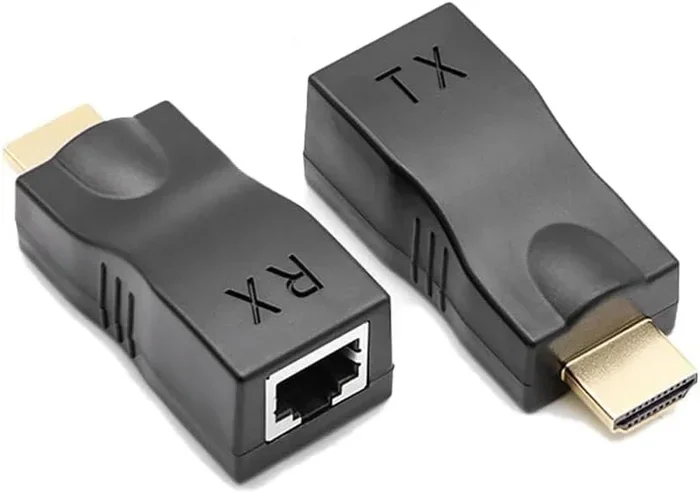
A Cat6 to HDMI converter or HDMI over Ethernet extender handles this transformation. The device receives the HDMI signal at one end, encodes it for transmission over the Cat6 cable, and then decodes it back into HDMI at the other end. This process happens in real time, so you do not experience delays or lag during regular use. The result is a clean, extended connection that delivers video and audio just like a direct HDMI cable would.
This method is especially useful when you need to stretch a signal beyond the standard 15-foot limit of most HDMI cables. With a Cat6 HDMI extender, you can easily push the signal 50, 100, or even 300 feet depending on the equipment you choose. The HDMI over Ethernet setup has become popular in both homes and offices because of its flexibility and reliability.
How the Signal Travels Through Cat6
A Cat6 cable contains four twisted pairs of copper wire. These pairs carry data signals with minimal interference. When you use a Cat6 HDMI conversion kit, the encoder at the source end takes the HDMI signal and sends it through these wire pairs. The decoder at the display end receives the data and reconstructs it into a full HDMI signal. This entire process happens almost instantly, so you see smooth, high-quality video on your screen.
How Does Cat6 to HDMI Conversion Work?
Understanding how Cat6 to HDMI conversion works helps you troubleshoot issues and choose the right gear. The process relies on two main devices: a sender unit and a receiver unit. Together, they form a bridge between your HDMI source and your display.
The sender unit connects to your device using a standard HDMI cable. It has a Cat6 output port where you plug in your Ethernet cable. The receiver unit connects to your TV or monitor with another HDMI cable. It has a Cat6 input port where the other end of the Ethernet cable plugs in. Once both units are powered on, the signal flows seamlessly from source to screen.
The Role of the Encoder and Decoder
Inside each unit sits a small chip that acts as an encoder or decoder. The encoder at the source takes the raw HDMI data and compresses it for travel over the Cat6 cable. The decoder at the display end decompresses it and rebuilds the original signal. Modern converters support high resolutions including 1080p and even 4K Ultra HD. Some advanced units also carry audio channels and Ethernet data simultaneously over the same cable.
Most HDMI over Cat6 systems use a technology called HDBaseT. This standard allows a single Cat6 cable to carry uncompressed HD video, audio, control signals, and even power. It is the same technology used in professional AV installations around the world. For home users, this means you get a clean, single-cable solution that keeps your setup tidy and organized.
Distance Limitations and Signal Quality
One of the biggest advantages of HDMI extension via Ethernet is the range. A standard HDMI cable works well up to about 15 feet. Beyond that, you may see signal degradation. A Cat6 HDMI extender can push the signal much farther. Most kits support distances of 50 to 100 feet. Some high-end models reach 300 feet or more with minimal quality loss.
Signal quality depends on the Cat6 cable quality and the converter model. Using a shielded Cat6 cable helps reduce interference. Keeping the cable run straight and avoiding sharp bends also preserves signal strength. If you need to go beyond 100 feet, consider a fiber-optic HDMI extender instead, as it offers even greater range.
What You Need to Convert Cat6 to HDMI
Before you start, gather the right equipment. Having everything ready makes the process smooth and frustration-free. Here is a clear list of what you need for a successful Cat6 to HDMI conversion.
Essential Equipment
- Cat6 to HDMI converter kit: This is the core of your setup. It includes a sender and receiver unit. Look for a kit that supports your desired resolution, such as 1080p or 4K.
- Cat6 Ethernet cable: Choose a high-quality, shielded Cat6 cable. The length depends on how far you need to run the signal. A 50-foot or 100-foot cable works for most setups.
- Standard HDMI cables: You need two short HDMI cables. One connects your source device to the sender unit. The other connects the receiver unit to your display.
- Power adapters: Most converter kits come with USB or wall power adapters. Make sure you have the correct power supply for both units.
Optional but Helpful Accessories
- HDMI over Cat6 wall plate: This gives your setup a clean, professional look. You mount it in the wall and connect cables behind the scenes.
- Cable management clips: These keep your Cat6 and HDMI cables neat and organized along walls or desks.
- Cable tester: A simple tool that checks if your Cat6 cable is working properly before you start the setup.
How to Choose the Right Converter
Not all HDMI to Cat6 converters are the same. Some support only 1080p, while others handle 4K resolution. Check the specifications before you buy. If you plan to watch 4K movies or play 4K games, make sure your converter supports that resolution. Also look for features like EDID support, which ensures your devices communicate properly. A good Cat6 HDMI conversion kit should also handle audio formats like Dolby Digital or DTS if you use a sound system.
Step-by-Step Guide to Convert Cat6 to HDMI
Now that you have your equipment, let us walk through the actual setup. This Cat6 to HDMI conversion process is simple and takes only a few minutes.
Step 1: Unbox and Inspect Your Equipment
Open your Cat6 to HDMI converter kit and check that you have all the parts. You should have a sender unit, a receiver unit, power adapters, and an instruction manual. Inspect the HDMI ports and Cat6 jacks for any visible damage. If anything looks off, contact the seller before proceeding.
Step 2: Connect the Sender Unit to Your Source Device
Take a short HDMI cable and plug one end into your source device. This could be a laptop, Blu-ray player, streaming stick, or gaming console. Plug the other end into the HDMI input on the sender unit. The sender unit is the device that will feed the signal into the Cat6 cable.
Step 3: Plug in the Cat6 Cable
Take your Cat6 Ethernet cable and plug one end into the Cat6 output port on the sender unit. Run the cable to the location of your display. Plug the other end into the Cat6 input port on the receiver unit. Make sure both connections click in firmly. A loose connection is one of the most common reasons for signal problems.
Step 4: Connect the Receiver Unit to Your Display
Use another short HDMI cable to connect the HDMI output on the receiver unit to your TV or monitor. Plug in the power adapter for the receiver unit and turn on your display.
Step 5: Power On and Test
Plug in the power adapter for the sender unit. Turn on your source device and your display. You should see the same image on your TV or monitor that you see on your source device. If the screen is blank, check all connections and try a different HDMI cable. Most setups work perfectly on the first try.
Step 6: Fine-Tune Your Settings
If the image looks off or the resolution is wrong, go into your source device display settings. Adjust the output resolution to match your display. Some converter kits also have small buttons on the units themselves for switching resolutions or adjusting settings. Refer to the manual for details.
Common Mistakes to Avoid When Converting Cat6 to HDMI
Even with a simple setup, some mistakes can cause frustration. Learning what to avoid saves you time and prevents headaches.
Using the Wrong Cable Category
Not all Ethernet cables are the same. Using a Cat5e cable instead of Cat6 may work for short distances, but it limits your performance. Cat6 cables support higher bandwidth and better shielding. For the best HDMI over Ethernet results, always use a proper Cat6 cable.
Skipping the Firmware Update
Some converter kits require a firmware update out of the box. Check the manufacturer’s website or the included manual. Updating the firmware can fix bugs and improve compatibility with newer devices. Skipping this step sometimes leads to the screen showing no signal even when everything is connected correctly.
Running the Cable Too Far Without a Repeater
While Cat6 can carry HDMI signals up to 100 feet, pushing beyond that range causes signal loss. If you need to cover a longer distance, use a repeater or choose a kit designed for long-range transmission. A Cat6 HDMI extender with built-in signal boosting handles this better than a basic kit.
Ignoring EDID and Resolution Mismatches
EDID stands for Extended Display Identification Data. It is how your devices agree on the best resolution and refresh rate. If your converter does not handle EDID properly, you may get a blank screen or poor image quality. Look for converters with strong EDID handling to avoid this issue.
Using Non-Power Adapters
Some cheap converter kits do not include proper power adapters. Running the units without adequate power leads to flickering or no signal at all. Always use the power adapters that come with your kit or ones that match the specifications exactly.
Expert Tips for the Best Cat6 to HDMI Setup
Getting a great Cat6 to HDMI conversion setup is about more than just plugging things in. A few expert tips make a big difference in performance and reliability.
Use Shielded Cat6 Cables
Shielded Cat6 cables have a foil or braid that blocks electromagnetic interference. This is especially important if your Cat6 cable runs near power cords or electrical wiring. A shielded cable keeps your HDMI signal clean and free from artifacts. For any serious setup, always choose shielded over unshielded.
Keep Your Cable Runs Straight
Avoid sharp bends or tight coils in your Cat6 cable. Bending the cable too sharply can damage the internal twisted pairs and weaken the signal. Use gentle curves and cable clips to route the cable smoothly along walls or floors. A well-routed cable lasts longer and performs better.
Label Your Cables
If you have multiple cables running through a wall or along a cable run, label each one at both ends. This saves you hours of confusion later if you need to troubleshoot or make changes. A simple piece of tape with “HDMI Sender” or “HDMI Receiver” goes a long way.
Test Before You Hide the Cables
Always test your full setup before you hide cables behind walls or furniture. Confirm that the video and audio work perfectly at every resolution you plan to use. Once cables are hidden, fixing a problem becomes much harder. A quick five-minute test now saves you from a major headache later.
Consider a Cat6 HDMI Wall Plate for Permanent Installations
If you are setting up a home theater or conference room that will stay in place, a Cat6 HDMI wall plate is a great investment. It mounts flush in the wall and provides clean, labeled connections for both the Cat6 cable and HDMI cables. This gives your room a professional, clutter-free look. Many wall plates also support keystone jacks that make swapping cables easy.
Keep Your Converter Cool
Converter units generate a small amount of heat during operation. Do not place them in enclosed spaces without ventilation. A little airflow keeps the units running reliably for years. If your kit comes with a fan, make sure the fan opening is not blocked by furniture or walls.
Benefits of Converting Cat6 to HDMI
There are many reasons to use a Cat6 to HDMI converter instead of a long HDMI cable. Here are the biggest benefits.
- Greater distance: Run your HDMI signal 50 to 100 feet or more without quality loss.
- Cleaner setups: One Cat6 cable replaces thick, stiff HDMI cables that are hard to route.
- Lower cost: Cat6 cable is cheaper and easier to find than long HDMI cables.
- Flexibility: You can run cables through walls, ceilings, and floors with ease.
- Future-proofing: Cat6 cables support high bandwidth, making them ready for even higher resolutions.
- Multi-device support: Some extender kits let you switch between multiple HDMI sources over one Cat6 cable.
Cat6 to HDMI vs. Other HDMI Extension Methods
There are several ways to extend an HDMI signal beyond the standard cable length. Here is how Cat6 to HDMI conversion compares to other popular methods.
| Method | Max Distance | Resolution Support | Ease of Setup | Cost |
|---|---|---|---|---|
| Standard HDMI Cable | Up to 15 ft | 4K @ short range | Very Easy | Low |
| Cat6 to HDMI Extender | Up to 100+ ft | 4K with good kits | Easy | Medium |
| Fiber Optic HDMI | Up to 300+ ft | 4K and 8K | Moderate | High |
| HDMI over HDBaseT | Up to 330 ft | 4K | Moderate | Medium-High |
| Wireless HDMI | Up to 30 ft | 1080p to 4K | Very Easy | Medium |
As you can see, a Cat6 HDMI extender offers a great balance of distance, quality, and affordability. It is the most popular choice for home and office setups. Fiber optic HDMI cables offer the best performance but cost significantly more. Wireless HDMI is easy but can suffer from interference and latency.
Final Thoughts on Converting Cat6 to HDMI
Can Cat6 be converted to HDMI? Yes, and it is easier than most people think. With a quality Cat6 to HDMI converter, a Cat6 cable, and a few minutes of your time, you can extend your HDMI signal to any room in your home or office. The process is reliable, affordable, and delivers excellent video and audio quality.
Whether you are a home user setting up a backyard movie screen or a business professional running displays across a conference room, Cat6 to HDMI conversion solves the distance problem elegantly. The key is choosing the right equipment, following the steps carefully, and avoiding the common mistakes we covered. Once you set it up, you will wonder how you ever managed without it.
Start with a basic Cat6 HDMI conversion kit that matches your resolution needs. Test your setup thoroughly before hiding any cables. Label everything and keep your connections clean. With these practices, your HDMI over Ethernet setup will serve you well for years to come. Enjoy your extended displays and the freedom of a tidy, organized cable setup.
Frequently Asked Questions
Do I need a special Cat6 cable to convert to HDMI?
You do not need a special Cat6 cable, but using a high-quality, shielded Cat6 cable gives the best results. Standard Cat6 cables work fine for most setups up to 100 feet. Shielded cables help reduce interference if your cable runs near power lines or electrical equipment. Always check that your cable is rated Cat6 and not Cat5e for optimal performance.
Can I convert Cat6 to HDMI for 4K resolution?
Yes, many modern Cat6 to HDMI converters support 4K resolution. Make sure to check the product specifications before purchasing. Not all converter kits handle 4K, so look for ones that explicitly list 4K or Ultra HD support. A good kit will also carry audio and control signals alongside the video.
How far can I run a Cat6 cable for HDMI conversion?
A standard Cat6 HDMI extender can run signals up to 100 feet reliably. Some high-end kits can push the signal even farther, up to 300 feet. The actual distance depends on the cable quality, converter model, and whether you use shielded cabling. For distances beyond 100 feet, consider a kit with signal boosting or a fiber optic alternative.
Is Cat6 to HDMI conversion lossless?
Most HDMI over Cat6 setups are nearly lossless for typical viewing distances. The converter encodes and decodes the signal, which can introduce minimal compression. However, for most home and office uses, the difference is imperceptible. Using quality equipment and a good Cat6 cable ensures the best possible signal fidelity.
Can I use a Cat6 to HDMI converter for gaming?
Yes, you can use a Cat6 HDMI conversion kit for gaming. Modern converters support high refresh rates and low latency, making them suitable for gaming. Look for a kit that advertises low input lag and supports your console or PC’s resolution and frame rate. Test the setup with a fast-paced game to confirm the experience is smooth.
What is the difference between an HDMI extender and a Cat6 to HDMI converter?
An HDMI extender is a general term for any device that extends an HDMI signal beyond the standard cable length. A Cat6 to HDMI converter is a specific type of HDMI extender that uses Cat6 Ethernet cable as the transmission medium. All Cat6 to HDMI converters are HDMI extenders, but not all HDMI extenders use Cat6 cable. Some use fiber optics or wireless technology instead.
=== CONCLUSION ===
Can Cat6 be converted to HDMI? The answer is a clear yes, and it opens up a world of flexibility for your display setups. With a reliable Cat6 to HDMI converter, you can extend your HDMI signal far beyond the limits of a standard cable. The process is simple, affordable, and delivers great results for both home and professional use.
Remember to choose quality equipment, use the right Cat6 cable, and follow the steps carefully. Avoid the common pitfalls like using the wrong cable category or skipping firmware updates. With a little care, your HDMI over Ethernet setup will work flawlessly for years. Enjoy the freedom of a clean, extended connection and the confidence that comes from knowing you set it up right.