Can I Get Hotspot Without Phone Service And How To Do It
Yes, you can absolutely get hotspot without phone service. Whether you want a mobile hotspot for internet on the go or need a Wi-Fi hotspot at home, there are several simple ways to get online without a traditional phone plan. This guide walks you through every method, from data-only SIM cards to portable hotspot devices, so you can choose the best option for your needs.
Have you ever wondered if you can get a hotspot without phone service? Maybe you travel a lot, live in an area with spotty coverage, or just want a simpler way to stay online. The good news is that yes, you can. You do not need a traditional phone plan to enjoy mobile hotspot internet.
In this guide, we will show you exactly how to set up a Wi-Fi hotspot without a phone line. We will cover every method, from data-only SIM cards to portable hotspot devices. By the end, you will know the best way to get wireless internet wherever you go.
Let us dive in and explore all the options available to you.
Key Takeaways
- Hotspot without phone service is possible: You can use data-only SIMs, portable hotspot devices, and USB tethering to get online.
- Multiple methods exist: From standalone hotspot plans to free hotspot apps, there are options for every budget.
- Data-only SIM cards are a popular choice: They give you mobile data without a phone number or contract.
- Portable hotspot devices work independently: Devices like MiFi units let you create a Wi-Fi network anywhere.
- Setting up your hotspot is easy: Most methods take just a few minutes to configure.
- Avoid common mistakes: Watch out for data caps, weak signal areas, and hidden fees.
📑 Table of Contents
- What Is a Hotspot and How Does It Work
- Can You Get Hotspot Without Phone Service
- How to Set Up Your Hotspot Without Phone Service
- Pros and Cons of Using Hotspot Without Phone Service
- Common Mistakes to Avoid When Using Hotspot Without Phone Service
- Expert Tips for Getting the Most Out of Your Hotspot
- Final Thoughts on Getting Hotspot Without Phone Service
- Frequently Asked Questions
What Is a Hotspot and How Does It Work
A hotspot is a physical or virtual location where devices can connect to the internet through Wi-Fi. When you use a mobile hotspot, your device shares its cellular data connection with other gadgets like laptops, tablets, or other phones.
Think of it like a bridge. Your cellular data plan connects to the internet. The hotspot feature then shares that connection wirelessly. Other devices can then use that shared signal to get online.
There are two main types of hotspots:
- Software hotspots: These use your phone or tablet to share data. You turn on the hotspot feature in your settings.
- Hardware hotspots: These are standalone devices like MiFi units or portable Wi-Fi routers that create their own network.
Both types work without a phone service plan. You just need a source of mobile data. That is the key takeaway here.
Can You Get Hotspot Without Phone Service
The short answer is yes. You can get a hotspot without phone service in several ways. A phone service usually means a contract with a carrier that includes voice calls and text messages. But hotspot only needs data. That is the important distinction.
Many people assume they need a full phone plan to use tethering or Wi-Fi sharing. This is not true. Carriers offer data-only plans that give you internet access without any calling or texting features. You can also use prepaid SIM cards that focus purely on data.
Here are the main ways to get hotspot internet without phone service:
Data-Only SIM Cards
A data-only SIM card is one of the easiest ways to get mobile hotspot access. This SIM gives you cellular data but no phone number. You cannot make calls or send texts. But you can connect to the internet and share that connection with other devices.
Most major carriers offer data-only plans. You can also find them from MVNOs (Mobile Virtual Network Operators). These are smaller companies that use the same networks as the big carriers but often at lower prices.
Portable Hotspot Devices
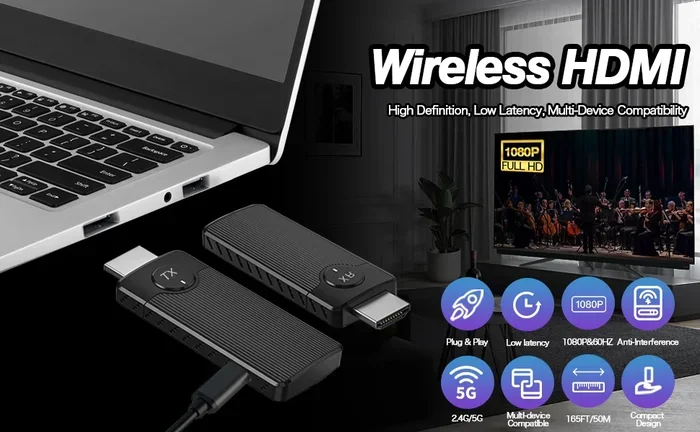
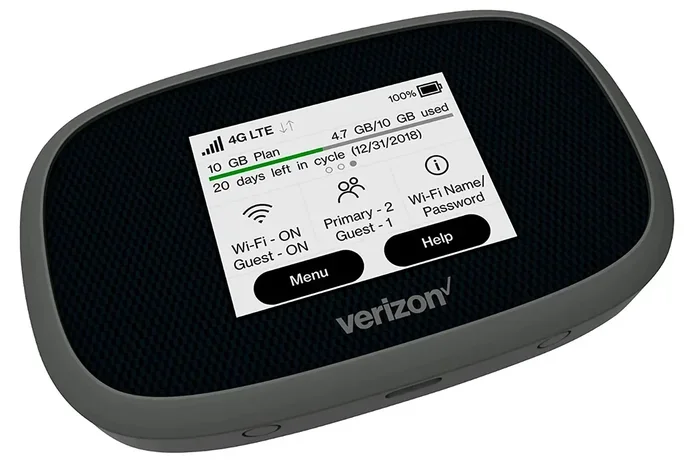
Portable hotspot devices are standalone gadgets that create a Wi-Fi network on the go. They are also called MiFi devices or travel routers. These devices have their own SIM card slot. You insert a data SIM, and the device creates a wireless hotspot for your other gadgets.
These devices are great for people who do not want to drain their phone battery. They are also perfect for travel. You can carry one in your pocket and connect up to 10 or more devices at once.
USB Tethering
USB tethering is another option. You connect your phone to a computer using a USB cable. The computer then uses your phone’s mobile data to get online. This method works even if you do not have a phone service plan. You only need a data plan or a prepaid SIM with data.
USB tethering is often faster and more stable than wireless hotspot sharing. It is also more secure because the connection is wired.
Free Public Hotspots
You can also use free public Wi-Fi hotspots. Libraries, cafes, airports, and malls often offer free internet access. While these are not personal hotspots, they serve the same purpose. You can get online without any phone service at all.
Hotspot Apps and Wi-Fi Sharing
Some apps let you find and connect to Wi-Fi networks nearby. Apps like Wi-Fi Map and Instabridge show you free hotspots in your area. These are not your own hotspots, but they help you stay connected without a phone plan.
How to Set Up Your Hotspot Without Phone Service
Setting up a hotspot without phone service is simpler than you might think. Here is a step-by-step guide for the most popular methods.
Method 1: Using a Data-Only SIM in Your Phone
Follow these steps to set up a mobile hotspot with a data-only SIM:
- Buy a data-only SIM card from your carrier or an MVNO.
- Insert the SIM into your phone.
- Go to Settings and tap on Network or Connections.
- Find the Mobile Hotspot or Tethering option.
- Turn on the hotspot and set a strong password.
- Connect your other devices to the new Wi-Fi network.
That is it. You now have a working hotspot without any phone service.
Method 2: Setting Up a Portable Hotspot Device
Here is how to get a standalone hotspot running:
- Purchase a portable hotspot device or MiFi unit.
- Insert a data SIM card into the device.
- Power on the device and wait for it to connect to the network.
- On your laptop or tablet, scan for Wi-Fi networks.
- Find your hotspot device and enter the password.
- You are now connected to broadband internet on the go.
Most portable hotspot devices have a battery life of 4 to 10 hours. They are perfect for travel or daily commutes.
Method 3: USB Tethering for Laptops
To use USB tethering:
- Connect your phone to your laptop with a USB cable.
- On your phone, go to Settings and find Hotspot or Tethering.
- Enable USB Tethering.
- Your laptop should automatically detect the connection.
- You now have internet access on your laptop.
This method works great when you need a stable connection for work or video calls.
Pros and Cons of Using Hotspot Without Phone Service
Every option has its strengths and weaknesses. Let us look at the big picture.
| Method | Pros | Cons |
|---|---|---|
| Data-Only SIM | Affordable, flexible, works with your existing phone | May need a new SIM, limited to one device at a time |
| Portable Hotspot Device | Battery independent, connects multiple devices, travel-friendly | Extra cost for device, another gadget to carry |
| USB Tethering | Fast and stable connection, no extra device needed | Requires a cable, drains phone battery slowly |
| Free Public Hotspots | No cost, no SIM needed | Not secure, limited availability, unreliable |
| Hotspot Apps | Easy to use, finds free networks | Depends on public networks, not always available |
Your best choice depends on your needs. If you travel often, a portable hotspot device is a solid investment. If you just need occasional internet at home, a data-only SIM is the most affordable route.
Common Mistakes to Avoid When Using Hotspot Without Phone Service
Setting up a hotspot without phone service is straightforward, but there are some pitfalls to watch out for.
Mistake 1: Ignoring data caps. Many data-only plans have limits. If you go over, you may face slow speeds or extra charges. Always check your plan details before you rely on hotspot for heavy usage.
Mistake 2: Using weak signal areas. A mobile hotspot is only as good as the cellular signal it receives. If you are in a basement or a remote area, your connection may drop. Try to use your hotspot where signal strength is strong.
Mistake 3: Forgetting to secure your hotspot. Always set a password on your Wi-Fi hotspot. An open hotspot is a security risk. Strangers could use your data or even access your devices.
Mistake 4: Not checking carrier compatibility. Not all SIM cards work with all devices. Make sure your data-only SIM is compatible with your phone or hotspot device before you buy.
Mistake 5: Overlooking battery drain. Running a mobile hotspot drains your phone battery fast. If you are using your phone as a hotspot, keep a charger handy or use a portable hotspot device instead.
Expert Tips for Getting the Most Out of Your Hotspot
Tip 1: Use a signal booster. If you often get weak cellular data signals, consider a signal booster. These devices amplify your carrier’s signal and improve your hotspot speed.
Tip 2: Choose the right data plan. Look for unlimited data plans if you use your hotspot a lot. If you only need occasional access, a prepaid data plan with a small data allowance can save you money.
Tip 3: Keep your device updated. Software updates often improve Wi-Fi sharing performance and fix bugs. Make sure your phone or hotspot device is always running the latest firmware.
Tip 4: Monitor your data usage. Most phones let you check how much data you have used. Go to Settings and look for Data Usage. This helps you avoid surprise overage charges.
Tip 5: Turn off hotspot when not in use. Leaving your hotspot on drains battery and uses data even when no devices are connected. Make it a habit to turn it off when you are done.
Final Thoughts on Getting Hotspot Without Phone Service
The bottom line is clear: you can get hotspot without phone service. You have many options to choose from. Whether you go with a data-only SIM card, a portable hotspot device, or USB tethering, you can stay connected without a traditional phone plan.
Mobile hotspot technology has made it easier than ever to get internet access on your terms. You do not need to be tied to a phone contract just to get online. A data-only plan or a standalone hotspot device gives you the freedom to connect whenever and wherever you want.
So go ahead. Explore your options. Pick the method that fits your lifestyle and budget. With the right setup, you can enjoy fast, reliable wireless internet without ever needing a phone service plan. The internet is yours to take with you.
Frequently Asked Questions
Can I use a hotspot without any SIM card at all?
Yes, you can use free public Wi-Fi hotspots without any SIM card. Libraries, cafes, and airports offer free internet access. You just need a device with Wi-Fi capability. However, these are not personal hotspots, and availability depends on your location.
Is it legal to use a hotspot without phone service?
Absolutely. Using a mobile hotspot with a data-only SIM or a portable hotspot device is completely legal. You are simply using cellular data to share an internet connection. As long as you have a valid data plan or SIM, there is nothing illegal about it.
How much does a data-only SIM cost per month?
Data-only SIM cards vary in price. Basic plans with 1 to 5 GB of data can cost as little as $10 to $20 per month. Unlimited data plans typically range from $30 to $60. Prices depend on the carrier and the amount of data you need.
Can I use my old phone as a hotspot without a phone plan?
Yes, you can. If you insert a data-only SIM card into your old phone, you can turn on the mobile hotspot feature. The phone does not need an active phone number or service plan. It just needs a data connection to share with other devices.
What is the difference between tethering and a hotspot?
Tethering is the general term for sharing your phone’s data connection with another device. Hotspot usually refers to sharing that connection wirelessly over Wi-Fi. USB tethering uses a cable, while a Wi-Fi hotspot broadcasts a wireless signal. Both work without phone service.
Will using a hotspot drain my phone battery quickly?
Yes, running a mobile hotspot uses a lot of battery power. Your phone has to maintain a cellular data connection and broadcast a Wi-Fi signal at the same time. To save battery, consider using a portable hotspot device instead. These devices have their own battery and keep your phone free for other tasks.