Can I Still Get A Laptop With A Dvd Drive Right Now
Yes, you can still get a laptop with a DVD drive in 2024, though your options are more limited than ever. Manufacturers have largely moved away from optical disc drives in favor of thinner designs, but multimedia laptops and gaming laptops with DVD drives still exist for those who need them.
Key Takeaways
- Limited but available: A few manufacturers still produce laptops with built-in DVD drives, though they are harder to find than ever.
- Best options: Gaming laptops and multimedia workstations are your best bet for finding a laptop with a DVD drive today.
- External drives work great: A USB external DVD drive is a convenient and affordable alternative if you cannot find a built-in one.
- Why they disappeared: Cloud storage, streaming, and USB drives made optical drives less essential, leading to their removal from most laptops.
- Consider your needs: Before searching for a laptop with a DVD drive, think about whether you truly need one or if an external option would suffice.
- Expert tip: If you need a DVD drive for work or specific software, a portable external drive paired with a slim laptop gives you the best of both worlds.
📑 Table of Contents
- Why You Might Still Need a Laptop With a DVD Drive
- Why Modern Laptops Dropped the DVD Drive
- Can You Still Get a Laptop With a DVD Drive? Yes, Here Is How
- Best Laptops With DVD Drives Available Today
- How to Use a DVD Drive With a Modern Laptop
- Is a DVD Drive Worth It in 2024 and Beyond?
- Common Mistakes When Buying a Laptop With a DVD Drive
- Final Thoughts on Finding a Laptop With a DVD Drive
Why You Might Still Need a Laptop With a DVD Drive
You might be wondering why anyone would still want a laptop with a DVD drive in today’s world of streaming and cloud storage. It is a fair question. After all, most of us watch movies on Netflix, store files on Google Drive, and install software from downloaded links.
But here is the thing. Not everyone lives in a fully digital world. Some people still rely on DVD discs for work, entertainment, or school. Maybe you need to burn family photos onto a disc. Perhaps your job requires you to install software from physical media. Or maybe you simply enjoy owning a disc-based movie collection.
The good news? You can still find a laptop with a DVD drive right now. It just takes a little know-how. Let us walk you through everything you need to know.
Who Still Needs an Optical Disc Drive?
You might be surprised at who still relies on DVD burners and optical media. Here are a few real-world examples:
- Remote workers who receive files on physical discs from clients or offices.
- Musicians and filmmakers who distribute work on CDs or DVDs.
- Schools and educators who still use disc-based learning materials.
- Travelers who want to watch movies during long flights without using internet data.
- Professionals who need to archive important documents on disc storage.
These are real people with real needs. And their need for a laptop with a built-in DVD drive is completely valid.
Why Modern Laptops Dropped the DVD Drive
To understand why finding a laptop with a DVD drive is so tricky today, you need to look at the bigger picture. The laptop design trends of the last decade have pushed optical drives almost completely out of the picture.
The Rise of Cloud Storage and Streaming
About fifteen years ago, burning a music CD or installing software from a disc was normal. Today, streaming services like Spotify, Netflix, and YouTube handle all of that. Cloud storage platforms like Dropbox, OneDrive, and iCloud make physical removable media feel outdated.
This shift changed everything. Manufacturers realized most users did not need a CD/DVD burner built into their device. So they started removing it.
The Push for Thinner, Lighter Designs
There is another big reason. People wanted thin and light laptops. An optical disc drive adds thickness, weight, and bulk. Removing it allowed makers to create the sleek compact laptops we love today.
- A standard DVD drive adds roughly 5 to 7 millimeters to a laptop’s thickness.
- It also adds about 100 to 200 grams of weight.
- That space can instead hold a bigger battery or better speakers.
So the trade-off was clear. Ditch the optical drive for a slimmer, more portable device. It made sense for most people. But not for everyone.
USB Drives and External Options
Another factor was the rise of USB flash drives. These tiny laptop accessories can hold huge amounts of data. Many people found it easier to plug in a USB drive than use a disc. This further reduced demand for disc reading and writing capabilities built into laptops.
Can You Still Get a Laptop With a DVD Drive? Yes, Here Is How
So let us get to the real question. Can I still get a laptop with a DVD drive? Absolutely. But you need to know where to look.
Gaming Laptops Still Include DVD Drives
One of the best places to find a gaming laptop with a DVD drive is in the gaming category. Gamers often need to install games from physical discs. They also tend to prefer larger screens and full-sized keyboards. These preferences mean gaming laptops usually have more room for ports, drives, and features.
Brands like ASUS ROG, MSI, and Lenovo Legion still offer models with optical disc drives. These machines are powerful enough for modern games and practical enough for everyday tasks. They also tend to have better laptop ergonomics for long gaming sessions.
Multimedia and Workstation Laptops
If gaming is not your thing, look at multimedia laptops and mobile workstations. These are designed for people who work with video, audio, or design software. Some still include DVD-ROM drives because their target users expect that level of portable media player functionality.
Dell Precision, HP ZBook, and Lenovo ThinkPad P-series sometimes offer configurations with optical drives. These are great choices if you need a professional-grade laptop with a DVD drive for work.
Business and Enterprise Models
Do not overlook business laptops. Some ThinkPad and Dell Latitude models still come with built-in optical drives. Companies that deal with disc backup or disc-based software often request these configurations. Check enterprise-focused product lines for the best chances.
What to Look For When Shopping
Ready to start your search? Here are some practical tips to guide you:
- Check the specifications page carefully. Look for terms like “DVD-RW,” “DVD±RW,” or “optical disc drive” in the specs.
- Filter by category. Use the gaming or workstation filters on shopping sites. These categories are more likely to include optical drives.
- Read reviews. Some reviewers specifically mention whether a laptop has a DVD drive or not.
- Call customer support. If the website is unclear, just ask. A quick phone call can save you from buying the wrong machine.
- Consider refurbished options. Older business laptops with DVD drives are often available refurbished at great prices.
Best Laptops With DVD Drives Available Today
Here is a quick look at some popular options that still offer a built-in DVD drive. Prices and availability change, so always verify before buying.
| Laptop | Category | DVD Drive | Best For |
|---|---|---|---|
| Lenovo ThinkPad T Series | Business | Yes (DVD±RW) | Professionals needing reliability |
| Dell Latitude 3000 Series | Business | Yes (DVD-RW) | Enterprise users |
| ASUS TUF Gaming | Gaming | Yes (DVD-RW) | Gamers and multimedia users |
| HP ProBook 400 Series | Business | Yes (DVD±RW) | Office and home use |
| Lenovo Legion 5 | Gaming | Some models | Power users needing performance |
Always double-check the exact model number. Some variants of these laptops may or may not include a DVD burner. The configuration matters a lot.
Quick Tips for Finding the Right Model
- Search for “DVD-RW” or “optical drive” directly in the product specs.
- Avoid ultrabooks if you need a laptop with a DVD drive. Ultrabooks almost never include them.
- Look at 15.6-inch models. The extra screen size often leaves room for an optical drive.
- Budget at least $600 to $1,200 for a solid multimedia laptop with this feature.
How to Use a DVD Drive With a Modern Laptop
Maybe you already have a great laptop with a DVD drive. Or maybe you decided to go with a slim model and need a workaround. Either way, there are simple solutions for everyone.
Using the Built-In Drive
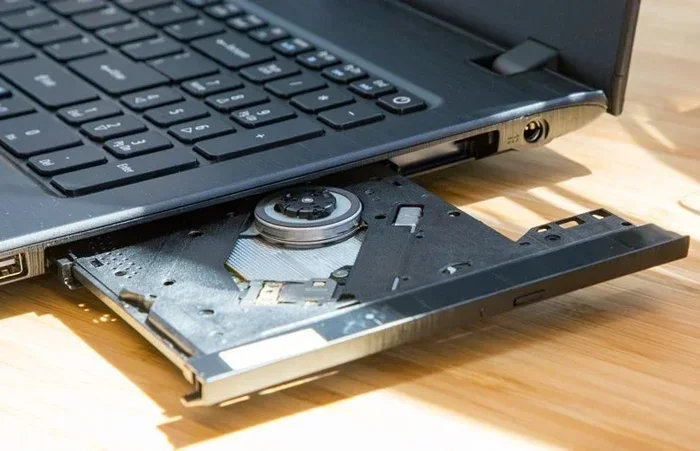
Using a built-in optical disc drive is straightforward. Just pop open the tray, place your disc in, and close it. Your operating system will usually detect it automatically. Windows, macOS, and Linux all support disc reading out of the box.
You can use the drive to:
- Watch movies and TV shows from DVD or Blu-ray discs.
- Listen to music CDs.
- Install software that comes on a disc.
- Burn files onto blank DVDs for backup or sharing.
- Read data from old disc-based software or archived documents.
Using an External USB DVD Drive
If your laptop does not have a built-in drive, an external DVD drive is your best friend. These devices connect through USB and work with almost any laptop. They are affordable, portable, and easy to use.
Here is what to look for in an external DVD drive:
- USB 3.0 or USB-C connection for faster data transfer.
- Plug-and-play support so you do not need to install drivers.
- Compact and lightweight design for easy portability.
- Compatibility with your operating system. Most work with Windows 10, Windows 11, and macOS.
Some popular options include the LG Ultra Portable DVD Writer and the ASUS USB External DVD Drive. Both are slim, reliable, and cost around $30 to $60. These make excellent laptop accessories for anyone who needs occasional disc reading or burning.
Pro Tip: Keep It Clean
Optical drives can get dusty over time. Use a soft, lint-free cloth to clean the disc tray and the lens area. This keeps your DVD drive working smoothly for years. If a disc gets stuck, do not force it. Instead, look for a small emergency eject hole on the drive face.
Is a DVD Drive Worth It in 2024 and Beyond?
This is the question that really matters. Let us break it down honestly.
The Case for Getting One
A laptop with a DVD drive is absolutely worth it if:
- Your job requires you to use physical media regularly.
- You have a large collection of disc-based movies or music you want to enjoy.
- You work in an environment where disc backup is part of the security policy.
- You frequently install software from physical discs.
- You want a self-contained device with no extra accessories to carry.
The Case Against It
On the other hand, you might not need a DVD drive if:
- You mainly stream movies and music.
- You store everything in the cloud or on USB drives.
- You prioritize a thin and light laptop for travel.
- You rarely use physical media.
For most casual users, an external DVD drive handles occasional needs perfectly fine. You get the flexibility without the bulk.
Expert Insight
Tech experts generally agree that optical disc drives are a niche feature now. However, they also point out that completely removing them limits options. “There is still a meaningful group of users who depend on optical media,” says one industry analyst. “Manufacturers should not forget them entirely.”
The best approach? Know your needs. If you truly require a laptop with a DVD drive, invest in a quality model. If you only need one occasionally, grab a portable external drive and save your money.
Common Mistakes When Buying a Laptop With a DVD Drive
Let me save you some headache. Here are common mistakes people make when shopping for a laptop with a built-in DVD drive:
- Assuming all models have one. Even within a product line, some versions skip the optical drive. Always check the specific model number.
- Ignoring the drive type. Some laptops come with a CD-only drive. Make sure it says DVD-RW or DVD±RW if you need full disc reading and burning.
- Paying too much. You do not need a top-of-the-line machine just for a DVD drive. Focus on your overall needs and budget.
- Forgetting about external options. Sometimes an external DVD drive paired with a slim laptop is smarter than buying a bulkier machine.
- Not checking return policies. If you are buying online, make sure you can return the laptop if the drive does not work as expected.
Final Thoughts on Finding a Laptop With a DVD Drive
So, can I still get a laptop with a DVD drive? Yes, you can. The options are narrower than they used to be, but they are still out there. Gaming laptops, multimedia laptops, and certain business models remain your best sources. If you cannot find a built-in drive that fits your budget, a USB external DVD drive is a fantastic backup plan.
The optical disc drive may not be a headline feature anymore. But for the people who need it, it is still incredibly useful. Do not let anyone tell you that it is obsolete. Technology serves all kinds of users, and your needs matter just as much as anyone else’s.
Take your time, do your research, and pick the setup that works best for your life. Whether that is a laptop with a DVD drive built right in or a slim laptop plus an external drive, you will be just fine. Happy disc spinning!
Frequently Asked Questions
Can I still buy a new laptop with a DVD drive in 2024?
Yes, you can still buy new laptops with DVD drives. Gaming laptops, some business models, and multimedia workstations are the best places to look. Brands like Lenovo, Dell, HP, and ASUS still offer select models with built-in optical drives. Always verify the specific model specifications before purchasing.
What is the best laptop with a DVD drive for everyday use?
The Lenovo ThinkPad T series and HP ProBook 400 series are excellent choices for everyday use. These business laptops offer reliable DVD-RW drives, solid performance, and comfortable keyboards. They are durable, well-supported, and designed for professionals who need disc reading and burning capabilities as part of their daily workflow.
Are external DVD drives a good substitute for a built-in one?
Yes, external USB DVD drives work very well as a substitute. They are portable, affordable (usually $30 to $60), and compatible with most laptops and operating systems. A good external DVD drive handles movie watching, file burning, and software installation just like a built-in optical disc drive. This is the most practical option if you love a slim laptop.
Why did manufacturers stop putting DVD drives in laptops?
Manufacturers removed DVD drives primarily to make laptops thinner, lighter, and more portable. The rise of cloud storage, streaming services, and USB flash drives reduced the need for removable media. Additionally, removing the drive freed up space for larger batteries, better speakers, and improved laptop ergonomics in modern compact laptops.
Can a laptop with a DVD play Blu-ray discs?
Most standard DVD drives cannot play Blu-ray discs. You need a dedicated Blu-ray drive for that. Some multimedia laptops and gaming laptops offer Blu-ray options, but they are less common. If you specifically need Blu-ray playback, look for models that explicitly list “Blu-ray” or “BD-ROM” in their specifications.
How much does a laptop with a DVD drive cost?
Prices vary depending on the brand and specifications. A reliable business laptop with a DVD drive typically costs between $600 and $1,200. Gaming laptops with DVD drives can range from $800 to $1,500 or more. If you want something budget-friendly, consider refurbished or older models from trusted brands. An external DVD drive costs much less, usually around $30 to $60.
=== CONCLUSION ===
Can I still get a laptop with a DVD drive? The answer is a clear and confident yes. While the market has shifted dramatically, laptops with DVD drives are still available in the gaming, business, and multimedia categories. Brands like Lenovo, Dell, HP, and ASUS continue to serve users who rely on optical disc drives for work, entertainment, and storage.
Your best strategy is to know what you actually need. If a built-in drive is essential, focus on 15.6-inch gaming or business laptops. If you just need the occasional disc read or burn, a portable external DVD drive paired with a slim compact laptop gives you the best of both worlds.
Do not let anyone say the DVD drive is dead. It is not. It is simply a niche feature now, serving the people who truly value it. So go ahead, find your perfect machine, and enjoy the simplicity of popping in a disc whenever you want. You have got this!