Can I Use a Wifi Receiver As Bluetooth Device Instead
Many people wonder if they can use a wifi receiver as a Bluetooth device instead. The short answer is no, they are two very different wireless technologies. However, understanding how each works helps you choose the right tool for your needs. This guide breaks down the key differences, similarities, and practical solutions for your wireless setup.
You have a wifi receiver sitting on your desk. Maybe it is a USB dongle or a PCI card inside your computer. And you are thinking, “Can I use this thing for Bluetooth too?” It is a fair question. After all, both wifi and Bluetooth are wireless technologies. They both send data through the air. So why not just use one for the other?
The truth is, wifi and Bluetooth are quite different. They work in different ways. They use different frequencies. They serve different purposes. You cannot simply plug in a wifi receiver and expect it to connect your wireless headphones or your phone to your laptop. But there is more to the story than that. Let us walk through it together.
In this article, we will explore everything you need to know about using a wifi receiver as a Bluetooth device. We will look at how each technology works. We will compare them side by side. And we will give you real solutions if you are trying to connect wireless devices without a dedicated Bluetooth adapter. By the end, you will have a clear picture of what is possible and what is not.
Key Takeaways
- Wifi receivers and Bluetooth devices serve different purposes: Wifi handles internet access, while Bluetooth connects nearby devices directly.
- You cannot convert a wifi receiver into a Bluetooth adapter without additional hardware or software support.
- Both technologies use wireless signals but operate on different frequencies and protocols.
- A combo wifi-Bluetooth adapter is the best solution if you need both functions in one device.
- Understanding wireless connectivity options helps you troubleshoot and optimize your setup.
- Bluetooth has a shorter range than wifi, making it ideal for personal device pairing.
- Wifi offers faster data speeds and internet access, which Bluetooth cannot provide on its own.
📑 Table of Contents
- What Is a Wifi Receiver and How Does It Work
- How Bluetooth Technology Works
- Can You Really Use a Wifi Receiver As a Bluetooth Device
- Key Differences Between Wifi and Bluetooth
- When to Use a Wifi Receiver Instead of Bluetooth
- Practical Solutions If You Do Not Have Bluetooth
- Common Mistakes People Make with Wireless Adapters
- Expert Tips for Better Wireless Performance
- Key Takeaways
- Frequently Asked Questions
- Final Thoughts
What Is a Wifi Receiver and How Does It Work
Understanding the Basics of a Wifi Receiver
A wifi receiver is a hardware device that lets your computer or laptop connect to a wireless network. It picks up signals from a router or access point. These signals carry internet data. Your device then uses that data to browse the web, stream videos, or download files.
Most modern laptops come with a built-in wifi receiver. But older desktops or certain compact PCs may not have one. That is where an external wifi adapter or USB wifi dongle comes in handy. You plug it into a USB port, and your computer gains access to wireless networks.
Wifi receivers operate on specific frequency bands. The most common ones are 2.4 GHz and 5 GHz. These frequencies allow data to travel through the air over relatively long distances. A typical wifi signal can reach 150 feet or more indoors, depending on the router and obstacles in the way.
How Wifi Connectivity Differs from Other Wireless Tech
Wifi is designed for one main job: providing internet access. When you connect your device to a wifi network, you are tapping into a larger network that links to the internet. This is very different from Bluetooth, which creates a direct connection between two devices.
Here are some key points about wifi receivers:
- Wifi receivers need a router or hotspot to function. They cannot work alone.
- They handle high data speeds. Modern wifi standards like 802.11ac and 802.11ax offer very fast wireless transmission.
- Wifi has a longer range compared to Bluetooth. You can be in another room and still stay connected.
- Wifi adapters require drivers to work properly with your operating system.
- They use more power than Bluetooth modules because they maintain a constant connection to a network.
So as you can see, a wifi receiver is built for one specific job. It is not a general-purpose wireless tool. It cannot pair with your wireless headphones, your smartwatch, or your wireless mouse the way Bluetooth does.
How Bluetooth Technology Works
The Core Function of Bluetooth
Bluetooth is a short-range wireless technology. It connects two devices directly to each other. You do not need a router or an internet connection. You just need two Bluetooth-enabled devices within close proximity.
When you pair your phone with a wireless speaker, for example, Bluetooth creates a direct link between them. Your phone sends audio data straight to the speaker. No internet is needed. No router is involved. It is a peer-to-peer wireless connection.
Bluetooth operates on the 2.4 GHz frequency band. But here is the important part: it uses a different protocol than wifi. It uses frequency-hopping spread spectrum. This means it rapidly switches between different channels within the 2.4 GHz band. This reduces interference and keeps the connection stable between your devices.
What Bluetooth Is Best Used For
Bluetooth excels at connecting personal devices over short distances. Here are some common uses:
- Wireless audio streaming to headphones, earbuds, and speakers
- Connecting peripherals like wireless keyboards, mice, and game controllers
- File transfers between phones, tablets, and computers
- Smart home devices like fitness trackers and smart locks
- Hands-free calling through car audio systems and headsets
Bluetooth has a typical range of about 30 feet for most devices. Some newer versions can reach further, but the standard use case is close proximity. This makes it perfect for personal area networking.
The Bluetooth protocol is built into many devices today. Smartphones, tablets, laptops, and even some TVs come with Bluetooth already enabled. But not every device has it. That is where people start asking if they can use something else, like a wifi receiver, to fill the gap.
Can You Really Use a Wifi Receiver As a Bluetooth Device
The Direct Answer: No, Not Directly
Let us get this out of the way. You cannot use a standard wifi receiver as a Bluetooth device. They are fundamentally different technologies. A wifi adapter is designed to communicate with routers and access points. It speaks the wifi protocol. Bluetooth devices speak the Bluetooth protocol. They do not understand each other.
Think of it like this. A wifi receiver is like a person who only speaks English. A Bluetooth device is like a person who only speaks Spanish. They are both communicating wirelessly, but they cannot understand each other without a translator. And in the world of wireless tech, there is no built-in translator between the two.
Even if both wifi and Bluetooth use the 2.4 GHz frequency, that does not make them compatible. The frequency is just the highway. The protocol is the language. And they speak different languages.
Why People Confuse Wifi and Bluetooth
It is easy to see why people mix these two up. Both are wireless. Both connect devices without cables. Both use similar frequency ranges. And both are common features on computers and phones. But the similarities stop there.
Here is a quick look at why the confusion happens:
- Both are wireless technologies that send data through the air
- Both operate on 2.4 GHz (though wifi also uses 5 GHz)
- Both are built into many devices as standard features
- Both enable wireless connectivity in different ways
- Both require drivers or software to function on a computer
But just because they share some traits does not mean they are interchangeable. A wifi receiver cannot send audio to your Bluetooth headphones. A Bluetooth dongle cannot connect you to your home wireless network. Each has a specific role.
Key Differences Between Wifi and Bluetooth
Comparing Wireless Technologies Side by Side
To really understand why you cannot swap one for the other, let us compare them directly. This table breaks down the main differences between wifi and Bluetooth:
| Feature | Wifi Receiver | Bluetooth Device |
|---|---|---|
| Primary Purpose | Internet access via wireless network | Direct device-to-device connection |
| Range | Up to 150+ feet indoors | Up to 30 feet (standard) |
| Data Speed | Very fast (hundreds of Mbps) | Moderate (up to 3 Mbps for Bluetooth 4.0) |
| Frequency | 2.4 GHz and 5 GHz | 2.4 GHz only |
| Needs Internet | Yes (to access the web) | No (works offline) |
| Power Usage | Higher | Lower |
| Device Pairing | Connects to a network | Pairs with a specific device |
| Common Use | Web browsing, streaming, downloads | Audio, peripherals, file sharing |
As you can see from the table, these two technologies are built for very different jobs. A wifi adapter is not going to help you pair your wireless earbuds. And a Bluetooth receiver is not going to get you online.
Frequency and Protocol Differences
Both wifi and Bluetooth use the 2.4 GHz band. But the way they use it is completely different. Wifi uses wide channels to push large amounts of data. This is how you can stream 4K video or download big files quickly.
Bluetooth uses narrow channels and frequency hopping. It trades speed for stability and low power consumption. This is why your Bluetooth headphones can run for hours on a single charge. They use very little energy because they are not trying to push huge amounts of data.
The Bluetooth protocol also includes built-in pairing and encryption. When you pair two Bluetooth devices, they establish a secure link. Wifi does not work this way. It connects to a network using a password or security key, but it does not pair with individual devices the same way.
When to Use a Wifi Receiver Instead of Bluetooth
Situations Where a Wifi Adapter Makes Sense
There are times when a wifi receiver is the right choice. If you need internet access on a desktop computer that does not have built-in wifi, a wifi adapter is the way to go. If you want to stream content from the internet on your TV, a wifi receiver can help.
Here are some scenarios where a wifi adapter is the better option:
- You need internet access on a device that does not have a built-in wifi receiver
- You are streaming content from online services like Netflix or YouTube
- You need a fast, stable connection for gaming or video calls
- Your device is far from the router and needs a strong wireless signal
- You are setting up a wireless network in your home or office
In all these cases, a wifi receiver is the right tool. It is not trying to be a Bluetooth device. It is doing exactly what it was designed to do: connect you to the internet.
Situations Where Bluetooth Is the Better Choice
On the other hand, Bluetooth is the clear winner when you need to connect two devices directly. If you want to listen to music on wireless headphones, Bluetooth is what you need. If you want to use a wireless mouse or keyboard, Bluetooth handles that perfectly.
Here is when Bluetooth is the right call:
- Connecting wireless headphones or speakers to your phone or computer
- Using a wireless mouse or keyboard without a USB receiver
- Transferring files between devices like phones and laptops
- Connecting a fitness tracker or smartwatch to your phone
- Using a game controller wirelessly with a console or PC
Bluetooth is all about personal, close-range connections. It is not about getting online. It is about making your devices talk to each other without wires.
Practical Solutions If You Do Not Have Bluetooth
Option 1: Buy a Bluetooth Adapter
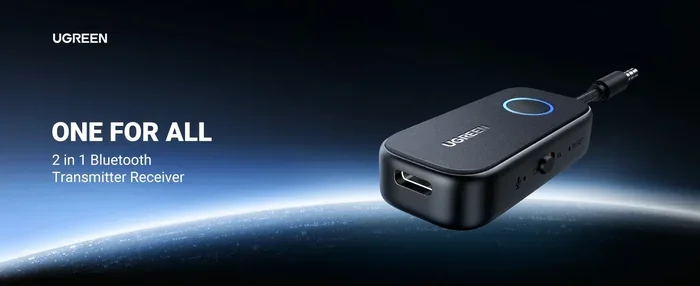
If your computer or laptop does not have built-in Bluetooth, the simplest solution is to buy a Bluetooth adapter. These are small USB dongles that plug right into your computer. They add Bluetooth capability quickly and easily.
Most Bluetooth adapters cost between 10 and 30 dollars. They are plug-and-play in most cases. Windows and macOS usually recognize them right away. You may need to install a driver, but that is typically automatic.
Look for a Bluetooth 5.0 or newer adapter for the best performance. These offer faster speeds, longer range, and better battery efficiency on your connected devices.
Option 2: Get a Combo Wifi-Bluetooth Adapter
If you need both wifi and Bluetooth and only have one USB port free, a combo adapter is a great choice. These devices handle both wireless technologies in a single USB dongle. You get internet access and Bluetooth connectivity all in one.
Combo adapters are especially useful for desktops and older laptops. They save you a USB port and keep your setup clean. Just make sure the combo adapter supports the wifi standards and Bluetooth versions you need.
Option 3: Use Bluetooth Built Into Other Devices
Many devices today come with Bluetooth already. Your smartphone has it. Your smart TV likely has it. Even some printers and speakers have it built in. If your computer does not have Bluetooth, you can use these devices as a bridge.
For example, you can pair your phone with a Bluetooth speaker. Then use your phone as a middleman to stream audio. It is not the most elegant solution, but it works in a pinch.
Option 4: Update Your Wireless Drivers
Sometimes, the issue is not about hardware at all. Outdated wifi drivers can cause wireless connectivity problems. Before you buy new hardware, make sure your drivers are up to date.
Go to your device manufacturer’s website and download the latest drivers for your wifi adapter. This can fix connection issues and improve performance. It will not add Bluetooth to a wifi-only adapter, but it can solve many common problems.
Common Mistakes People Make with Wireless Adapters
When it comes to wireless connectivity, people make some mistakes over and over. Here are a few to avoid:
- Assuming all wireless is the same. Wifi and Bluetooth are different. Do not expect a wifi receiver to work as a Bluetooth adapter.
- Buying the wrong adapter. Make sure your adapter supports the right standards. Check for Bluetooth version and wifi standard before you buy.
- Ignoring driver updates. Old drivers can cause slow speeds and connection drops. Keep them updated.
- Placing your router or adapter poorly. Walls, metal objects, and other electronics can weaken your wireless signal. Keep your adapter in a clear, open space.
- Overloading a single USB port. If you use a USB hub, make sure it has enough power for your adapters. Weak power can cause disconnections.
Avoiding these mistakes can save you a lot of frustration. It also helps you get the most out of your wireless setup.
Expert Tips for Better Wireless Performance
Want to get the most from your wifi receiver or Bluetooth adapter? Here are some tips from the experts:
- Keep your adapters updated. Manufacturers release firmware updates that improve performance and fix bugs. Check for updates regularly.
- Use a USB extension cable. This lets you place your adapter in a better position for signal strength. Avoid placing it behind your monitor or inside a desk.
- Switch to the 5 GHz band if your router supports it. It is less crowded than 2.4 GHz and offers faster speeds.
- Reduce interference. Microwaves, cordless phones, and baby monitors all operate on 2.4 GHz. Keep your wireless devices away from these.
- Restart your adapters regularly. A quick reset can fix many minor connection issues and refresh your wireless signal.
- Use the latest Bluetooth version. Bluetooth 5.0 and newer offer better range, speed, and battery life. Upgrade your adapter if possible.
These small steps can make a big difference in your wireless experience. You will notice faster speeds, more stable connections, and fewer dropped signals.
Key Takeaways
- Wifi receivers and Bluetooth devices are not interchangeable. They use different protocols and serve different purposes.
- A wifi adapter cannot function as a Bluetooth device without additional hardware or software support.
- Both technologies enable wireless connectivity but in very different ways.
- A combo wifi-Bluetooth adapter is the best option if you need both functions in one device.
- Bluetooth is best for short-range device pairing, while wifi is best for internet access.
- Buying the right adapter for your specific need saves time, money, and frustration.
- Keeping drivers and firmware updated improves wireless performance across all devices.
Frequently Asked Questions
Can I use a wifi dongle to connect Bluetooth headphones?
No, a standard wifi dongle cannot connect Bluetooth headphones. Wifi dongles are designed for wireless network access only. You need a Bluetooth adapter or a device with built-in Bluetooth to pair wireless headphones.
Is there any way to make a wifi receiver work with Bluetooth?
Not directly. Some advanced USB adapters come with both wifi and Bluetooth built in. But a pure wifi receiver cannot be converted into a Bluetooth device. You would need to purchase a separate Bluetooth adapter.
What is the main difference between a wifi adapter and a Bluetooth adapter?
A wifi adapter connects your device to a wireless network for internet access. A Bluetooth adapter connects your device to other devices directly for data sharing, audio streaming, and peripheral use. They use different protocols and serve different purposes.
Do combo wifi-Bluetooth adapters work well?
Yes, combo adapters work very well. They save USB ports and provide both wireless network access and Bluetooth connectivity. Just make sure the combo adapter supports the wifi standards and Bluetooth versions you need for your devices.
Why does Bluetooth have a shorter range than wifi?
Bluetooth is designed for short-range, low-power connections between personal devices. It uses less power and lower data speeds, which keeps the range limited. Wifi, on the other hand, is designed to cover larger areas and push more data, so it has a longer range.
Can I stream audio using a wifi connection instead of Bluetooth?
Yes, you can stream audio over wifi using apps like Spotify, Apple Music, or YouTube. However, wifi streaming requires an internet connection and a network setup. Bluetooth streaming works offline between two paired devices. Both have their place depending on your needs.
Final Thoughts
So, can you use a wifi receiver as a Bluetooth device? The answer is a clear no. They are two different wireless technologies built for different jobs. A wifi receiver connects you to the internet. A Bluetooth adapter connects your devices to each other.
But understanding this difference is actually empowering. Once you know what each technology does, you can make smarter choices about your wireless setup. You will buy the right adapter. You will troubleshoot problems faster. And you will get the most out of your wireless devices.
If you need both wifi and Bluetooth, a combo adapter is your best friend. If you only need internet, a wifi receiver is perfect. If you just want to go wireless with your headphones or keyboard, Bluetooth is the way to go.
The world of wireless connectivity can feel confusing at first. But once you understand the basics, it all makes sense. Wifi receivers and Bluetooth devices each have their place. Use them for what they were designed to do, and you will have a smooth, reliable wireless experience every time.