Can Laptop Screen Affect Eyes and Your Vision Health
Can laptop screen affect eyes? Yes, prolonged screen time can cause digital eye strain, dry eyes, blurry vision, and even disrupt your sleep cycle. Understanding how your laptop screen affects your eyes is the first step toward protecting your long-term vision health. This guide covers the science, symptoms, and proven solutions to keep your eyes safe.
You probably spend hours staring at your laptop every day. Whether you work from home, binge-watch shows, or scroll through social media, your screen is always there. But have you ever stopped to think about what all that screen time is doing to your eyes?
The short answer is yes. Can laptop screen affect eyes in meaningful ways? Absolutely. Research shows that extended screen use leads to a range of eye problems. From temporary dryness to long-term vision strain, the effects are real. The good news is that you can take simple steps to protect yourself.
This article breaks down exactly how your laptop screen affects your eyes, what symptoms to watch for, and what you can do about it. Let us walk through everything you need to know about screen time effects on your vision.
Your eyes were not designed to stare at a bright rectangle for eight hours straight. Yet that is exactly what millions of people do every single day. Understanding the connection between your screen habits and eye health is the first step toward change.
Key Takeaways
- Laptop screens emit blue light that can strain your eyes and disrupt sleep patterns.
- Digital eye strain affects millions of people who work on computers daily.
- Simple habits like the 20-20-20 rule can significantly reduce eye fatigue.
- Proper screen settings and lighting make a big difference in eye comfort.
- Blue light glasses and screen filters offer added protection against harmful rays.
- Dry eyes are a common problem caused by reduced blinking during screen use.
- Regular eye checkups help catch vision problems early before they worsen.
📑 Table of Contents
- How Laptop Screens Affect Your Eyes
- Common Eye Problems Caused by Laptop Screens
- How to Protect Your Eyes from Screen Damage
- Blue Light: What You Need to Know
- Signs You Are Experiencing Digital Eye Strain
- Quick Tips for Healthier Screen Habits
- Common Mistakes That Make Screen Eye Strain Worse
- Conclusion
How Laptop Screens Affect Your Eyes
When you look at a laptop screen, your eyes are working harder than you might think. The screen sends out constant light, sharp text, and rapid pixel movements. All of this forces your eye muscles to stay tense and focused. Over time, this leads to fatigue and discomfort.
The Science Behind Screen Eye Strain
Your eyes naturally adjust to different distances and light levels. But a laptop screen sits at a fixed distance and brightness. This means your eye muscles stay locked in one position for long periods. The result is eye fatigue and tension headaches.
Screens also reduce your blink rate. Normally, you blink about 15 to 20 times per minute. But when you focus on a screen, that number drops to about 5 to 7 times per minute. Fewer blinks means less moisture on your eyes. This leads directly to dry eyes and irritation.
The blue light emitted by laptop screens is another major concern. Blue light has a short wavelength and high energy. It penetrates deep into your eye and reaches the retina. While the amount from a laptop is small, cumulative exposure over years can contribute to vision problems.
How Screen Brightness and Glare Play a Role
Have you ever noticed your eyes hurting more when you use your laptop in a dark room? That is because your screen is much brighter than your surroundings. The contrast forces your pupils to constantly adjust. This creates eye strain faster than you might expect.
Screen glare is another hidden culprit. Reflections from windows or overhead lights bounce off your screen and into your eyes. This forces you to squint and lean in, which adds tension to your eye muscles and neck.
Even screen resolution matters. A low-resolution screen forces your eyes to work harder to make out pixels and edges. A sharp, high-resolution display is easier on your eyes because the text and images appear smoother and more natural.
Common Eye Problems Caused by Laptop Screens
So what exactly happens when you spend too much time in front of a laptop? Several eye-related issues can develop over time. Let us look at the most common ones.
Digital Eye Strain
Digital eye strain, also called computer vision syndrome, is the most common problem linked to laptop use. It covers a group of symptoms that come from prolonged screen time. You might experience tired eyes, headaches, blurred vision, or neck and shoulder pain.
Studies suggest that 50 to 90 percent of people who work on computers report some form of digital eye strain. It is not just a minor annoyance. For many people, it affects their productivity and quality of life.
Dry Eye Syndrome
When you stare at a screen, you blink less often. This causes your tears to evaporate faster than usual. The result is dry, itchy, and burning eyes. Some people also feel like they have something stuck in their eye.
Dry eye syndrome can become chronic if you do not address the root cause. Over-the-counter eye drops can help in the short term, but fixing your screen habits is the real long-term solution.
Blurry Vision and Focusing Problems
After a long day on the laptop, do your eyes feel blurry when you look away? This is called accommodative spasm. Your eye muscles get stuck in a focusing mode that is meant for close-up work. When you shift your gaze to something farther away, your eyes struggle to adjust.
Over time, this can contribute to myopia, or nearsightedness, especially in younger people whose eyes are still developing.
Sleep Disruption
This one might surprise you. Your laptop screen can mess with your sleep. Blue light tricks your brain into thinking it is still daytime. This suppresses melatonin, the hormone that tells your body it is time to sleep. Using your laptop late at night can make it harder to fall asleep and reduce sleep quality.
How to Protect Your Eyes from Screen Damage
The good news is that you do not have to quit using your laptop. There are many practical ways to reduce the impact of screen time on your eyes. Here are the most effective strategies.
Follow the 20-20-20 Rule
This is one of the simplest and most effective tips for eye health. Every 20 minutes, look at something at least 20 feet away for 20 seconds. This gives your eye muscles a chance to relax and reset. Set a timer on your phone if you need a reminder at first.
Adjust Your Screen Brightness
Your screen brightness should match the lighting in your room. If your room is bright, increase your screen brightness. If it is dim, lower it. Most modern laptops have an auto-brightness feature. Turn it on so your screen adjusts naturally to the environment.
Position Your Screen Correctly
Where your laptop sits matters more than you think. Follow these guidelines:
- Distance: Keep your screen about 20 to 26 inches from your eyes.
- Height: The top of the screen should be at or slightly below eye level.
- Angle: Tilt the screen back about 10 to 20 degrees to reduce glare.
These small adjustments can make a huge difference in how your eyes feel after a long work session.
Use Blue Light Filters and Glasses
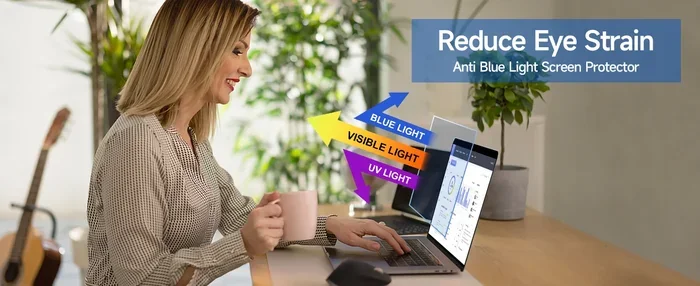
Blue light filter software like Night Shift or f.lux reduces the amount of blue light your screen emits. You can schedule these to turn on automatically after sunset. Blue light glasses add an extra layer of protection by filtering harmful wavelengths before they reach your eyes.
Many users report that blue light glasses help reduce eye strain and improve sleep quality. They are especially useful for people who work late hours on their laptops.
Blink More Often
It sounds simple, but conscious blinking can do wonders for your eyes. Try to remind yourself to blink fully and regularly while using your laptop. You can also place a small sticky note on your monitor as a reminder until it becomes a habit.
Take Regular Breaks
Do not just rest your eyes. Stand up, stretch, and move around. This improves blood circulation, reduces neck tension, and gives your eyes a proper break. Even a five-minute break every hour can significantly reduce eye fatigue.
Use Proper Ambient Lighting
Avoid working in complete darkness with just your laptop screen as the light source. Use a desk lamp or overhead light to create balanced ambient lighting. This reduces the contrast between your screen and your surroundings, which eases the load on your eyes.
Blue Light: What You Need to Know
Blue light gets a lot of attention when people talk about screen effects on eyes. But what exactly is it, and should you be worried?
Blue light is part of the visible light spectrum. It has a short wavelength and high energy compared to other colors. The sun is the biggest source of blue light, but screens also emit it. Your laptop, phone, and tablet all produce blue light in varying amounts.
In small doses, blue light is not harmful. It actually helps boost alertness and mood during the day. But too much exposure, especially at night, can cause problems. These include eye strain, sleep disruption, and potential long-term retinal damage.
The key is balance. During the day, blue light from screens is generally manageable. But evening screen use is where the real risk lies. That is why experts recommend cutting screen time at least one hour before bed or using blue light filters in the evening.
| Light Source | Blue Light Level | Eye Risk Level | Sleep Impact |
|---|---|---|---|
| Sunlight | Very High | Low (during day) | None |
| Laptop Screen | Moderate | Moderate | High (at night) |
| Phone Screen | Moderate to High | Moderate | High (at night) |
| LED Bulbs | Moderate | Low | Moderate |
| E-Reader (non-backlit) | Low | Low | Low |
As you can see, your laptop screen falls in the moderate range for blue light exposure. The risk increases when you use it in dark environments or late at night. Using screen filters and limiting evening use are the best ways to stay safe.
Signs You Are Experiencing Digital Eye Strain
How do you know if your laptop use is affecting your eyes? Watch out for these warning signs:
- Sore or burning eyes after a work session
- Frequent headaches that start behind the eyes
- Blurry vision that comes and goes
- Dry or watery eyes that feel irritated
- Neck and shoulder pain from poor posture
- Difficulty focusing on objects far away
- Increased sensitivity to light
If you notice any of these symptoms regularly, it is time to make changes. Ignoring them can lead to worsening vision problems over time.
Expert Insight: Dr. Sarah Mitchell, an optometrist with over 15 years of experience, says: “I see patients every week who dismiss their eye strain as just ‘tired eyes.’ But early intervention makes a huge difference. Simple changes like adjusting screen position and taking breaks can prevent chronic issues.”
Quick Tips for Healthier Screen Habits
Want to protect your eyes without overhauling your entire routine? Try these quick tips:
- Increase your font size so you do not have to squint.
- Clean your screen regularly to reduce glare and smudges.
- Use dark mode or a warm color theme in the evening.
- Sit at arm’s length from your screen for optimal distance.
- Stay hydrated to support tear production and eye moisture.
- Eat eye-friendly foods like carrots, leafy greens, and fish rich in omega-3 fatty acids.
- Get annual eye exams even if you think your vision is fine.
These habits take almost no extra time, but they add up to significant eye protection over the months and years ahead.
Common Mistakes That Make Screen Eye Strain Worse
Many people unknowingly make habits that increase the strain on their eyes. Here are the most common mistakes:
- Using your laptop in bed with the lights off. This creates extreme contrast and forces your eyes to work overtime.
- Ignoring the brightness setting and leaving it at maximum all the time.
- Sitting too close to the screen. This puts extra strain on your focusing muscles.
- Skipping breaks during long work sessions. Your eyes need regular rest just like the rest of your body.
- Not updating your prescription. Old glasses or contact lenses can make screen work much harder on your eyes.
Avoiding these mistakes alone can reduce your eye fatigue and discomfort significantly.
Conclusion
The answer to can laptop screen affect eyes is a clear yes. From digital eye strain and dry eyes to sleep disruption and long-term vision problems, the effects are real and well-documented. But the good news is that you have the power to reduce the damage. Simple changes like adjusting brightness, following the 20-20-20 rule, using blue light filters, and taking regular breaks can make a world of difference.
Your eye health matters just as much as any other part of your body. Treat it with the same care and attention. Start small, build better habits, and your eyes will thank you for years to come. Protect your vision today so you can enjoy clear, comfortable sight for the rest of your life.
Frequently Asked Questions
How many hours of laptop use is safe for eyes?
Most eye care professionals recommend following the 20-20-20 rule and taking a 15-minute break after every two hours of continuous screen use. There is no strict “safe” number of hours, but limiting prolonged use and building in regular breaks significantly reduces the risk of digital eye strain and other vision problems.
Do blue light glasses really work for laptop screens?
Yes, blue light glasses can help reduce eye strain and improve sleep quality, especially when used during evening screen time. They filter out a portion of the high-energy blue light emitted by laptop screens, which can otherwise disrupt your natural sleep cycle and cause eye fatigue.
Can laptop screens cause permanent eye damage?
There is no strong evidence that laptop screens cause permanent eye damage on their own. However, prolonged and unprotected exposure to blue light over many years may contribute to retinal damage in some individuals. The more immediate risks are temporary issues like dry eyes, blurry vision, and chronic eye strain.
What is the best screen brightness for eye comfort?
The best brightness setting matches your surrounding ambient lighting. In a well-lit room, you can use a brighter screen. In a dim room, lower the brightness significantly. Many laptops have an auto-brightness feature that adjusts the screen based on the light in your environment, which is a great option for eye protection.
Does screen resolution affect eye strain?
Yes, screen resolution plays a role in eye comfort. A low-resolution screen forces your eyes to work harder to process pixelated text and images. A high-resolution display renders sharper, smoother images that are much easier on your eyes, reducing the risk of eye fatigue and headaches.
How can I reduce dry eyes while using my laptop?
To reduce dry eyes, make a conscious effort to blink more often while using your laptop. Use artificial tears or lubricating eye drops if needed. Also, ensure your room has proper ambient lighting and avoid pointing fans or air conditioners directly at your face, as dry air can worsen the problem.