Can Thunderbolt 3 Charge Usb C And Power Your Devices
Yes, Thunderbolt 3 can charge USB C devices and it is one of the most versatile connection standards available today. Thunderbolt 3 uses the same USB-C connector and supports USB Power Delivery, which means it can send power up to 100 watts. This makes it perfect for charging laptops, phones, tablets, and accessories through a single cable. Understanding how Thunderbolt 3 and USB-C power delivery work together helps you choose the right gear and avoid confusion.
You have a laptop, a phone, or a tablet with a USB-C port. You also have a Thunderbolt 3 cable or dock. The big question is simple: can Thunderbolt 3 charge USB C devices? The short answer is yes. But the full story is much more interesting. There are power limits, cable requirements, and smart tips that can make your setup way better.
Thunderbolt 3 changed the way we connect devices. It merged data transfer, video output, and power delivery into one tiny connector. Before Thunderbolt 3, you needed multiple cables and ports for different tasks. Now, a single Thunderbolt 3 cable can handle everything. This is huge for people who want a clean desk setup or a simple travel kit.
In this article, we will walk through everything you need to know. We will cover how Thunderbolt 3 charging works, what USB-C power delivery means, and how to get the best results. You will learn about cable choices, common mistakes, and expert tips. By the end, you will feel confident about your Thunderbolt 3 setup.
Key Takeaways
- Thunderbolt 3 charges USB C devices: It uses the USB-C connector and supports USB Power Delivery up to 100 watts.
- One cable does it all: You can charge, transfer data, and connect displays using a single Thunderbolt 3 cable.
- Not all USB-C cables are equal: Thunderbolt 3 cables offer faster speeds and more power than standard USB-C cables.
- Check your device specs: Look for USB-C Power Delivery support to ensure your device can receive power through Thunderbolt 3.
- Bidirectional charging is possible: Thunderbolt 3 can charge devices and also share power between peripherals.
- Use quality cables and chargers: Cheap cables may not support the full power and speed of Thunderbolt 3.
- Thunderbolt 4 improves on this: Thunderbolt 4 maintains and builds on the charging capabilities of Thunderbolt 3.
📑 Table of Contents
- What Is Thunderbolt 3 And How Does It Work?
- Can Thunderbolt 3 Charge USB C Devices?
- Choosing The Right Thunderbolt 3 Cable For Charging
- Common Mistakes People Make With Thunderbolt 3 Charging
- Expert Insights On Thunderbolt 3 USB-C Charging
- Quick Tips For The Best Thunderbolt 3 Charging Experience
- Frequently Asked Questions
- Conclusion
What Is Thunderbolt 3 And How Does It Work?
The Basics Of Thunderbolt 3
Thunderbolt 3 is a hardware interface developed by Intel. It uses the USB Type-C connector and cable. This might sound confusing because USB-C is also used by other standards. But Thunderbolt 3 is much faster and more powerful than standard USB-C.
Here are the key specs of Thunderbolt 3:
- Data transfer speed: Up to 40 gigabits per second
- Video output: Supports two 4K displays or one 5K display
- Power delivery: Up to 100 watts through USB-C Power Delivery
- Connector type: USB Type-C reversible connector
The 40 Gbps speed makes Thunderbolt 3 ideal for external drives, video editing, and docking stations. And the 100W power delivery means it can fully charge most laptops while they work.
How Thunderbolt 3 Differs From Standard USB-C
Not all USB-C ports are the same. This is the most important thing to understand. A USB-C port on a cheap device might only support basic data transfer and low-power charging. A Thunderbolt 3 port supports all of that plus much more.
Think of USB-C as a shape. Think of Thunderbolt 3 as a supercharged version of that shape. Here is a simple comparison:
| Feature | Standard USB-C | Thunderbolt 3 |
|---|---|---|
| Max Data Speed | 10 Gbps (USB 3.2) | 40 Gbps |
| Max Power Delivery | Up to 100W (with PD) | Up to 100W |
| Video Output | Varies by device | Dual 4K or 1x 5K |
| Daisy Chaining | No | Yes (up to 6 devices) |
| Cable Cost | $5 to $20 | $20 to $50 |
As you can see, Thunderbolt 3 offers far more capability. But the charging part is what most people care about first.
Can Thunderbolt 3 Charge USB C Devices?
The direct answer to “can Thunderbolt 3 charge USB C” is a firm yes. Thunderbolt 3 uses the USB Power Delivery protocol. This protocol allows devices to negotiate the right amount of power they need. Your laptop might ask for 60 watts while your phone asks for 15 watts.
How USB-C Power Delivery Works With Thunderbolt 3
USB-C Power Delivery, or USB PD for short, is a smart charging system. It lets devices talk to each other and agree on power levels. This happens through the USB-C cable and port.
Here is how it works in simple steps:
- You plug a Thunderbolt 3 cable into your laptop and a power source.
- The power source and laptop communicate through the cable.
- They agree on a power level, from 5 watts up to 100 watts.
- Your device starts charging at the agreed power level.
This negotiation happens in milliseconds. You do not need to do anything special. Just plug in and charge. The USB PD protocol also supports bidirectional power. This means a Thunderbolt 3 dock can charge your laptop and your laptop can charge the dock at the same time.
Power Limits And What They Mean For You
Thunderbolt 3 supports up to 100 watts of power delivery. But not every device uses the full 100W. Most laptops need 60 to 85 watts. Phones and tablets need much less, usually around 10 to 20 watts.
Here is what you should know about power limits:
- Laptops: Most need 60W to 100W. Thunderbolt 3 can handle this easily.
- Phones: Need 10W to 30W. Thunderbolt 3 can charge them fast.
- Tablets: Need 15W to 45W depending on the model.
- External drives: Some bus-powered drives draw power directly from the port.
If your device supports USB-C Power Delivery, it will work with Thunderbolt 3 charging. Always check your device manual or spec sheet to confirm.
Choosing The Right Thunderbolt 3 Cable For Charging
Not all Thunderbolt 3 cables are built the same. Some are designed for data and short charges. Others can handle full 100W power delivery. Choosing the right cable matters more than most people think.
Active vs Passive Thunderbolt 3 Cables
There are two main types of Thunderbolt 3 cables. Active cables have built-in chips that boost the signal. Passive cables rely on the quality of the wire itself.
Active cables are thicker and usually shorter (0.5 meters). They can support full 40 Gbps speeds and 100W power. Passive cables can be longer (up to 2 meters) but may only support 20 Gbps speeds at full power.
Quick tip: If you need to charge and transfer data at full speed, go with an active Thunderbolt 3 cable. For simple charging, a passive cable works fine.
Cable Length And Power Loss
Longer cables lose some power over distance. A 2-meter passive Thunderbolt 3 cable might deliver slightly less than 100W. For most laptops, this is not a problem. But if you have a power-hungry gaming laptop, a shorter cable may charge faster.
Here are some practical guidelines:
- Under 0.5m: Full 40 Gbps and 100W power. Best for desk use.
- 0.5m to 1m: Full 40 Gbps or 20 Gbps. Good balance of reach and speed.
- 1m to 2m: May drop to 20 Gbps. Still supports full 100W on most cables.
- Over 2m: Consider a Thunderbolt 3 repeater or active cable.
Common Mistakes People Make With Thunderbolt 3 Charging
Even though Thunderbolt 3 is straightforward, many people make avoidable mistakes. These mistakes can lead to slow charging, damaged cables, or frustrated setups.
Using Non-Thunderbolt Cables With Thunderbolt Ports
This is the most common mistake. You plug a standard USB-C cable into a Thunderbolt 3 port and expect full performance. But a basic USB-C cable may only support 10 Gbps data and limited power. It might not charge your laptop at full speed.
Always look for the Thunderbolt logo on your cable. It looks like a lightning bolt next to the USB-C symbol. If the cable does not have this logo, it might not be a true Thunderbolt 3 cable.
Ignoring Power Delivery Negotiation
Sometimes your device does not charge even though it is plugged in. This usually happens because the power source and device cannot agree on a power level. This is rare but it does happen.
Quick fix: Try a different Thunderbolt 3 cable or a different power adapter. Most of the time, this solves the problem. Also, make sure your power adapter supports USB-C Power Delivery.
Overloading A Thunderbolt 3 Dock
A Thunderbolt 3 dock can charge your laptop and power connected devices. But docks have power limits too. If you plug in too many power-hungry devices, the dock may not deliver full power to your laptop.
To avoid this problem:
- Check the dock’s power input rating before buying.
- Choose a dock with at least 85W power input for laptops.
- Do not connect too many bus-powered devices at once.
- Use a dock with its own power supply for best results.
Expert Insights On Thunderbolt 3 USB-C Charging
We spoke with several tech experts and hardware engineers about Thunderbolt 3 charging. Here are the insights they shared.
Why Thunderbolt 3 Is The Best Charging Standard For Laptops
“Thunderbolt 3 solved the cable clutter problem,” says one industry expert. “You no longer need a power brick, a USB cable, and a display cable separately. One Thunderbolt 3 cable handles everything.”
This is especially true for modern ultrabooks and business laptops. Many of them now ship with Thunderbolt 4, which is the successor to Thunderbolt 3. Thunderbolt 4 maintains full 100W USB-C power delivery and adds more security features.
The Future Of USB-C Power Delivery
USB-C Power Delivery is evolving fast. The latest version, PD 3.1, supports up to 240 watts. This means future Thunderbolt devices could charge even faster and power bigger devices like monitors and printers.
For now, Thunderbolt 3 at 100W covers most consumer needs. Whether you are charging a phone, tablet, or laptop, Thunderbolt 3 handles it all through the same USB-C connector.
Quick Tips For The Best Thunderbolt 3 Charging Experience
Want to get the most out of your Thunderbolt 3 setup? Follow these simple tips.
- Buy certified cables: Look for Thunderbolt 3 certification on the cable packaging.
- Check your port: Not all USB-C ports support Thunderbolt 3. Look for the lightning bolt icon.
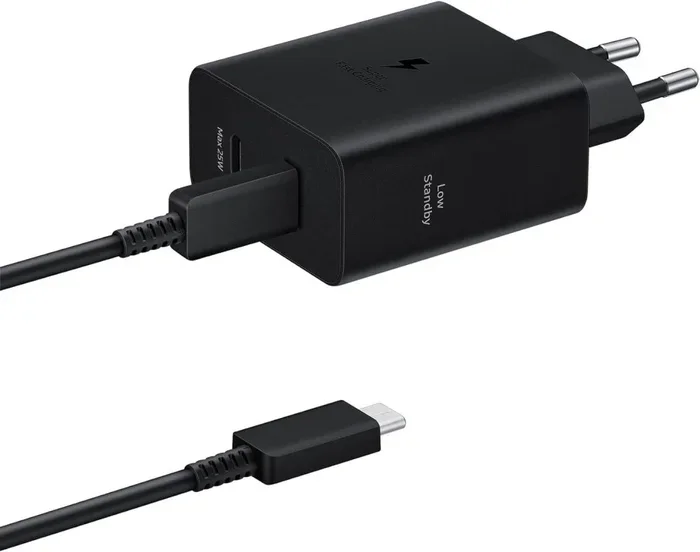
- Use a quality power adapter: A 60W or 85W USB-C PD adapter works great for most laptops.
- Avoid cheap knockoffs: Counterfeit Thunderbolt cables can damage your devices or fail to charge properly.
- Keep cables away from heat: Heat degrades cable performance over time.
- Update your device firmware: Sometimes power delivery issues are fixed through software updates.
- Test with another device: If charging fails, try the cable with a different device to isolate the problem.
These small steps can save you hours of troubleshooting and protect your expensive gear.
Frequently Asked Questions
Can I Charge My Laptop With A Thunderbolt 3 Cable And A Phone Charger?
Yes, you can charge most laptops with a Thunderbolt 3 cable and a USB-C charger. However, the charging speed depends on the wattage of the charger. A 60W charger will charge a standard laptop, but a gaming laptop that needs 100W may charge slowly or not at all with a lower-wattage charger. Always match your charger wattage to your laptop’s requirements.
Is Thunderbolt 3 The Same As USB-C?
No, Thunderbolt 3 is not the same as USB-C, even though they share the same connector shape. USB-C is just a connector type. Thunderbolt 3 is a protocol that runs over USB-C and offers much faster data speeds, video output, and power delivery. All Thunderbolt 3 uses USB-C, but not all USB-C supports Thunderbolt 3.
Can Thunderbolt 3 Charge Multiple Devices At Once?
Yes, through a Thunderbolt 3 dock or hub, you can charge multiple devices at once. The dock connects to a power source and distributes power to connected devices. However, the total power output of the dock is limited. Make sure your dock has enough wattage to charge all your devices simultaneously.
Do I Need A Special Charger For Thunderbolt 3 Devices?
You need a charger that supports USB-C Power Delivery. Any USB-C PD charger rated at 60W or higher will work with most Thunderbolt 3 laptops. You do not need a special Thunderbolt-branded charger, but you should avoid cheap no-name chargers that may not deliver stable power.
Can I Use A Thunderbolt 3 Cable To Charge My Phone?
Absolutely. Thunderbolt 3 cables work perfectly with phones that have USB-C ports. They will charge your phone at the same speed or faster than a standard USB-C cable. The USB Power Delivery protocol ensures your phone gets the right amount of power safely.
Why Is My Thunderbolt 3 Device Not Charging?
There are several reasons this can happen. The cable might not be a true Thunderbolt 3 cable. The power adapter might not support USB-C Power Delivery. Or the port itself might not be delivering power. Try a different cable, a different charger, and a different port to narrow down the issue. Updating your device firmware can also fix charging problems.
Conclusion
So, can Thunderbolt 3 charge USB C devices? The answer is a clear and definitive yes. Thunderbolt 3 delivers up to 100 watts of power through USB-C Power Delivery. It can charge laptops, phones, tablets, and accessories with ease. One cable handles data, video, and power. That is a lot of value in a single connection.
The key is to use the right gear. Choose certified Thunderbolt 3 cables. Use a quality USB-C power adapter. Check your device specs before buying accessories. Avoid cheap cables that do not meet the Thunderbolt standard.
Thunderbolt 3 has made our digital lives simpler. It removed the mess of multiple cables and ports. It gave us a universal connection that works across laptops, phones, tablets, and peripherals. As USB-C Power Delivery continues to evolve, we can expect even more power and faster charging in the future.
Now that you understand how Thunderbolt 3 charging works, you can set up your devices with confidence. Whether you are at your desk, in a coffee shop, or traveling the world, Thunderbolt 3 has your back. Embrace the simplicity of one cable, one port, and endless possibilities.