Can Dvi Support 4k Resolution And High Quality Display
Can DVI Support 4K? The short answer is: it depends on the DVI type and your setup. Dual-link DVI can technically carry a 4K signal, but only at 30Hz, which feels choppy for everyday use. If you want smooth 4K at 60Hz, you need DisplayPort or HDMI 2.0 or higher. This guide breaks down everything you need to know about DVI and 4K resolution, so you can make the right choice for your display.
If you are connecting a monitor or TV and wondering whether your DVI cable can handle 4K resolution, you are not alone. Many people still have DVI ports on their computers or monitors and want to know if they can push ultra high definition content through them. The truth is, the answer is more complicated than a simple yes or no. It really comes down to the type of DVI you are using, the hardware on both ends, and what you plan to do with your display.
In this article, we will walk you through everything you need to know about DVI and 4K support. We will look at the different DVI connector types, explain bandwidth limits, compare DVI with other ports, and give you practical tips. By the end, you will know exactly what to expect and how to get the best picture quality from your setup.
Key Takeaways
- Single-link DVI cannot support 4K at all. It lacks the bandwidth needed for ultra high definition.
- Dual-link DVI can pass a 4K signal, but only at 30Hz. This works for static images but not smooth video or gaming.
- HDMI 2.0 and DisplayPort 1.2 or higher are the real winners for 4K at 60Hz and beyond.
- Using a DVI to HDMI adapter can help, but you still need the right source and cable quality.
- Older graphics cards and monitors may limit your 4K experience even with the right cable.
- Signal degradation and cable length can affect 4K performance over DVI connections.
- Plan your setup carefully by matching your port types, cable quality, and device capabilities.
📑 Table of Contents
What Is DVI and How Does It Work?
DVI stands for Digital Visual Interface. It was introduced in the late 1990s as a way to connect displays to computers. Back then, it was a huge step forward. It replaced older analog connections like VGA and offered a cleaner, sharper digital signal. For many years, DVI was the standard port on desktop computers and monitors.
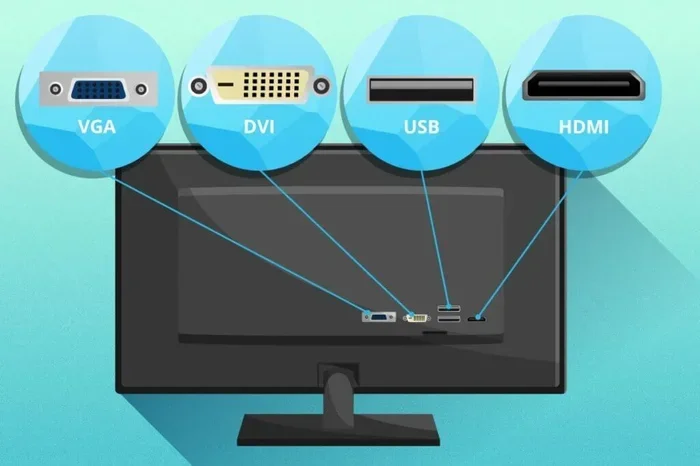
There are three main types of DVI connectors. Each one handles signals differently, and that matters a lot when we talk about 4K resolution.
DVI-A: Analog Only
DVI-A carries only an analog signal. This type was designed for older CRT monitors. It cannot carry digital signals at all, so it has no use for 4K. If you see a DVI-A port, think of it as a legacy connection. It is not capable of delivering the high pixel counts needed for ultra high definition.
DVI-D: Digital Only
DVI-D carries a pure digital signal. This is the type you will most often find on modern devices. There are two versions: single-link and dual-link. The dual-link version has more pins and can push more data. When we ask can DVI support 4K, this is the connector that makes it possible, at least to a point.
DVI-I: Integrated (Analog and Digital)
DVI-I supports both analog and digital signals. It is the most versatile of the three. However, its digital bandwidth is the same as DVI-D of the same link type. So a DVI-I single-link still cannot do 4K, and a DVI-I dual-link has the same 4K limits as DVI-D dual-link.
Can Single-Link DVI Handle 4K?
The honest answer here is no. Single-link DVI simply does not have enough bandwidth to carry a 4K signal. Let us break down why this is the case.
A single-link DVI connection has a maximum bandwidth of about 165 megahertz. That is enough for a resolution of 1920 by 1200 at 60Hz. But 4K resolution is 3840 by 2160 pixels. That is more than four times the number of pixels in a full HD screen. To push that many pixels, you need a much wider data pipe.
With single-link DVI, you can run a 4K display, but only at a reduced refresh rate. In practice, the best you can get is around 30Hz. At that speed, the image feels sluggish. Moving your mouse or scrolling through a webpage will look choppy. Watching video at 30Hz is not a pleasant experience either. So for all practical purposes, single-link DVI is not a viable option for 4K.
Why Bandwidth Matters for 4K
Every pixel on your screen needs data to tell it what color and brightness to display. More pixels mean more data. 4K resolution demands a lot of bandwidth because there are over eight million pixels being refreshed dozens of times per second. Single-link DVI was designed for a much lower pixel count. It was built for the displays of its era, not for the ultra high definition monitors we use today.
Can Dual-Link DVI Support 4K Resolution?
This is where things get interesting. Dual-link DVI doubles the bandwidth by adding more pins and data lanes. The maximum bandwidth jumps to about 330 megahertz. That is enough to technically carry a 4K signal.
But there is a catch. Dual-link DVI can support 4K at 30Hz only. It cannot reach the 60Hz refresh rate that makes 4K feel smooth and responsive. For static images, presentations, or reading documents, 30Hz is tolerable. But for anything involving motion, it falls short.
What 30Hz Means in Real Life
At 30Hz, your screen refreshes the image 30 times per second. Compare that to 60Hz, which refreshes 60 times per second. The difference is very noticeable. At 30Hz, you may see flickering, motion blur, or lag during fast movements. If you are a gamer or a video editor, 30Hz 4K is not acceptable. You need at least 60Hz for a comfortable experience.
Some people try to use dual-link DVI for 4K gaming and run into frustration. The frame rate drops, the visuals stutter, and the overall experience feels underwhelming. That is why most experts recommend using a different port for 4K content.
Can You Overclock Dual-Link DVI for 4K at 60Hz?
Some users wonder if they can push dual-link DVI past its limits. In rare cases, with specific hardware and reduced color depth, you might squeeze out a 60Hz signal. But this is not reliable. It can cause display errors, dropped frames, and instability. We do not recommend relying on this workaround. It is better to use a port that was designed for 4K from the start.
DVI vs HDMI vs DisplayPort for 4K
If DVI has limits with 4K, what should you use instead? Let us compare the three most common display connection types.
DVI for 4K
As we have covered, dual-link DVI can handle 4K at 30Hz. It works for basic tasks but falls short for anything that needs smooth motion. DVI also does not support audio. You would need a separate audio connection if your setup requires sound.
HDMI for 4K
HDMI has evolved a lot over the years. HDMI 1.4 can carry 4K at 30Hz, similar to dual-link DVI. But HDMI 2.0 and later versions can deliver 4K at 60Hz with ease. HDMI 2.1 goes even further, supporting 4K at 120Hz and even 8K. HDMI also carries audio through the same cable, which is a big convenience.
DisplayPort for 4K
DisplayPort is often the best choice for 4K. DisplayPort 1.2 supports 4K at 60Hz. DisplayPort 1.4 and 2.0 push the limits even higher, supporting higher refresh rates and HDR content. DisplayPort also supports daisy-chaining, which means you can connect multiple monitors to a single port. This makes it ideal for professional and creative workflows.
Comparison Table
| Feature | Dual-Link DVI | HDMI 2.0 | DisplayPort 1.2 |
|---|---|---|---|
| Max 4K Resolution | 3840 x 2160 | 3840 x 2160 | 3840 x 2160 |
| Max Refresh Rate at 4K | 30Hz | 60Hz | 60Hz |
| Audio Support | No | Yes | Yes |
| HDR Support | No | Yes | Yes |
| Daisy-Chaining | No | No | Yes |
| Common Availability | Older systems | Wide | Wide |
How to Get 4K Working with DVI
If you are stuck with a DVI-only setup and still want to use a 4K display, there are some options. Let us walk through them.
Use a DVI to HDMI Adapter
A DVI to HDMI adapter can let you connect a DVI output to an HDMI monitor. This works well because the digital signal is the same. The adapter just changes the connector shape. However, the adapter will not add any extra bandwidth. If your DVI port is dual-link and your monitor supports 4K at 30Hz, you will get that result. The adapter does not magically upgrade the signal.
Check Your Graphics Card
Your graphics card plays a big role in whether 4K works over DVI. Older GPUs may not output a 4K signal through DVI at all. Even if they do, the refresh rate may be lower than expected. Check your GPU specifications to confirm its 4K output capabilities over DVI. If your card does not support it, no cable or adapter will fix the problem.
Upgrade Your Cable
Not all DVI cables are created equal. A high quality dual-link DVI cable with proper shielding can make a difference. Cheap or damaged cables may cause signal loss, artifacts, or a failure to display 4K at all. Look for cables that are rated for high bandwidth and are not excessively long. Longer cables are more prone to signal degradation, which can hurt your 4K experience.
Consider a DisplayPort or HDMI Upgrade
If your goal is a smooth 4K experience, the best path forward is to upgrade your connection. Add a DisplayPort or HDMI 2.0 output to your setup. Many modern graphics cards have multiple ports. You can buy an affordable adapter or a new cable and instantly get a better result. The small cost of upgrading pays off in a much better viewing experience.
Quick Tips for DVI 4K Setups
- Always use a dual-link DVI cable if you are attempting 4K.
- Keep your cable as short as possible to reduce signal loss.
- Check your monitor and GPU specs before buying any adapter.
- Update your graphics drivers to ensure 4K support is enabled.
- Use a certified adapter to avoid compatibility issues.
- If you notice flickering or artifacts, the cable or adapter may be faulty.
Is DVI Still Worth Using for 4K in 2024?
The short answer is: probably not. DVI technology is aging. It was designed for a different era of displays. While it can technically carry a 4K signal in limited circumstances, it does not deliver the experience that modern users expect. Smooth motion, high refresh rates, HDR support, and audio are all missing or limited on DVI.
If you are building a new setup or upgrading your display, invest in HDMI 2.1 or DisplayPort 2.0 connections. These modern ports handle 4K, 8K, and even higher resolutions with ease. They carry audio, support HDR, and offer refresh rates that make everything feel buttery smooth.
That said, if you have an older computer or monitor with only DVI, do not throw it away. You can still use it for 4K at 30Hz for tasks like reading, browsing, or viewing static images. Just know what you are getting into and set your expectations accordingly.
Common Mistakes People Make with DVI and 4K
- Using a single-link DVI cable for 4K. This will not work at all. Always verify you have a dual-link cable.
- Assuming any DVI port supports 4K. Check the port type and your GPU specs first.
- Ignoring cable quality. A cheap or damaged cable can cause all sorts of 4K display problems.
- Forgetting about audio. DVI does not carry sound. You need a separate audio solution.
- Using long unshielded cables. Signal degradation over long runs is a real issue that hurts 4K performance.
Expert Insight: What Pros Recommend
Display technology experts consistently advise against relying on DVI for 4K in professional environments. Whether you are a video editor, a graphic designer, or a gamer, the limitations of dual-link DVI at 30Hz will hold you back. The consensus is clear: use DisplayPort or HDMI 2.0 or higher for any serious 4K work. These connections offer the bandwidth, features, and future-proofing that DVI simply cannot match.
If you are stuck with DVI for now, a DVI to DisplayPort or DVI to HDMI active adapter can bridge the gap. These adapters take the DVI signal and convert it to a modern format. They cost little and can make a big difference. Just make sure the adapter supports the resolution and refresh rate you need.
Key Takeaways
- Single-link DVI cannot support 4K. It lacks the bandwidth for even a basic 4K signal.
- Dual-link DVI can support 4K at 30Hz only. This works for static content but not smooth video or gaming.
- HDMI 2.0 and DisplayPort 1.2 are the real solutions for 4K at 60Hz. They offer the bandwidth and features DVI cannot match.
- Always check your hardware. Your GPU, monitor, and cable all need to support 4K for it to work properly.
- Adapters can help, but they do not add bandwidth. A DVI-to-HDMI adapter will not turn single-link DVI into a 4K powerhouse.
- Plan for the future. If you are buying new equipment, choose modern ports like HDMI 2.1 or DisplayPort 2.0 for the best 4K experience.
Frequently Asked Questions
Can I use a single-link DVI cable for 4K?
No, single-link DVI does not have enough bandwidth to carry a 4K signal. You will need a dual-link DVI cable at minimum, and even then you will only get 4K at 30Hz.
What is the difference between DVI-D and DVI-I for 4K?
DVI-D carries only a digital signal, while DVI-I supports both digital and analog. For 4K, the digital portion is what matters. Both DVI-D and DVI-I dual-link have the same 4K limits at 30Hz.
Can I get 4K at 60Hz over DVI?
No, dual-link DVI maxes out at 4K 30Hz. To get 4K at 60Hz or higher, you need HDMI 2.0, DisplayPort 1.2, or a newer connection standard.
Do I need a special cable for 4K over DVI?
You need a certified dual-link DVI cable that supports high bandwidth. Not all DVI cables are equal. A cheap or damaged cable can prevent 4K from working properly.
Can a DVI to HDMI adapter enable 4K?
Yes, but only if your source port is dual-link DVI. The adapter converts the signal but does not add extra bandwidth. You will still be limited to 4K at 30Hz over DVI.
Is it better to use DVI or HDMI for a 4K monitor?
HDMI is the better choice for 4K. HDMI 2.0 or higher supports 4K at 60Hz, carries audio, and supports HDR. DVI is limited to 4K at 30Hz and has no audio support.
=== CONCLUSION ===
So, can DVI support 4K? The answer is yes, but with significant limitations. Dual-link DVI can pass a 4K signal, but only at 30Hz. That is enough for static images and basic tasks, but it is not good enough for gaming, video editing, or anything that needs smooth motion. Single-link DVI cannot do 4K at all.
If you want the full 4K experience with 60Hz refresh rates, audio, and HDR support, you need to look beyond DVI. HDMI 2.0 or higher and DisplayPort 1.2 or higher are the connections that truly deliver on 4K promise. They offer the bandwidth, features, and flexibility that modern displays demand.
For now, if DVI is all you have, you can still make it work for 4K with the right cable and adapter. Just know what to expect. And if you are planning a new setup, invest in modern ports that will serve you well for years to come. Your eyes will thank you. Choose the right connection, and your 4K display will shine the way it was meant to.