Can You Charge Anker With Usb C Everything You Need To Know
Can You Charge Anker With Usb C? Yes, most modern Anker devices support USB-C charging and you can use a USB-C cable and USB-C power delivery adapter to power them up. This guide covers which Anker products work with USB-C, what charging speed you can expect, and how to pick the right USB-C charger for your needs.
If you own an Anker device, you have probably wondered whether you can charge it with a USB-C cable. The short answer is yes, in most cases. But the full picture is a bit more nuanced. Not every Anker product uses the same port, and not every USB-C charger delivers the same charging speed. This guide breaks it all down so you can charge your Anker devices with confidence.
USB-C has become the go-to charging standard for most electronics. It is fast, reversible, and widely supported. Anker, one of the top names in portable charging, has fully adopted USB-C across its newer product lines. Whether you have a power bank, a wall charger, or a battery pack, there is a good chance it supports USB-C charging. Let us dive into the details and answer every question you might have.
In this article, you will learn which Anker devices work with USB-C, what USB-C power delivery means for your charging speed, how to choose the right cable and adapter, and much more. By the end, you will know exactly how to charge your Anker gear using USB-C and get the best performance out of it.
Key Takeaways
- Most Anker devices support USB-C charging: From power banks to wall chargers, Anker has embraced the USB-C standard across many product lines.
- USB-C power delivery matters: The charging speed depends on the USB-C PD wattage your adapter and cable can handle.
- Not all Anker products use USB-C: Some older models still use micro-USB or USB-A ports, so check your device before buying.
- Use the right cable: A USB-C to USB-C cable is essential for the fastest charging speeds and safest power transfer.
- Anker makes great USB-C chargers: Products like the Anker Nano and Anker 737 are built for USB-C PD charging.
- Safety features are built in: Anker USB-C chargers include overcharge protection, temperature control, and short-circuit prevention.
- Future-proof your setup: Investing in USB-C accessories now ensures compatibility with upcoming devices and standards.
📑 Table of Contents
- Can You Charge Anker With Usb C? The Short Answer
- Which Anker Devices Support USB-C Charging?
- How Fast Can You Charge Anker Devices With USB-C?
- Choosing the Right USB-C Charger for Anker Devices
- Common Mistakes When Charging Anker With USB-C
- Expert Tips for Best USB-C Charging with Anker
- Is USB-C Charging Better Than USB-A or Micro-USB for Anker?
- Final Thoughts: Can You Charge Anker With Usb C
Can You Charge Anker With Usb C? The Short Answer
The simple answer is yes. Most Anker devices released in the last few years come with USB-C ports. This includes popular products like the Anker PowerCore series, the Anker Nano charger, and the Anker 737 power station. You can plug in a USB-C cable and connect it to any USB-C power source to charge these devices.
However, there are a few things you should keep in mind. The charging speed depends on several factors. These include the USB-C PD rating of your charger, the quality of your cable, and the power requirements of your Anker device. Using a low-wattage adapter will result in slower charging speeds. And using a cheap or damaged cable can even be unsafe.
Why USB-C Has Become the Standard
USB-C is not just another connector type. It represents a major step forward in how we power our devices. The USB-C connector is small, reversible, and capable of delivering much more power than older standards. This is why Anker and many other brands have shifted to USB-C as their primary charging option.
With USB-C power delivery, you can charge devices faster and more efficiently. A single USB-C cable can handle data transfer, video output, and power delivery all at once. This makes it incredibly versatile. For Anker users, this means fewer cables and a simpler charging setup.
Which Anker Devices Support USB-C Charging?
Not every Anker product uses USB-C. Some older models still rely on micro-USB or USB-A ports. But the good news is that most current Anker devices are USB-C compatible. Here is a breakdown of popular Anker product lines and their USB-C support.
Anker PowerCore Series
The Anker PowerCore is one of the most popular portable chargers on the market. Many newer models in this series feature USB-C charging and USB-C power delivery. These battery packs allow you to charge your phone, tablet, or laptop on the go using a single USB-C cable.
For example, the Anker PowerCore III and Anker PowerCore Slim lines support USB-C input and output. This means you can charge the power bank itself via USB-C and then use it to charge other devices. The charging speed depends on the wattage of your USB-C wall charger.
Anker Wall Chargers
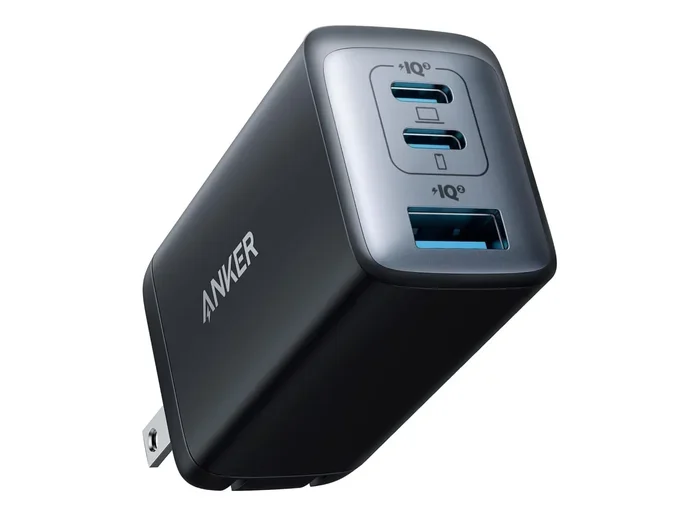
Anker wall chargers are designed to work with USB-C devices right out of the box. The Anker Nano series, for instance, is a compact USB-C charger that delivers fast power delivery to laptops, phones, and tablets. The Anker 737 is another popular option that supports high-wattage USB-C PD for fast charging.
These Anker chargers are built with safety features like overcharge protection and temperature control. They are fully USB-C compatible and designed to work seamlessly with Anker portable chargers and other devices.
Anker Power Stations and Solar Generators
For larger power needs, Anker offers power stations and solar generators. Many of these products include USB-C ports for fast charging of phones, laptops, and other USB-C devices. The Anker 767 and Anker 757 are great examples. They support USB-C PD input, which means you can recharge them quickly using a USB-C charger.
How Fast Can You Charge Anker Devices With USB-C?
Charging speed is one of the biggest reasons people switch to USB-C. With the right setup, you can charge your Anker devices much faster than with older micro-USB or USB-A connections. But the actual speed depends on several factors.
Understanding USB-C Power Delivery
USB-C power delivery, often called USB-C PD, is a charging standard that allows higher wattage through a USB-C cable. Standard USB-C can deliver up to 15 watts. But USB-C PD can go up to 100 watts or more. This is what makes fast charging possible for laptops and portable chargers.
When you use a USB-C PD charger with an Anker device that supports it, the two devices negotiate the best charging speed automatically. This process is called power negotiation. It ensures your device gets the right amount of power without overloading the circuit.
Factors That Affect Charging Speed
Several things determine how fast you can charge an Anker device with USB-C:
- Charger wattage: A higher-wattage USB-C adapter delivers faster charging speeds. For example, a 65-watt USB-C charger will charge an Anker PowerCore faster than a 20-watt adapter.
- Cable quality: Not all USB-C cables are created equal. A high-quality USB-C to USB-C cable supports higher power delivery and safer charging. Cheap cables may limit speed or even damage your device.
- Device compatibility: Your Anker device must support USB-C PD to benefit from fast charging. Check the product specs to confirm.
- Temperature: Extreme heat or cold can slow down charging speed. Anker devices are designed to work in normal room temperatures.
- Cable length: Longer USB-C cables may result in slightly slower charging due to resistance. Keep cables short for the best charging speed.
Choosing the Right USB-C Charger for Anker Devices
Not all USB-C chargers are the same. To get the best charging speed and safety, you need to pick the right adapter for your Anker device. Here is what to look for.
Wattage Matters
The wattage of your USB-C wall charger directly affects charging speed. For most Anker portable chargers and power banks, a 20-watt to 45-watt USB-C charger works well. For larger power stations or laptop charging, you may need a 65-watt or even 100-watt USB-C PD adapter.
Cable Compatibility
Your USB-C cable is just as important as your charger. Look for cables that are rated for USB-C PD and support the wattage you need. A USB-C to USB-C cable is the standard choice for charging Anker devices with USB-C input. Avoid ultra-cheap cables that do not list their power rating.
Brand Trust and Safety Certifications
Anker is a trusted brand in charging accessories, but you can also use USB-C chargers from other reputable brands. Look for USB-IF certification and safety marks like UL or CE certification. These ensure your USB-C charger meets safety standards and will not damage your Anker device.
| Charger Type | Wattage Range | Best For | USB-C PD Support |
|---|---|---|---|
| Anker Nano | 20W – 30W | Phones, small power banks | Yes |
| Anker 737 | 65W – 140W | Laptops, large power banks | Yes |
| Anker PowerPort III | 30W – 65W | Tablets, power banks | Yes |
| Third-party USB-C charger | 18W – 100W | Various Anker devices | Depends on model |
Common Mistakes When Charging Anker With USB-C
Even though USB-C charging is simple, people make mistakes that can slow down charging speed or even damage their devices. Here are the most common errors to avoid.
Using the Wrong Cable
Not every USB-C cable supports fast charging. Some cables are designed only for data transfer and can handle very low power delivery. Always use a USB-C cable rated for USB-C PD if you want the best charging speed for your Anker device.
Ignoring the Charger Wattage
Using a low-wattage USB-C adapter will result in slow charging. If your Anker device supports 45 watts of USB-C PD, a 10-watt charger will take much longer to fill it up. Always match your charger wattage to your device’s power requirements.
Charging in Extreme Temperatures
Extreme heat or cold can affect charging speed and battery health. Anker devices have built-in thermal protection, but it is still best to charge them at room temperature. Avoid leaving your Anker power bank in a hot car or near a heater while it is charging.
Using Damaged Cables or Adapters
A frayed or damaged USB-C cable can cause unsafe charging conditions. It may lead to slow charging speeds, intermittent connections, or even short circuits. Inspect your cables and adapters regularly and replace any that show signs of wear.
Expert Tips for Best USB-C Charging with Anker
Want to get the most out of your Anker devices and USB-C charging setup? Here are some expert tips that make a real difference.
- Use Anker-branded cables: Anker makes high-quality USB-C cables that are optimized for their own devices. They support the full USB-C PD wattage and include safety features.
- Unplug during peak charging: Once your Anker device reaches 100%, unplug it to avoid overcharging and extend battery life.
- Invest in a GaN charger: Gallium Nitride (GaN) USB-C chargers are smaller, cooler, and more efficient than traditional silicon chargers. Anker offers several excellent GaN USB-C options.
- Keep firmware updated: Some Anker devices receive firmware updates that improve charging speed and USB-C compatibility. Check the Anker app or website for updates.
- Use a power strip with USB-C: A USB-C power strip lets you charge multiple devices at once, including your Anker power bank, without using up your wall outlets.
Quick Tips for Everyday USB-C Charging
Here are some quick, practical tips you can use every day:
- Always check that your USB-C cable is fully inserted into both the charger and the Anker device.
- Use a short USB-C cable for faster charging when you do not need to move around.
- Store your USB-C cables coiled loosely to prevent internal wire damage.
- Buy USB-C chargers from reputable brands or directly from Anker.
- Clean the USB-C port on your Anker device regularly to remove dust and lint.
Is USB-C Charging Better Than USB-A or Micro-USB for Anker?
USB-C charging is generally better than USB-A or micro-USB in almost every way. It is faster, more efficient, and more convenient. The USB-C connector is reversible, so you never have to flip it to plug it in correctly.
USB-A ports are older and support lower power delivery. Micro-USB is even older and slower. If your Anker device has a USB-C port, you should always use it for the best charging experience. It is the future-proof choice that delivers faster charging speeds and better long-term compatibility.
That said, if you have an older Anker product that only supports micro-USB or USB-A, you can still use those ports effectively. Just know that you will not get the same charging speed or versatility as you would with USB-C.
Final Thoughts: Can You Charge Anker With Usb C
The answer to Can You Charge Anker With Usb C is a clear yes. Almost all modern Anker devices support USB-C charging, and using a USB-C cable with a quality USB-C charger gives you the fastest and safest charging speeds. Whether you have a portable power bank, a wall charger, or a power station, USB-C is the way to go.
Just remember to use the right cable, match your charger wattage to your device, and avoid common mistakes like using damaged cables or low-quality adapters. With the right setup, your Anker devices will charge quickly, safely, and efficiently every single time.
If you take one thing away from this guide, let it be this: USB-C charging is the present and future of powering your Anker gear. Invest in good USB-C accessories, and you will enjoy faster charging and better compatibility for years to come.
Frequently Asked Questions
Can I charge my Anker PowerCore with a USB-C cable?
Yes, most modern Anker PowerCore models support USB-C charging. Check the product label or manual to confirm your specific model has a USB-C input port. Use a USB-C to USB-C cable and a compatible USB-C charger for the best results.
What USB-C charger wattage do I need for Anker devices?
For most Anker portable chargers and power banks, a 20-watt to 45-watt USB-C charger works great. For larger devices like Anker power stations or laptop charging, a 65-watt or higher USB-C PD adapter is recommended. Always check your device specifications for the ideal wattage.
Can I use a third-party USB-C charger with Anker products?
Yes, you can use a third-party USB-C charger with Anker devices as long as it supports USB-C PD and meets safety certifications like UL or CE. Avoid cheap, uncertified chargers that may not deliver safe or consistent power delivery.
Why is my Anker device charging slowly on USB-C?
Slow charging can happen if you are using a low-wattage USB-C adapter, a damaged cable, or a cable that does not support USB-C PD. Extreme temperatures can also slow down charging speed. Try using a higher-wattage charger and a quality USB-C cable to improve charging speed.
Are all Anker USB-C cables the same?
No, not all USB-C cables are the same. Some support only low power delivery and data transfer speeds, while others are rated for high-wattage USB-C PD and fast charging. Always choose USB-C cables that match the wattage and speed requirements of your Anker device.
Can I charge an Anker power bank and my phone with the same USB-C charger?
Yes, most USB-C chargers can charge multiple devices at once, including your Anker power bank and your phone. If your charger has multiple USB-C ports, you can charge both devices simultaneously. Just make sure the total wattage output is enough for both devices.