Can You Bend Fiber Optic Hdmi Cable Yes And Here Is How
Yes, you can bend a fiber optic HDMI cable, but you must follow the correct bend radius to prevent damage. Unlike standard copper cables, these optical cables use light to transmit data, making them more flexible yet delicate at the connectors. This guide will show you exactly how to bend your cable safely without losing signal quality.
When you are setting up a home theater or a gaming console, the last thing you want is a messy tangle of wires. A fiber optic hdmi cable promises the best picture and sound. But you might wonder if you can route it around corners. The short answer is yes. You can bend fiber optic hdmi cable, but you must do it carefully. Unlike standard copper wires, these cables use light to send data. This makes them different from the hdmi cable you are used to. If you bend them the wrong way, you damage the glass inside. This guide will show you exactly how to handle your fiber optic cable bend without breaking the connection. You will learn the safe limits, the right tools, and the best routing tricks.
Many people buy a bendable hdmi cable because they have tight spaces behind their TV. You might need to route the wire along a baseboard or through a wall. The good news is that hdmi cable bending is totally possible. You just need to know the rules. This article breaks down everything you need to know. We will cover the science, the steps, and the common errors to avoid. By the end, you will feel confident routing your optical hdmi cable like a pro. Let us dive into the world of flexible glass wiring and keep your audio video signal strong.
Key Takeaways
- Respect the Bend Radius: Always keep a gentle curve to avoid breaking the glass inside.
- Never Kink the Cable: Sharp angles cause permanent signal loss in fiber optic hdmi cables.
- Use Right-Angle Adapters: These help manage tight spaces without stressing the fiber.
- Check the Connector: The joints are the weakest point, so protect them during bending.
- HDMI 2.1 Support: Fiber optic hdmi cables handle high bandwidth, but bending requires care.
- Signal Loss is Real: Bending too tightly breaks the light path, killing your audio and video.
📑 Table of Contents
- What Is a Fiber Optic HDMI Cable and How Does It Work?
- Can You Bend a Fiber Optic HDMI Cable?
- Understanding the Bend Radius of Fiber Optic Cables
- How to Safely Bend Your Fiber Optic HDMI Cable
- Common Mistakes When Bending HDMI Cables
- Expert Tips for Fiber Optic HDMI Cable Management
- How Fiber Optic HDMI Cables Compare to Standard Copper Cables
- When to Replace Your Fiber Optic HDMI Cable
What Is a Fiber Optic HDMI Cable and How Does It Work?
A fiber optic hdmi cable is not a regular wire. It uses tiny strands of glass to carry data. These strands are thinner than a human hair. Light travels through the glass to send audio and video signals. This is very different from a standard copper hdmi cable. Copper cables use electricity, which creates some resistance. Fiber optic cables use light, which moves at incredible speed. This is why they can support hdmi 2.1 and high bandwidth over long distances. You can run a fiber optic cable for fifty feet or more without losing quality. This makes them perfect for large living rooms or home theaters.
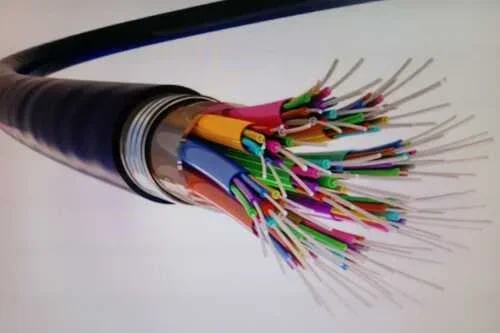
The structure of the cable matters a lot. There is a core that carries the light. Around the core is a cladding layer. This cladding reflects the light back inward. This process is called total internal reflection. It keeps the signal moving forward. Outside the cladding is a buffer coating. This protects the glass from moisture. The outermost layer is the jacket. This is the plastic shell you see. When you think about hdmi cable bending, you are dealing with this outer jacket. The jacket is flexible. The glass inside is not. Understanding this helps you see why you must be gentle. A fiber optic cable bend must respect the glass core. If the glass breaks, the light escapes. Your screen will flicker or go dark.
Can You Bend a Fiber Optic HDMI Cable?
Yes, you absolutely can bend a fiber optic hdmi cable. But you cannot bend it like a piece of string. The cable has a specific minimum curve it needs. This is called the bend radius. If you follow the bend radius, the cable stays safe. If you ignore it, you risk breaking the internal glass strands. A fiber optic hdmi bend must be smooth and gradual. Sharp corners are the enemy of optical cables. When you route your cable, imagine drawing a gentle arc. That is the shape you want to create.
Many people ask about hdmi cable flexibility. Fiber cables are actually quite flexible in the right hands. You can coil them or route them around furniture. The key is to never force a tight angle. Think of the cable like a garden hose. You can curve it around a corner easily. But if you kink it with a sharp bend, the water stops flowing. The same goes for light inside a fiber optic cable. A gentle curve lets the light pass through. A sharp kink blocks the light. So yes, you can bend the cable. Just make sure the curve is wide and smooth. This keeps your signal loss to a minimum.
Why Does Bending Matter for Signal Quality?
Bending matters because it affects the light path. When light hits a sharp bend, it reflects off the cladding wrong. Some of the light escapes the core. This is called macrobending loss. It weakens the signal traveling to your TV. You might notice sparkles on the screen. Or you might lose the picture entirely. With a fiber optic hdmi cable, maintaining a smooth curve keeps the light on track. This ensures you get the full 4K or 8K resolution your hdmi 2.1 setup offers. Proper cable management protects the light path. It also makes your setup look clean and organized.
Understanding the Bend Radius of Fiber Optic Cables
The bend radius is the most important number to know. It tells you the smallest safe curve for your cable. For most fiber optic hdmi cables, the minimum bend radius is about 25 to 50 millimeters. This is roughly one to two inches. You should never make a curve tighter than this. If you do, you risk breaking the glass fibers inside. The cable might still work at first. But over time, the damage gets worse. Eventually, the signal drops completely.
There are two types of bending to understand. The first is macro-bending. This is when you bend the cable too sharply. The second is micro-bending. This is when you squeeze or pinch the cable. Both types cause light to leak out. They both ruin your hdmi cable performance. Always check the manufacturer’s guide for the exact bend radius. Different brands have different rules. Some cables are more flexible than others. A flexible hdmi cable might have a smaller bend radius. But even then, you must respect the limit. Treating your fiber optic cable bend with care guarantees a long lifespan.
How the Bend Radius Affects Your Installation
When you install a fiber optic hdmi cable, you must plan your route. Look at the corners and curves in your path. If you have a tight corner, you need more space. You cannot just force the cable around a tight wall edge. You need room to make a gentle arc. This is where cable management tools help. You can use soft curves or corner protectors. These accessories give the cable room to breathe. They prevent sharp angles from forming. If you are running the cable through a wall, use a gentle sweeping turn. Do not make a 90-degree corner inside the wall. A sweeping curve keeps the bend radius safe. This simple step saves you from signal problems later.
How to Safely Bend Your Fiber Optic HDMI Cable
Now that you know the rules, let us look at the actual steps. Bending your fiber optic hdmi cable safely is easy when you follow a plan. You do not need special tools. Just a little patience and care. Here is how to do it right the first time.
First, plan your route before touching the cable. Measure the distance from your source to your TV. Look at the path you need to take. Identify every corner or obstacle. Second, create gentle curves. Do not make sharp turns. Imagine drawing a wide, smooth arc with the cable. Third, secure the cable with soft ties. Use velcro straps instead of hard plastic zip ties. Hard ties can compress the cable. This creates micro-bends that damage the glass. Fourth, leave some slack in the cable. Do not pull it tight. Slack gives you room to make curves without stretching the fiber. Fifth, test the connection after routing. Turn on your device and check for a clear picture.
Quick Tips for a Clean Install
- Use a straight tail: Leave at least five centimeters straight before the first bend.
- Avoid the connector: Never bend the cable right at the hdmi connector.
- Use right-angle adapters: These help change direction without bending the cable itself.
- Check for kinks: Run your fingers along the cable to feel for sharp spots.
- Keep it loose: A gentle curve is always better than a tight squeeze.
By following these steps, you protect your investment. A fiber optic cable bend done right looks great and works perfectly. Your home theater setup will run smoothly for years. You will enjoy flawless video and crisp audio without any interruptions. Remember that hdmi cable care starts with how you handle the cable during installation. Take your time, and your setup will thank you.
Common Mistakes When Bending HDMI Cables
Many people make avoidable mistakes when routing their cables. Knowing what not to do is just as important as knowing what to do. Here are the common errors that damage fiber optic hdmi cables.
The first mistake is kinking the cable. A kink is a sharp, sudden bend. This breaks the internal glass fibers instantly. You will lose the signal completely. The second mistake is pulling the cable too tight. This stretches the fiber optic cable. Stretching damages the glass strands and the outer jacket. The third mistake is ignoring the connector. The connection point is the most fragile part of the cable. Never bend the cable right at the hdmi connector. Always leave a straight tail of at least five centimeters. The fourth mistake is using the wrong cable ties. Hard ties can crush the cable housing. This squeezes the glass inside and creates micro-bends. Always use soft velcro ties for cable management. The fifth mistake is twisting the cable. A slight twist is okay. But a tight twist stresses the glass core. Keep the cable as straight as possible when routing it.
What Happens If You Bend the Cable Too Much?
If you bend a fiber optic hdmi cable too much, the light escapes. This causes signal loss. You might see sparkles or static on your screen. The audio might cut out randomly. In some cases, the picture disappears completely. Sometimes the damage is not visible right away. The cable might work for a few days and then fail. This is because the tiny glass strands are already broken. They continue to work until they break completely. This is why you must always respect the bend radius. It is much easier to prevent damage than to fix it. If you suspect you have over-bent your cable, replace it. Do not risk your viewing experience with a damaged wire.
Expert Tips for Fiber Optic HDMI Cable Management
Proper cable management makes a huge difference. It protects your fiber optic hdmi cable and keeps your room looking clean. Here are expert tips for routing your cables safely.
Start by using cable channels. These are raceways that hide your wires along the wall. They allow you to make smooth, gradual turns. You can also use flexible conduit for extra protection. This is especially useful if the cable runs along the floor. Another expert tip is to avoid running the cable near sharp edges. If the cable rubs against a table leg or a door frame, it wears down over time. This creates a weak spot that breaks easily. You should also consider the temperature. Extreme heat or cold can make the cable housing brittle. A brittle housing cracks easily when you bend the cable. Keep your optical hdmi cable away from direct sunlight and heaters.
Using Right-Angle Adapters for Tight Spaces
When you have a very tight space, right-angle adapters are your best friend. These adapters plug into your TV or source device. They change the direction of the cable by 90 degrees. This means you do not have to bend the fiber optic cable itself. The adapter handles the turn. This is a great way to avoid hdmi cable bending altogether. You can route the cable straight down the wall. Then the adapter turns it flat against the back of the TV. This keeps the bend radius safe and looks very neat. It is a simple accessory that solves many routing problems.
How Fiber Optic HDMI Cables Compare to Standard Copper Cables
It helps to understand the difference between fiber and copper. A standard copper hdmi cable uses electrical signals. Copper is metal, and metal can be bent more aggressively. However, copper cables suffer from signal loss over long distances. A fiber optic hdmi cable uses light. Light travels much faster and farther. But the glass inside is delicate. You cannot bend copper as aggressively as you might think either. Both cables need care. However, the rules for bending are different. Copper has a copper core and shielding. Fiber has glass strands and cladding. When you bend a copper cable, you worry about the shielding. When you bend a fiber optic cable, you worry about the glass core. Knowing this difference helps you treat each cable correctly.
For short runs under ten feet, copper is usually fine. For runs over fifteen feet, fiber is the better choice. Fiber does not suffer from electromagnetic interference. This means no sparkles from a nearby power cord. If you have a long run, a fiber optic hdmi cable is the way to go. Just remember that hdmi cable bending rules for fiber are stricter. You must keep the curves gentle. Copper is more forgiving of sharp kinks. Fiber is not. Treat your fiber cable with the respect it deserves.
When to Replace Your Fiber Optic HDMI Cable
Even with the best care, cables can wear out. Knowing when to replace your fiber optic hdmi cable saves you frustration. The first sign is frequent signal drops. If your picture flickers or goes black often, the cable is damaged. The second sign is sparkles on the screen. These tiny lights mean the glass core is broken. Light is leaking out where it should not be. The third sign is no audio or video at all. If you try different ports and devices, the cable is likely the problem. The fourth sign is physical damage. If the jacket is cracked or the glass is visible, replace it immediately. A damaged cable can also hurt your equipment. It is not worth the risk. Always replace a cable that has been sharply bent or kinked.
Final Thoughts on Bending Your Fiber Optic HDMI Cable
Bending a fiber optic hdmi cable is perfectly safe if you follow the rules. Always respect the bend radius. Never make sharp kinks or tight corners. Use gentle curves and soft ties. Your fiber optic cable bend should look like a wide arc, not a sharp angle. By taking it slow, you keep your signal strong. You protect your investment in a high-quality home theater setup. Enjoy the stunning picture and sound that a fiber optic cable provides. With the right care, your cable will perform beautifully for years to come.
Frequently Asked Questions
Can I bend my fiber optic HDMI cable at a 90-degree angle?
No, you should never bend a fiber optic hdmi cable at a sharp 90-degree angle. Sharp kinks break the internal glass strands and cause permanent signal loss. Instead, use a gentle curve or a right-angle adapter to change direction safely.
What happens if I bend my fiber optic HDMI cable too tightly?
Bending the cable too tightly causes macrobending loss, where light escapes the glass core. This results in sparkles on your screen, flickering video, or a complete loss of audio and video. Always keep the curve wider than the minimum bend radius.
Do I need special tools to bend a fiber optic HDMI cable?
No, you do not need any special tools to bend a fiber optic cable. You only need your hands to create gentle curves and some soft velcro ties to secure it in place. The most important tool is patience to avoid sharp angles.
Can I run a fiber optic HDMI cable through a wall?
Yes, you can run a fiber optic hdmi cable through a wall, but you must plan the route carefully. Use sweeping curves instead of sharp corners inside the wall to maintain a safe bend radius. This protects the glass core from damage over time.
Is a fiber optic HDMI cable more flexible than a copper HDMI cable?
A fiber optic hdmi cable is highly flexible in terms of routing, but it is delicate when bent. Copper cables can handle tighter, sharper bends, but they suffer from signal loss over long distances. Fiber offers better performance but requires a gentler curve.
How do I protect my fiber optic HDMI cable from damage when bending?
To protect your fiber optic cable bend, always leave a straight tail near the connectors and avoid using hard plastic zip ties. Use soft velcro straps, keep the cable loose, and never twist it tightly. Proper cable management prevents micro-bends and signal loss.