Can You Connect 2 Bluetooth Speakers At The Same Time
Yes, you can connect 2 Bluetooth speakers at the same time, and it is easier than you think. Whether you want stereo sound, louder volume, or to fill a big room, pairing two speakers opens up a world of wireless audio possibilities. This guide walks you through every method, tip, and trick to make it work seamlessly.
Key Takeaways
- Dual speaker pairing is supported by most modern devices and Bluetooth versions.
- Stereo mode splits audio between two speakers for a richer listening experience.
- Speaker chaining and app-based methods offer flexible ways to connect multiple speakers.
- Not all speakers support dual pairing, so check compatibility first.
- Audio sync issues are common but can be fixed with simple adjustments.
- The motherboard inside your device plays a key role in enabling Bluetooth connectivity, and understanding its core components helps you troubleshoot connection problems.
📑 Table of Contents
- Can You Connect 2 Bluetooth Speakers At The Same Time?
- How Bluetooth Speaker Pairing Works
- Methods to Connect 2 Bluetooth Speakers
- Stereo Mode vs. Party Mode
- Benefits of Connecting Two Bluetooth Speakers
- Common Problems and How to Fix Them
- Quick Tips for the Best Experience
- Does Your Device Support It?
- Expert Insights on Multi-Speaker Setups
- Key Takeaways
- Conclusion
Can You Connect 2 Bluetooth Speakers At The Same Time?
Have you ever wanted to turn up the volume on your music but one speaker just was not cutting it? Maybe you are setting up for a backyard party or trying to get better sound in your living room. The good news is that connecting 2 Bluetooth speakers at the same time is totally possible. And the best part? You do not need to be a tech expert to pull it off.
Bluetooth technology has come a long way in recent years. What used to be a simple one-to-one connection is now capable of supporting multi-speaker setups. Whether your phone, tablet, or laptop can handle two speakers depends on a few things. But in most cases, the answer is a clear yes. Let us dive into how this works and what you need to know.
The ability to pair two speakers simultaneously gives you more control over your wireless audio experience. You get louder sound, better coverage, and in many cases, true stereo separation. Imagine one speaker playing the left channel and the other playing the right. That is the kind of upgrade that makes a real difference. So let us break down exactly how to make it happen.
How Bluetooth Speaker Pairing Works
Before you start connecting two speakers, it helps to understand the basics of Bluetooth speaker pairing. Bluetooth uses short-range radio waves to send audio from your device to a speaker. Each speaker acts as a receiver that picks up the signal and turns it into sound. When you pair a speaker, your device remembers it and can reconnect automatically.
Now, when you want to connect a second speaker, your device needs to support dual audio or multi-point connection. This feature allows your phone or computer to send audio to more than one speaker at the same time. Not every device has this capability, but most modern ones do. Let us look at the different ways you can set this up.
Understanding Bluetooth Versions
The version of Bluetooth your device uses matters a lot. Bluetooth 5.0 and newer versions handle multi-speaker connections much better than older versions. They offer a stronger signal, longer range, and more stable connections. If your phone or laptop has Bluetooth 4.2 or older, you might run into issues when trying to connect two speakers.
Here is a quick look at how Bluetooth versions affect your setup:
- Bluetooth 4.0-4.2: May support dual audio on some devices, but performance can be inconsistent.
- Bluetooth 5.0: Much better at handling multiple connections and maintaining stable audio.
- Bluetooth 5.2 and newer: Offers the best experience for connecting two or more speakers simultaneously.
The Bluetooth protocol inside your device determines how well it manages multiple connections. Think of it like a highway. The newer the version, the wider the road. More data can flow through without traffic jams or dropouts.
Methods to Connect 2 Bluetooth Speakers
There are several ways to connect two Bluetooth speakers at once. The method you choose depends on your device, your speakers, and what kind of setup you want. Let us walk through the most popular options.
Method 1: Use Built-in Dual Audio Feature
Many Android phones and some Windows laptops have a built-in feature called Dual Audio or Multi-Speaker. This feature lets you pair two Bluetooth speakers directly from your device settings. Here is how it usually works:
- Turn on both Bluetooth speakers and put them in pairing mode.
- Go to your device settings and open the Bluetooth menu.
- Pair the first speaker as you normally would.
- Pair the second speaker while the first one is still connected.
- Play your music or video, and audio will stream to both speakers.
This method is the easiest and does not require any extra apps. However, it works best on Android devices running version 10 or newer. iPhones do not have a native dual audio feature, so you will need a different approach (more on that below).
Method 2: Use Manufacturer Apps
Several speaker brands offer their own apps that make connecting two speakers simple. Brands like JBL, Sony, Bose, and Ultimate Ears have apps that include a party mode or stereo mode feature. These apps handle the connection behind the scenes so you do not have to fiddle with settings.
For example, JBL’s JBL Connect app lets you link two JBL speakers for a louder, more immersive sound. Sony’s Music Center app does the same for Sony speakers. These apps are free to download and are very user-friendly. Just make sure both speakers are from the same brand for the best results.
Method 3: Use a Bluetooth Transmitter
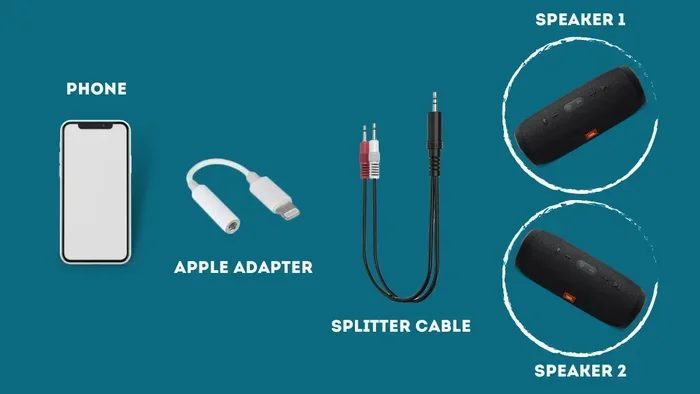
If your device does not support dual audio natively, you can use a Bluetooth transmitter. This small device plugs into your phone, tablet, or computer and sends audio to two speakers at the same time. It is a great workaround for devices that lack built-in multi-speaker support.
You simply plug the transmitter into your device, pair both speakers with it, and you are good to go. Some transmitters even let you adjust the volume of each speaker independently. This gives you more control over your audio output and sound balance.
Method 4: Chain Speakers Using Speaker-to-Speaker Connection
Some Bluetooth speakers support a daisy-chain or speaker-to-speaker connection. This means you pair the second speaker directly with the first one, rather than connecting both to your phone. The first speaker receives the audio from your phone and then sends it to the second speaker.
This method works well for speakers from the same brand. It also reduces the load on your phone’s Bluetooth connection. However, there can be a slight delay between the two speakers, which might affect audio sync in some cases.
Stereo Mode vs. Party Mode
When you connect two Bluetooth speakers, you typically have two options: stereo mode and party mode. Each one serves a different purpose, and knowing the difference helps you get the best experience.
Stereo Mode
In stereo mode, one speaker plays the left audio channel and the other plays the right channel. This creates a spatial sound effect that makes your music feel more immersive. It is perfect for listening in a room where you want to feel like you are in the middle of the music.
To use stereo mode, you usually need to assign one speaker as the left and the other as the right. Most manufacturer apps make this easy. Just look for the stereo or L/R split option in the settings. The result is a much wider and more detailed soundstage compared to a single speaker.
Party Mode
Party mode sends the same audio to both speakers at the same time. This is all about louder volume and filling a large space with sound. If you are hosting a barbecue, a beach day, or a small gathering, party mode ensures everyone can hear the music clearly.
The trade-off is that you lose stereo separation. Both speakers play the exact same track, so the sound feels more flat. But for pure volume and coverage, party mode is hard to beat. It is also a great way to boost speaker volume without needing expensive equipment.
Benefits of Connecting Two Bluetooth Speakers
So why bother connecting two speakers instead of just using one? There are several real benefits that make this setup worth your time.
- Louder volume: Two speakers produce more sound than one, making them ideal for large rooms or outdoor events.
- Better coverage: Placing speakers in different corners of a room ensures sound reaches every seat.
- Enhanced sound quality: Stereo mode creates a richer, more detailed listening experience.
- No extra wires: Everything is wireless, so you avoid tangled cables and messy setups.
- Portability: You can move the speakers around and rearrange your setup whenever you want.
- Cost-effective upgrade: Instead of buying one expensive speaker, two affordable ones can deliver similar or better results.
Another big benefit is flexibility. You can use two cheap portable speakers for a casual get-together and then separate them for everyday use. The wireless connection gives you the freedom to experiment with placement and find the sweet spot for your space.
Common Problems and How to Fix Them
Connecting two Bluetooth speakers is not always perfect. You might run into a few hiccups along the way. Here are the most common issues and simple fixes.
Audio Sync Delay
One of the most frustrating problems is when the two speakers are out of sync. You might hear a slight echo or notice that one speaker lags behind the other. This happens because Bluetooth has a small built-in delay, and when two speakers are involved, the delay can become noticeable.
To fix this, try reducing the distance between your device and the speakers. Also, make sure both speakers are the same model or from the same brand. Some apps allow you to manually adjust the delay, which can help align the audio perfectly.
One Speaker Keeps Disconnecting
If one speaker drops out frequently, it might be a range issue. Bluetooth has a typical range of about 30 feet. Walls, furniture, and other electronics can weaken the signal. Try moving the speakers closer to your device and away from interference sources like microwaves or Wi-Fi routers.
Also, check if your device’s Bluetooth range settings have any power-saving features that limit the connection. Disabling these features can sometimes stabilize the connection between your device and both speakers.
Poor Sound Quality
When you connect two speakers, the audio quality might drop slightly. This is because your device has to split the audio signal between two outputs. To maintain the best sound quality, use speakers that support high-quality Bluetooth codecs like aptX or LDAC.
Additionally, keep your speakers at a similar volume level. If one speaker is much louder than the other, it can throw off the balance. Most apps let you adjust the volume of each speaker independently, so use that feature to fine-tune your setup.
Quick Tips for the Best Experience
Getting the most out of your dual-speaker setup is all about small details. Here are some quick tips that make a big difference.
- Keep both speakers the same model: Matching speakers ensure consistent sound and better sync.
- Update your firmware: Check for speaker firmware updates that improve Bluetooth performance.
- Place speakers strategically: Position them at ear level and angle them toward the listening area.
- Use a dedicated app: Manufacturer apps often offer better control than built-in device settings.
- Charge both speakers fully: Low battery can cause dropouts and reduced audio quality.
- Minimize obstacles: Keep the path between your device and speakers clear for a stronger signal.
These small steps can transform your wireless streaming experience. You will notice clearer sound, fewer dropouts, and a more enjoyable listening session every time.
Does Your Device Support It?
Not every phone, tablet, or laptop can connect to two Bluetooth speakers at once. Before you try, it is worth checking if your device supports the feature. Here is a quick breakdown by device type.
- Android phones (Android 10+): Most support dual audio out of the box. Look for the feature in Bluetooth settings.
- iPhones: iPhones do not natively support dual Bluetooth audio. You will need a third-party app or a Bluetooth transmitter.
- Windows laptops: Many Windows 10 and 11 laptops support audio output to two Bluetooth speakers through settings.
- Mac computers: Macs support multiple Bluetooth audio devices but setup can be a bit more involved.
- iPads and tablets: Some iPad models support dual audio, but it varies by generation and operating system.
The Bluetooth connectivity hardware inside your device plays a big role here. The internal components on your device’s motherboard handle Bluetooth signals, and the quality of those components affects how well your device can manage multiple connections. Understanding what is inside your device can help you troubleshoot when things do not work as expected. You can learn more about the key components found on the motherboard to better understand how your device processes Bluetooth audio signals and manages connections.
Expert Insights on Multi-Speaker Setups
Audio engineers and tech experts agree that connecting two Bluetooth speakers is one of the simplest ways to improve your listening experience. According to sound specialists, the key is matching speakers with similar drivers and frequency responses. When two speakers are too different, the audio can sound unbalanced or muddy.
Experts also recommend placing speakers at least 3 to 5 feet apart for the best stereo effect. Too close together and you lose the spatial benefit. Too far apart and the audio sync issues become more noticeable. Finding the right distance takes a little experimentation, but the results are worth it.
Another expert tip is to avoid connecting more than two speakers unless your device explicitly supports it. Trying to connect three or more speakers can overload the Bluetooth connection and cause constant dropouts. Stick to two for the most reliable wireless audio experience.
Key Takeaways
- Connecting 2 Bluetooth speakers is possible on most modern devices with the right method.
- Stereo mode gives you spatial sound, while party mode maximizes volume.
- Built-in dual audio, manufacturer apps, transmitters, and speaker chaining are your main connection options.
- Audio sync issues are common but fixable with proper placement and settings.
- Match your speakers for the best sound quality and balance.
- Check your device compatibility before attempting a dual-speaker setup.
Conclusion
The short answer to can you connect 2 Bluetooth speakers at the same time is yes. With the right device, the right method, and a little patience, you can turn any room into your personal concert hall. Whether you choose stereo mode for richer sound or party mode for maximum volume, the experience is a big step up from using a single speaker.
Remember to check your device compatibility first, use the right connection method, and place your speakers thoughtfully. Small adjustments can make a huge difference in sound quality and sync. Once you get the setup right, you will wonder how you ever listened to music with just one speaker.
So go ahead and give it a try. Connect those two speakers, fire up your favorite playlist, and enjoy the immersive wireless audio experience you have been missing out on. Your ears will thank you.
Frequently Asked Questions
Can I connect two different brand Bluetooth speakers together?
Yes, you can connect two different brand speakers, but it works best if both speakers support the same connection method. Using a Bluetooth transmitter or your device’s built-in dual audio feature usually works across brands. However, matching speakers from the same brand often gives you better sound sync and balance.
Why is there a delay between my two connected Bluetooth speakers?
The delay happens because Bluetooth has a small built-in latency, and when audio is sent to two speakers, the signals can arrive at slightly different times. This is more noticeable with lower-quality Bluetooth codecs. Keeping the speakers close together and using Bluetooth 5.0 or newer can reduce the delay significantly.
Can I connect more than 2 Bluetooth speakers at once?
It depends on your device. Most phones and laptops support connecting two speakers at a time. Some advanced devices and apps allow you to connect three or more, but the experience may suffer from dropouts and sync issues. It is best to stick with two speakers for a reliable setup.
Do I need any special equipment to connect 2 Bluetooth speakers?
In most cases, you do not need any special equipment. Your phone or laptop and two Bluetooth speakers are all you need. However, if your device does not support dual audio, a Bluetooth transmitter can be a helpful and affordable workaround to connect two speakers simultaneously.
Will connecting two Bluetooth speakers drain my phone battery faster?
Yes, connecting two speakers uses more Bluetooth power than connecting one. Your phone has to maintain two separate connections and send audio to both at the same time. To save battery, keep your phone plugged in or fully charged during extended listening sessions.
Can I use one speaker for calls and the other for music?
Generally, no. When you connect two Bluetooth speakers, they both receive the same audio stream. You cannot split call audio to one speaker and music to the other using standard Bluetooth features. The dual connection is designed for a single audio source shared between both speakers.