Can You Use Bluetooth Speakers With Lg Tv Yes Easy Guide
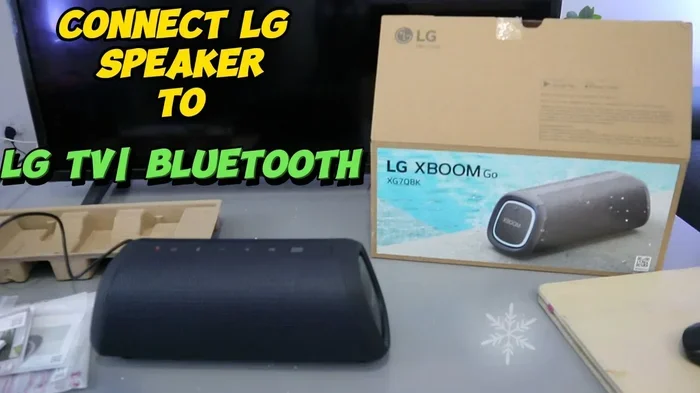
Yes, you can use Bluetooth speakers with an LG TV. Most modern LG smart TVs come with built-in Bluetooth, making wireless audio setup simple and fast. Whether you want louder sound, better bass, or a wireless listening experience, connecting Bluetooth speakers to your LG TV is straightforward and works with most speaker brands.
Can You Use Bluetooth Speakers With Lg Tv? The short answer is yes. If you own an LG television and want to ditch the built-in speakers for something with more punch, Bluetooth speakers are a great option. They are convenient, wireless, and work with most LG TV models. Whether you are watching movies, playing games, or streaming music, connecting a Bluetooth speaker to your LG TV can transform your viewing experience.
In this guide, we walk you through everything you need to know. From pairing your speaker to troubleshooting common problems, you will find clear, practical steps that work. We also share tips on choosing the right speaker and getting the best audio quality from your setup.
Many people ask, Can You Use Bluetooth Speakers With Lg Tv, because they want better sound without wires. The good news is that LG has made this process easier over the years. Most LG smart TVs released in the last five years include Bluetooth support right out of the box. Older models may need a small accessory, but even then, the process is simple and affordable.
Key Takeaways
- LG TVs with built-in Bluetooth let you pair wireless speakers easily without extra hardware.
- Older LG models may need a Bluetooth transmitter or adapter to enable wireless audio.
- Pairing is simple and usually takes less than two minutes once you know the steps.
- Audio latency can be an issue, but there are easy fixes to sync sound with video.
- Multiple speakers can sometimes be connected, but compatibility varies by TV model.
- Troubleshooting steps like resetting Bluetooth and updating firmware solve most connection problems.
📑 Table of Contents
- Can You Use Bluetooth Speakers With Lg Tv
- How Bluetooth Speakers Connect to LG TVs
- Step-by-Step Guide to Pairing Bluetooth Speakers
- Best Bluetooth Speakers for LG TVs
- Troubleshooting Common Bluetooth Speaker Issues
- Expert Tips for Better Bluetooth Audio on LG TVs
- Can You Use Bluetooth Speakers With Lg Tv: Final Thoughts
Can You Use Bluetooth Speakers With Lg Tv
The answer depends on your LG TV model. Most LG smart TVs made after 2018 have Bluetooth built in. This means you can connect wireless speakers directly without buying anything extra. If your TV was made before that, you might still have Bluetooth, but you may need to check the settings or add a Bluetooth transmitter.
Here is how to check if your LG TV has Bluetooth:
- Press the Home button on your LG remote.
- Go to Settings.
- Select Sound or All Settings.
- Look for Bluetooth or Sound Out.
- If you see a Bluetooth option, your TV supports wireless speakers.
If your LG TV does not have Bluetooth, do not worry. You can still use Bluetooth speakers. A Bluetooth adapter or transmitter plugs into your TV’s audio output and sends sound wirelessly to your speaker. This is a cheap and effective solution. You can learn more about using Bluetooth adapters on TVs in our guide on Can I Use A Bluetooth Adapter On My Tv.
Which LG TV Models Support Bluetooth Speakers
Most LG smart TVs in the mid-range and above support Bluetooth. Here are some popular series that work well with wireless speakers:
- LG OLED TVs (OLED B, C, G, and W series) all have Bluetooth.
- LG NanoCell TVs support Bluetooth on most models.
- LG UHD TVs in the UN7000 and newer series include Bluetooth.
- LG Smart TVs with webOS 4.0 or later generally support Bluetooth audio.
Check your specific model number on the LG website or in your TV settings to confirm. The LG TV Bluetooth feature is standard across most current models, so you are very likely to have it.
How Bluetooth Speakers Connect to LG TVs
Understanding how Bluetooth works with your LG TV helps you troubleshoot issues later. Bluetooth uses radio waves to send audio from your TV to your speaker. The connection is wireless and does not need cables. Once paired, the TV sends sound directly to the speaker.
The process works like this:
- Your LG TV searches for nearby Bluetooth devices.
- Your speaker becomes visible as a discoverable device.
- You select the speaker from the TV’s Bluetooth menu.
- The devices pair and connect automatically.
- Audio streams from the TV to the speaker wirelessly.
Bluetooth has a typical range of about 30 feet. This means your speaker can be in another room as long as there are no thick walls blocking the signal. For the best experience, keep the speaker within the same room as your TV.
If you want to turn older speakers into Bluetooth devices, you can use a Bluetooth transmitter. This small device connects to your TV’s audio output and broadcasts sound to your wireless speakers. Many people ask about this process, and you can find more details in our article on Can I Make My Tv Bluetooth With An Adapter.
Bluetooth Version Differences
Not all Bluetooth connections are the same. Newer versions offer better range, faster connections, and lower audio delay. Here is a quick look at Bluetooth versions:
- Bluetooth 4.0 — Basic connectivity, common in older LG TVs.
- Bluetooth 5.0 — Better range and stability, found in most modern LG TVs.
- Bluetooth 5.2 — The latest standard with improved audio quality and multi-device support.
If your TV has an older Bluetooth version, you may notice a slight delay between the video and audio. This is called audio latency. We will cover how to fix this later in the article.
Step-by-Step Guide to Pairing Bluetooth Speakers
Pairing a Bluetooth speaker with your LG TV is quick and easy. Follow these steps and you will be listening to wireless audio in under five minutes.
Step 1: Turn On Your Bluetooth Speaker
Make sure your speaker is powered on and in pairing mode. Most speakers have a button or switch that activates pairing mode. When the LED light flashes, it means the speaker is ready to connect. Check your speaker’s manual if you are unsure how to enter pairing mode.
Step 2: Open Bluetooth Settings on Your LG TV
On your LG remote, press the Home button. Navigate to Settings, then select Sound or All Settings. Look for the Bluetooth option and select it. Your TV will start searching for nearby devices.
Step 3: Select Your Speaker
Your speaker should appear in the list of available devices. Tap on it to select. Some speakers require you to enter a PIN, but most modern speakers connect without one. Wait for the confirmation message that says the devices are paired.
Step 4: Test the Audio
Play a video or some music on your LG TV. The sound should now come through your Bluetooth speaker. If you hear audio, you are all set. If not, move to the troubleshooting section below.
Quick Tips for a Smooth Pairing Process
- Keep your speaker close to the TV during the first pairing.
- Turn off other Bluetooth devices that might interfere.
- Make sure your speaker is fully charged before pairing.
- Restart your LG TV if the speaker does not appear in the list.
For a deeper dive into connecting Bluetooth devices to TVs, you can also check our guide on Can I Use Any Bluetooth Headphones With My Tv, which covers similar pairing concepts.
Best Bluetooth Speakers for LG TVs
Not all Bluetooth speakers are the same. Some sound better than others, and some work more reliably with LG TVs. Here are a few things to look for when choosing a speaker.
What to Look for in a Bluetooth Speaker
- Bluetooth 5.0 or higher — Offers better range and less audio delay.
- Battery life — Pick a speaker that lasts at least 8 hours for long viewing sessions.
- Audio quality — Look for speakers with clear mids, strong bass, and good volume.
- Compatibility — Most speakers work with any TV that has Bluetooth, but check reviews to be sure.
- Size and portability — Choose a size that fits your room and setup.
Top Picks for LG TV Users
Here are some popular Bluetooth speakers that pair well with LG TVs:
- JBL Flip 6 — Great sound, waterproof, and reliable Bluetooth connection.
- Sony SRS-XB33 — Extra bass and long battery life. Perfect for movie nights.
- Bose SoundLink Micro — Compact and powerful for its size.
- Anker Soundcore Motion+ — Affordable with surprisingly good audio quality.
These speakers all use standard Bluetooth, so they work with any LG TV that supports Bluetooth audio output. You do not need any special brand match between your TV and speaker.
Troubleshooting Common Bluetooth Speaker Issues
Sometimes things do not go smoothly. Bluetooth connections can be finicky, but most problems have simple fixes. Here are the most common issues and how to solve them.
Speaker Not Showing Up on LG TV
If your speaker does not appear in the Bluetooth device list, try these steps:
- Make sure the speaker is in pairing mode.
- Restart both the speaker and the TV.
- Move the speaker closer to the TV.
- Turn off other Bluetooth devices nearby.
- Check if the speaker is already connected to another device and disconnect it first.
Audio Delay or Lag
A delay between video and audio is one of the most common complaints about Bluetooth speakers. This happens because Bluetooth takes a tiny bit of time to transmit sound. Here is how to reduce it:
- Use a Bluetooth 5.0 speaker, which has lower latency than older versions.
- Reduce the distance between the TV and the speaker.
- Check if your LG TV has an audio sync or lip-sync setting in the sound menu.
- Some LG TVs have a Bluetooth audio sync feature that helps align sound with video.
If the delay is still bothersome, a Bluetooth transmitter with aptX Low Latency codec can make a big difference. You can learn more about using transmitters with your TV in our article on Can I Listen To My Samsung Tv With Bluetooth Headphones, which covers similar audio delay solutions.
Paired but No Sound
Sometimes the speaker connects but you hear no audio. This usually means the TV is still sending sound to its own speakers. Here is how to fix it:
- Go to your LG TV sound settings.
- Select Sound Out or Audio Output.
- Choose your Bluetooth speaker as the audio output device.
- The TV sound should now come through the speaker.
Speaker Keeps Disconnecting
If your Bluetooth speaker keeps dropping the connection, try these fixes:
- Update your LG TV firmware through the Settings menu.
- Update your speaker’s firmware using its companion app.
- Reset the Bluetooth connection on both devices.
- Remove the speaker from the TV’s Bluetooth memory and pair it again.
Expert Tips for Better Bluetooth Audio on LG TVs
Want to get the most out of your Bluetooth speaker and LG TV setup? These expert tips will help you improve sound quality and reliability.
Use the Right Audio Format
LG TVs support different audio formats. For the best Bluetooth audio quality, set your TV’s audio output to PCM or SBC. Some advanced speakers support aptX or AAC codecs, which deliver better sound. Check your TV’s sound settings to see which formats are available.
Keep Firmware Updated
Both your LG TV and your Bluetooth speaker benefit from regular firmware updates. These updates often include Bluetooth performance improvements and bug fixes. Check for updates in your TV settings and in your speaker’s app regularly.
Position Matters
Place your Bluetooth speaker in a clear line of sight from the TV. Walls, furniture, and other electronics can weaken the Bluetooth signal. For the best wireless connection, keep the speaker within 15 to 20 feet of the TV.
Consider a Bluetooth Transmitter for Older TVs
If your LG TV does not have built-in Bluetooth, a Bluetooth transmitter is your best friend. These small devices plug into your TV’s audio output and send sound wirelessly to your speaker. They cost between $10 and $40 and are an easy way to add Bluetooth to any TV. You can read more about this process in our guide on Can I Turn My Stereo Into Bluetooth, which covers similar Bluetooth conversion techniques.
Use a Bluetooth Splitter for Multiple Speakers
Want to connect more than one Bluetooth speaker to your LG TV? A Bluetooth splitter lets you pair multiple speakers at once. This is great for outdoor movie nights or larger rooms. Keep in mind that not all LG TVs support multi-device Bluetooth connections natively, so a splitter may be necessary.
Can You Use Bluetooth Speakers With Lg Tv: Final Thoughts
The short answer to Can You Use Bluetooth Speakers With Lg Tv is a clear yes. Whether your LG TV has built-in Bluetooth or needs a small adapter, connecting wireless speakers is easy and affordable. The process takes just a few minutes, and the result is better sound for your movies, shows, and music.
Most modern LG TVs support Bluetooth audio out of the box. Older models can use a Bluetooth transmitter to add wireless capability. Once paired, your Bluetooth speaker delivers clean, convenient, wire-free sound.
If you run into problems, the troubleshooting steps in this guide should help you fix them quickly. Keep your devices updated, reduce distance between the TV and speaker, and check your audio output settings. With the right setup, your LG TV and Bluetooth speaker will work together perfectly.
Take some time to explore your TV’s Bluetooth settings today. You might be surprised at how easy it is to upgrade your sound. A simple Bluetooth speaker can make a huge difference in how you enjoy your favorite content on your LG TV.
Frequently Asked Questions
Why won’t my Bluetooth speaker connect to my LG TV?
Make sure your speaker is in pairing mode and within range of the TV. Restart both devices and check that no other device is already connected to the speaker. Also verify that your LG TV has Bluetooth enabled in its settings. If the problem continues, remove the speaker from the TV’s Bluetooth memory and try pairing again.
Can I connect multiple Bluetooth speakers to my LG TV?
Some LG TVs support multiple Bluetooth connections, but most only allow one speaker at a time. If you want to connect more than one speaker, you can use a Bluetooth splitter. This device sends the audio signal to multiple speakers wirelessly, giving you richer sound in larger rooms.
Does every LG TV support Bluetooth?
Most LG smart TVs made after 2018 include Bluetooth, but not every model. Check your TV’s settings under Sound or All Settings for a Bluetooth option. If your TV does not have Bluetooth, you can add it using a Bluetooth transmitter or adapter that plugs into your TV’s audio output.
Is there a delay when using Bluetooth speakers with an LG TV?
A slight delay, called audio latency, can happen with Bluetooth connections. This is more noticeable with older Bluetooth versions. Using a Bluetooth 5.0 speaker reduces this delay significantly. You can also adjust the audio sync settings on your LG TV to help align sound with the video.
Can I use any brand of Bluetooth speaker with my LG TV?
Yes, Bluetooth is a universal standard. Any Bluetooth speaker works with any LG TV that supports Bluetooth audio. You do not need matching brands. Popular brands like JBL, Sony, Bose, and Anker all pair easily with LG TVs.
Do I need a Bluetooth adapter for my LG TV?
You only need a Bluetooth adapter if your LG TV does not have built-in Bluetooth. Most LG TVs made in the last five years include Bluetooth already. If your older model does not, a Bluetooth transmitter or adapter is an inexpensive way to add wireless audio support to your TV.
=== CONCLUSION ===
Can You Use Bluetooth Speakers With Lg Tv is a question with a simple answer: yes. Connecting a Bluetooth speaker to your LG TV is easy, affordable, and makes a noticeable difference in sound quality. Whether you have a newer LG smart TV with built-in Bluetooth or an older model that needs a transmitter, the process is straightforward and takes only a few minutes.
Follow the pairing steps in this guide, use the troubleshooting tips when needed, and choose a good Bluetooth speaker for the best experience. With the right setup, you will enjoy wireless, high-quality audio every time you watch your favorite shows or listen to music on your LG TV.