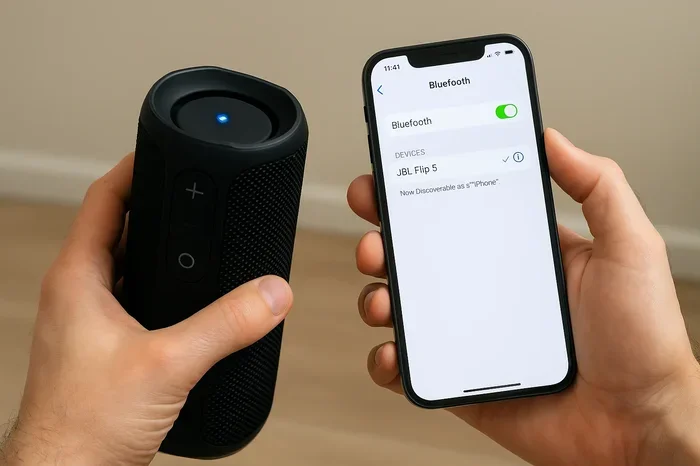
Can You Connect Multiple Speakers To Bluetooth At Once
Yes, you can connect multiple speakers to Bluetooth at once, and it is easier than most people think. Whether you want to create a stereo pair, fill a large room with sound, or set up a multi-room audio system, Bluetooth technology makes it possible. This guide covers every method, brand compatibility, and practical tip you need to know. Learn how to pair wireless speakers, boost your sound quality, and avoid common mistakes.
Have you ever been at a backyard party and thought, “My one Bluetooth speaker just isn’t cutting it”? Or maybe you want to fill your living room with rich, full sound without buying a expensive home theater system. The good news is that you can connect multiple speakers to Bluetooth and create an immersive audio experience without spending a fortune.
Connecting more than one wireless speaker might sound complicated, but it really is not. Most modern Bluetooth speakers come with built-in features that let you pair two or more units together. And if your speakers do not support native pairing, there are clever workarounds that work just as well. In this guide, we will walk you through every method, every option, and every tip you need to get your wireless audio game to the next level.
Whether you are a casual listener or a serious audiophile, understanding how Bluetooth connectivity works with multiple speakers opens up a world of possibilities. From stereo pairing to party mode, the options are more accessible than ever. Let us dive in.
Key Takeaways
- Multiple Bluetooth speakers can be connected simultaneously using built-in features, third-party apps, or Bluetooth adapters.
- Stereo pairing lets you use two speakers as a left and right channel for richer sound.
- Party mode and multi-room audio let you sync several speakers across different rooms.
- Bluetooth version matters — newer versions offer better range, stability, and multi-device support.
- Third-party apps like AmpMe and SoundSeeder make connecting mixed-brand speakers much simpler.
- Common issues like audio delay and disconnections can be fixed with simple troubleshooting steps.
- Not all speakers support multi-speaker pairing, so always check compatibility before buying.
📑 Table of Contents
How Bluetooth Speaker Pairing Works
Before we get into the different ways to connect multiple speakers, it helps to understand the basics of Bluetooth speaker pairing. Bluetooth is a short-range wireless technology that sends audio data between devices. When you pair a phone to a speaker, the phone sends the audio signal through the air using radio waves.
The latest Bluetooth versions — especially Bluetooth 5.0 and above — offer much better range, faster data transfer, and improved stability. Older versions like Bluetooth 4.0 or 4.2 can still connect speakers, but they may struggle with distance and signal drops. If you want the best experience with multiple speakers, make sure your devices support at least Bluetooth 4.2.
The Basics of Speaker Pairing
When you pair two speakers together, one speaker acts as the primary unit. It receives the audio signal from your phone or tablet. The second speaker then receives that signal wirelessly from the first speaker. This is called daisy chaining, and it is how most wireless speakers handle multi-unit connections.
Here is a simple breakdown of how it works:
- You turn on both speakers and put them in pairing mode.
- One speaker connects to your phone as the primary device.
- The second speaker connects to the first speaker, not directly to your phone.
- Audio flows from your phone to speaker one, and then from speaker one to speaker two.
This process creates a seamless wireless audio experience. Both speakers play the same audio in sync. The result is louder, fuller sound that covers more space.
Why Bluetooth Range Matters
Bluetooth range is the maximum distance between two connected devices. Most speakers have a range of about 30 to 100 feet. If you place speakers too far apart, you may experience audio dropouts or delay. For the best results, keep your speakers within range of each other, especially when using daisy chaining.
If you are setting up a multi-room audio system, consider using Bluetooth repeaters or mesh network systems. These devices extend the signal and keep all your speakers connected without interruption.
Different Ways To Connect Multiple Speakers To Bluetooth
Not all setups are the same, and not all speakers support the same features. Fortunately, there are several methods you can use to connect multiple Bluetooth speakers at once. Let us look at each one.
Method 1: Native Stereo Pairing
Many premium wireless speakers from brands like JBL, Sony, Bose, and Samsung offer native stereo pairing. This means you can connect two speakers from the same brand and use them as a left and right channel. It is the best way to get true stereo sound from Bluetooth speakers.
Here is how it usually works:
- Turn on both speakers and make sure they are fully charged.
- Put both speakers in pairing mode.
- On your phone, go to Bluetooth settings and connect to the primary speaker.
- Use the manufacturer’s app or button combination to link the second speaker.
- Your speakers are now in stereo pair mode and playing different audio channels.
The sound quality with stereo pairing is noticeably better than playing a single speaker. You get depth, direction, and a much more immersive listening experience. This is perfect for living rooms, balconies, and outdoor gatherings.
Method 2: Party Mode and Group Play
Party mode is different from stereo pairing. Instead of splitting the audio into left and right channels, party mode plays the same audio on all connected speakers at the same volume and timing. It is perfect for large parties, outdoor events, and big rooms.
Brands like JBL (with PartyBoost), Sony (with Wireless Party Chain), and Bose (with SimpleSync) have their own versions of party mode. Here is what you need to know:
- PartyBoost works with most JBL speakers released after 2018.
- Wireless Party Chain supports many Sony S-series speakers.
- SimpleSync lets you pair Bose speakers with Bose soundbars and TVs.
The beauty of party mode is that you can connect 50 or more speakers in some cases. The sound fills the entire space evenly. Just keep in mind that all speakers must be from the same brand and support the same protocol for native party mode.
Method 3: Third-Party Apps
What if your speakers are from different brands? What if your older speaker does not support stereo pairing or party mode? This is where third-party apps come in. Apps like AmpMe, SoundSeeder, and Bluetooth Speaker Sync let you group speakers from different manufacturers.
These apps use your phone’s audio output to send the same signal to multiple speakers over your local Wi-Fi network or Bluetooth. Here is a quick comparison:
| App | Platform | Max Speakers | Cross-Brand |
|---|---|---|---|
| AmpMe | iOS and Android | Unlimited | Yes |
| SoundSeeder | Android | 6 | Yes |
| Bose Connect | iOS and Android | 2 | No (Bose only) |
| JBL Portable | iOS and Android | 100+ | No (JBL only) |
Third-party apps are a great option when you want flexibility. You can mix and match speaker brands and models. The trade-off is that some apps add a slight audio delay, which can cause the speakers to fall out of sync. For casual listening, this is rarely noticeable. For music-heavy events, you may want to test the sync before the party starts.
Method 4: Bluetooth Adapters and Transmitters
If your speakers do not have any smart features or app support, you can still connect them using a Bluetooth adapter. A Bluetooth transmitter plugs into the audio output of your source device and sends the signal wirelessly to the speakers.
Some Bluetooth adapters support dual output, meaning you can connect two speakers at the same time. You simply pair each speaker with the adapter, and both play in sync. This is a budget-friendly option for people who already own non-Bluetooth speakers with AUX or RCA inputs.
Look for adapters that support aptX or aptX Low Latency codecs. These reduce audio delay and improve sound quality significantly compared to standard Bluetooth codecs.
Top Brands That Support Multi-Speaker Bluetooth
Not all wireless speakers are created equal when it comes to multi-speaker connectivity. Some brands have built-in support for connecting multiple units, while others leave you searching for workarounds. Here is a look at the top brands and what they offer.
JBL
JBL is one of the most popular brands for Bluetooth speakers, and they offer excellent multi-speaker support. Their PartyBoost technology lets you connect up to 100 JBL PartyBoost-compatible speakers. You can also use JBL Stereo Pair mode to create a left and right channel with two compatible speakers.
Popular JBL models that support multi-speaker pairing include the JBL Flip 6, JBL Charge 5, JBL Xtreme 3, and JBL Boombox 3. If you already own a JBL speaker, check the product page to see if it supports PartyBoost or stereo mode.
Sony
Sony offers Wireless Party Chain technology on its S-series speakers. The Sony SRS-XB43, SRS-XG30, and SRS-R1 are all compatible with this feature. You can connect up to 100 speakers in a single party chain. Sony also supports stereo pairing on select models.
Sony speakers are known for their deep bass and clear highs, making them a great choice for multi-speaker setups. The Wireless Party Chain app makes it easy to group and control your speakers from your phone.
Bose
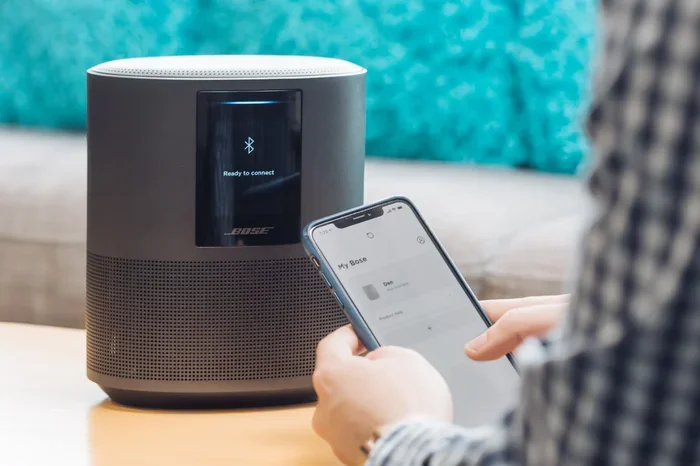
Bose focuses more on sound quality than party features, but they still offer solid multi-speaker options. The SimpleSync feature lets you pair Bose speakers with Bose soundbars and home theater systems. You can also connect two Bose speakers for a stereo experience on models like the Bose SoundLink Flex and Bose Portable Home Speaker.
Bose speakers are not as flexible with cross-brand pairing, but the audio quality is outstanding. If pure sound is your priority, Bose is hard to beat.
Other Notable Brands
Other brands that support multi-speaker Bluetooth include:
- Ultimate Ears (UE) — supports UE Megaboom PartyUp for connecting up to 8 speakers.
- Anker Soundcore — offers PartyCast on select models for grouping up to 100 speakers.
- Marshall — supports Marshall Multi Room app for grouping speakers across rooms.
Tips For The Best Multi-Speaker Bluetooth Experience
Setting up multiple speakers is one thing. Getting them to sound great together is another. Here are some practical tips to help you get the best results from your wireless speaker setup.
Keep Speakers Close Together
Bluetooth range is not infinite. When you daisy chain speakers, each hop between speakers weakens the signal slightly. Keep your speakers within 30 to 50 feet of each other for the most stable connection. If you are setting up a large outdoor area, place speakers closer together and use fewer units.
Match Your Speaker Volumes
When connecting multiple speakers, make sure they are all set to the same volume level. If one speaker is louder than the others, it throws off the balance. Most speaker apps let you adjust the volume of each unit independently. Use this feature to fine-tune your setup.
Use the Same Bluetooth Version
Mixing speakers with different Bluetooth versions can cause sync issues and audio delays. If possible, use speakers from the same generation or with the same Bluetooth version. This ensures they communicate at the same speed and reduces the chance of lag.
Charge Your Speakers Fully
Low battery can affect Bluetooth performance. Speakers with low charge may experience disconnections or reduced range. Before any event, charge all your wireless speakers to 100%. This guarantees stable connectivity and consistent sound quality throughout the event.
Minimize Wireless Interference
Bluetooth operates on the 2.4 GHz frequency band, which is shared with Wi-Fi routers, microwaves, and other wireless devices. If you experience dropouts or static, move away from other wireless devices or switch your Wi-Fi to the 5 GHz band. This frees up the 2.4 GHz space for your Bluetooth audio streaming.
Update Your Firmware
Speaker manufacturers regularly release firmware updates that improve Bluetooth stability and add new features. Check the manufacturer’s app for updates before your event. A simple firmware update can fix many common speaker connectivity issues.
Common Problems And How To Fix Them
Even with the best setup, you may run into issues when connecting multiple Bluetooth speakers. Here are the most common problems and how to solve them.
Speakers Are Out of Sync
Audio delay or lag between speakers is the most common complaint. This usually happens when using third-party apps or when speakers are too far apart. To fix this, move the speakers closer together, close other apps running in the background, or try a different sync method.
One Speaker Keeps Disconnecting
If one speaker drops out frequently, check its battery level first. A low battery causes unstable connections. Also, make sure the speaker is not too far from the primary speaker. Remove any physical obstacles like walls or furniture between the speakers, as these weaken the Bluetooth signal.
Speakers Will Not Pair
If your speakers refuse to connect, try resetting them. Most speakers have a reset button or a specific button combination for factory reset. After resetting, put both speakers in pairing mode and try again. Also, make sure your phone’s Bluetooth is turned off and back on before attempting to pair.
Poor Sound Quality
If the audio sounds compressed or distorted, your speakers may be competing for bandwidth. Reduce the number of connected speakers and see if the quality improves. Also, check that your source device is not compressing the audio. Use high-quality audio files or streaming services with higher bitrates for the best results.
Is Connecting Multiple Bluetooth Speakers Worth It?
The short answer is yes. Connecting multiple speakers to Bluetooth transforms your listening experience. You get louder sound, better coverage, and richer audio that a single speaker simply cannot deliver. Whether you are hosting a party, setting up a backyard movie night, or just want better sound in your living room, a multi-speaker Bluetooth setup is a game changer.
The cost is also reasonable. You do not need expensive equipment. Even budget-friendly wireless speakers from brands like Anker Soundcore and JBL offer solid multi-speaker features. All you need is a little patience and the right setup method.
One thing to keep in mind is that Bluetooth is not perfect. There will always be a slight delay compared to wired connections or dedicated wireless systems like Sonos or HEOS. But for most everyday use cases, the convenience and portability of Bluetooth speakers far outweigh the minor limitations.
If you are serious about audio quality and want a whole-home system, consider a dedicated multi-room audio system. Brands like Sonos, Denon HEOS, and Apple HomePod offer superior sound and seamless integration. But for casual listening, outdoor fun, and portable entertainment, connecting multiple Bluetooth speakers is one of the best things you can do.
Conclusion
Connecting multiple speakers to Bluetooth at once is not only possible, it is also incredibly easy once you know how. Whether you use native stereo pairing, party mode, third-party apps, or Bluetooth adapters, there is a method that works for every setup and every budget. The key is to choose the right method for your speakers and your needs.
Start by checking what your speakers support. Look for stereo pairing, party mode, or cross-brand compatibility. Then follow the steps we outlined in this guide, and you will be enjoying immersive, room-filling sound in no time. Remember to keep your speakers close, charged, and updated for the best experience.
The world of wireless audio has opened up, and Bluetooth speaker pairing is at the heart of it. So go ahead, grab your speakers, and turn any room into your personal concert hall. Your ears will thank you.
Frequently Asked Questions
Can I connect speakers from different brands to Bluetooth?
Yes, you can connect speakers from different brands using third-party apps like AmpMe or SoundSeeder. Native stereo pairing and party mode usually only work within the same brand. For mixed-brand setups, these apps are your best bet.
Does connecting multiple Bluetooth speakers reduce sound quality?
Not significantly. The sound quality may vary slightly depending on the method you use. Third-party apps can introduce a small amount of audio delay, but native pairing and stereo mode maintain excellent sound quality.
How many Bluetooth speakers can I connect at once?
The number depends on the brand and method. Most native party modes support up to 100 speakers. Third-party apps like AmpMe support unlimited speakers, though performance may vary with very large groups.
Do I need Wi-Fi to connect multiple Bluetooth speakers?
No, Wi-Fi is not required for Bluetooth speaker pairing. Bluetooth uses its own wireless connection. However, some third-party apps like AmpMe use Wi-Fi to sync speakers, which can provide better sync than Bluetooth alone.
Can I use Bluetooth speakers for a stereo pair?
Yes, many modern Bluetooth speakers support stereo pairing. You assign one speaker as the left channel and the other as the right channel. This creates true stereo sound and is supported by brands like JBL, Sony, and Bose.
Why is there a delay between my connected Bluetooth speakers?
Audio delay, also called latency, happens because Bluetooth has a slight processing time. This is more noticeable with third-party apps and older Bluetooth versions. Using Bluetooth 5.0 or higher and keeping speakers close together reduces delay significantly.