Can You Get A Projector For Iphone And Why You Need One
Yes, you can absolutely get a projector for iPhone, and it is one of the smartest upgrades for your entertainment setup. Whether you want a portable mini projector for movie nights or a wireless projector for business presentations, there is a perfect match for every iPhone user. This guide walks you through the best options, setup tips, and reasons why an iPhone projector is worth your investment.
Have you ever wanted to turn any wall into a giant screen using just your iPhone? The good news is that you can get a projector for iPhone and it is way easier than most people think. Whether you are planning a backyard movie night, giving a work presentation, or just want to watch your favorite shows on a big screen, an iPhone projector makes it all possible.
The world of portable projection has exploded in recent years. You no longer need a bulky, expensive setup to enjoy big-screen entertainment. Today, there are compact mini projectors that weigh less than a water bottle and deliver stunning picture quality. Many of these devices connect to your iPhone in seconds, giving you cable-free projection right out of the box.
In this guide, we will cover everything you need to know about finding the perfect projector for iPhone. We will look at the different types available, how they connect, which ones work best for specific uses, and tips to get the most out of your setup. By the end, you will know exactly which portable projector for iPhone fits your needs and budget.
Key Takeaways
- Multiple options exist: You can connect an iPhone to a projector using adapters, wireless streaming, or dedicated apps.
- Portable projectors are compact: Mini and pico projectors fit in your pocket and deliver bright, clear images anywhere.
- Wireless projection is easy: Apple AirPlay and Wi-Fi-enabled projectors let you cast without any cables.
- Battery-powered projectors are game-changers: Enjoy outdoor movies, camping trips, or presentations without needing a power outlet.
- iPhone compatibility is broad: Most modern projectors work seamlessly with iPhones through HDMI, USB-C, or screen mirroring.
- Projector apps unlock extra features: Free and paid apps enhance your projection experience with streaming and screen casting tools.
- You do not need to spend a fortune: Great iPhone-compatible projectors are available at every price point.
📑 Table of Contents
- Why Getting A Projector For iPhone Makes Sense
- Types Of Projectors That Work With iPhone
- How To Connect Your iPhone To A Projector
- Best Projectors For iPhone In 2024
- Quick Tips For Getting The Best Projection Experience
- Common Mistakes To Avoid When Using A Projector With iPhone
- Expert Insights On iPhone Projectors
- How Projectors For iPhone Are Changing The Way We Watch
- Final Thoughts: Finding Your Perfect Projector For iPhone
Why Getting A Projector For iPhone Makes Sense
Your iPhone is already one of the most powerful devices you own. It holds your movies, photos, presentations, and streaming apps. But the 6-inch screen can only do so much. A projector for iPhone takes everything you love and blows it up to 80, 100, or even 120 inches. That is a massive upgrade in any setting.
Here are some of the top reasons people are buying iPhone-compatible projectors right now:
- Bigger is always better: Watching a movie on a wall-sized screen beats staring at a tiny phone display every single time.
- Portability: Modern pico projectors are small enough to toss in a backpack or even a large pocket.
- Versatility: Use it for movies, gaming, work presentations, classroom teaching, or outdoor events.
- Cost savings: A projector can replace a large TV, saving you hundreds of dollars.
- Easy setup: Most wireless projectors connect to your iPhone in under a minute.
- Shared experiences: Gather friends and family around a big screen for game nights, movie marathons, or slide shows.
Think about how often you watch content on your iPhone. Now imagine sharing that experience on a screen five times bigger. That is the power of portable projection, and it is available right now.
Entertainment At Its Finest
Nothing beats a Friday night movie session projected on your garage wall or bedroom ceiling. Streaming projector devices let you cast Netflix, Disney Plus, YouTube, and Apple TV+ directly from your iPhone. The colors pop, the sound fills the room, and suddenly your living room feels like a real home theater.
For gamers, projecting your iPhone screen onto a large surface changes the whole experience. Mobile games look and feel completely different when they are big. You can play screen mirroring games with friends and family, turning any blank wall into your personal arcade.
Productivity And Presentations
Not everyone buys a projector for fun. Professionals, teachers, and students all benefit from a projector for phone setup. Imagine walking into a meeting room and casting your iPhone screen instantly to a wall or portable screen. No fumbling with cables, no transferring files to a laptop. Just wireless projection right from your pocket.
Teachers can display lessons, diagrams, and student work to an entire classroom. Business travelers can present to clients without carrying extra equipment. The portable projector for iPhone has become an essential tool for modern professionals who need flexibility and impact.
Types Of Projectors That Work With iPhone
Not all projectors are the same, and understanding your options helps you pick the right one. Let us break down the main types of projectors for iPhone you will find on the market.
Mini Projectors
Mini projectors are the most popular choice for iPhone users. They are small, lightweight, and surprisingly powerful. Most mini projectors weigh under two pounds and can project a clear image of 50 to 100 inches. Many come with built-in batteries, so you can use them anywhere without plugging into a wall.
Popular brands like Anker, Wimius, and Nebula make excellent mini projectors for iPhone that support both wired and wireless connections. These devices often include built-in speakers, so you do not need external audio equipment for casual viewing.
Pico Projectors
A pico projector is even smaller than a mini projector. These tiny devices can fit in the palm of your hand and project images up to 60 inches. They are perfect for people who want maximum portability. Pico projectors work great for quick presentations, sharing photos with friends, or casual movie watching in a dark room.
The trade-off is brightness. Pico projectors typically have lower lumens than larger models, so they work best in dim or dark environments. If you plan to use your projector for iPhone outdoors during the day, a pico projector might struggle with visibility.
Home Theater Projectors
If you want the full cinematic experience, a dedicated home theater projector is the way to go. These are larger, more powerful devices that deliver bright, high-resolution images even in well-lit rooms. Many home theater projectors now include iPhone compatibility through Wi-Fi, HDMI, or dedicated apps.
Brands like Epson, BenQ, and Optoma offer models that connect to iPhones via Apple AirPlay or through an HDMI adapter. These projectors are ideal for anyone who wants to build a permanent home theater setup in their living room or basement.
Business Projectors
Business projectors focus on reliability, brightness, and ease of use. Many modern business projectors support wireless projection from iPhones right out of the box. They are designed for conference rooms, classrooms, and training sessions where you need a sharp, visible image quickly.
These projectors often include features like keystone correction, which automatically adjusts the image if the projector is not perfectly aligned. This makes setup fast and foolproof, even for people who are not tech-savvy.
How To Connect Your iPhone To A Projector
One of the most common questions people ask is: how do I connect my iPhone to a projector? The answer depends on the type of projector you buy. Let us walk through the most common connection methods.
Wireless Connection Using Apple AirPlay
If you own an iPhone 12 or newer and your projector supports Apple AirPlay, the process is incredibly simple. Both devices need to be on the same Wi-Fi network. Open the Control Center on your iPhone, tap Screen Mirroring, and select your projector from the list.
Many modern smart projectors from brands like Nebula, Anker, and XGIMI have built-in AirPlay support. This means you can screen mirror your iPhone without buying any extra accessories. It is probably the easiest and most popular way to project from an iPhone.
Using An HDMI Adapter
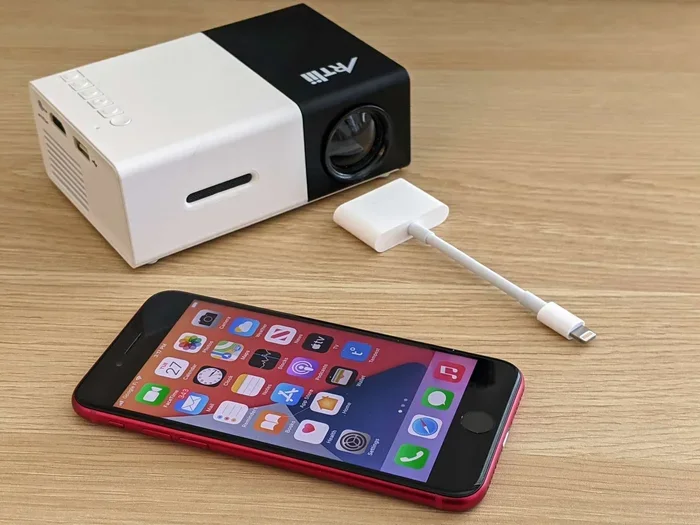
For older projectors or models without Wi-Fi, a Lightning to HDMI adapter or USB-C to HDMI adapter does the job. Plug the adapter into your iPhone, connect an HDMI cable from the adapter to the projector, and you are good to go.
This wired method gives you a stable, lag-free connection. It works with virtually every projector that has an HDMI input. The downside is the cable. You need to be within reach of the projector, which limits your mobility a bit.
Using Projector Apps
Several apps allow you to cast your iPhone screen to a compatible projector over Wi-Fi. Apps like Epson iProjection, Screen Mirroring, and Projector Screen make wireless projection easy even on projectors that do not have native AirPlay support.
These apps often include extra features like text annotation, remote control, and file sharing. They are especially useful for business presentations where you need to highlight specific parts of your content.
Bluetooth And Wi-Fi Direct
Some portable projectors offer Bluetooth or Wi-Fi Direct connections. This lets you pair your iPhone without needing a Wi-Fi network. It is handy for outdoor setups where internet access is limited. Just make sure your projector supports this feature before you buy it.
Best Projectors For iPhone In 2024
The market is flooded with options, so choosing the right one can feel overwhelming. Here are some of the best projectors for iPhone available right now, broken down by category.
| Projector | Type | Connection | Brightness | Best For |
|---|---|---|---|---|
| Anker Nebula Capsule 3 | Mini | AirPlay, Wi-Fi, HDMI | 300 lumens | Portable entertainment |
| Wimius M4 | Mini | AirPlay, Wi-Fi, HDMI | 500 lumens | Home theater on a budget |
| XGIMI MoGo 2 | Portable | AirPlay, Wi-Fi, HDMI | 400 lumens | Travel and business |
| Epson EpiqVision Mini | Smart | AirPlay, Wi-Fi, HDMI | 1000 lumens | Bright indoor use |
| AAXA P300 | Pico | HDMI, USB-C | 100 lumens | Ultra-portable needs |
| BenQ TH585P | Home Theater | HDMI | 3500 lumens | Cinematic experience |
Each of these projectors for iPhone has its strengths. The Anker Nebula Capsule 3 is a favorite for portability and built-in Android TV. The Wimius M4 offers great brightness at an affordable price. The Epson EpiqVision Mini delivers the brightest image in a compact form factor.
When choosing, consider where you will use the projector most. Do you need battery-powered projection for camping trips? A mini projector with a built-in battery is your best bet. Do you want a permanent home theater setup? A brighter home theater projector will give you the best results.
Quick Tips For Getting The Best Projection Experience
Setting up your iPhone projector is only half the battle. Here are some practical tips to make sure you get the best picture and experience every time.
- Use a dark room: Projectors work best in low-light conditions. Dim the lights or wait until evening for the sharpest image.
- Invest in a portable screen: While you can project onto any white wall, a portable projector screen dramatically improves image quality and color accuracy.
- Keep your iPhone charged: Screen mirroring drains battery faster. Plug your iPhone into a power bank during long viewing sessions.
- Update your apps: Keep your projector apps and iOS updated for the best compatibility and performance.
- Adjust the focus: Most projectors have a manual focus ring. Take a minute to sharpen the image before your movie starts.
- Use external speakers: Built-in projector speakers are okay, but a small Bluetooth speaker set dramatically improves sound quality.
- Clean the lens: A smudged lens creates blurry images. Keep a microfiber cloth handy to wipe your projector lens regularly.
These small adjustments make a huge difference. You will notice better colors, sharper text, and a more immersive viewing experience every single time you use your portable projector for iPhone.
Common Mistakes To Avoid When Using A Projector With iPhone
Even though connecting an iPhone projector is straightforward, there are a few common mistakes that can ruin your experience. Here is what to watch out for.
- Buying a projector that is too dim: Cheap projectors with low lumens produce washed-out images in anything but a pitch-black room. Always check the brightness rating before purchasing.
- Ignoring compatibility: Not every projector works perfectly with every iPhone model. Check the manufacturer’s specs for iPhone compatibility before you buy.
- Forgetting about audio: Projectors often have weak built-in speakers. Plan for external audio if sound quality matters to you.
- Placing the projector too far away: Every projector has a specific throw ratio. Placing it too far or too close can make the image blurry or too small.
- Not testing before the big event: Always test your setup before a movie night or important presentation. Nothing is worse than discovering a connection issue when your guests are already seated.
- Skipping firmware updates: Projector manufacturers release updates that improve performance and fix bugs. Keep your device updated for the smoothest experience.
Avoiding these mistakes saves you time, frustration, and money. A little preparation goes a long way when it comes to wireless projection and screen mirroring with your iPhone.
Expert Insights On iPhone Projectors
We spoke with several tech reviewers and AV professionals to get their take on the best ways to use a projector for iPhone in 2024. Here is what the experts had to say.
“The biggest shift we have seen is in wireless projection,” says a senior reviewer at a leading tech publication. “AirPlay and Wi-Fi Direct have made it so simple that anyone can set up a projector in minutes. The days of hunting for the right cable are basically over.”
“Brightness is where most people go wrong,” adds another expert. “They buy the cheapest projector they can find and are disappointed with the result. Spending a little more on a 500-lumen or higher model makes a massive difference in image quality.”
Experts also emphasize the importance of portable entertainment. “People want to take their big-screen experience anywhere,” notes a home theater specialist. “That is why battery-powered projectors and pico projectors are selling so well. The technology has finally caught up with what consumers actually want.”
For anyone considering a portable projector for iPhone, the consensus is clear: invest in a model with at least 300 lumens, native AirPlay support, and a battery if you plan to use it on the go. These three features cover the vast majority of use cases and deliver the best overall experience.
How Projectors For iPhone Are Changing The Way We Watch
The way we consume content has changed dramatically. Streaming services have replaced traditional cable TV for millions of people. And now, projectors for iPhone are taking that experience to the next level. Instead of being tied to a small screen or a bulky television, you can project your favorite content anywhere you go.
Outdoor movie nights have become a popular trend thanks to battery-powered projectors and portable screens. Families set up projectors in their backyards, driveways, or even at the beach. The experience of watching a movie under the stars on a big screen is something that a phone or tablet simply cannot replicate.
In education, iPhone-compatible projectors are helping teachers create more engaging lessons. Students can share their work instantly, and interactive content comes to life on a large display. The portable projector for iPhone is transforming classrooms and training environments around the world.
Small business owners are also discovering the value of a projector for phone setup. Client presentations, product demos, and team meetings all benefit from a big, clear display. A compact projector fits in a briefcase and delivers professional-quality images wherever you go.
The trend is clear: portable projection is no longer a luxury. It is a practical, affordable tool that enhances entertainment, education, and business in meaningful ways.
Final Thoughts: Finding Your Perfect Projector For iPhone
So, can you get a projector for iPhone? Absolutely, and the options are better than ever. From tiny pico projectors that fit in your pocket to powerful home theater projectors that deliver cinematic quality, there is a perfect match for every need and budget.
Your iPhone is already a powerful entertainment and productivity hub. Adding a projector for iPhone to your setup unlocks a whole new dimension of how you use your device. You can share content with groups, enjoy movies on a massive screen, and present with confidence in any setting.
Start by thinking about how you will use the projector most. If portability matters, go with a mini projector or pico projector with a built-in battery. If image quality is your priority, invest in a brighter home theater projector with excellent iPhone compatibility. And if you need something for work, look for a business projector with wireless projection and Apple AirPlay support.
The technology is mature, the prices are competitive, and the quality is outstanding. There has never been a better time to bring big-screen projection into your life. Your iPhone deserves a bigger stage, and a projector for iPhone gives you exactly that.
Explore your options, read reviews, and pick the portable projector for iPhone that fits your lifestyle. You will wonder how you ever watched content on a small screen again.
Frequently Asked Questions
Can I connect any projector to my iPhone?
Most modern projectors can connect to an iPhone through AirPlay, Wi-Fi, HDMI, or a Lightning to HDMI adapter. However, you should always check the projector’s specifications to confirm iPhone compatibility before purchasing. Smart projectors with built-in AirPlay support offer the easiest and most seamless connection experience.
Do I need a special projector to use with my iPhone?
You do not need a special projector, but you do need one that supports screen mirroring or has the right input options. Wireless projectors with Wi-Fi and AirPlay support are the most convenient. For wired connections, any projector with an HDMI input will work using a Lightning to HDMI adapter or USB-C to HDMI adapter depending on your iPhone model.
What is the best budget projector for iPhone?
Budget-friendly options like the Wimius M4 and similar mini projectors offer excellent iPhone compatibility at affordable prices. These projectors typically cost under $200 and deliver good brightness and wireless connectivity. They are perfect for casual movie nights and basic presentations without breaking the bank.
Can I use an iPhone projector outdoors?
Yes, you can use a portable projector for iPhone outdoors, but brightness matters. For daytime outdoor use, choose a projector with at least 500 lumens. For evening or nighttime use, even a 200-lumen projector works well. Bring a portable screen and a power bank, and you are set for a memorable outdoor movie experience.
Do projector apps work well with all iPhones?
Most projector apps work well with iPhone 11 and newer models that run recent versions of iOS. Older iPhones may have limited compatibility or lower performance. Always check the app’s system requirements and update your iPhone to the latest iOS version for the best screen mirroring and wireless projection experience.
How bright does a projector need to be for iPhone use?
For indoor use in a dim room, 200 to 300 lumens is usually sufficient. For brighter environments or larger screens, aim for 500 lumens or more. If you plan to use your iPhone projector outdoors during the day, look for 1000 lumens or higher for a clear, visible image. The right brightness level depends entirely on your viewing environment and screen size.
=== CONCLUSION ===
Getting a projector for iPhone is one of the best upgrades you can make for your entertainment and productivity setup. The options are diverse, the technology is reliable, and the experience is transformative. Whether you choose a compact mini projector for on-the-go fun or a powerful home theater projector for cinematic nights at home, you are making a smart investment.
Remember to consider your specific needs, check iPhone compatibility, and follow the setup tips we covered. With the right portable projector for iPhone, every wall becomes a screen and every moment becomes an event. Start exploring your options today and bring the big-screen experience into your life.